
Amazon DEA-C01 Practice Exam Questions & Answers
Amazon DEA-C01 Exam Details
Key details for this exam, checked against the published exam outline
- Exam Code
- DEA-C01
- Full Name
- AWS Certified Data Engineer - Associate
- Issuing Body
- Amazon Web Services
- Question Format (Our Bank)
- Multiple Choice
- Delivery
- Online proctored or at a Pearson VUE test centre
- Eligibility
- No formal prerequisites required, though equivalent 2-3 years of data engineering experience and 1-2 years of hands-on AWS experience are recommended
- Validity
- 3 years from date earned. recertification requires passing the current version of this exam
- Full Question Set
- 335 questions Get All Questions
Free DEA-C01 Practice Questions
Each question shows the correct answer and an explanation of why it is right
Question 1 Domain 1 Data Ingestion and Transformation
A company is building a data stream processing application. The application runs in an Amazon Elastic Kubernetes Service (Amazon EKS) cluster. The application stores processed data in an Amazon DynamoDB table.
The company needs the application containers in the EKS cluster to have secure access to the DynamoDB table. The company does not want to embed AWS credentials in the containers.
Which solution will meet these requirements?
In this scenario, the company is using Amazon Elastic Kubernetes Service (EKS) and wants secure access to DynamoDB without embedding credentials inside the application containers. The best practice is to use IAM roles for service accounts (IRSA), which allows assigning IAM roles to Kubernetes service accounts. This lets the EKS pods assume specific IAM roles securely, without the need to store credentials in containers.
IAM Roles for Service Accounts (IRSA):
With IRSA, each pod in the EKS cluster can assume an IAM role that grants access to DynamoDB without needing to manage long-term credentials. The IAM role can be attached to the service account associated with the pod.
This ensures least privilege access, improving security by preventing credentials from being embedded in the containers.
Alternatives Considered:
A (Storing AWS credentials in S3): Storing AWS credentials in S3 and retrieving them introduces security risks and violates the principle of not embedding credentials.
C (IAM user access keys in environment variables): This also embeds credentials, which is not recommended.
D (Kubernetes secrets): Storing user access keys as secrets is an option, but it still involves handling long-term credentials manually, which is less secure than using IRSA.
IAM Best Practices for Amazon EKS
Secure Access to DynamoDB from EKS
Question 2 Domain 4 Data Security and Governance
A global ecommerce company processes customer transactions, inventory updates, and user activity logs across multiple AWS services. The company needs a scalable, fully managed, and event-driven orchestration solution to coordinate complex extract, transform, and load (ETL) workflows. The solution must use AWS Glue and Amazon EMR to process data. The data will be stored in Amazon Redshift and Amazon S3. The solution must support dependency management, automated retries, and data pipeline monitoring.
Which solution will meet these requirements?
Option C is the best answer because Amazon MWAA is a fully managed Apache Airflow service built specifically for workflow orchestration. Airflow uses Directed Acyclic Graphs (DAGs) to model task dependencies, which directly satisfies the requirement for dependency management. Amazon MWAA also supports orchestration across AWS analytics services such as Amazon S3, Amazon Redshift, and Amazon EMR, making it a natural fit for complex ETL pipelines. AWS documentation describes workflow definitions, tasks, and Airflow-based orchestration as core MWAA concepts.
This choice is stronger than A because the question specifically asks for orchestration of complex ETL workflows with dependency management, retries, and monitoring across multiple data-processing systems. While AWS Step Functions is an orchestration service, the option specifies an express workflow, and AWS states that Express Workflows are designed for high-volume, short-duration runs and can run for only up to five minutes, which is often not the best fit for longer-running ETL jobs on EMR and Glue.
The uploaded study material also points to orchestration services for dependent ETL jobs and identifies both Step Functions and workflow orchestration concepts as core exam knowledge, but for this exact multi-step ETL orchestration pattern, MWAA with DAGs is the most precise match.
Question 3 Domain 4 Data Security and Governance
The company stores a large volume of customer records in Amazon S3. To comply with regulations, the company must be able to access new customer records immediately for the first 30 days after the records are created. The company accesses records that are older than 30 days infrequently.
The company needs to cost-optimize its Amazon S3 storage.
Which solution will meet these requirements MOST cost-effectively?
The most cost-effective solution in this case is to apply a lifecycle policy to transition records to Amazon S3 Standard-IA storage after 30 days. Here's why:
Amazon S3 Lifecycle Policies: Amazon S3 offers lifecycle policies that allow you to automatically transition objects between different storage classes to optimize costs. For data that is frequently accessed in the first 30 days and infrequently accessed after that, transitioning from the S3 Standard storage class to S3 Standard-Infrequent Access (S3 Standard-IA) after 30 days makes the most sense. S3 Standard-IA is designed for data that is accessed less frequently but still needs to be retained, offering lower storage costs than S3 Standard with a retrieval cost for access.
Cost Optimization: S3 Standard-IA offers a lower price per GB than S3 Standard. Since the data will be accessed infrequently after 30 days, using S3 Standard-IA will lower storage costs while still allowing for immediate retrieval when necessary.
Compliance with Regulations: Since the records need to be immediately accessible for the first 30 days, the use of S3 Standard for that period ensures compliance with regulatory requirements. After 30 days, transitioning to S3 Standard-IA continues to meet access requirements for infrequent access while reducing storage costs.
Alternatives Considered:
Option B (S3 Intelligent-Tiering): While S3 Intelligent-Tiering automatically moves data between access tiers based on access patterns, it incurs a small monthly monitoring and automation charge per object. It could be a viable option, but transitioning data to S3 Standard-IA directly would be more cost-effective since the pattern of access is well-known (frequent for 30 days, infrequent thereafter).
Option C (S3 Glacier Deep Archive): Glacier Deep Archive is the lowest-cost storage class, but it is not suitable in this case because the data needs to be accessed immediately within 30 days and on an infrequent basis thereafter. Glacier Deep Archive requires hours for data retrieval, which is not acceptable for infrequent access needs.
Option D (S3 Standard-IA for all records): Using S3 Standard-IA for all records would result in higher costs for the first 30 days, as the data is frequently accessed. S3 Standard-IA incurs retrieval charges, making it less suitable for frequently accessed data.
Amazon S3 Lifecycle Policies
S3 Storage Classes
Cost Management and Data Optimization Using Lifecycle Policies
AWS Data Engineering Documentation
Get the complete DEA-C01 question set
$20$40
Question 4 Domain 2 Data Store Management
A data engineer maintains a materialized view that is based on an Amazon Redshift database. The view has a column named load_date that stores the date when each row was loaded.
The data engineer needs to reclaim database storage space by deleting all the rows from the materialized view.
Which command will reclaim the MOST database storage space?
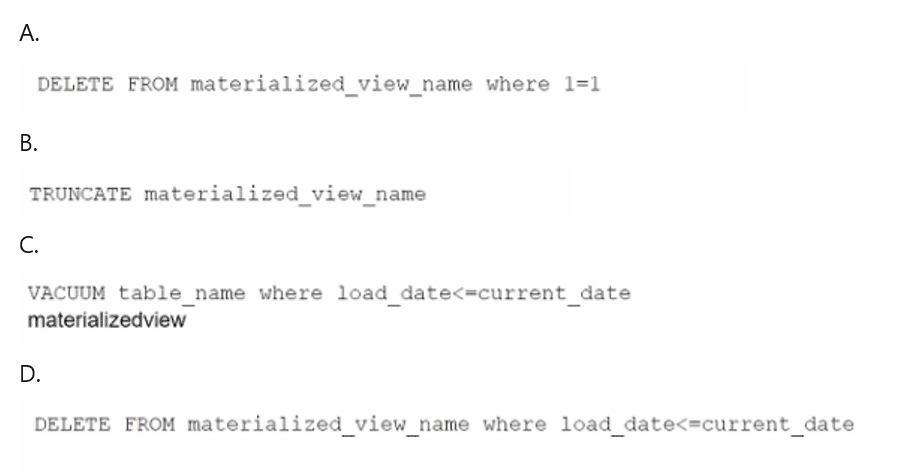
To reclaim the most storage space from a materialized view in Amazon Redshift, you should use a DELETE operation that removes all rows from the view. The most efficient way to remove all rows is to use a condition that always evaluates to true, such as 1=1. This will delete all rows without needing to evaluate each row individually based on specific column values like load_date.
Option A: DELETE FROM materialized_view_name WHERE 1=1;This statement will delete all rows in the materialized view and free up the space. Since materialized views in Redshift store precomputed data, performing a DELETE operation will remove all stored rows.
Other options either involve inappropriate SQL statements (e.g., VACUUM in option C is used for reclaiming storage space in tables, not materialized views), or they don't remove data effectively in the context of a materialized view (e.g., TRUNCATE cannot be used directly on a materialized view).
Amazon Redshift Materialized Views Documentation
Deleting Data from Redshift
Question 5 Domain 1 Data Ingestion and Transformation
A marketing company uses Amazon S3 to store marketing data. The company uses versioning in some buckets. The company runs several jobs to read and load data into the buckets.
To help cost-optimize its storage, the company wants to gather information about incomplete multipart uploads and outdated versions that are present in the S3 buckets.
Which solution will meet these requirements with the LEAST operational effort?
The company wants to gather information about incomplete multipart uploads and outdated versions in its Amazon S3 buckets to optimize storage costs.
Option B: Use Amazon S3 Inventory configurations reports to gather the information.S3 Inventory provides reports that can list incomplete multipart uploads and versions of objects stored in S3. It offers an easy, automated way to track object metadata across buckets, including data necessary for cost optimization, without manual effort.
Options A (AWS CLI), C (S3 Storage Lens), and D (usage reports) either do not specifically gather the required information about incomplete uploads and outdated versions or require more manual intervention.
Amazon S3 Inventory Documentation
Question 6 Domain 2 Data Store Management
A company hosts its applications on Amazon EC2 instances. The company must use SSL/TLS connections that encrypt data in transit to communicate securely with AWS infrastructure that is managed by a customer.
A data engineer needs to implement a solution to simplify the generation, distribution, and rotation of digital certificates. The solution must automatically renew and deploy SSL/TLS certificates.
Which solution will meet these requirements with the LEAST operational overhead?
The best solution for managing SSL/TLS certificates on EC2 instances with minimal operational overhead is to use AWS Certificate Manager (ACM). ACM simplifies certificate management by automating the provisioning, renewal, and deployment of certificates.
AWS Certificate Manager (ACM):
ACM manages SSL/TLS certificates for EC2 and other AWS resources, including automatic certificate renewal. This reduces the need for manual management and avoids operational complexity.
ACM also integrates with other AWS services to simplify secure connections between AWS infrastructure and customer-managed environments.
Alternatives Considered:
A (Self-managed certificates): Managing certificates manually on EC2 instances increases operational overhead and lacks automatic renewal.
C (Secrets Manager automation): While Secrets Manager can store keys and certificates, it requires custom automation for rotation and does not handle SSL/TLS certificates directly.
D (ECS Service Connect): This is unrelated to SSL/TLS certificate management and would not address the operational need.
AWS Certificate Manager Documentation
Question 7 Domain 4 Data Security and Governance
A company is setting up a new Amazon SageMaker Unified Studio domain. Each of the company's business units needs isolated control over its own assets, projects, and metadata. Specific datasets must be shareable with other business units upon approval. The company also requires centralized user authentication and identity mapping.
Which solution will meet these requirements?
Option D is correct because domain units in Amazon SageMaker Unified Studio are specifically designed to organize assets and other domain entities by business unit or team, while also enabling delegated authority to domain unit owners for authorization and governance. AWS states that domain units let selected users within each business unit log in and share assets to the catalog, and that users elsewhere in the enterprise can discover those assets and request access. This directly matches the requirement for isolated control with controlled cross-business-unit sharing upon approval. AWS also documents that Unified Studio supports authentication through AWS IAM Identity Center, which satisfies the need for centralized authentication and identity mapping.
Option A is incorrect because API keys are not the correct authentication model for Unified Studio portal access; AWS documents IAM Identity Center and related identity-provider-based sign-in instead. Option B is wrong because it prevents the required approved sharing. Option C is less suitable because the requirement is to isolate business units within a domain while still enabling governed sharing; separate domains would add more separation than needed and complicate sharing. Therefore, one domain with separate domain units, IAM Identity Center, and access-request-based sharing is the best fit.
What the Amazon DEA-C01 Exam Covers
Exam domains verified against the Official Amazon DEA-C01 exam guide, last checked October 2026.
Domain 1 Data Ingestion and Transformation
34%Design and implement data ingestion from streaming and batch sources including Kinesis, MSK, S3, DynamoDB, and AWS DMS. Build transformation pipelines using AWS Glue, Lambda, and EMR. Orchestrate workflows with EventBridge, Apache Airflow, and AWS Step Functions. Apply programming concepts with Python, SQL, and other languages.
Domain 2 Data Store Management
26%Select optimal data storage services such as Redshift, DynamoDB, RDS, and Lake Formation based on cost, performance, and access patterns. Design schemas and manage data models for these stores. Build and maintain technical data catalogs with AWS Glue Data Catalog. Manage data lifecycle policies, versioning, and TTL settings.
Domain 3 Data Operations and Support
22%Automate data processing using AWS Glue, Amazon MWAA, and AWS Step Functions. Monitor and troubleshoot pipelines with CloudWatch and CloudTrail. Query data using Athena and Redshift. Ensure data quality through validation checks and implement data cleansing and preparation techniques.
Domain 4 Data Security and Governance
18%Implement authentication with IAM roles and VPC security groups. Apply authorization through custom policies, Lake Formation permissions, and role-based access control. Encrypt data in transit and at rest using AWS KMS. Manage PII detection, data masking, and privacy compliance. Enable centralized logging with CloudTrail and CloudWatch Logs.
DEA-C01 Exam FAQ
Common questions about the exam itself
What background do I need to take the DEA-C01 exam?
How long should I study to pass DEA-C01?
What makes the Data Ingestion and Transformation domain hardest?
What happens on exam day for the DEA-C01 test?
Can I retake DEA-C01 if I fail, and how long must I wait?
How long is the DEA-C01 certification valid, and how do I renew it?
Is DEA-C01 the right exam for a data engineer role, and what does it prepare me for?
How does DEA-C01 compare to the old Data Analytics Specialty exam?
What's the passing score for DEA-C01, and how is it scaled?
Do I need to pass the Cloud Practitioner exam before taking DEA-C01?
Other Amazon Exams
Free practice questions for more Amazon certification exams