Key details for this exam, checked against the published exam outline
Each question shows the correct answer and an explanation of why it is right
What calculated field type will you use to calculate the number of holidays a worker has in a time week?
The correct answer is B. Count Related Instances.
In Workday Time Tracking, when the requirement is to determine how many holidays occur for a worker within a time week, the calculation is about counting occurrences of related records that meet certain criteria. That is exactly what Count Related Instances is designed to do. It counts the number of related objects or records associated with the parent business object, typically after applying a filter such as days marked as holidays.
In this scenario, the parent context is the time week, and the system needs to count how many related day-level instances in that week qualify as holidays. Because the requirement is a numeric count of instances, not a sum of hours or a mathematical formula, Count Related Instances is the most appropriate calculated field type.
The other options do not match the business need. Arithmetic is used when combining numeric values through math operations, but first you would still need the holiday count itself. Lookup Related Value retrieves a value from a related object, not the number of occurrences. Date Difference calculates the difference between two dates and is not intended for counting holiday days in a week.
Therefore, for calculating the number of holidays in a time week, the correct calculated field type is Count Related Instances.
Refer to the following scenario to answer the question below.
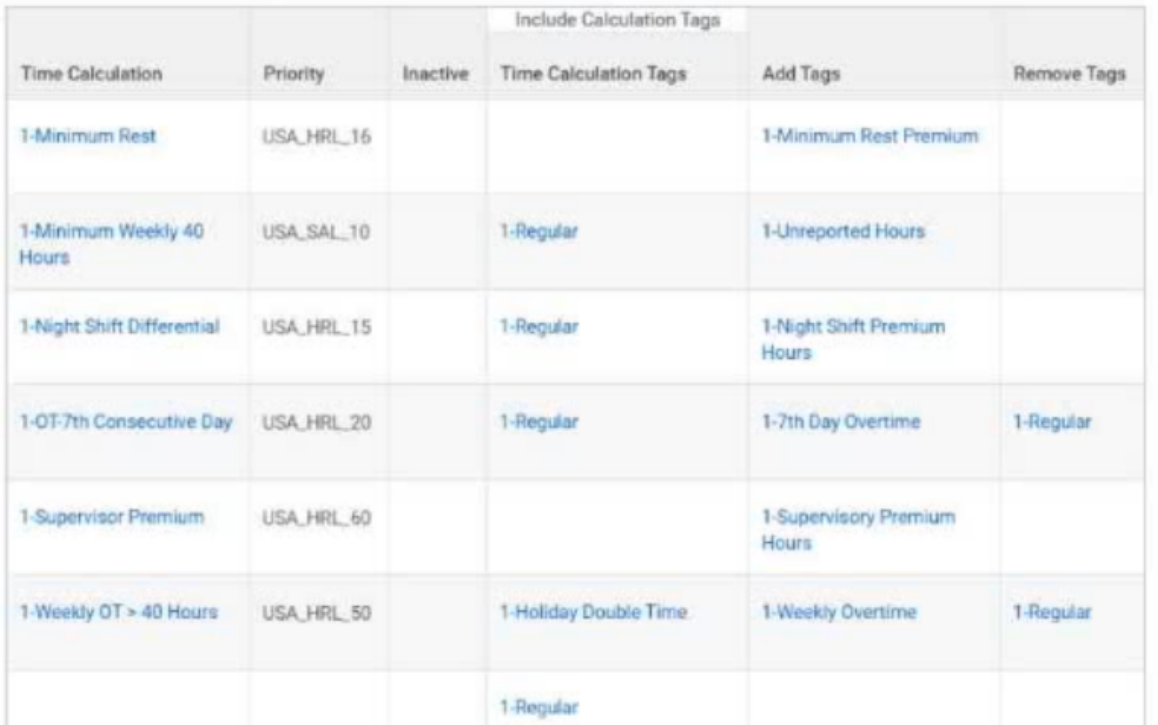
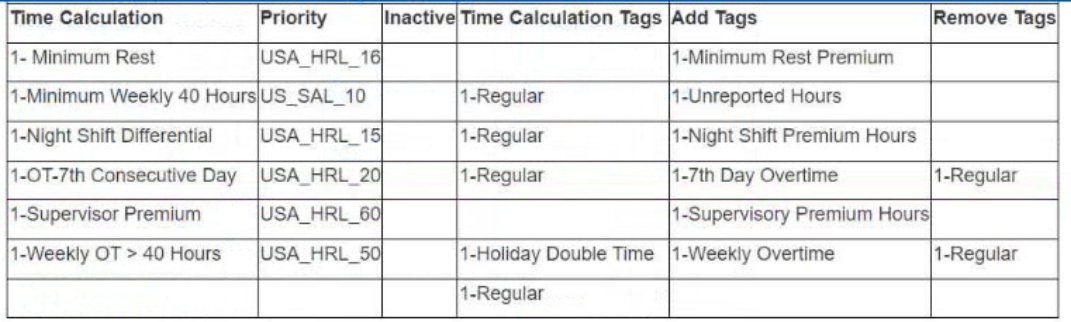
In the report, what calculation has the highest priority?
The correct answer is D. 1-Minimum Weekly 40 Hours. In the scenario shown, the Priority column lists the calculation priorities as values such as USA_HRL_16, USA_SAL_10, USA_HRL_15, USA_HRL_20, and USA_HRL_50. Among the answer choices, 1-Minimum Weekly 40 Hours has the priority USA_SAL_10, which represents the highest priority in the report because it carries the lowest priority number shown among the listed options.
In Workday Time Tracking, priorities are important because they determine the sequence in which time calculations are applied. This matters when more than one time calculation can affect the same reported time. Higher-priority calculations are evaluated first, and their output may influence later calculations such as overtime, premiums, shift differential, or exception handling. That sequencing is essential to avoid overlap, double counting, or incorrect premium generation.
The other options have lower priority values in the report: 1-Night Shift Differential is USA_HRL_15, 1-Minimum Rest is USA_HRL_16, and 1-Weekly Overtime is not the highest priority item shown. Therefore, based on the priority values displayed in the report, the correct choice is 1-Minimum Weekly 40 Hours.
What app provides a central location for cards that display frequently used tasks and reports for Time Tracking?
The correct answer is D. Time Administrator Home.
In Workday Time Tracking, Time Administrator Home is the app designed to provide administrators with a centralized workspace for managing time tracking activities. It displays cards that surface commonly used tasks, reports, alerts, and administrative actions, making it easier for time administrators to access the most relevant tools from one place. This home page is intended to improve efficiency by organizing frequent Time Tracking functions into a single operational hub.
The other options are not apps that provide a card-based administrative home experience. All Time Entry Templates is a report or task used to review configured templates, not a central home app. View Worker's Time Eligibility is a worker-specific report used to review which time tracking components apply to a worker. View Worker's Time Eligibility by Organization is also a reporting function, focused on reviewing eligibility across organizations rather than serving as a dashboard.
Because the question specifically asks for an app that offers a central location for cards showing frequently used Time Tracking tasks and reports, Time Administrator Home is the only option that fits that description. It is the main administrative landing area for ongoing monitoring and action in Workday Time Tracking.
Therefore, the correct answer is D. Time Administrator Home.
Refer to the following scenario to answer the question below.
You are reviewing time for a worker in California. The worker has reported hours for the seventh consecutive day and the hours are calculating as configured. This week the worker reported 11 hours on the seventh consecutive day worked. This worker is eligible for double-time on all hours worked over 8 on the seventh consecutive day; however, all 11 hours are tagged as seventh consecutive day hours.
You have created and assigned the Seventh Consecutive Day Double Time time calculation to a time calculation group.
Where on the Seventh Consecutive Day Double Time calculation do you find the hours that count toward seventh consecutive day double time?
The correct answer is A. Include Calculation Tags grid.
In Workday Time Tracking, the Include Calculation Tags section determines which hours are evaluated by a specific time calculation. For a rule such as Seventh Consecutive Day Double Time, Workday looks at the hours that already carry certain calculation tags and uses those tagged hours to determine whether the threshold for double time has been reached. In other words, the hours that count toward the seventh consecutive day double-time rule are identified in the Include Calculation Tags grid.
This is different from the Add Tags field, which defines the result of the calculation by specifying the tag that will be added after the criteria are met. The Remove Tags field controls which tags should be removed once the calculation applies. The Time Calculation Group grid is not where the hours are identified; it simply groups related calculations for worker eligibility and execution.
In this scenario, if all 11 hours remain tagged as seventh consecutive day hours instead of splitting after 8 hours, reviewing the Include Calculation Tags grid is essential because it shows exactly which tagged hours Workday is counting toward the threshold. That is the configuration area that determines the hours considered for the seventh consecutive day double-time calculation.
Therefore, the correct answer is A.
You need to know a worker's leave status on the date of a specific time block.
What calculated field will you use?
The correct answer is C. Lookup Value As of Date.
In Workday Time Tracking, when you need to determine the value of a worker-related attribute on a specific date, the appropriate calculated field type is Lookup Value As of Date. In this scenario, the requirement is to know the worker's leave status on the date tied to a particular time block. Because leave status can vary over time, the calculation must return the value that was effective as of the time block date, not just the worker's current status.
This is exactly what Lookup Value As of Date is designed to do. It allows Workday to evaluate an effective-dated field and return the correct value for the specified date context. That makes it especially useful in Time Tracking calculations where the date of the time block is critical for determining eligibility, status, or rule outcomes.
The other options do not meet this requirement. True/False Condition only evaluates whether a condition is met and does not retrieve the dated value itself. Date Difference calculates the number of days between two dates, which is unrelated here. Arithmetic is used for numeric calculations and cannot return an effective-dated status value.
Therefore, for finding a worker's leave status on the date of a specific time block, the correct calculated field is Lookup Value As of Date.
Refer to the following scenario to answer the question below.
You are entering worked time for Amanda Baker, who is an employee in California. You discover that her daily overtime, daily double time, and weekly overtime calculations are not processing, even though they are configured in the tenant.
Once you determine the issue and fix the problem, what is the final action you must take to confirm that the configuration is successful?
The correct answer is D. Run time tracking calculations on the period that is being tested.
In Workday Time Tracking, after correcting a configuration issue related to overtime or double-time rules, the system does not confirm the result simply because the setup has been updated. The relevant time calculations must be reprocessed for the time period being tested so Workday can apply the corrected logic to the worker's reported time. This is especially important in scenarios involving California overtime, where daily overtime, daily double time, and weekly overtime calculations may interact and depend on proper eligibility, grouping, and priority configuration.
Running time tracking calculations ensures that the reported time blocks are reevaluated using the updated configuration. Only then can you verify whether the worker's hours are now correctly tagged and calculated.
The other options are not appropriate for this validation step. A job change or compensation change affects worker data but does not rerun time calculation logic for the testing period. Run a pay calculation is a payroll activity and occurs downstream from Time Tracking; it does not replace the need to first verify that time has been calculated correctly in Workday Time Tracking.
Therefore, the final action needed to confirm the fix is to run time tracking calculations on the period being tested
You have configured a Time Entry Code and assigned a default calculation tag of Callback Guaranteed Time.
What happens when a worker reports time using this Time Entry Code?
The correct answer is D. The hours are tagged with the Callback Guaranteed Time Calculation Tag.
In Workday Time Tracking, when a default calculation tag is assigned to a Time Entry Code, that tag is automatically applied to time reported with that code unless other calculation logic changes the outcome. This means the time entry itself carries the designated calculation tag into the time calculation process. In this case, if the Time Entry Code has a default calculation tag of Callback Guaranteed Time, then any hours entered using that code will be tagged with Callback Guaranteed Time.
This setup is commonly used to ensure specific kinds of time are consistently identified for later calculation logic, such as guaranteed callback minimums, premiums, or special pay treatment. The tag itself does not automatically determine the pay rate; instead, it marks the hours so the relevant time calculations can recognize and process them correctly.
Option A is incorrect because the worker's Work Schedule Calendar does not control the default calculation tag placed on a Time Entry Code. Option B is incorrect because the Time Entry Template does not retag the reported time to another default code in this way. Option C is incorrect because assigning a calculation tag alone does not directly guarantee payment at time and a half; pay outcomes depend on downstream calculation and payroll configuration.
Exam domains verified against: Official Workday Workday-Pro-Time-Tracking exam guide, last checked October 2026.
Understand core concepts, terminology, and structure of time tracking. Learn how to configure basic setup required to capture worker time and identify how time is recorded and stored in the system.
Sample question from this domain above: Q3
Master different time entry methods and formats that workers can use. Apply validation rules to ensure accuracy and compliance, and identify and resolve errors in submitted time entries.
Sample question from this domain above: Q7
Apply rules for overtime, shifts, and premiums to recorded time. Understand how time blocks are evaluated and processed into calculated results by the system.
Link time tracking with absence and leave plans in Workday. Record time off, manage leave requests, and ensure consistency between worked time and recorded absences.
Sample question from this domain above: Q5
Generate standard and custom time tracking reports for analysis and visibility. Monitor time data for accuracy and completeness, and audit entries and track changes for compliance.
Common questions about the exam itself

