At ValidExamDumps, we consistently monitor updates to the VMware 5V0-41.20 exam questions by VMware. Whenever our team identifies changes in the exam questions, objectives, focus areas or requirements, We immediately update our exam questions for both PDF and online practice exams. This commitment ensures our customers always have access to the most current and accurate questions. By preparing with these up to date and 100% exam domain coverage questions, our customers can successfully pass the VMware SD-WAN Troubleshoot exam on their first attempt without needing additional materials or study guides.
Other certification materials providers often include outdated or removed questions by VMware in their 5V0-41.20 exam. These outdated questions lead to customers failing their VMware SD-WAN Troubleshoot exam. In contrast, we ensure our questions bank includes only precise and up-to-date questions. Our main priority is your success in the VMware 5V0-41.20 exam, not profiting from selling obsolete exam questions in PDF or Online Practice Test.
Scenario 2:
After resolving numerous connectivity Issues throughout the various branch sites, connectivity between applications and users is finally present. The network administrator is informed that during certain tests, applications are not performing as they are expected to. Users report that call quality has not fully improved and that some of their calls either drop or have poor voice quality where the conversation is breaking up. Other users are noticing that file transfers are slower than expect. A group of users from a few sites have reported slowness in accessing internal and external applications.
Exhibit.
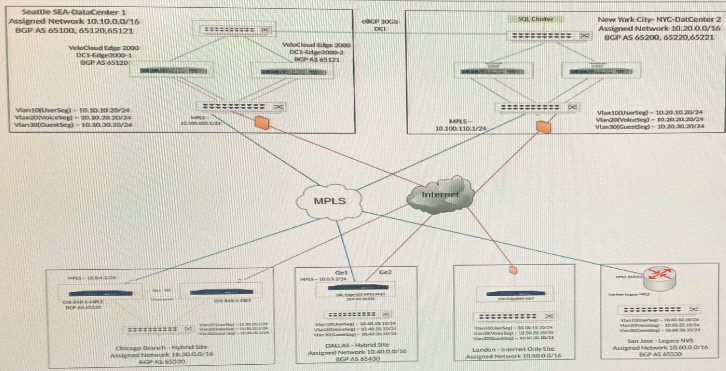
A network administrator has configured a Business Policy to send a specific application directly out an underlay interface. Users have complained of slow responses for that application. While troubleshooting, the network administrator finds the traffic is actually taking an overlay path to another SD-WAN Edge.
What is causing this behavior?
Scenario 2:
After completing the branch activation activities for all required branches, the administrator attempts to test connectivity between the various branches and between the hubs and branches- The administrator notices a lack of connectivity despite being certain that configurations have been complete. The administrator also observed that several users are reporting intermittent connectivity to some of the applications they are accessing. Other users are reporting no access to these applications. Other users at some of the branches claim they cannot get to certain public resources. The administrator wants to ensure that all sites can talk to each other and all resources are accessible.
Exhibit.
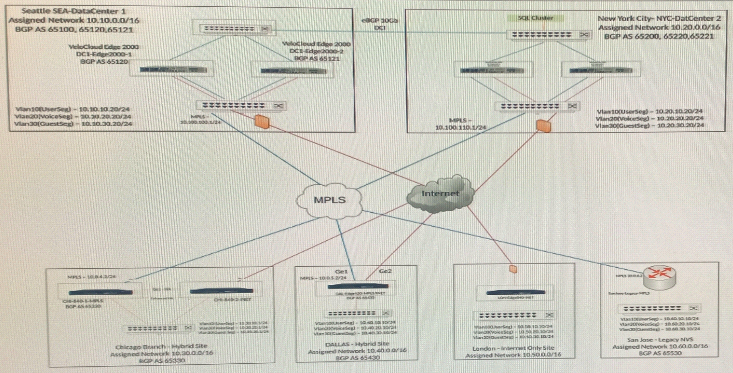
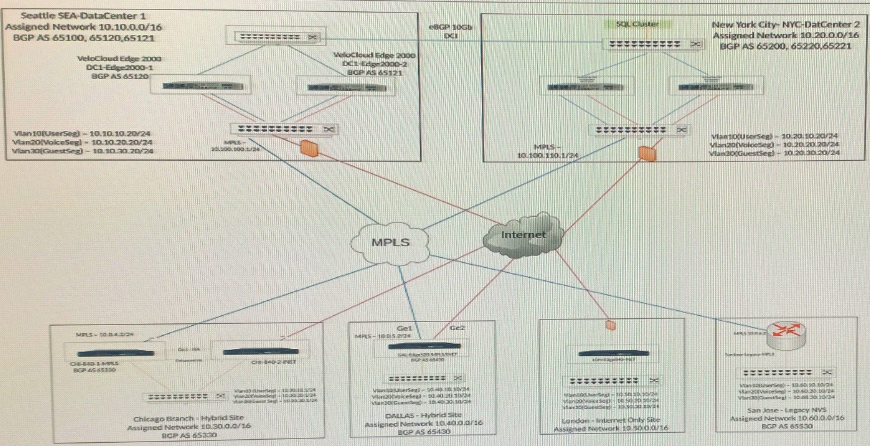
The tunnel from the Dallas site to the Seattle hub is not coming up.
What are two things that should be checked to determine the issue? (Choose two.)
Scenario 3:
After resolving numerous connectivity issues throughout the various branch sites, connectivity between applications and users is finally present. The network administrator is informed that during certain tests, applications are not performing as they are expected to. Users report that call quality has not fully improved and that some of their calls either drop or have poor voice quality where the conversation is breaking up. Other users are noticing that file transfers are slower than expect. A group of users from a few sites have reported slowness in accessing internal and external applications.
Exhibit.
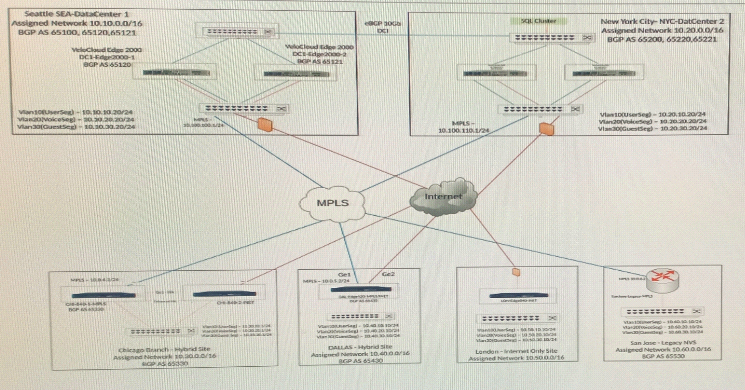
Users at the Dallas Branch are complaining that downloads/uploads from Office365 are slow. Working in Teams has been providing slow responses. The Internet circuit is 100Mbps while the MPLS Circuit is 45Mbps. Upon troubleshooting, the network administrator has noticed the traffic is Backhauling through the Seattle hub for all internet traffic.
How should the network administrator resolve the issue?
Scenario 2:
After completing the branch activation activities for all required branches, the network administrator attempts to test connectivity between the various branches and between the hubs and branches. The administrator notices a lack of connectivity despite being certain that configurations have been complete. The administrator also observed that several users are reporting intermittent connectivity to some of the applications they are accessing. Other users are reporting no access to these applications. Other users at some of the branches claim they cannot get to certain public resources. The administrator wants to ensure that all sites can talk to each other and all resources are accessible.
Exhibit.
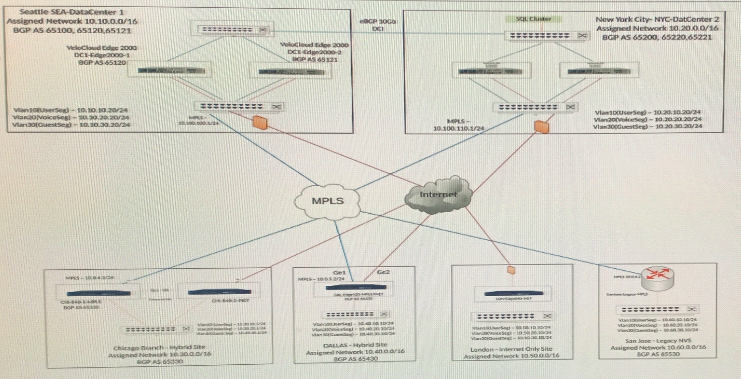
A network administrator is investigating connectivity issues between Chicago and San Jose. The administrator browses to the Overlay Flow Control (OFC) window and notices that the screen is blank with no routes shown in the OFC.
What is a possible reason for this?
Scenario 3:
After resolving numerous connectivity issues throughout the various branch sites, connectivity between applications and users is finally present. The network administrator is informed that during certain tests, applications are not performing as they are expected lo. Users report that call quality has not fully improved and that some of their calls either drop or have poor voice quality where the conversation is breaking up. Other users are noticing that file transfers are slower than expect. A group of users from a few sites have reported slowness in accessing internal and external applications.
Exhibit.
Users are complaining that web pages to certain web sites are very slow to load and at times unresponsive. The network administrator has verified that the traffic is going correctly out the underlay.
What should the administrator check next?

