Key details for this exam, checked against the published exam outline
Each question shows the correct answer and an explanation of why it is right
An NSX administrator would like to create an L2 segment with the following requirements:
* L2 domain should not exist on the physical switches.
* East/West communication must be maximized as much as possible.
Which type of segment must the administrator choose?
An overlay segment is a layer 2 broadcast domain that is implemented as a logical construct in the NSX-T Data Center software. Overlay segments do not require any configuration on the physical switches, and they allow for optimal east/west communication between workloads on different ESXi hosts. Overlay segments use the Geneve protocol to encapsulate and decapsulate traffic between the hosts. Overlay segments are created and managed by the NSX Manager.
A customer has a network where BGP has been enabled and the BGP neighbor is configured on the Tier-0 Gateway. An NSX administrator used the get gateways command to retrieve this information:
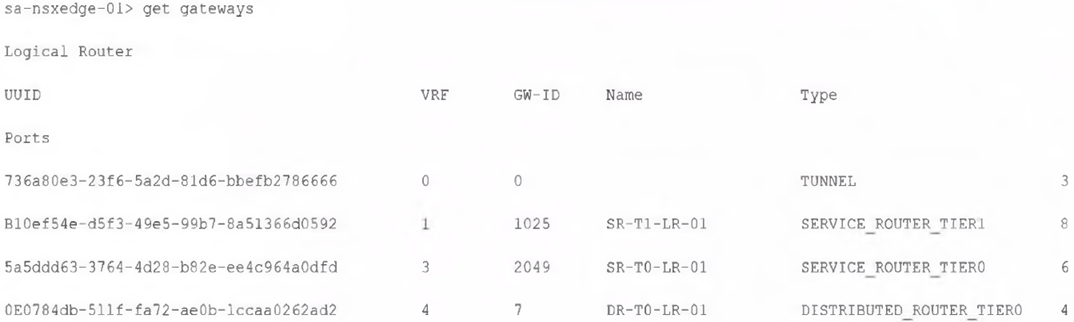
Which two commands must be executed to check BGP neighbor status? (Choose two.)
vrf 3: The VRF ID for the Tier-0 Service Router (SR) is 3, as indicated in the output. To check the BGP neighbor status, you need to enter the correct VRF context.
sa-nsxedge-01(tier0_sr)> get bgp neighbor: This command retrieves the BGP neighbor status on the Tier-0 Service Router, which is where BGP neighbors are configured in NSX environments.
Which tool could be used to configure BGP on a Tier-0 Gateway?
Which NSX feature can be leveraged to achieve consistent policy configuration and simplicity across sites?
According to the VMware NSX Documentation, this is the NSX feature that can be leveraged to achieve consistent policy configuration and simplicity across sites:
NSX Federation: This feature allows you to create and manage a global network infrastructure that spans across multiple sites using a single pane of glass. You can use this feature to synchronize policies, segments, gateways, firewalls, VPNs, load balancers, and other network services across sites.
Which three of the following describe the Border Gateway Routing Protocol (BGP) configuration on a Tier-0 Gateway? (Choose three.)
It supports a 4-byte autonomous system number: BGP on a Tier-0 Gateway supports 4-byte AS (Autonomous System) numbers, which are necessary for larger routing domains.
Can be used as an Exterior Gateway Protocol: BGP is commonly used as an Exterior Gateway Protocol to establish routing between different autonomous systems (AS).
BGP is enabled by default: On a Tier-0 Gateway, BGP is typically enabled by default, allowing administrators to configure it for external routing.
Which choice is a valid insertion point for North-South network introspection?
The Tier-0 gateway is the valid insertion point for North-South network introspection in an NSX environment. North-South traffic refers to traffic entering or leaving the data center, and the Tier-0 gateway is responsible for routing this traffic between the NSX environment and external networks. Placing network introspection at the Tier-0 gateway allows for inspection and security policies to be applied to traffic as it moves in and out of the data center.
Which of the following statements is true regarding the use of a Dynamic Routing Protocol on a Tier-1 Gateway?
In NSX, BGP is the only supported dynamic routing protocol on a Tier-1 Gateway. OSPF is not supported at the Tier-1 level; it is only available on Tier-0 Gateways. This limitation means that for dynamic routing on a Tier-1 Gateway, administrators can configure BGP to exchange routing information with connected Tier-0 Gateways.
Exam domains verified against: Official VMware 2V0-41.24 exam guide, last checked October 2026.
This section evaluates the knowledge of VMware system administrators and networking professionals regarding the VMware Virtual Cloud Network and its integration with NSX. It covers the foundational framework of the Virtual Cloud Network, detailing its purpose and the architectural principles that underpin it. Candidates will learn to identify the practical benefits and use cases for NSX in real-world scenarios, showcasing how NSX complements the broader VMware product portfolio.
Assess ability to prepare, deploy, and manage NSX infrastructure. Prepare environments by creating Transport Zones and IP Pools while ensuring ESXi hosts are configured effectively for NSX deployment.
Focus on diagnosing and resolving issues in NSX deployments using log files effectively, from locating default NSX component logs to generating log bundles. Explore tools available for resolving NSX issues and methods to identify and fix common installation and configuration problems.
Common questions about the exam itself

