Key details for this exam, checked against the published exam outline
Each question shows the correct answer and an explanation of why it is right
Refer to the exhibit.
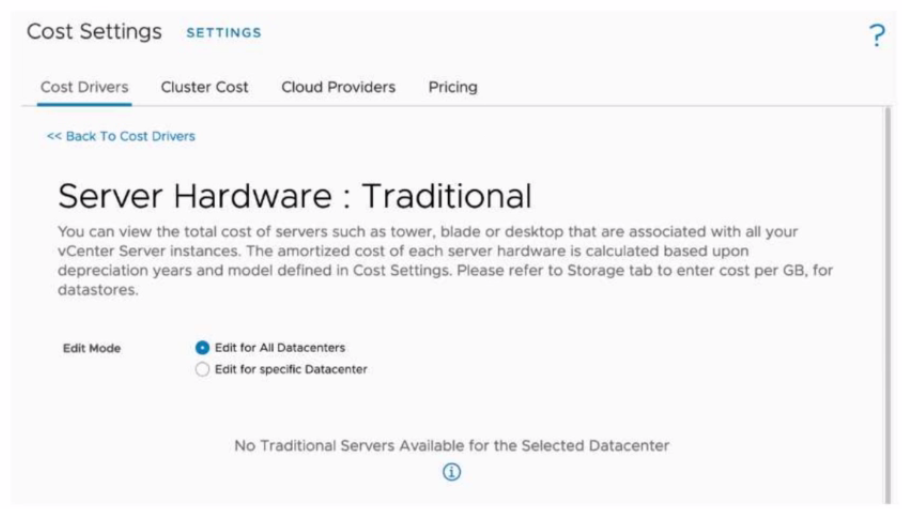
An administrator is tasked to manually upload the cost drivers of all the hosts, to obtain cost calculations accurate for their datacenter. However, when the administrator tries to update the cost drivers, the message displayed on the exhibit is shown.
what is the cause of this message?
The message 'No Traditional Servers Available for the Selected Datacenter' indicates that all the hosts in the selected datacenter are part of vSAN-enabled clusters.
In VMware vRealize Operations, traditional cost drivers apply only to server hardware that is not managed within a vSAN environment. When vSAN is enabled on clusters, the cost drivers and cost calculations for hardware are managed differently because vSAN considers storage costs as part of the software-defined infrastructure, which changes the way costs are modeled and amortized.
Key Points:
Traditional Hardware vs. vSAN:
Traditional cost drivers are associated with non-vSAN environments (e.g., standard storage and compute hardware costs).
For vSAN-enabled clusters, cost calculations must include software-defined storage and are therefore managed under different settings.
Message Meaning:
The error clearly indicates that there are no traditional servers detected because all hosts are part of vSAN-enabled clusters in the datacenter.
Resolution:
If the administrator wants to update cost drivers for these clusters, they must refer to vSAN-specific cost models in vRealize Operations.
Navigate to the vSAN cost settings section in the interface to input appropriate cost metrics.
For more information on cost management in vRealize Operations for vSAN-enabled clusters, refer to VMware's official documentation:
Cost Drivers and Configuration in vRealize Operations
vSAN Cost and Capacity Management with vRealize Operations
What is the purpose of using Collector Groups in vReaiize Operations?
In vRealize Operations, Collector Groups are utilized to manage and distribute the workload of data collection across multiple remote collectors.
Purpose of Collector Groups:
Adapter Load Distribution: By assigning adapter instances to a collector group, vRealize Operations can distribute the data collection load among multiple collectors within the group. This ensures that no single collector is overwhelmed, enhancing performance and scalability.
Resiliency and High Availability: If a collector within the group becomes unavailable, the workload can be redistributed among the remaining collectors, ensuring continuous data collection without interruption.
Therefore, the primary purpose of using Collector Groups is to achieve adapter load distribution by distributing the number of monitored objects across different remote collectors.
An administrator has been tasked with analyzing the impact of deploying a new application The current infrastructure is using an external storage array. What vRealize Operations What-If Analysis should the administrator perform to get this information?
When tasked with analyzing the impact of deploying a new application in an environment utilizing an external storage array, the appropriate What-If Analysis in VMware vRealize Operations is Workload Planning: Traditional. This analysis allows administrators to model the addition of new workloads to traditional (non-hyperconverged) infrastructures, providing insights into resource utilization and capacity planning.
To perform this analysis:
Navigate to the What-If Analysis Section:
In the vRealize Operations interface, go to Plan > Capacity.
Click on the What-If Analysis tile.
Select Workload Planning: Traditional:
Click the ADD button.
Choose Add VMs under the Workload Planning: Traditional tile.
Configure the New Workload:
Specify the data center or custom data center where the new application will be deployed.
Define the workload profile by either:
Manually entering the number of vCPUs, memory, storage, and expected usage percentage.
Importing attributes from existing VMs to use as templates.
Set the Time Frame:
Enter the start and end dates for the period during which the workload will be active. The system can project scenarios up to one year from the current date.
Run the Analysis:
After configuring the workload, run the scenario to receive vRealize Operations' assessment.
The system will indicate whether the proposed workload fits within the targeted infrastructure and provide projections on resource utilization over time.
This process enables administrators to forecast the impact of new applications on existing resources, ensuring informed decisions regarding capacity and performance.
A company needs a solution that provides all the following advantages:
* Provides enhanced visibility to environments by collecting, searching, and displaying log data for infrastructure.
* Delivers faster analytical queries and aggregation.
Which VMware product accomplishes these requirements?
VMware vRealize Log Insight is the product that fulfills the requirements of enhanced visibility and faster analytical queries . It excels at collecting, searching, and displaying log data for infrastructure, providing comprehensive insights into your environment. Additionally, vRealize Log Insight is designed for high-performance log analysis, enabling faster analytical queries and aggregation for efficient troubleshooting and root cause analysis.
Here's why the other options are not the best fit:
vRealize AI Cloud: This product focuses on AI-driven optimization and automation, not primarily on log management and analysis.
vRealize Network Insight: This product specializes in network visibility and security, with a focus on network traffic analysis rather than log management.
vRealize Operations Manager: While vRealize Operations Manager provides performance monitoring and capacity planning, its log analysis capabilities are not as comprehensive as those of vRealize Log Insight.
An administrator has been tasked to quickly recover unused allocated compute from existing development virtual machines (VMs) using vRealize Operations, as vSphere duster is now at capacity.
The current state of the environment:
* The VMs either have dev or prod in their name.
* Production VMs reside on duster due to historical usage.
* The administrator already has permission to modify any development VMs within the duster
Which approach below will quickly ensure duster compute resources are recovered from the correct VMs?
When a vSphere cluster reaches capacity, it's essential to reclaim unused resources from virtual machines (VMs) to optimize performance and accommodate new workloads. In this scenario, the administrator's goal is to recover compute resources from development VMs, identifiable by the 'dev' in their names, without affecting production VMs labeled with 'prod.'
The most efficient approach is to generate an Oversized Virtual Machines Report. This report identifies VMs that have been allocated more resources than they consistently utilize, making them prime candidates for rightsizing.
Steps to Generate the Oversized VMs Report in vRealize Operations:
Access the VM Rightsizing Dashboard:
Navigate to the Optimize Performance section.
Select the VM Rightsizing dashboard.
Filter VMs by Name:
Use the filtering options to include only VMs with 'dev' in their names, ensuring the focus remains on development VMs.
Review Oversized VMs:
Within the dashboard, locate the list of Oversized VMs.
This section displays VMs with allocated resources exceeding their actual usage.
Analyze Recommendations:
For each listed VM, vRealize Operations provides recommendations on optimal resource allocation based on historical usage patterns.
Implement Rightsizing:
After reviewing the recommendations, adjust the resources (CPU, memory) of the identified VMs to match the suggested sizes.
This process, known as rightsizing, ensures that VMs have resources commensurate with their workload demands, freeing up excess allocations for other uses.
Benefits of This Approach:
Immediate Resource Reclamation: By rightsizing oversized development VMs, you can quickly recover CPU and memory resources.
Non-Disruptive to Production: Focusing on VMs with 'dev' in their names ensures that production workloads remain unaffected.
Operational Efficiency: Rightsizing enhances overall cluster performance by reducing resource contention and improving utilization.
By following this method, the administrator can efficiently reclaim compute resources from development VMs, alleviating the cluster's capacity constraints without impacting production workloads.
What three types of authentication sources are valid in vRealize Operations? (Choose three.)
vRealize Operations supports the following authentication sources:
VMware Identity Manager (vIDM) : vIDM is a platform for identity and access management, allowing you to manage users, groups, and authentication policies.
OpenLDAP : OpenLDAP is an open-source implementation of the Lightweight Directory Access Protocol (LDAP), providing access to directory services for user authentication.
Active Directory (AD) : Active Directory is a Microsoft directory service that provides authentication and authorization services for users and computers in a network.
The following authentication sources are not supported in vRealize Operations:
OAuth2: While OAuth2 is a widely used authorization framework, it is not directly supported as an authentication source in vRealize Operations.
RADIUS: RADIUS is primarily used for network access authentication and is not a standard authentication source for vRealize Operations.
LocalOS: LocalOS authentication refers to authenticating users against the local operating system of the vRealize Operations appliance, which is not a recommended practice for production environments.
Which VMware product provides continuous performance optimization, efficient capacity and cost management, intelligent remediation, and integrated compliance as a subscription based service?
VMware vRealize Operations Cloud is a subscription-based service that offers continuous performance optimization, efficient capacity and cost management, intelligent remediation, and integrated compliance. As a cloud-delivered service, it enables IT teams to manage VMware Cloud environments across on-premises data centers and hosted environments, such as VMware Cloud on AWS.
Key features of vRealize Operations Cloud include:
Continuous Performance Optimization: Utilizes AI/ML-driven analytics to ensure optimal performance of applications and infrastructure by proactively identifying and resolving potential issues.
Efficient Capacity and Cost Management: Provides insights into resource utilization, helping to optimize capacity and reduce costs through intelligent planning and forecasting.
Intelligent Remediation: Offers actionable recommendations and automated remediation to address performance bottlenecks and configuration issues promptly.
Integrated Compliance: Ensures that infrastructure and applications adhere to industry standards and organizational policies, reducing risk and enhancing security.
As a SaaS offering, vRealize Operations Cloud delivers these capabilities without the need for on-premises deployment and maintenance, allowing for faster access to new features and scalability to meet evolving business needs.
Exam domains verified against: Official VMware 2V0-32.22 exam guide, last checked October 2026.
Covers fundamental architecture and technologies underlying VMware cloud solutions including virtualization concepts, cloud computing models and VMware's specific architectural approaches. This domain requires the ability to explain core VMware cloud technologies and their interrelationships.
Focuses on VMware cloud products, their features and use cases. Requires familiarity with different VMware cloud solutions and how solutions address specific business needs.
Covers assessing requirements, designing cloud infrastructures and planning migrations. Candidates must be able to evaluate business needs and architect appropriate solutions.
Addresses installing VMware cloud environments, configuring settings and setting up cloud infrastructures. Hands-on knowledge of deployment procedures is essential.
Covers performance tuning techniques, resource optimization strategies and upgrade procedures. Candidates should understand how to maximize efficiency and manage transitions between versions.
Sample question from this domain above: Q3
Focuses on diagnostic techniques, common issues and resolution strategies. Candidates must be able to identify and resolve cloud operations problems.
Covers routine management activities, monitoring procedures and operational best practices. Candidates should understand day-to-day management and oversight of cloud operations environments.
Common questions about the exam itself

