Key details for this exam, checked against the published exam outline
Each question shows the correct answer and an explanation of why it is right
A development team has created a VMware Aria Automation Template that has undergone multiple versions of development to accommodate the changes requested by the application owner.
An administrator is now tasked with identifying differences among these versions of the VMware Aria Automation template and publish the right one. Which option can the administrator use to view to identify the differences between the versions?
When working with multiple versions of a VMware Aria Automation Template, it is important to identify differences between these versions to understand what changes have been made and ensure the correct version is published. The Diff option is used to compare different versions of the template. This feature highlights the differences line-by-line, making it easier for administrators to see what modifications have been made across versions and decide which version to publish.
Reference
VMware Aria Automation Template Management
Which VMware Aria Suite product helps an administrator understand the monetary impact of deployments and manage costs in VMware Aria Automation?
VMware Aria Operations is the product within the VMware Aria Suite that assists administrators in understanding the monetary impact of deployments and managing costs in VMware Aria Automation. This product offers robust capabilities for capacity and cost management, performance monitoring, and optimization across hybrid and multi-cloud environments.
VMware Aria Operations provides detailed insights into cloud costs through features such as cost dashboards, reporting, and capacity management. These tools help administrators track and analyze infrastructure consumption, optimize resource usage, and perform chargeback and showback for different departments or projects. This enables better financial control and ensures that cloud resources are used efficiently and cost-effectively.
Exhibit.
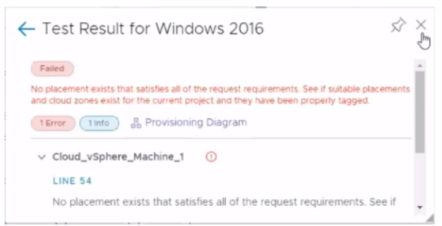
An administrator is testing a newly created Windows 2016 template in VMware Aria Automation Assembler. While using the Test option from within the VMware Aria Automation template, the attached error appears.
What is a possible cause for this error message?
What is the purpose of using a custom form?
The purpose of using a custom form in VMware Aria Automation is to customize the input parameters and enhance a request form. This allows administrators to tailor the user interface and input fields according to specific requirements, improving the user experience and ensuring that all necessary information is collected efficiently during the request process.
Which type of cloud account is configured during the Quickstart process?
During the Quickstart process of VMware Aria Automation, the type of cloud account configured is VMware vCenter. This setup is essential for integrating vCenter resources into the VMware Aria Automation environment, allowing for efficient management and deployment of virtual machines and other resources within a vSphere environment.
An administrator creates a new project in VMware Aria Automation mapping compute resources to a specific group of users.
Which object is used to assign compute resources with a project?
In VMware Aria Automation, a Cloud Zone is used to assign compute resources to a project. A Cloud Zone is a logical construct that maps to a specific set of compute resources within a Cloud Account, such as a vCenter Server or AWS region. When creating a new project, administrators map these Cloud Zones to the project, thereby defining which resources are available for provisioning within that project. This allows for granular control over resource allocation and ensures that the resources are used by the designated group of users within the project.
Reference
VMware Aria Automation Projects and Cloud Zones
Within a VMware Aria Automation solution, which three containers make up the VMware Aria Automation Orchestrator Service? (Choose three.)
Within a VMware Aria Automation solution, the VMware Aria Automation Orchestrator Service is composed of several containers. The key containers that make up the Orchestrator service are:
vro-server-app: This container handles the core Orchestrator server functions.
vco-polyglot-runner: This container is responsible for running the workflows and scripts that are defined in multiple programming languages.
vco-controlcenter-app: This container manages the Orchestrator Control Center, which is used for administrative and configuration tasks.
These containers work together to ensure that the Orchestrator service operates smoothly and efficiently.
Reference
VMware Aria Automation Orchestrator Service
7 domains from the VMware 2V0-31.24 exam outline, with approximate weightings. Every sample question above is tagged with the domain it comes from
Covers essential concepts and architecture of VMware Aria Automation, including main components and features for cloud administrators and IT professionals. Understand the foundational building blocks before moving into deployment and configuration tasks.
Addresses installing and initially configuring VMware Aria Automation for system administrators and deployment specialists. Includes preparing prerequisites, setting up endpoints, and configuring initial settings to get the platform operational.
Focuses on creating and managing blueprints and catalogs for cloud architects and solution designers. Details the definition of resources, services, and catalog items that enable self-service provisioning for end users.
Emphasizes managing resources within VMware Aria Automation for cloud administrators and operations managers. Covers resource allocation, monitoring, and optimization to ensure efficient use of infrastructure.
Explores extending the functionality of VMware Aria Automation and integrating it with other systems and applications for integration specialists and developers. Utilizes APIs and custom scripts to connect external tools and workflows.
Sample question from this domain above: Q6
Discusses implementing governance frameworks and policies within VMware Aria Automation to ensure compliance and security standards for compliance officers and IT managers. Establishes controls over provisioning and resource usage.
Focuses on monitoring system performance and troubleshooting common issues that arise within VMware Aria Automation for support engineers and system administrators. Enables rapid identification and resolution of problems in production environments.
Common questions about the exam itself

