Key details for this exam, checked against the published exam outline
Each question shows the correct answer and an explanation of why it is right
Which Indicator should be excluded from a Historic Data Collection because its scores cannot be accurately collected?
Historic Data Collection is designed to accurately reconstruct past indicator scores based on historical records. Indicators that rely on calculated age values, such as summed age of open problems, cannot be accurately reconstructed because age is a time-relative value that depends on the exact moment of calculation.
Count-based indicators (options A, B, and D) can be recalculated historically by evaluating record states at specific points in time. However, summing age values requires knowing the precise age of each record at each historical interval, which is not reliably reproducible. ServiceNow documentation explicitly warns against using historic data collection for age-based and duration-sum indicators, making option C the correct exclusion.
What does the ''Allow formula component to be NULL'' setting for a Formula Indicator do?
The Allow formula component to be NULL setting controls how a Formula Indicator behaves when one or more component indicators return NULL values. When enabled, the formula continues to calculate using the available components instead of aborting the calculation.
If this setting is disabled and any component returns NULL, the entire formula result becomes NULL. The setting does not automatically convert NULLs to zero, nor does it skip calculation entirely. ServiceNow documentation explains that this option provides flexibility in environments where some component indicators may not have data for every period, ensuring the formula can still produce meaningful results. Therefore, option D accurately describes the behavior.
Which definition describes the functionality of a Formula Indicator?
A Formula Indicator in ServiceNow Platform Analytics allows you to calculate a derived score using up to five other indicators (automated or manual) through a mathematical expression. These component indicators must already exist and have collected data.
Formula Indicators are not calculated at view time; instead, they are pre-calculated during data collection and stored like other indicator scores. This ensures consistent historical trending and optimal dashboard performance. Aggregates such as count or sum are handled by automated indicators, not formula indicators. Formula indicators also cannot reference indicator threshold values, as thresholds are used only for KPI status evaluation and visualization, not for calculations.
ServiceNow documentation clearly states the five-indicator limit and emphasizes that Formula Indicators are meant for derived metrics, such as percentages, ratios, or normalized scores, making option B the only correct definition.
When creating a breakdown on the age of a task, which table can be used as the Facts table of the Breakdown Source?
When creating a breakdown based on the age of a task, the correct Facts table for the Breakdown Source is Bucket [pa_buckets]. In Platform Analytics, age-based breakdowns (such as 0--5 days, 6--10 days, etc.) are not derived directly from the Task table. Instead, they use bucketed data, which is generated by bucket groups during data collection.
The pa_buckets table stores the calculated bucket values for records at collection time, making it the authoritative facts table for age, duration, and numeric range breakdowns. Bucket Groups define how values are grouped, while the Bucket table stores the actual bucket assignments used in analytics. The Task table itself cannot be used as the facts table for age breakdowns because Platform Analytics requires pre-aggregated, time-aware bucket data to ensure historical accuracy. The Choice table is only used for choice list values and is unrelated to numeric or age-based breakdowns. ServiceNow documentation clearly states that bucket-based breakdowns must reference the pa_buckets table to function correctly and produce accurate time series analytics.
Which scenario requires a scripted Breakdown Mapping?
A scripted Breakdown Mapping is required when there is no direct field relationship between the Indicator source data and the Breakdown source table. In such cases, standard field mapping cannot resolve how indicator records should be categorized, so a script is needed to programmatically determine the correct breakdown value.
Mapping to a Sys ID field (option B) is supported through standard mappings. Database views (option C) can still be mapped if fields are accessible. Dot-walked fields (option D) are commonly supported without scripting. According to ServiceNow Platform Analytics documentation, scripted mappings are specifically intended for complex or indirect relationships, making option A the correct answer.
You see this error in a Breakdown Source:
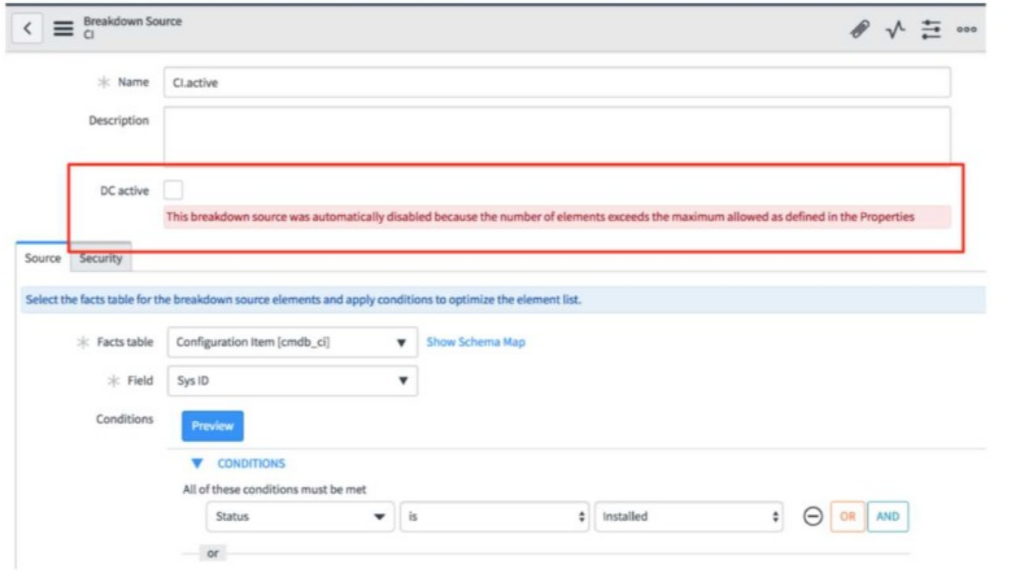
Which action resolves the issue?
In ServiceNow Platform Analytics, a Breakdown Source is automatically disabled when the number of generated breakdown elements exceeds the maximum element limit defined in system properties (for example, properties controlling the maximum allowed breakdown elements during data collection). This safeguard exists to protect system performance and prevent excessive storage and processing during data collection jobs.
When this error occurs, the recommended and documented resolution is not to increase the system property arbitrarily. Increasing the global limit can negatively impact performance across all analytics workloads and is discouraged unless there is a strong architectural justification.
Instead, ServiceNow best practice is to refine the Breakdown Source conditions---for example, by adding filters, narrowing scope, or excluding unnecessary records---so that the number of returned elements falls below the configured system threshold. Once the conditions are optimized, you can safely re-enable DC active, and the breakdown will participate in data collection successfully.
Simply re-enabling DC active without reducing elements will cause the breakdown to be disabled again, and deleting/recreating the source does not address the root cause. Therefore, option D is the correct and fully supported resolution according to ServiceNow Platform Analytics documentation and best practices.
Which user should you run Data Collections as?
ServiceNow best practice recommends running Performance Analytics data collections using a dedicated service account specifically created for analytics processing. This ensures consistent permissions, predictable access to data, and improved auditability.
Running collections as individual admins can introduce permission inconsistencies if roles change. The maint account is intended for system upgrades and maintenance, not scheduled analytics jobs. A dedicated Performance Analytics service account minimizes operational risk and aligns with ServiceNow security and governance guidelines.
ServiceNow documentation emphasizes the importance of service accounts for background processing, making option C the correct and recommended choice.
Exam domains verified against: Official ServiceNow CIS-PA exam guide, last checked October 2026.
Understand the Performance Analytics solution architecture and its main components. Learn the standard sequence of deployment tasks and identify when Platform Analytics fits common business use cases.
Set up indicator data sources by configuring source conditions and facts tables. Distinguish between different indicator types and write aggregation scripts to calculate metrics from raw data.
Create breakdown sources and define how data dimensions split across dashboards. Use breakdown mappings, matrix configurations, and scripted logic to organize and filter analytics data.
Manage the flow of data into Platform Analytics from configuration through execution. Adjust collection settings and identify common problems when data arrives late or incomplete.
Sample question from this domain above: Q5
Build effective visualizations and assemble them into dashboards that stakeholders can navigate and filter. Optimize dashboard performance and use KPI Details to explore underlying data.
Deploy solutions faster using pre-built content packs and platform features for complex scenarios. Configure Spotlight to highlight key metrics and focus user attention on critical indicators.
Common questions about the exam itself

