
Free SAP C_THR81_2505 Exam Practice Questions & Explanations
Prepared & Reviewed by the ValidExamDumps Editorial Team
At ValidExamDumps, we consistently monitor updates to the SAP C_THR81_2505 exam questions by SAP. Whenever our team identifies changes in the exam questions, objectives, focus areas or requirements, We immediately update our exam questions for both PDF and online practice exams. This commitment ensures our customers always have access to the most current and accurate questions. By preparing with these up to date and 100% exam domain coverage questions, our customers can successfully pass the SAP Certified Associate - SAP SuccessFactors Employee Central Core exam on their first attempt without needing additional materials or study guides.
Other certification materials providers often include outdated or removed questions by SAP in their C_THR81_2505 exam. These outdated questions lead to customers failing their SAP Certified Associate - SAP SuccessFactors Employee Central Core exam. In contrast, we ensure our questions bank includes only precise and up-to-date questions. Our main priority is your success in the SAP C_THR81_2505 exam, not profiting from selling obsolete exam questions in PDF or Online Practice Test.
What properties are available when using model base objects in business rules? Note: There are 3 correct answers to this question.
When working with model base objects in SAP SuccessFactors Employee Central business rules, the following properties are available:
B . Visibility
Visibility determines whether a field is displayed or hidden based on business rules. This is critical for maintaining data confidentiality or streamlining user interfaces.
C . Previous Value
This property allows rules to compare the current value of a field with its previous value, enabling conditional logic for actions such as triggering notifications or workflows.
E . Required
Required indicates whether a field must be populated before a record can be saved. Business rules can enforce data completeness using this property.
A . PII (Personally Identifiable Information) and D. Max-length are not applicable properties for business rules in the context of model base objects.
Which of the following can you use to explore released APIs?
The SAP Business Accelerator Hub is the primary platform for exploring released APIs.
It provides a central repository where developers can browse, test, and integrate various APIs across SAP solutions.
The hub is designed for simplifying API access and ensuring integration consistency in SAP environments.
Other options like SAP Application Interface Framework and SAP Integration Suite focus on integration but do not primarily serve as a platform for exploring APIs.
In which section in the Manage Permission Roles tool do you set Biographical Information?
The Biographical Information permissions are managed in the Employee Data section of the Manage Permission Roles tool.
This section governs access to basic employee details, including biographical information such as name, date of birth, and personal identifiers.
Configuring permissions here ensures that the appropriate user roles can view or edit biographical details while maintaining data security and compliance.
How do you enable a cost center in the Succession Data Model to be used as a filter in a permission group?
To enable a cost center in the Succession Data Model for use as a filter in a permission group, you must:
Navigate to the <dg-filters> section within the Succession Data Model.
Add an entry for the cost-center object within the <dg-filters> section.
This action allows the cost center to be selectable as a filter for Dynamic Groups, which are used to define permission groups in Employee Central.
Correct Answer:
A: Go to <dg-filters> then add cost-center
Which clause meets the WFD_Address rule requirement?
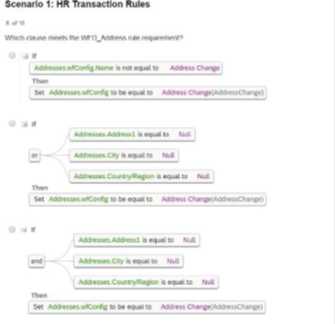
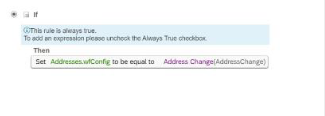
The clause in Option D meets the WFD_Address rule requirement because it checks the following conditions comprehensively:
Address is not equal to Null.
City and CountryRegion are equal to Null.
When these conditions are met, it sets the configuration for Address Change accordingly, ensuring data completeness and accuracy for address-related transactions.
Scenario 1: HR Transaction Rules