
Free SAP C_THR81_2505 Exam Practice Questions & Explanations
Prepared & Reviewed by the ValidExamDumps Editorial Team
At ValidExamDumps, we consistently monitor updates to the SAP C_THR81_2505 exam questions by SAP. Whenever our team identifies changes in the exam questions, objectives, focus areas or requirements, We immediately update our exam questions for both PDF and online practice exams. This commitment ensures our customers always have access to the most current and accurate questions. By preparing with these up to date and 100% exam domain coverage questions, our customers can successfully pass the SAP Certified Associate - SAP SuccessFactors Employee Central Core exam on their first attempt without needing additional materials or study guides.
Other certification materials providers often include outdated or removed questions by SAP in their C_THR81_2505 exam. These outdated questions lead to customers failing their SAP Certified Associate - SAP SuccessFactors Employee Central Core exam. In contrast, we ensure our questions bank includes only precise and up-to-date questions. Our main priority is your success in the SAP C_THR81_2505 exam, not profiting from selling obsolete exam questions in PDF or Online Practice Test.
Your customer would like to autogenerate the Position Code to avoid manual entry. Which of the following are prerequisites to achieve this requirement?
Note: There are 3 correct answers to this question.
To autogenerate the Position Code in Position Management, the following prerequisites must be fulfilled:
B . Set a Business Rule using the Trigger Rules to Generate Assignment ID External with the event type onSave and assign it in Position > Save Rules:
This rule ensures that the Position Code is automatically generated when a position is saved, based on the predefined logic in the business rule.
C . Set Position External Code Generation by On Save rule to Yes in Position Management Settings > General tab:
Enabling this setting ensures that the system allows automatic code generation based on the onSave rules defined in the Position Management module.
E . Set the Position Code field as read-only in the Position Object Definition:
Making the Position Code field read-only prevents manual entry, ensuring that the code is exclusively autogenerated by the system.
These settings align with best practices in automating Position Code generation and reducing manual input errors.
How does the system validate the destination object for composite associations?
In SAP SuccessFactors Employee Central, when configuring composite associations, the system validates that the destination object has its effective dating set to 'From Parent.' This setting ensures that the effective dates of the associated records are synchronized with the parent object, maintaining data consistency across related entities.
This validation is crucial because it ensures that any changes in the parent object's effective dates are appropriately reflected in the associated child objects, thereby preserving the integrity of historical data and future-dated records.
How are business rules handled in Employee Central Quick Actions?
In a generic object with a picklist field, what must be entered in the Valid Values Source?
When configuring a picklist field in a generic object within SAP SuccessFactors Employee Central, the Valid Values Source must be set to the Picklist Code. This configuration links the field to the appropriate set of predefined values, ensuring data consistency and integrity.
Options A, C, and D are not applicable in this context:
A . Picklist Value ID
This refers to individual entries within a picklist and is not used to define the source of valid values for a field.
C . Legacy Picklist ID
Legacy Picklist IDs pertain to older configurations and are not relevant for defining valid value sources in the current framework.
D . Picklist Value External Code
This represents specific external codes for picklist entries and is not used to set the valid values source for a field.
Which HRIS elements share the same People Profile block? Note: There are 2 correct answers to this question.
In SAP SuccessFactors Employee Central, the People Profile is designed to consolidate related HRIS elements into cohesive blocks for streamlined data management. Specifically, the compInfo (Compensation Information) and payComponentRecurring (Recurring Pay Components) HRIS elements share the same People Profile block. Similarly, the personalinfo (Personal Information) and globalinfo (Global Information) HRIS elements are grouped together within the People Profile. This structured grouping enhances the user experience by providing a unified view of related employee information.
Due to confidentiality reasons, when the HR Business Partner (maintained in Job Relationship) is creating a change in salary for an employee, this action will need to be approved by the manager of the HR Business Partner creating the request.
How do you define this in the workflow when filling in the Approver Type, Approver Role, Context, and Relationship to Approver? Refer to the screenshot to answer the question
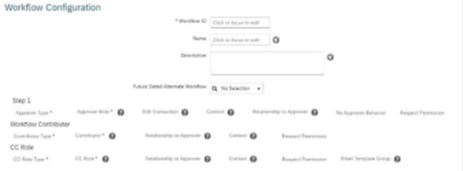
To ensure that the salary change initiated by the HR Business Partner is approved by their manager, you need to configure the workflow with the following details:
Approver Type: Manager
Approver Role: Manager
Context: Initiator (this ensures the approval request is routed to the manager of the person initiating the workflow).
Relationship to Approver: From the initiator's position, the system derives the relationship to their manager.
Selecting Role: Manager - Source: Initiator in Step 1 aligns with these requirements.
Scenario 2: Approvals for Self-Service
Fields in the termination screen are configured in which hris-element?
Fields displayed on the termination screen are configured in the Employment Information HRIS element. This element contains employment-specific details, such as hire dates, termination dates, and reasons for termination.
Other HRIS elements like Personal Information, Compensation Information, and Job Information do not manage termination-specific configurations
Which of the following can you use to explore released APIs?
The SAP Business Accelerator Hub is the primary platform for exploring released APIs.
It provides a central repository where developers can browse, test, and integrate various APIs across SAP solutions.
The hub is designed for simplifying API access and ensuring integration consistency in SAP environments.
Other options like SAP Application Interface Framework and SAP Integration Suite focus on integration but do not primarily serve as a platform for exploring APIs.