Key details for this exam, checked against the published exam outline
Each question shows the correct answer and an explanation of why it is right
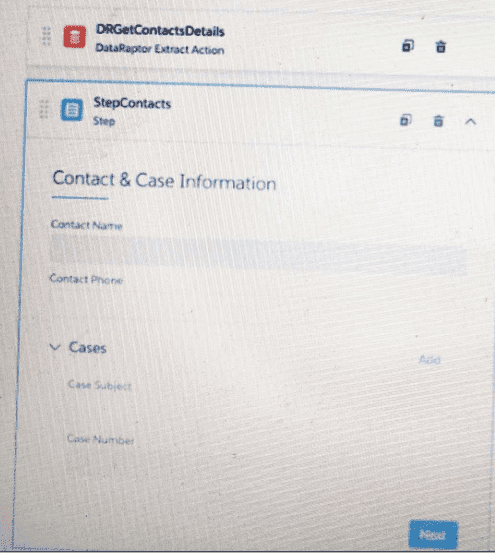
Refer to the exhibit below. What JSON from the DRGetContactDeteils action would display all six values correctly shown? BlkCases is a Repeat Block, and the names of the elements are the same as the label names without spaces.
A)
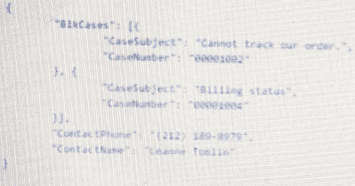
B)
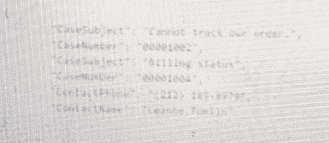
C)
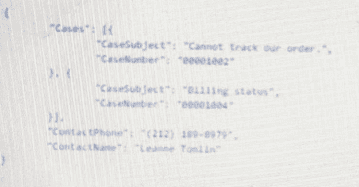
D)
According to theOmniScript Data JSONpage, the OmniScript structure JSON defines the data elements and their properties that are used in an OmniScript. The exhibit shows an OmniScript structure JSON with six elements: ContactName, ContactPhone, ContactEmail, CaseNumber, CaseSubject, and CaseStatus. The DRGetContactDetails action is a DataRaptor Extract action that retrieves data from the Contact and Case objects in Salesforce. The BlkCases element is a Repeat Block that displays a list of cases related to the contact. Therefore, the JSON from the DRGetContactDetails action that would display all six values correctly shown is option A, which has the following structure:
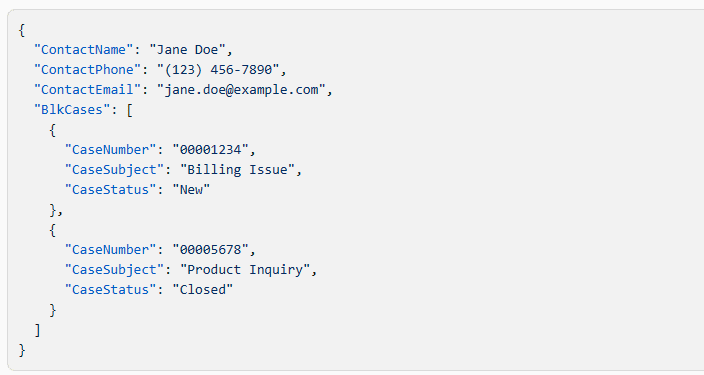
The other options have different structures that do not match the OmniScript structure shown.
An OmniStudio Developer needs an Integration Procedure that gets data from Salesforce, uses an Apex class to process the data, and then sends data to the entity that called the Integration Procedure. Which three elements provide this functionality?
The Integration Procedure needs three separate responsibilities: retrieve Salesforce data, process it with Apex, and return the final response. A Data Mapper Extract Action reads Salesforce data and returns selected records and fields to the Integration Procedure data JSON. A Remote Action calls an Apex class method or invocable action, which satisfies the requirement to process data through Apex. A Response Action then returns the final data to the caller. Data Mapper Post Action is wrong because it writes data to Salesforce rather than retrieving it. HTTP Action is wrong because it calls an external REST endpoint, not an Apex class. The correct Integration Procedure design is therefore Data Mapper Extract Action, Remote Action, and Response Action.
When designing an OmniScript for a business process, what is best practice regarding the placement of data actions, for example Data Mapper Extracts, that retrieve data necessary for a step?
The data action should be placed where the step can retrieve the required data before the user needs to see or use it. Placing the Data Mapper Extract Action on the same relevant step keeps the data retrieval close to the UI elements that depend on it and avoids loading unrelated data globally in the Header. Placing the action after the data usage is obviously too late because the fields or options would already be rendered without the needed values. A Set Values element cannot execute a Data Mapper Extract; it only sets or changes values in the OmniScript data JSON. Salesforce's OmniScript action-element documentation explains that action elements are used to get, modify, and write data during the OmniScript process.
The phone number of a Contact is changed in an OmniScript. What should an OmniStudio Developer configure to update the Contact record in Salesforce?
Updating Salesforce data from an OmniScript requires a write operation, so the correct tool is a Data Mapper Load. A Data Mapper Extract reads data from Salesforce; it cannot update the Contact record. A Data Mapper Transform only reshapes data between formats and does not perform the Salesforce database update. The Data Mapper Load should include the Contact identifier and the new Phone value so Salesforce can update the correct record. When upsert behavior is needed, the appropriate field mapping must identify the key used to determine whether the record already exists. The question asks specifically about changing a Contact phone number from an OmniScript, so the correct configuration is a Data Mapper Load with the RecordId/key and updated phone value.
An OmniStudio Developer needs to build a Data Mapper Transform to send product pricing to a Calculation Procedure.
Given the JSON output below, which mapping in the Transform is correct for the Output JSON Path for the Base Price?
{
"input": {
"ProductName": "Text",
"ProductImage": "Text",
"NumberofEmployees": "Text",
"BasePrice": "Text",
"Zip": "Text"
}
}
The correct Output JSON Path is input:BasePrice. The required JSON places BasePrice inside the lowercase input node, so the path must preserve both the correct parent node and the exact field name casing. Option A is wrong because it uses dot notation and incorrectly lowercases BasePrice as baseprice. Option B is wrong because it uses Input with an uppercase I, while the JSON node is input. In JSON-based mappings, path and field names must match the expected output structure. Salesforce's Data Mapper Transform documentation states that the Output JSON Path defines the desired output path and that path levels are separated using colon syntax, for example Contact:LastName. Therefore, C is the only mapping that correctly targets the BasePrice node under input.
What is best practice for ensuring that the OmniScript data collected from the user is properly secured before being stored or used in subsequent actions?
The correct answer is D, but with one serious qualification: the Data Mapper must be configured with the proper security controls. Data Mapper Load is the OmniStudio component used to write JSON, XML, or custom input data to Salesforce objects. For secure storage, the save operation should rely on Salesforce object access, field-level security, sharing, and OmniStudio security settings rather than storing sensitive values in temporary session variables or assuming the UI framework handles everything automatically. Validation rules help data quality, not full access control. Session Variables are not the correct place to persist sensitive business data. Therefore, Data Mapper Load is the correct saving mechanism, supported by Salesforce security configuration.
Exam domains verified against: Official Salesforce Plat-Dev-210 exam guide, last checked October 2026.
Describe the Omnistudio solution as it applies to common customer use case scenarios in different industries (telco, energy, healthcare, public sector, etc.).; Determine a project’s needs by evaluating a customer's requirements, assumptions, risks, and constraints.; Explain Managed Package Runtime vs. Standard Runtime, Automatic Upgrades, and Manual Intervention Upgrade.; Explain Omnistudio license requirements, Permission Set licenses and Permission Sets.; Describe the tools required to complete the end-to-end implementation process (SFCLI, VBT, Migration, etc.).; Explain testing, versioning, cloning where applicable through Omnistudio components.
Determine card styles, data sources, fields and actions based on requirements. Build the JSON data structure supporting the Flexcards framework and match functional requirements to framework capabilities.
Sample question from this domain above: Q1
Compare and contrast Omniscript elements and configuration to meet use case requirements. Understand the JSON data structure supporting Omniscript and select appropriate elements and properties.
Sample question from this domain above: Q3
Compare and contrast Integration Procedure elements and configuration to meet use case requirements. Select appropriate Integration Procedure elements and common properties based on functional specifications.
Sample question from this domain above: Q2
Define and configure Data Mappers to extract, transform, load and map data between source (JSON, XML, Custom Apex class, etc.) and target (JSON, XML, Custom Apex class, sObject, PDF, Docusign, etc.).; Configure and retrieve data from multiple objects with various filter options using Extract Interface.; Configure and retrieve data from a single object and related fields using Turbo Extract Interface.; Configure and import data to multiple objects using load interface.; Configure the Transform interface type to prepare data for downstream use (JSON, etc.) or document generation (PDF, Docusign).; Configure formulas to create or modify values within Data Mappers (concatenate, arithmetic, date formatting, etc.) across interface types (Transform, Extract and Load interface) for downstream use.; Map source and target data structures to achieve expected output structure.; Describe best practices for Data Mappers.
Resolve Flexcards display and state issues.; Resolve Omniscripts errors or UI not rendering correctly.; Resolve Data Mapper output and Data Mapping issues.; Resolve integration procedures execution errors.; Resolve caching problems.; Resolve incorrect permissions and access issues.; Resolve missing or broken JSON.; Resolve publishing and deployment issues.; Use the Debug Console to identify failures and implement resolutions.
Common questions about the exam itself

