Key details for this exam, checked against the published exam outline
Each question shows the correct answer and an explanation of why it is right
Universal Containers (UC) is a leading provider of management training globally. UC embarked on a Salesforce transformation journey to allow students to register for courses in the Salesforce Community. UC has a learning system that masters all courses and student registration. UC requested a near real-time feed of student registration from Salesforce to the learning system. The integration architect recommends using Salesforce Platform Events. Which API should be used for the Salesforce pl1atform event solution?
Salesforc30e Platform Events are built on top of a highly scalable, event-driven messaging architecture designed to enable real-time communication between apps. To consume these events from outside Salesforce---such as from a legacy learning system---clients must use the Streaming API.
The Streaming API is the technical foundation for receiving event notifications in a Publish/Subscribe model. It utilizes the CometD protocol or the newer gRPC-based Pub/Sub API to maintain a persistent connection between the external client and Salesforce. When a student registers for a course in the Salesforce Community, a Platform Event is 'published' to the event bus. The learning system, acting as a 'subscriber,' remains connected via the Streaming API and receives the event message instantly without needing to poll Salesforce for updates.
This architecture is ideal for 'near real-time' requirements because it eliminates the overhead of traditional point-to-point integrations. While the REST and SOAP APIs (Options A and B) can be used to publish events into Salesforce, they are not designed to receive unsolicited notifications from the platform. By using the Streaming API, the integration architect ensures the solution is both responsive and efficient, as Salesforce only pushes data when a relevant event occurs. Furthermore, because Platform Events provide a retention window, the Streaming API allows the learning system to use a Replay ID to catch up on any registration events missed during a brief network outage.
A media company recently implemented an IAM system supporting SAML and OpenId. The IAM system must integrate with Salesforce to give new self-service customers instant access to Salesforce Community Cloud. Which requirement should Salesforce Community Cloud support for self-registration and SSO?
To provide 'instant access' for new customers via an external IAM system using SAML, Salesforce provides a declarative feature called Just-in-Time (JIT) provisioning.
When a customer attempts to log in to the Community (Experience Cloud) through the IAM system, the IAM system (acting as the Identity Provider) sends a SAML assertion to Salesforce. If JIT provisioning is enabled, Salesforce parses the user information contained in that assertion---such as name, email, and federation ID. If a corresponding User record does not exist, Salesforce automatically creates one on-the-fly and then logs the user in. This eliminates the need for a manual registration step or pre-provisioning accounts.
Option A is slightly incorrect because Registration Handlers are specifically associated with Authentication Providers (which use OpenID Connect/OAuth), not SAML SSO. Option C is incorrect because JIT provisioning is a feature of SAML, while Authentication Providers use the Registration Handler class to achieve the same result. For a 'self-service' scenario where speed to market and standard protocols are key, SAML SSO with JIT provisioning is the architect's primary choice for automating user management and providing a seamless single-entry point for subscribers.
A company captures orders and needs to send them to the Order fulfillment system. The user is not required to have confirmation from the fulfillment system. Which system constraint question should be considered when designing this integration?
When a business process does not require immediate confirmation from a target system, the architecture can move from a synchronous Request-Reply pattern to an asynchronous Fire-and-Forget pattern. In this transition, the most critical 'non-functional' requirement for the Integration Architect is to define acceptable latency.
Latency determines the technical stack. If the fulfillment system must receive the order within seconds (Near Real-Time), the architect might choose Salesforce Outbound Messaging or a Flow-triggered Platform Event. If the order only needs to arrive within 4-12 hours, a Batch ETL process is more efficient as it conserves API limits and can handle much higher volumes more reliably.
While address validation (Option B) is a functional requirement, it does not define the architectural framework. Option C is a specific solution implementation question rather than a fundamental design constraint. By asking about latency, the architect identifies the time boundary between 'Data Entry' in Salesforce and 'Processing' in the fulfillment system. This answer directly informs the choice of pattern, the retry logic required, and the error-handling strategy needed to ensure the 'Order-to-Cash' cycle is completed successfully without blocking the sales rep's productivity.
An enterprise customer is implementing Salesforce for Case Management. Based on the landscape (Email, Order Management, Data Warehouse, Case Management), what should the integration architect evaluate?
The evaluation of an integration landscape is a process of rationalization. The goal is to identify which legacy systems Salesforce will replace (System Retirement) and which systems it must coexist with (Integration).
In this scenario, Salesforce is being implemented for Case Management. Salesforce Service Cloud is the industry leader for this specific function. Therefore, the legacy Case Management System should be retired. Any architecture that suggests 'integrating' Salesforce with the legacy Case Management system (Options A and B) is creating a redundant and complex 'dual-master' scenario that increases technical debt.
To provide a successful support experience, Salesforce needs to be the central 'Engagement Layer,' which requires integration with the remaining ecosystem:
Email Management System: To support 'Email-to-Case' and ensure all customer communications are captured within the Salesforce Case record.
Order Management System (OMS): Support agents often need to verify purchase history or shipping status to resolve a case. A 'Data Virtualization' or 'Request-Reply' integration with the OMS is vital.
Data Warehouse: For long-term historical reporting and cross-functional analytics, Salesforce must push case data to the enterprise Data Warehouse.
By evaluating the integration with the Data Warehouse, Order Management, and Email Management systems, the architect ensures that Salesforce is enriched with the context it needs to resolve cases while simultaneously retiring the redundant legacy support system.
Northern Trail Outfitters submits orders to a manufacturing system web service that has experienced multi-day outages. Which solution should an integration architect recommend to handle errors during these types of outages?
When a target system experiences prolonged outages (lasting 'several days'), point-to-point integration solutions built within Salesforce are likely to fail or reach their retry limits. For example, Salesforce Outbound Messaging (Option B) only retries for up to 24 hours before dropping the message.
The architecturally robust solution is to introduce a Middleware layer (ESB or iPaaS) that provides queuing and buffering. In this model, Salesforce sends the order to the middleware. The middleware immediately acknowledges receipt (preserving Salesforce performance). If the manufacturing system is offline, the middleware stores the message in a persistent queue.
Middleware is designed for this high level of Quality of Service (QoS). It can be configured with custom retry logic---such as waiting 30 minutes between attempts---and can hold millions of messages for days or even weeks. This effectively 'insulates' Salesforce from the manufacturing system's instability. Option C is overly complex and requires custom development in both the event bus and Apex, whereas middleware provides this functionality as a native capability. By using middleware, the architect ensures that no orders are lost during extended manufacturing downtime and that the integration is decoupled and resilient.
A company's cloud-based single page application consolidates data local to the application with data from on-premise and Third-party systems. The diagram below typifies the application's combined use of synchronous and asynchronous calls. The company wants to use the average response time of its application's user interface as a basis for certain alerts. For this purpose, the following occurs:
Log every call start and finish date and time to a central analytics data store.
Compute response time uniformly as the difference between the start and finish date and time (A to H in the diagram).
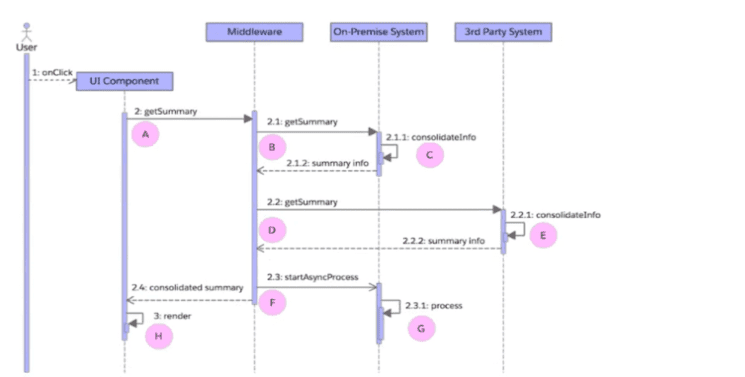
Which computation represents the end-to-end response time from the user's perspective?
Exam domains verified against: Official Salesforce Plat-Arch-204 exam guide, last checked September 2026.
Map existing systems to identify standards, protocols, and boundaries that will affect your integration design. Look for authentication mechanisms, data formats, and API availability across the current infrastructure.
Extract functional and non-functional requirements from use cases, then classify data by sensitivity level. Consider CRM adoption factors, scalability needs, and regulatory constraints that shape the integration approach.
Build system inventories and document integration patterns. Define performance targets and security rules, matching business processes to concrete technical constraints and response time requirements.
Select integration patterns that fit the business problem. Choose appropriate Salesforce APIs and define components, then articulate the trade-offs and limitations of your proposed design.
Sample question from this domain above: Q1
Implement APIs as both provider and consumer. Design outbound calls, error handling, security mechanisms, and resilience strategies for production stability and system updates.
Sample question from this domain above: Q5
Set up performance monitoring, error escalation procedures, and recovery workflows. Define reporting requirements and rollback plans to keep integrations running smoothly after deployment.
Common questions about the exam itself

