Salesforce Analytics-DA-201 Practice Exam Questions & Answers
6 Free Questions
· Last reviewed: September 29, 2026
· Prepared & Reviewed by the ValidExamDumps Editorial Team
Exam Facts
Salesforce Analytics-DA-201 Exam Details
Key details for this exam, checked against the published exam outline
174
Practice Questions (Our Bank)
105 minutes
Exam Duration
USD 250
Official Exam Fee
- Exam Code
- Analytics-DA-201
- Full Name
- Salesforce Certified Tableau Data Analyst
- Issuing Body
- Salesforce
- Question Format (Our Bank)
- Multiple Choice, Hotspot, Order List, Drag & Drop
- Validity
- 3 years
Practice Questions
Free Analytics-DA-201 Practice Questions
Each question shows the correct answer and an explanation of why it is right
VA
ValidExamDumps Editorial Team
Every question and its answer is checked by our Analytics-DA-201 exam
preparation team, who also write the explanation shown with each one.
How we research and review these pages
You want to create the following table in a view.
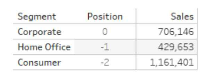
Which function should you use to create the Position column?
Correct Answer:
B
Explanation
To create the Position column, you should use the FIRST () function. The FIRST () function returns the number of rows from the current row to the first row in the partition. For example, the first row in a partition will return 0, the second row will return -1, and so on. In this question, the partition is defined by the Segment field, and the table is sorted by the Sales field in descending order. Therefore, the Position column shows the offset of each row from the first row in each segment, based on the sales ranking.Reference:
Tableau Certified Data Analyst Exam Prep Guide, page 11, section ''Creating Calculated Fields''
Tableau Help: FIRST Function
A Data Analyst has a website that displays data in a table format.
The analyst wants to connect to the data of the website by using the least amount of effort.
What should the analyst use to connect to the data?
Correct Answer:
B
Explanation
A Tableau Prep flow can output to a .hyper file, which is Tableau's optimized extract format. The colleague exports the flow results to .hyper, and the analyst then connects to this file through Tableau Desktop's file connection options. This allows the analyst to start dashboard work before the flow is formally published to the server.
You have the following tiled dashboard that has one sheet.
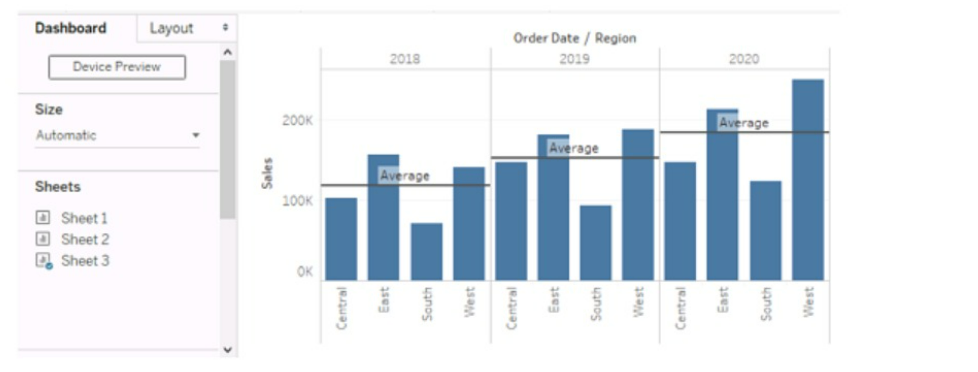
You want to replace the sheet with Sheet2.
What should you do?
Correct Answer:
D
Explanation
In Tableau, to replace a sheet on a dashboard, you can simply drag the desired sheet (Sheet2 in this case) from the sheets list onto the dashboard where the current sheet (Sheet3) is. This will replace the existing visualization with the new one.
A Data Analyst has created a Tableau Prep flow that is ready to be used. The output will be used by a colleague to build a dashboard on Tableau Cloud or Tableau Server.
Where should the analyst output the data to?
Correct Answer:
D
Explanation
To add quarterly totals to a table, you need to enable the Add All Subtotals option. This creates subtotal rows at the appropriate grouping levels, in this case by quarter. Without this option enabled, you would only see individual data points without the summary rows.
You have the following chart that sorts states by the number of products each state has purchased.
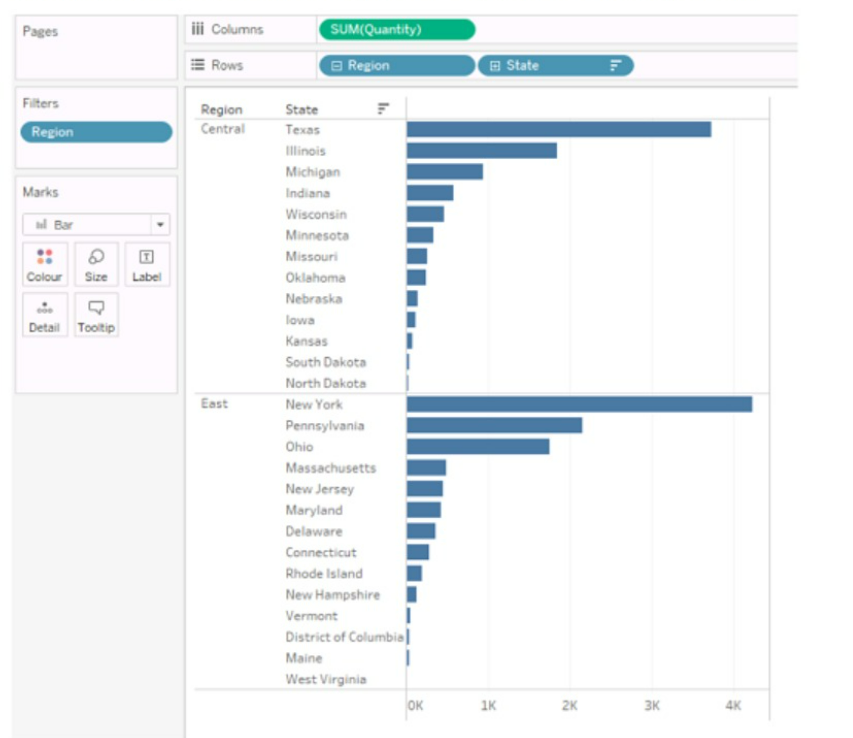
Which formula should you use to include a number with the position of each state within each region?
Correct Answer:
D
Explanation
The LOOKUP function is used to return the value of a specified field in a different row, which can be defined relative to the current row. In this context, it can be used to include a number with the position of each state within each region by looking up the SUM([Quantity]) in each respective position.Reference:The information is inferred from general Tableau knowledge as well as the following sources:
Tableau Functions (Alphabetical)
LOOKUP
Tableau Certified Data Analyst Exam Guide
SIMULATION
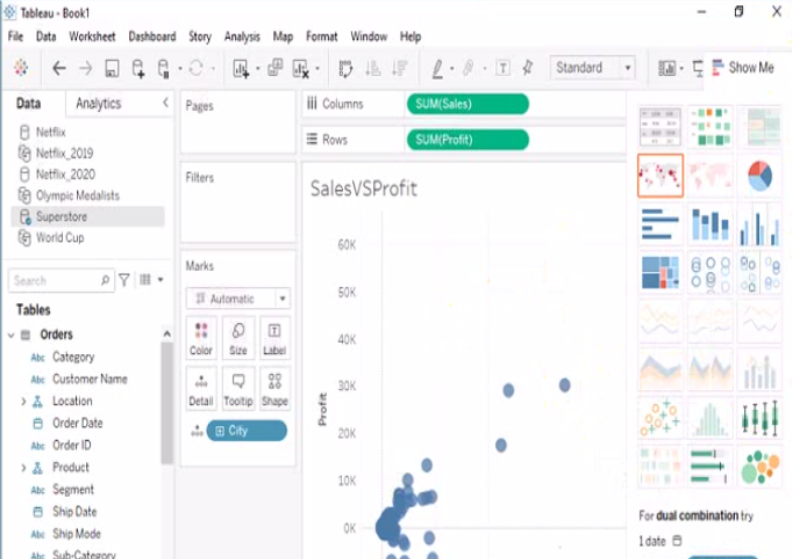
Open the link to Book1 found on the desktop. Open SalesVSProfit worksheet.
Add a distribution band on Profit to show the standard deviation from- 1 to 1.
Correct Answer:
A
Explanation
To add a distribution band on Profit to show the standard deviation from -1 to 1, you need to do the following steps:
Open the link to Book1 found on the desktop. This will open the Tableau workbook that contains the SalesVSProfit worksheet.
Click on the SalesVSProfit tab at the bottom of the workbook to open the worksheet. You will see a scatter plot that shows the relationship between Sales and Profit for each Sub-Category.
Click on the Analytics tab on the left side of the workbook to open the Analytics pane. You will see a list of analytical objects that you can drag and drop onto your worksheet.
Drag Distribution Band from the Analytics pane to Profit on the Rows shelf. This will add a distribution band on Profit that shows the average and confidence interval for each Sub-Category.
Click on the Edit button on the distribution band to open the Edit Distribution Band dialog box. You will see options to customize your distribution band.
Change the Band From value to -1 and the Band To value to 1. This will change the distribution band to show the standard deviation from -1 to 1, which means one standard deviation below and above the average.
Click OK to apply the changes. You will see that the distribution band now shows a narrower range of values for Profit.
Full Access
Get the complete Analytics-DA-201 question set
- 174 questions covering all exam domains
- Correct answers with explanations, like the free questions above
- PDF and online practice test
- 90 days of free updates
Domain 1: Connect To and Transform Data
24%
Master connecting to various data sources including files, databases, and Tableau Server or Cloud. Learn to assess data quality, perform cleaning operations, and prepare data using Tableau Prep with unions, joins, and aggregations.
Sample questions from this domain above:
Q2Q6
Domain 2: Explore and Analyze Data
41%
Build calculated fields using date, string, logical, numeric, and aggregate functions. Create table calculations for moving averages, running totals, rankings, and percentiles. Apply filters, parameters, and Level of Detail expressions to enable deeper analysis.
Sample questions from this domain above:
Q1Q4
Domain 3: Create Content
26%
Design and build charts, dashboards, and stories from scratch. Add interactivity through filters, actions, and parameters. Format visualizations with colors, shapes, annotations, tooltips, and responsive layouts for different devices.
Sample question from this domain above:
Q5
Domain 4: Publish and Manage Content on Tableau Server and Tableau Cloud
9%
Publish workbooks and data sources to Tableau Server or Cloud. Schedule extract refreshes and manage published content through alerts, subscriptions, and custom views. Understand user roles and permissions for content distribution.
Sample question from this domain above:
Q3
FAQ
Analytics-DA-201 Exam FAQ
Common questions about the exam itself
What background do I need before taking the Analytics-DA-201 exam?
You should have practical experience with Tableau Desktop, understanding how to connect to data sources, create visualizations, and build basic dashboards. Hands-on work with calculated fields, filters, and dashboard design is essential. The exam tests applied skills, not just theory, so work with real data before attempting it.
How long should I study to prepare for Analytics-DA-201?
Most candidates prepare for 4 to 8 weeks, depending on their existing Tableau experience. If you already work with Tableau regularly, 4 weeks of focused study on the exam outline topics may be enough. Without hands-on experience, allow 8 to 12 weeks to build the practical skills the exam requires.
What is the hardest section of the Analytics-DA-201 exam?
The Explore and Analyze Data domain accounts for 41 percent of the exam weight and covers the most complex topics: Level of Detail expressions, table calculations, and advanced calculated fields using multiple function types. Start preparing this section early and practice writing real formulas in Tableau, not just memorizing syntax.
How many questions are on Analytics-DA-201 and how long does it take?
The exam has 60 questions and you have 105 minutes to complete it. This gives roughly 1.75 minutes per question, so you need to work efficiently. Practice with timed mock exams to build the speed and accuracy the real exam demands.
What score do I need to pass Analytics-DA-201?
Salesforce does not publicly disclose the exact passing score for this exam. Most Salesforce Tableau exams use a scaled scoring method rather than a simple percentage, so focus on understanding concepts deeply rather than aiming for a specific number.
Can I retake the Analytics-DA-201 exam if I fail?
Yes, you can retake the exam after a 1-day waiting period if it is your first retake. Subsequent retakes require a 14-day waiting period. You can attempt the same exam up to 6 times per year. Each retake costs the full exam fee.
How long is the Salesforce Certified Tableau Data Analyst certification valid?
Your certification is valid for 3 years from the date you pass the exam. After 3 years, you must retake the exam or complete continuing education to maintain the credential. Salesforce periodically updates the exam content, so check closer to your renewal date for any changes.
What job roles does Analytics-DA-201 prepare me for?
This certification prepares you for data analyst positions focused on analytics and visualization. Professionals use it to move into roles like Business Intelligence Analyst, Analytics Developer, or Tableau Specialist. It validates the mid-level skills employers expect for analytics roles working with Tableau.
How does Analytics-DA-201 relate to other Tableau certifications?
Analytics-DA-201 is the intermediate Tableau credential. The Tableau Desktop Foundations exam is entry-level and covers basic skills. The Tableau Consultant and Server Admin certifications are advanced options for different career paths. Most data analysts target the Data Analyst cert after gaining desktop experience.
Is Analytics-DA-201 administered online or at a test center?
Salesforce Tableau exams are delivered online and proctored remotely, so you can take the exam from home or an office with a reliable internet connection. You need a quiet space, a working webcam, and a clear desk for the duration of the exam.

