Key details for this exam, checked against the published exam outline
Each question shows the correct answer and an explanation of why it is right
What happens when enabling spectrum analysis mode on a RUCKUS AP?
When spectrum analysis mode is enabled on a RUCKUS Access Point, the AP's radios are temporarily dedicated to spectrum scanning and interference analysis, meaning they cannot serve wireless clients during that period. Therefore, new clients will not be able to join, and existing clients are typically disconnected.
According to the RUCKUS One Online Help -- Spectrum Analysis Tool and RUCKUS AI Documentation -- RF Monitoring and Optimization, spectrum analysis mode captures and reports RF energy utilization, identifying interference sources such as non-Wi-Fi devices, microwave ovens, or Bluetooth. The AP alternates its radio into ''sniffer'' mode to analyze RF characteristics, during which client association and data traffic handling are suspended.
The output is visualized through graphs and real-time utilization charts, not histograms. Furthermore, an AP can only scan one band (either 2.4 GHz or 5 GHz) at a time --- not both simultaneously.
Thus, the correct answer is A, since enabling spectrum analysis prevents new client associations while the AP is in scanning mode.
RUCKUS One Online Help -- Spectrum Analysis Overview
RUCKUS Analytics 3.5 User Guide -- RF Health and Interference Detection
RUCKUS AI Documentation -- Spectrum Monitoring and RF Analysis Tools
Which factor primarily determines the maximum theoretical throughput of a Wi-Fi link?
The maximum theoretical throughput of a Wi-Fi link is primarily defined by the channel width (e.g., 20, 40, 80, or 160 MHz) and the Modulation and Coding Scheme (MCS) rate selected by the device.
As stated in the RUCKUS One Online Help -- PHY and Data Rate Concepts, throughput increases with wider channels and higher modulation (e.g., 1024-QAM in Wi-Fi 6). However, achieving these rates depends on sufficient SNR, which influences the MCS level that can be sustained.
RUCKUS Analytics collects PHY rate metrics to validate link efficiency and helps determine whether MCS downgrades are caused by environmental noise or interference.
Transmit power and beacon timing affect stability, not raw throughput.
RUCKUS One Online Help -- PHY Layer Data Rates and MCS Overview
RUCKUS Analytics 3.5 User Guide -- PHY Rate Distribution and Efficiency
RUCKUS AI Documentation -- Channel Width and Modulation Impacts on Throughput
Which RUCKUS technology helps optimize channel use by measuring actual throughput performance rather than noise levels alone?
ChannelFly is RUCKUS's machine learning--based dynamic channel selection technology. It evaluates real-time throughput on each channel rather than relying only on noise or interference metrics to determine the best operating channel.
As outlined in RUCKUS One Online Help -- ChannelFly Operation and RUCKUS AI Documentation -- Channel Optimization, ChannelFly continuously monitors channel conditions and switches to those offering higher capacity.
This ensures maximum real-world performance, especially in dense environments with unpredictable interference.
BeamFlex+ adjusts antenna patterns, SmartCast prioritizes traffic, and PD-MRC enhances signal reception but do not handle channel learning or selection.
RUCKUS One Online Help -- ChannelFly Dynamic Channel Selection
RUCKUS Analytics 3.5 User Guide -- Channel Efficiency and Throughput Analysis
RUCKUS AI Documentation -- Adaptive Channel Learning Algorithms
Which SmartZone feature allows an administrator to schedule periodic configuration backups automatically?
The Backup Management feature in SmartZone enables administrators to schedule automatic configuration backups at regular intervals. These backups can include cluster, zone, and AP configuration data.
As detailed in RUCKUS One Online Help -- Backup and Restore Procedures, this feature supports manual and scheduled backups with options for secure off-box storage.
The RUCKUS Analytics 3.5 User Guide -- Backup Compliance Monitoring notes that this ensures disaster recovery readiness and simplifies configuration rollback.
System Snapshot and Cluster Maintenance features track versioning and updates but are not used for configuration backup automation.
RUCKUS One Online Help -- Backup Management and Scheduling Options
RUCKUS Analytics 3.5 User Guide -- Configuration and Backup Audit Reports
RUCKUS AI Documentation -- Backup Automation and Data Retention
Review the exhibit.
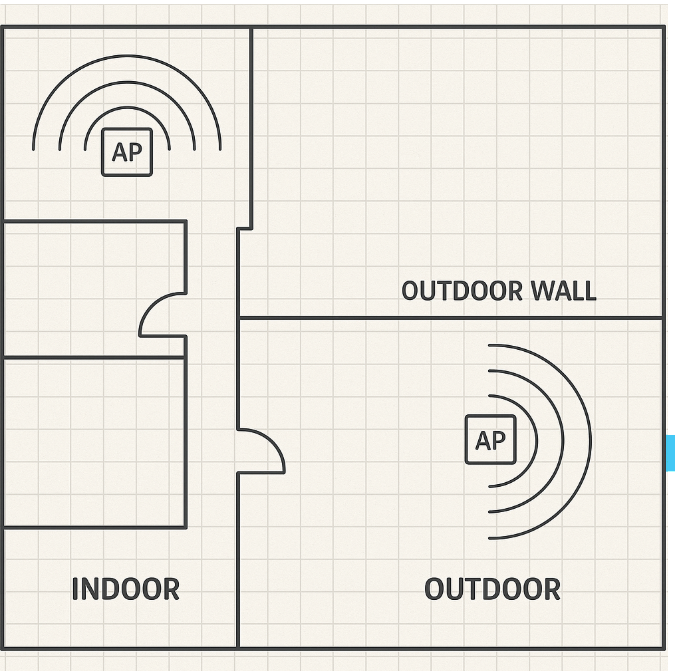
Based on the AP mounting locations, which AP antenna types provide complete coverage to both the indoor and outdoor areas?
In this layout, the indoor APs are centrally mounted to provide even signal distribution in all directions, while outdoor APs are wall-mounted facing the exterior coverage zone.
According to RUCKUS One Online Help -- Antenna Selection and Deployment and RUCKUS AI Documentation -- RF Design Guidelines, the best configuration for complete coverage is:
Indoor space: Use Omni-Directional antennas, which radiate uniformly in 360 for even indoor coverage and minimal dead zones.
Outdoor space: Use Patch antennas, which are semi-directional with a 60--90 beamwidth ideal for covering patios, courtyards, or building perimeters without wasting signal behind the AP.
Yagi antennas are highly directional and suited for long-distance point-to-point links, not area coverage. Semi-directional indoor antennas are unnecessary unless indoor partitioning or wall density requires focused energy.
This combination---Omni indoors and Patch outdoors---provides optimal performance for mixed indoor-outdoor designs and aligns with RUCKUS high-density deployment best practices.
RUCKUS One Online Help -- Antenna Orientation and Coverage Recommendations
RUCKUS Analytics 3.5 User Guide -- RF Propagation and Signal Distribution Analysis
RUCKUS AI Documentation -- Mixed Environment RF and Antenna Design
When designing for a high-density large public venue (LPV) deployment such as a stadium, which three considerations need to be taken into account? (Choose three.)
Designing Wi-Fi for Large Public Venues (LPV) such as stadiums, arenas, or convention centers requires a highly strategic RF approach to handle extreme client density and dynamic environmental factors.
According to RUCKUS One Online Help -- High-Density Design Best Practices and RUCKUS AI Documentation -- LPV Deployment Planning, three critical considerations are:
Expected number of devices (B): Determines AP count, bandwidth capacity, and airtime utilization. LPV environments often exceed one device per seat, requiring precise capacity planning.
Effect of human bodies on RF propagation (D): Human absorption of 2.4 GHz and partial reflection of 5 GHz signals dramatically affects coverage. RUCKUS recommends directional antennas and elevated AP placement to overcome this.
Other factors like WAN speed and charging stations are operational but not primary design variables in LPV RF engineering.
RUCKUS One Online Help -- High-Density Wi-Fi Design and Capacity Planning
RUCKUS Analytics 3.5 User Guide -- Client Density and Capacity Metrics
RUCKUS AI Documentation -- Stadium and LPV RF Deployment Guidelines
Exam domains verified against: Official RUCKUS RCWA exam guide, last checked September 2026.
RF concepts and 802.11 standards including channelization across frequency bands a/b/g/n/ac/ax/BE. Study antenna patterns, Fresnel Zones, mesh versus P2P bridges, OFDM and OFDMA differences, and how client roaming works across access points.
Sample question from this domain above: Q2
Understand RUCKUS proprietary technologies including BeamFlex, auto-cell sizing, and Zero Touch deployment through SWIPE. Know the controller and AP options, including SmartZone variants, Unleashed, and ROne, plus data planes and clustering approaches. Positioning of services like CloudPath and RUCKUS Analytics.
Sample question from this domain above: Q3
Conduct site surveys using predictive tools and on-site methods like Ekahau. Gather design requirements including network segmentation, tunneling strategies, VLAN planning, and PoE budgets. Plan security with RADIUS, PKI, and guest access. Select appropriate products and hypervisor resources for the deployment.
Configure SmartZone and ROne controllers, set up licensing, zones, domains, and AP groups. Deploy and discover APs using DHCP Option 43, DNS, or Layer 2 methods. Implement advanced features including Bonjour Gateway, mesh networking, traffic policies, dynamic VLANs, and role-based access control for security.
Sample question from this domain above: Q4
Optimize performance using load and band balancing, airtime fairness, and decongestion methods. Configure 802.11k/r/v roaming amendments and Client Admission Control. Manage channel selection with DFS and RUCKUS AI. Tune transmission rates, OFDM settings, and power optimization for better client experience.
Sample question from this domain above: Q1
Use packet capture and internal tools to diagnose client connectivity issues and AP-to-controller problems. Access AAA logs, syslog, and SNMP data for analysis. Run speed tests and gather packet traces to isolate performance or association failures.
Manage controller upgrades and firmware processes. Configure administrative roles and authentication through AD, RADIUS, TACACS, MFA, and SSO. Monitor events and alarms via SNMP and syslog. Create reports, set health thresholds, back up and restore configurations, and detect rogue APs.
Common questions about the exam itself

