At ValidExamDumps, we consistently monitor updates to the RedHat EX447 exam questions by RedHat. Whenever our team identifies changes in the exam questions,exam objectives, exam focus areas or in exam requirements, We immediately update our exam questions for both PDF and online practice exams. This commitment ensures our customers always have access to the most current and accurate questions. By preparing with these actual questions, our customers can successfully pass the RedHat Red Hat Certified Specialist in Advanced Automation: Ansible Best Practices Exam exam on their first attempt without needing additional materials or study guides.
Other certification materials providers often include outdated or removed questions by RedHat in their RedHat EX447 exam. These outdated questions lead to customers failing their RedHat Red Hat Certified Specialist in Advanced Automation: Ansible Best Practices Exam exam. In contrast, we ensure our questions bank includes only precise and up-to-date questions, guaranteeing their presence in your actual exam. Our main priority is your success in the RedHat EX447 exam, not profiting from selling obsolete exam questions in PDF or Online Practice Test.
Create a file called specs.empty in home/bob/ansible on the local machine as follows:
HOST=
MEMORY=
BIOS=
VDA_DISK_SIZE=
VDB_DISK_SIZE=
Create the playbook /home/bob/ansible/specs.yml which copies specs.empty to all remote nodes' path /root/specs.txt. Using the specs.yml playbook then edit specs.txt on the remote machines to reflect the appropriate ansible facts.
Create a role called sample-apache and store it in /home/bob/ansible/roles. The role should
satisfy the following requirements:
*In the role, install and enable httpd. Also enable the firewall to allow http. Also run the template
*index.html.j2 and make sure this runs Create a template index.html.j2 that displays "Welcome to the server HOSTNAME"
In a play called apache.yml in /home/bob/ansible/ run the sample-apache role.
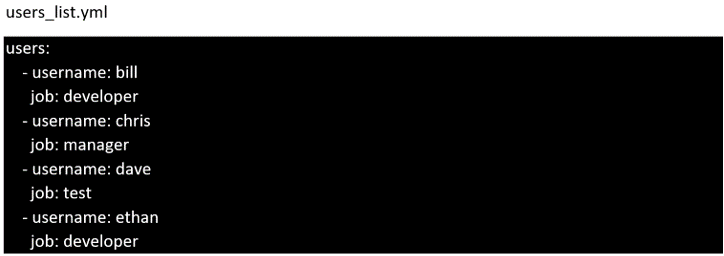
Create the users in the file usersjist.yml file provided. Do this in a playbook called users.yml located at /home/sandy/ansible. The passwords for these users should be set using the lock.yml file from TASK7. When running the playbook, the lock.yml file should be unlocked with secret.txt file from TASK 7.
All users with the job of 'developer' should be created on the dev hosts, add them to the group devops, their password should be set using the pw_dev variable. Likewise create users with the job of 'manager' on the proxy host and add the users to the group 'managers', their password should be set using the pw_mgr variable.
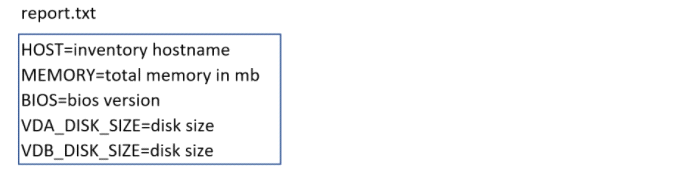
Create a file in /home/sandy/ansible/ called report.yml. Using this playbook, get a file called report.txt (make it look exactly as below). Copy this file over to all remote hosts at /root/report.txt. Then edit the lines in the file to provide the real information of the hosts. If a disk does not exist then write NONE.
Using the Simulation Program, perform the following tasks:
Static Inventories Task:
1. Add a new group to your default ansible host file. call the group [ec2]
2. Add a new host to the new group you created.
3. Add a variable to a new host entry in the /etc/ansible/hosts file. Add the following. localhost http_port=80 maxRequestsPerChild=808
4. Check to see if maxRequestsPerChild is pulled out with an ad-hoc command.
5. Create a local host file and put a target group and then a host into it. Then ping it with an ad-hoc command.

