Key details for this exam, checked against the published exam outline
Each question shows the correct answer and an explanation of why it is right
Select the true statements about the json.-dumps () function. (Select two answers.)
The json.dumps() function is used to convert a Python object into a JSON string1. It takes Python data as its argument, such as a dictionary or a list, and returns a JSON string.
1. It returns a JSON string.
This statement is true because the json.dumps () function takes a Python object as its argument and returns a JSON-formatted string that represents the object. For example, json.dumps ([1, 2, 3]) returns '[1, 2, 3]'.
Select the true statements about the sqirte3 module. (Select two answers.)
1. The sqlite3 module in python provides an interface compliant to the DB-API 2.0. Thus, it follows a standard performance metric that allows for consistency in database programming with python.
2. The special name 'memory' is used to create a database in RAM using the sqlite3 module. Thus, when you use it as the name of the database file while opening a connection, it creates a temporary database that exists only in memory.
What is ElementTree?
ElementTree is a Python built-in module that provides a simple and efficient API for parsing and creating XML data. It allows you to access and manipulate XML data in a very straightforward way, making it easy to write XML processing applications.
This statement is true because ElementTree is a module in the standard library of Python that provides an API for working with XML data. The module supports parsing XML from strings or files, creating XML trees from scratch or modifying existing ones, searching and iterating over XML elements, and writing XML data to strings or files.
The following snippet represents one of the OOP pillars Which one is that?
The given code snippet demonstrates the concept of encapsulation in object-oriented programming. Encapsulation refers to the practice of keeping the internal state and behavior of an object hidden from the outside world and providing a public interface for interacting with the object. In the given code snippet, the__init__andget_balancemethods provide a public interface for interacting with instances of theBankAccountclass, while the__balanceattribute is kept hidden from the outside world by using a double underscore prefix.
Analyze the following function and choose the statement that best describes it.
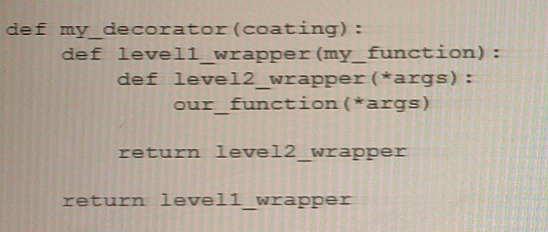
In the given code snippet, therepeatfunction is a decorator that takes an argumentnum_timesspecifying the number of times the decorated function should be called. Therepeatfunction returns an inner functionwrapper_repeatthat takes a functionfuncas an argument and returns another inner functionwrapperthat callsfuncnum_timestimes.
The provided code snippet represents an example of a decorator that accepts its own arguments. The@decorator_functionsyntax is used to apply thedecorator_functionto thesome_functionfunction. Thedecorator_functiontakes an argumentarg1and defines an inner functionwrapper_functionthat takes the original functionfuncas its argument. Thewrapper_functionthen returns the result of callingfunc, along with thearg1argument passed to thedecorator_function.
Here is an example of how to use this decorator withsome_function:
@decorator_function('argument 1')
def some_function():
return 'Hello world'
Whensome_functionis called, it will first be passed as an argument to thedecorator_function. Thedecorator_functionthen adds the string'argument 1'to the result of callingsome_function()and returns the resulting string. In this case, the final output would be'Hello world argument 1'.
Official Python documentation on Decorators:https://docs.python.org/3/glossary.html#term-decorator
Which function or operator should you use to obtain the answer True or False to the question: "Do two variables refer to the same object?"
To test whether two variables refer to the same object in memory, you should use theisoperator. Theisoperator returnsTrueif the two variables point to the same object in memory, andFalseotherwise.
For example:
a = [1, 2, 3]
b = a
c = [1, 2, 3]
print(a is b) # True
print(a is c) # False
In this example,aandbrefer to the same list object in memory, soa is breturnsTrue. On the other hand,aandcrefer to two separate list objects with the same values, soa is creturnsFalse.
Official Python documentation on Comparisons:https://docs.python.org/3/reference/expressions.html#not-in
Official Python documentation on Identity comparisons:https://docs.python.org/3/reference/expressions.html#is
Theisoperator is used to test whether two variables refer to the same object in memory. If two variablesxandyrefer to the same object, the expressionx is ywill evaluate toTrue. Otherwise, it will evaluate toFalse.
Exam domains verified against: Official Python Institute PCPP-32-101 exam guide, last checked October 2026.
Advanced concepts in class design, inheritance, polymorphism, and composition. Learn magic methods, decorators, static and class methods, abstract classes, attribute encapsulation, and object serialization with pickle and shelve modules.
Python Enhancement Proposals including PEP 8 style guidelines, PEP 20 philosophy, and PEP 257 docstring conventions. Learn naming conventions, code layout, and using linters to ensure code quality.
Sample question from this domain above: Q2
Socket programming, REST API clients, HTTP methods, and data transfer formats. Work with JSON and XML, understand status codes, and build simple REST clients using the requests module.
Database operations with sqlite3, file format processing including CSV and XML, logging configuration, and INI file parsing with ConfigParser. Learn CRUD operations and transaction management.
Sample question from this domain above: Q4
Common questions about the exam itself

