Key details for this exam, checked against the published exam outline
Each question shows the correct answer and an explanation of why it is right
What is the main purpose of the sendmail SMTP queue in a Proofpoint system?
The correct answer is A. To hold email messages temporarily until they can be successfully delivered. Proofpoint's SMTP relay and mail-flow references are built on standard MTA behavior, where queued mail is retained for retry when the next-hop destination is temporarily unavailable or when delivery cannot be completed immediately. This is the classic role of the SMTP queue in sendmail-based processing: hold the message, retry later, and complete delivery when conditions permit. It is a transport and delivery-management function rather than a security-analysis function. (proofpoint.com)
The other choices describe different capabilities that belong to other parts of the email protection platform. Long-term archiving is not the purpose of the SMTP queue. Spam detection is performed by filtering, reputation, and policy modules, not by the queue itself. Attachment analysis for malware belongs to virus protection, sandboxing, or advanced threat analysis features rather than the sendmail queue. In the Threat Protection Administrator course under Mail Flow, the queue is part of message transport operations and helps administrators understand deferred delivery, retry timing, and how messages move between acceptance and final successful handoff. This is why queue-related alerts and threshold monitoring are separate from content inspection features. So the verified answer for the main purpose of the sendmail SMTP queue is A. (proofpoint.com)
In the context of Proofpoint, what is an SMTP Profile?
The correct answer is C. A setting that defines email routing policies. In Proofpoint administration, SMTP-related profiles are used as configuration objects that shape how mail is handled in transport, including route behavior and SMTP service characteristics. The course question's correct answer aligns with the operational role of SMTP profiles in governing routing and transport behavior, not quarantine personalization or encryption-key generation. Proofpoint's general SMTP and relay documentation frames SMTP configuration around how messages are relayed, routed, and delivered between systems, which supports this answer. (proofpoint.com)
The incorrect options do not fit the function of an SMTP Profile. A block list of email addresses would be part of filtering or policy controls, not SMTP profile definition. A Proofpoint-generated encryption key belongs to cryptographic or secure message workflows, not to SMTP profile configuration. A user-defined quarantine setting is part of end-user or administrative quarantine handling and is unrelated to transport profile architecture. In the Threat Protection Administrator course, Mail Flow focuses heavily on routing, relay behavior, and delivery path control, and this question sits squarely in that domain. So when the course asks what an SMTP Profile is in Proofpoint, the best verified answer is that it is a setting that defines email routing policies. (proofpoint.com)
When you are attempting to release a message from the quarantine folder, you have the three choices shown here. The option of Release Encrypted With Scan will do which of the following?
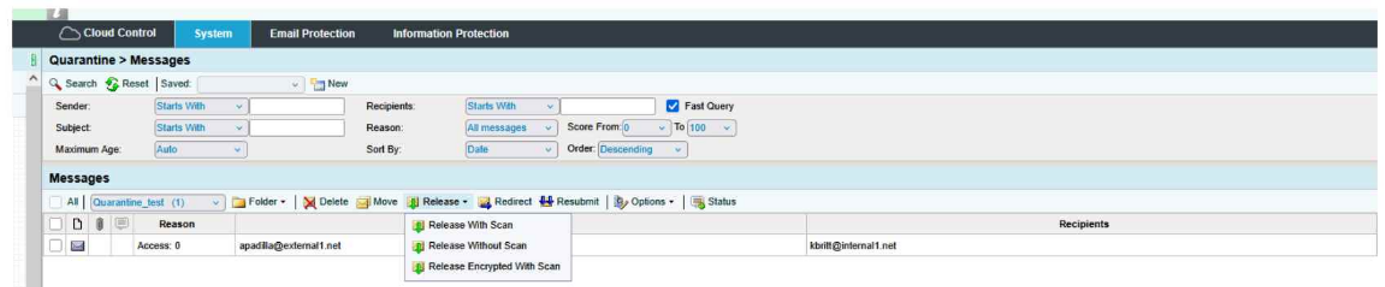
The correct answer is D. Resubmit the message to message defense and virus protection and release an encrypted message to the user.
From the exhibit, the release menu shows three distinct actions:
Release With Scan
Release Without Scan
Release Encrypted With Scan
The wording of Release Encrypted With Scan tells you two actions are happening together:
The message is being rescanned through the relevant protection layers, which in the course context means it is resubmitted through Message Defense and Virus Protection.
After that scan step, the message is released in encrypted form to the recipient.
That is why D is the only choice that includes both parts of the action: scan/resubmit and encrypted release.
Why the other options are incorrect:
A is incomplete because it mentions encrypted delivery, but it leaves out the with scan portion.
B is incomplete because it includes the rescan behavior, but it does not include encrypted delivery.
C is incorrect because the action is not releasing the message to the user's digest; it is releasing the actual message to the user.
This is a Quarantine administration question focused on understanding the difference between release options. The exhibit clearly shows that Release Encrypted With Scan combines rescanning plus encrypted delivery, making Answer D the verified course-aligned choice.
What is the purpose of roles when assigning administrative access to Proofpoint Protection Server?
Pick the 2 correct responses below.
The correct answers are D and E. In Proofpoint administration, roles exist to simplify access management and to assign the right permissions to the right people. Proofpoint documentation on console-user permissions shows that administrators can modify what a console user is allowed to see and do, which directly supports the idea that roles grant different abilities and permissions across administrative portals. That makes E correct.
Roles also make administration easier when onboarding new analysts and administrators because access can be assigned through predefined permission structures instead of configuring every capability one by one for each person. That is the operational benefit the course is testing with D. This is consistent with role-based administration in Proofpoint products, where access is organized to support scalable management and clear separation of duties.
The other options do not fit the purpose of roles in the Threat Protection Administrator course. Roles are not primarily about temporary just-in-time permission requests, custom session timeouts per portal, or interface personalization such as colors and pictures. Those are outside the expected role-management objective. In the course's User Management section, roles are about making portal administration manageable and ensuring different users receive appropriate access levels. Therefore, the correct pair is D and E.
When setting up an Import/Authentication Profile in PPS, which of the following is a required piece of information to connect to an LDAP server?
The correct answer is LDAP server hostname or IP address because an Import/Authentication Profile that connects to LDAP must first know where the LDAP directory service is located. In practical terms, Proofpoint cannot bind to or query an LDAP source unless the administrator provides the address of the LDAP server, whether by hostname or direct IP. This is foundational connection information. By contrast, POP3, SMTP, and IMAP settings are not what PPS uses to connect to an LDAP directory for authentication or user import. Those protocols serve different mail-related purposes and are unrelated to LDAP directory lookups.
Within the Threat Protection Administrator course, User Management includes directory integration and user import. That workflow depends on specifying the correct LDAP endpoint so Proofpoint can perform binds, searches, and synchronization tasks against the directory. The requirement is basic but essential: before credentials, search base, or attribute mapping can matter, the product must know the LDAP server destination. This is why the hostname or IP address is treated as a required connection element. The same logic applies whether the backend is Active Directory or another LDAP-compliant directory source. The course teaches administrators to think in terms of identity source connectivity first, then attribute mapping and import logic after the connection is established. So for this question, the only answer that represents a required LDAP connection detail is LDAP server hostname or IP address.
72 questions covering all exam domains, starting from $20
Exam domains verified against: Official Proofpoint TPAD01 exam guide, last checked September 2026.
Understand key product functionalities and their integration within the suite. Learn the architecture and deployment models of Proofpoint email security solutions in your organization.
Learn how the Email Protection Server manages inbound and outbound mail, routes, SMTP, TLS, and certificates. Understand mail flow routing and SMTP profile configuration.
Build policies and rules for message filtering and disposition, and configure SMTP profiles. Create and manage policy routes for internal, external, and relay traffic.
Create and manage mail rules, control SMTP rate, configure outbound throttling, and enhance email security. Set up safe and block lists to control message flow.
Manage quarantine folders, configure settings, release messages, and understand precedence. Understand how messages are quarantined and the user experience when retrieving them.
Use Smart Search, analyze logs, configure syslogs and leverage PoD API for insights. Search message metadata and configure centralized logging for monitoring and troubleshooting.
Sample question from this domain above: Q2
Configure alert profiles, manage notifications, and monitor system performance with reports. Set up incident alerts and generate reports for compliance and monitoring.
Configure SPF, DKIM, and DMARC policies, and set up email authentication keys. Understand how email authentication protocols protect against spoofing and domain abuse.
Sample question from this domain above: Q1
Sync AD, import profiles, configure LDAP and SSO, and set user roles and access. Manage user identity synchronization and access control within the platform.
Tune spam management policies, create custom spam rules, and configure safe and block lists. Understand the spam engine and how to define definite versus possible spam.
Configure virus protection policies, restrict processing, and edit rules. Set up malware scanning and define response actions for infected messages.
Set up and customize email warning tags, tag routes, and configure email digests. Implement user-facing notifications and message release workflows.
Manage URL Rewrite, configure Message Defense, and use the TAP Dashboard. Deploy advanced threat detection for zero-day exploits, credential theft, and business email compromise.
Differentiate Cloud versus On Premises defense, configure servers, workflows, and manage threat response. Execute incident response workflows and block campaigns during active threats.
Sample question from this domain above: Q5
Common questions about the exam itself

