Key details for this exam, checked against the published exam outline
Each question shows the correct answer and an explanation of why it is right
The UI triggers incident DEVICESW_CONCURRENT_FLOWLIMIT_EXCEEDED for a branch site. Based in the image below, which tool can be used to identify the host?
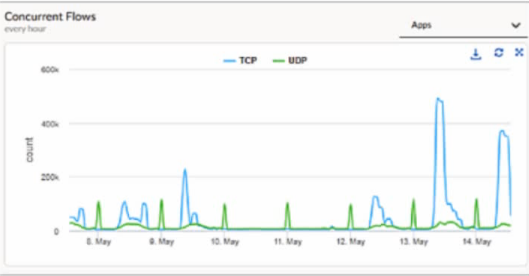
When a Prisma SD-WAN ION device triggers the DEVICESW_CONCURRENT_FLOWLIMIT_EXCEEDED incident, it indicates that the number of active sessions has reached the hardware or software-defined capacity limit of that specific appliance. In the provided graph, we can see a massive spike in concurrent TCP flows on May 13th, reaching nearly 500k, which is a clear indicator of anomalous behavior---likely a 'top talker' host, a malware outbreak, or a misconfigured application generating excessive connections.
To identify the specific host responsible for this surge, administrators should navigate to Monitor Activity Flows. This interface, commonly known as the Flow Browser, provides the most granular visibility into real-time and historical session data within the Prisma SD-WAN fabric. Unlike 'Transaction Stats,' which provide high-level summaries, or 'New Flows,' which only show the rate of session initiation, the Flows view allows an engineer to filter and sort the active session table by metadata such as Source IP, Destination IP, Application, and Site.
By utilizing the Flow Browser, an administrator can quickly group flows by 'Source IP' to pinpoint exactly which internal host is consuming the most flow table entries. This is the standard 'Day 2' operational workflow for troubleshooting performance and capacity incidents. While running a tcpdump (Option A) is a valid diagnostic for packet-level analysis, it is inefficient for identifying a single host among hundreds of thousands of flows and can further tax the device's CPU during a high-load event. The Monitor Activity Flows tool is designed specifically for this type of scale, providing the necessary visibility to remediate the flow limit exhaustion and restore normal network operations.
A branch manager reports slow network performance, and the network administrator wants to use Prisma SD-WAN Copilot to quickly identify if a specific user, by source IP address, is consuming excessive bandwidth as well as which applications are contributing to this consumption. How can Copilot assist in this investigation?
Prisma SD-WAN Copilot is an AI-powered operational tool designed to simplify network management through Natural Language Processing (NLP). Traditionally, identifying a bandwidth 'hog' required manual navigation through multiple dashboards, such as WAN Clarity and the Flow Browser, to correlate source IP addresses with specific application flows and timestamps. Copilot transforms this workflow by allowing administrators to interact with the system using conversational queries.
When an administrator inputs a query like ''Show top bandwidth source IPs at SD-WAN Branch X over last 3 hours,'' Copilot leverages its underlying machine learning models and integrated data lake to aggregate telemetry across the entire fabric. It instantly identifies the specific source IPs responsible for the highest throughput and correlates that data with application visibility. Instead of providing a static report or redirecting the user to other tools, Copilot presents an interactive, summarized view directly within the interface. This view highlights the top-consuming users and breaks down their consumption by application, such as YouTube, Netflix, or business-critical SaaS tools.
This capability significantly reduces the Mean Time to Resolution (MTTR) for performance issues. By bypassing the need for manual data correlation, Copilot provides immediate 'Day 2' operational insights. It effectively acts as a virtual assistant that understands the context of the network topology, site names, and time ranges, allowing the administrator to quickly determine if a branch's slow performance is due to an individual user's behavior or a broader infrastructure issue.
Which action meets the needs of an organization that requires elevated incident notifications for its headquarters location?
In the Prisma SD-WAN (Instant-On Network) management framework, administrators can customize how events are handled and prioritized across different sites through Event Policies. An organization that requires 'elevated incident notifications' for a critical site like its headquarters needs a way to differentiate those alerts from standard branch notifications in the management portal and integrated third-party tools.
The most direct and effective method to achieve this is by configuring an Event Policy Rule specifically for the headquarters site. Within the incident policy framework, administrators can create rules that match specific resources---in this case, the headquarters site---and apply an action to set the priority. Priority levels typically range from P1 (highest) to P5 (lowest).1 By setting these to the highest level (P1), any generated incident for that site will immediately stand out on the dashboard as a high-priority event.
This approach is superior to other options because it changes the inherent importance of the alert within the Prisma SD-WAN logic itself. For example, a 'WAN Link Down' event at a small retail branch might be a P3, but the same event at the HQ could be elevated to a P1 via a custom policy rule. This elevation ensures that the Network Operations Center (NOC) is alerted more urgently and that external integrations, such as ServiceNow or PagerDuty, receive the correct priority mapping for immediate escalation. Options such as aggressive SLA thresholds (Option B) only increase the frequency of alerts, not necessarily their notification priority, while global syslog or SNMP settings (Options A and D) lack the site-specific granularity required for this use case.
In the Prisma SD-WAN portal, the Application Health dashboard assigns a color-coded "Health Score" (Green, Yellow, Red) to applications.
Which three metrics are combined to calculate this composite AppX (Application Experience) score? (Choose three.)
Comprehensive and Detailed Explanation
The AppX (Application Experience) score is a proprietary metric used by Prisma SD-WAN to provide a holistic view of user experience, rather than just network statistics. It is calculated based on three key components:
Transaction Failure Rate (A): The percentage of application transactions that failed (e.g., TCP resets, HTTP 500 errors). This indicates availability.
Network Transfer Time (B): The time taken for packets to traverse the network (WAN/LAN latency). This indicates network health.
Server Response Time (C): The time taken by the application server to respond to a request. This indicates backend performance.
Why not D or E?
Bandwidth Utilization (D) is a capacity metric, not a direct measure of quality. A link can be 90% full but still deliver packets quickly (good AppX), or 10% full but dropping packets (bad AppX).
Jitter (E) is a network-layer metric primarily relevant for UDP Real-Time media. While important, the high-level 'AppX' score for general TCP apps focuses on the 'Time-to-Glass' metrics (NTT/SRT) and success rates.
When defining a Path Quality Profile (SLA) for a "Transactional" application group (e.g., Citrix, Oracle), the administrator sets the "Packet Loss" threshold to 1%.
What happens to the traffic for this application if all active paths currently exceed this 1% loss threshold?
Comprehensive and Detailed Explanation
This behavior describes the 'Best Available Path' logic inherent in Prisma SD-WAN's availability design.
SLA Thresholds: Path Quality Profiles act as filters to identify compliant paths.
Total Violation: If all configured 'Active' paths violate the SLA (e.g., Path A has 2% loss, Path B has 5% loss, and the threshold is 1%), the system does not drop the traffic (Option A) because maintaining connectivity is prioritized over perfect quality.
Selection Logic: The system enters a fallback state where it compares the available active paths and selects the 'Least Bad' one---the path that is closest to meeting the SLA (in this case, Path A with 2% loss).
Backup Paths: Traffic would only move to a Backup path (Option D) if the policy explicitly configures the backup path to engage upon SLA violation of the active set. However, strictly speaking, if only active paths are considered and all fail, it picks the best of the active group rather than blackholing the traffic.
A network engineer is troubleshooting a user complaint regarding "slow application performance" for an internal web application. While viewing the Flow Browser in the Prisma SD-WAN portal, the engineer notices that the Server Response Time (SRT) is consistently high (over 500ms), while the Network Transfer Time (NTT) and Round Trip Time (RTT) are low (under 50ms).
What does this data indicate about the root cause of the issue?
Comprehensive and Detailed Explanation
The Flow Browser and App Response Time metrics in Prisma SD-WAN are critical tools for isolating the fault domain---determining whether a problem lies in the 'Network' or the 'Application.'
Network Transfer Time (NTT) / Round Trip Time (RTT): These metrics measure the time it takes for packets to traverse the network (WAN/LAN) and for acknowledgments to return. A low NTT (e.g., <50ms) confirms that the network pipes (SD-WAN overlay, Underlay circuits) are healthy and transporting packets quickly.
Server Response Time (SRT): This metric specifically measures the time between the server receiving a request and the server sending the first byte of the response. It essentially measures the 'processing time' of the backend server.
In the scenario described, the network metrics (NTT/RTT) are excellent, effectively ruling out WAN congestion, packet loss, or latency (Option A and C). However, the Server Response Time (SRT) is very high (500ms). This signature is a definitive indicator that the network delivered the request instantly, but the application server took a long time to process it. This points the troubleshooting effort toward the server infrastructure (e.g., a slow SQL query, an overloaded web server, or lack of compute resources) rather than the SD-WAN environment.
In which modes can a Prisma SD-WAN branch be deployed?
Comprehensive and Detailed Explanation
Prisma SD-WAN (formerly CloudGenix) defines three distinct Operational Modes for a branch site, which determine how the ION device processes traffic and interacts with the network.
Analytics Mode (Monitor): In this mode, the ION device is typically deployed inline or in a 'promiscuous' monitor state to gain visibility into network traffic without actively enforcing path selection policies.1 It 'learns' applications, bandwidth usage, and network characteristics (auditing) but does not steer traffic or block flows.2 This is often used during Proof of Concepts (POVs) or the initial 'burn-in' phase of a deployment to generate reports without risking network disruption.
Control Mode: This is the full production state. In Control Mode, the ION device actively enforces Path Policies, QoS Policies, and Security Policies. It builds Secure Fabric VPN tunnels, steers traffic based on application SLAs (e.g., sending voice over MPLS and bulk data over Broadband), and handles failover events.3 This is the required mode for a fully functional SD-WAN site.
Disabled Mode: This mode effectively shuts down the site's SD-WAN functionality from the controller's perspective. It is an administrative state used when a site is being decommissioned, provisioned but not yet live, or isolated for troubleshooting. In this state, the device does not participate in the fabric.
Exam domains verified against: Official Palo Alto Networks SD-WAN-Engineer exam guide, last checked October 2026.
Design SD-WAN networks by identifying device selection criteria, bandwidth planning, and licensing options. Assess existing architectures and plan data center configurations, branch deployments, security requirements, and high availability strategies.
Deploy Prisma SD-WAN by configuring site-specific settings, developing templates for data centers and branches, and tuning routing protocols. Implement network segmentation using VRF for multi-tenant and isolated network environments.
Monitor and operate SD-WAN using device-level statistics, controller-generated logs, and WAN Clarity reports. Configure alerts and notifications for real-time visibility into SASE-related events and network performance.
Sample question from this domain above: Q5
Integrate Prisma SD-WAN with Prisma Access and Cloud Identity Engine for unified security policies. Support IoT device connectivity using Device-ID and implement path and security policies based on User or Group identification.
Resolve connectivity issues between sites, diagnose routing and forwarding problems, and identify application performance issues. Use the co-pilot tool and analytics to optimize network configurations and support decision-making.
Common questions about the exam itself

