
Free Palo Alto Networks PCNSC Exam Practice Questions & Explanations
Prepared & Reviewed by the ValidExamDumps Editorial Team
At ValidExamDumps, we consistently monitor updates to the Palo Alto Networks PCNSC exam questions by Palo Alto Networks. Whenever our team identifies changes in the exam questions, objectives, focus areas or requirements, We immediately update our exam questions for both PDF and online practice exams. This commitment ensures our customers always have access to the most current and accurate questions. By preparing with these up to date and 100% exam domain coverage questions, our customers can successfully pass the Palo Alto Networks Certified Network Security Consultant exam on their first attempt without needing additional materials or study guides.
Other certification materials providers often include outdated or removed questions by Palo Alto Networks in their PCNSC exam. These outdated questions lead to customers failing their Palo Alto Networks Certified Network Security Consultant exam. In contrast, we ensure our questions bank includes only precise and up-to-date questions. Our main priority is your success in the Palo Alto Networks PCNSC exam, not profiting from selling obsolete exam questions in PDF or Online Practice Test.
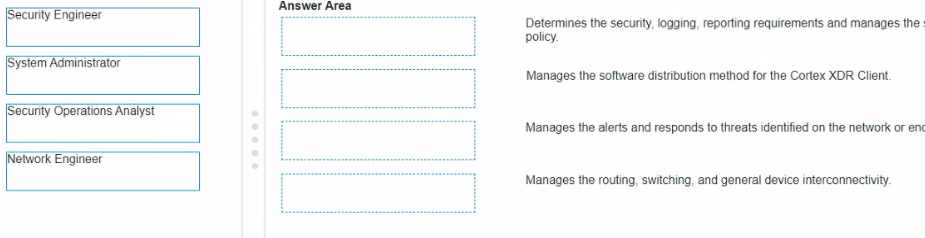
Identity the Stakeholder with their Role when planning a Firewall Panorama, and Cortex XDR Deployment
Correct answer with every item placed in its correct position
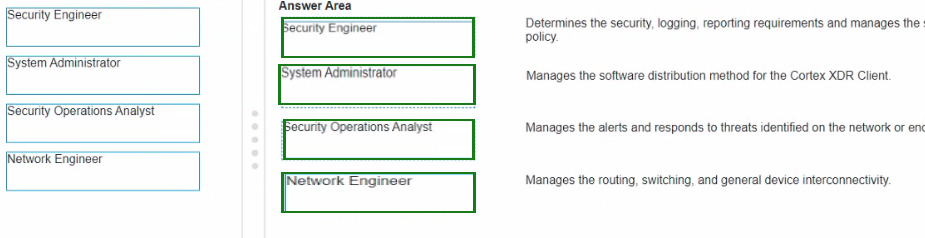
System Administrator - They are responsible for the deployment and maintenance of software, including the Cortex XDR client. This includes distributing the software across the organization and ensuring it is up to date.
Security Operations Analyst - Their primary responsibility is to monitor and analyze security events, manage alerts, and respond to threats. They play a critical role in incident detection and response.
Network Engineer - They ensure the network infrastructure is properly configured for routing, switching, and general device interconnectivity. This ensures that all components, including firewalls and endpoint security solutions, can communicate effectively.
Which command would you use to view the current sessions on a Palo Alto firewall?
What feature should be used to decrypt and inspect inbound SSL traffic without having to install a certificate on the client devices?
Which category of Vulnerability Signatures is most likely to trigger false positive alerts?
The category of Vulnerability Signatures that is most likely to trigger false positive alerts is:
C . info-leak
Information leakage signatures are designed to detect attempts to access or disclose sensitive information. These signatures can be prone to false positives because benign activities or legitimate data transmissions can sometimes be mistakenly identified as information leaks.
Palo Alto Networks - Managing False Positives in Threat Prevention: https://docs.paloaltonetworks.com/pan-os/10-0/pan-os-admin/threat-prevention/manage-false-positives-in-threat-prevention
Palo Alto Networks - Vulnerability Protection: https://docs.paloaltonetworks.com/pan-os/10-0/pan-os-admin/threat-prevention/vulnerability-protection
Which Palo Alto Networks feature allows you to create dynamic security policies based on the behavior of the devices in your network?
Which CLI command should you use to verify whether all SFP SFP*, or QSFP modules are installed in a firewall?
To verify whether all SFP, SFP+, or QSFP modules are installed in a firewall, you should use the following CLI command:
C . show system state filter sys.s-phy*
This command provides detailed information about the physical state of the system, including the status of SFP, SFP+, and QSFP modules installed in the firewall.
Palo Alto Networks - CLI Commands for Troubleshooting Hardware Issues: https://docs.paloaltonetworks.com/pan-os/10-0/pan-os-cli-quick-start/troubleshooting-hardware-issues
Palo Alto Networks - Understanding Hardware and Interface Details via CLI: https://knowledgebase.paloaltonetworks.com
Your customer believes that the Panorama appliance is being overwhelmed by the logs from deployed Palo Alto Networks Next-Generation Firewalls. What CLl command can you run to determine the number of logs per second sent by each firewall?
To determine the number of logs per second sent by each firewall to a Panorama appliance, the appropriate CLI command to use is:
D . debug log-receiver statistics
This command provides detailed statistics about the logs being received by the Panorama, including the rate at which logs are being sent by each connected firewall. This information can help identify whether the Panorama is being overwhelmed by the volume of logs and which firewalls are contributing the most to the log traffic.
Palo Alto Networks - CLI Commands for Troubleshooting Panorama: https://docs.paloaltonetworks.com
Palo Alto Networks - Managing Logs and Log Forwarding: https://knowledgebase.paloaltonetworks.com
In an environment using User-ID, what role does the User-ID agent play?