
Free Palo Alto Networks NetSec-Generalist Exam Practice Questions & Explanations
Prepared & Reviewed by the ValidExamDumps Editorial Team
At ValidExamDumps, we consistently monitor updates to the Palo Alto Networks NetSec-Generalist exam questions by Palo Alto Networks. Whenever our team identifies changes in the exam questions, objectives, focus areas or requirements, We immediately update our exam questions for both PDF and online practice exams. This commitment ensures our customers always have access to the most current and accurate questions. By preparing with these up to date and 100% exam domain coverage questions, our customers can successfully pass the Palo Alto Networks Network Security Generalist exam on their first attempt without needing additional materials or study guides.
Other certification materials providers often include outdated or removed questions by Palo Alto Networks in their NetSec-Generalist exam. These outdated questions lead to customers failing their Palo Alto Networks Network Security Generalist exam. In contrast, we ensure our questions bank includes only precise and up-to-date questions. Our main priority is your success in the Palo Alto Networks NetSec-Generalist exam, not profiting from selling obsolete exam questions in PDF or Online Practice Test.
Which step is necessary to ensure an organization is using the inline cloud analysis features in its Advanced Threat Prevention subscription?
The inline cloud analysis feature in the Advanced Threat Prevention subscription enables real-time threat detection using machine learning (ML) and deep-learning models. However, for it to be effective, the firewall must decrypt encrypted traffic to analyze potential threats hidden within TLS/SSL connections.
Why SSL Decryption is Necessary?
Threat actors often hide malware and exploits in encrypted traffic.
Without SSL decryption, inline cloud analysis cannot inspect encrypted threats.
Decryption allows full visibility into traffic for inline deep-learning threat detection.
Why Other Options Are Incorrect?
A . Configure Advanced Threat Prevention profiles with default settings and only focus on high-risk traffic to avoid affecting network performance.
Incorrect, because default settings may not enable inline cloud analysis, and focusing only on high-risk traffic reduces security effectiveness.
C . Update or create a new anti-spyware security profile and enable the appropriate local deep-learning models.
Incorrect, because Anti-Spyware profiles detect command-and-control (C2) traffic, but inline cloud analysis requires inspecting full packet content, which requires SSL decryption.
D . Disable anti-spyware to avoid performance impacts and rely solely on external threat intelligence.
Incorrect, because disabling anti-spyware would leave the network vulnerable. Inline cloud analysis works in conjunction with threat intelligence and local prevention capabilities.
Reference to Firewall Deployment and Security Features:
Firewall Deployment -- Ensures encrypted traffic is inspected for threats.
Security Policies -- Requires SSL decryption policies to apply Advanced Threat Prevention.
VPN Configurations -- Ensures decryption and inspection apply to VPN traffic.
Threat Prevention -- Works alongside Advanced WildFire and inline ML models.
WildFire Integration -- Inspects unknown threats in decrypted files.
Zero Trust Architectures -- Enforces continuous inspection of all encrypted traffic.
Thus, the correct answer is: B. Enable SSL decryption in Security policies to inspect and analyze encrypted traffic for threats.
Based on the image below, which source IP address will be seen in the data filtering logs of the Cloud NGFW for AWS with the default rulestack settings?
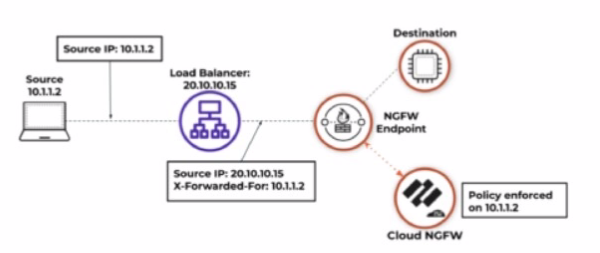
Based on the image and default rulestack settings of the Cloud NGFW for AWS, the source IP address seen in the data filtering logs will be 20.10.10.15, which is the IP address of the load balancer.
Default Rulestack Behavior: By default, the rulestack settings do not inspect or preserve the original client IP (e.g., 10.1.1.2) in the 'X-Forwarded-For' header. Instead, the load balancer's IP (20.10.10.15) is recorded as the source IP.
Logging Mechanism: Unless explicitly configured to parse the 'X-Forwarded-For' header, the firewall's logs will reflect the IP address of the device directly sending the traffic to the NGFW (the load balancer in this case).
Cloud NGFW for AWS Documentation
Data Filtering Logs and Source IP Behavior
A security administrator is adding a new sanctioned cloud application to SaaS Data Security.
After authentication, how does the tool gain API access for monitoring?
When adding a new sanctioned cloud application to SaaS Data Security, the tool establishes API access by receiving an OAuth token or a similar type of token from the cloud application.
API Integration: The token allows the SaaS Data Security solution to authenticate itself with the cloud application, enabling secure monitoring and management of user activity, data flow, and security events.
Token Usage: The token maintains the connection between the SaaS application and the security tool, ensuring seamless communication while enforcing access policies and monitoring for anomalies.
Security: This method ensures that API access is secure and prevents unauthorized access to the cloud application.
Palo Alto Networks SaaS Security API Documentation
OAuth Authentication and API Access
Which two policies in Strata Cloud Manager (SCM) will ensure the personal data of employees remains private while enabling decryption for mobile users in Prisma Access? (Choose two.)
In Strata Cloud Manager (SCM), policies need to balance privacy while ensuring secure decryption for mobile users in Prisma Access. The correct approach involves:
SSL Forward Proxy (C) -- Enables decryption of outbound SSL traffic, allowing security inspection while ensuring unauthorized data does not leave the network.
No Decryption (D) -- Excludes personal data from being decrypted, ensuring compliance with privacy regulations (e.g., GDPR, HIPAA) and protecting sensitive employee information.
Why These Two Policies?
SSL Forward Proxy (C)
Decrypts outbound SSL traffic from mobile users.
Inspects traffic for malware, data exfiltration, and compliance violations.
Ensures corporate security policies are enforced on user traffic.
No Decryption (D)
Ensures privacy-sensitive traffic (e.g., online banking, healthcare portals) remains untouched.
Exclusions can be defined based on categories, user groups, or destinations.
Helps maintain regulatory compliance while still securing other traffic.
Other Answer Choices Analysis
(A) SSH Decryption -- Not relevant in this context, as SSH traffic is typically used for administrative access rather than mobile user web browsing.
(B) SSL Inbound Inspection -- Used for inbound traffic to company-hosted servers, not for securing outbound traffic from mobile users.
Reference and Justification:
Firewall Deployment -- SSL Forward Proxy enables traffic visibility, No Decryption protects privacy.
Security Policies -- Defines what traffic should or should not be decrypted.
Threat Prevention & WildFire -- Decryption helps detect hidden threats while excluding sensitive personal data.
Zero Trust Architectures -- Ensures least-privilege access while maintaining privacy compliance.
Thus, SSL Forward Proxy (C) and No Decryption (D) are the correct answers, as they balance security and privacy for mobile users in Prisma Access.
In Prisma SD-WAN. what is the recommended initial action when VoIP traffic experiences high latency and packet loss during business hours?
VoIP (Voice over IP) traffic is highly sensitive to network conditions, including latency, jitter, and packet loss. In Prisma SD-WAN, maintaining optimal VoIP quality requires dynamic path selection and real-time monitoring of network conditions.
Recommended Initial Action: Monitoring Real-Time Path Performance Metrics
When VoIP traffic experiences high latency and packet loss during business hours, the first step is to analyze real-time path performance metrics in Prisma SD-WAN's monitoring dashboard.
Why Real-Time Monitoring is Crucial?
Identifies the Affected Links -- Prisma SD-WAN continuously monitors path quality metrics for each available WAN link (e.g., MPLS, broadband, LTE).
Provides Insights on Congestion -- Real-time monitoring helps determine whether the issue is caused by congestion, ISP problems, or packet drops.
Aids in Dynamic Path Selection -- Prisma SD-WAN can automatically switch to a better-performing path based on live telemetry data.
Avoids Unnecessary Configuration Changes -- Without accurate diagnostics, changing VPN gateways or link tags may not address the root cause.
Why Other Options Are Incorrect?
A . Configure a new VPN gateway connection.
Incorrect, because the issue is VoIP performance degradation due to latency and packet loss, not a VPN gateway failure.
A new VPN connection won't resolve ongoing traffic congestion in the current SD-WAN path.
C . Add new link tags to existing interfaces.
Incorrect, because adding new link tags does not immediately resolve latency and packet loss issues.
Link tags help classify WAN links for application-aware routing, but the immediate priority is to analyze performance metrics first.
D . Disable the most recently created path quality.
Incorrect, because disabling a path quality profile without understanding the cause could negatively impact failover and traffic steering policies.
Instead, monitoring real-time metrics first ensures the right corrective action is taken.
Reference to Firewall Deployment and Security Features:
Firewall Deployment -- Prisma SD-WAN is deployed alongside Palo Alto firewalls for network security and traffic steering.
Security Policies -- Ensures VoIP traffic is prioritized with QoS and traffic shaping policies.
VPN Configurations -- Uses IPsec tunnels and Dynamic Path Selection (DPS) for optimal WAN performance.
Threat Prevention -- Detects and mitigates network-based attacks impacting VoIP performance.
WildFire Integration -- Not directly related but helps detect malicious traffic within VoIP signaling.
Panorama -- Centralized logging and monitoring of SD-WAN path quality metrics across multiple locations.
Zero Trust Architectures -- Enforces identity-based access controls for secure VoIP communications.
Thus, the correct answer is: B. Monitor real-time path performance metrics.