Key details for this exam, checked against the published exam outline
Each question shows the correct answer and an explanation of why it is right
SIMULATION
Challenge 2 -Task 1
In deploying a new application, a cloud customer needs to reflect different security postures. If a security zone is enabled with the Maximum Security Zone recipe, the customer will be unable to create or update a resource in the security zone if the action violates the attached Maximum Security Zone policy.
As an application requirement, the customer requires a compute instance in the public subnet. You therefore, need to configure Custom Security Zones that allow the creation of compute instances in the public subnet.
Review the architecture diagram, which outlines the resoures you'll need to address the requirement:
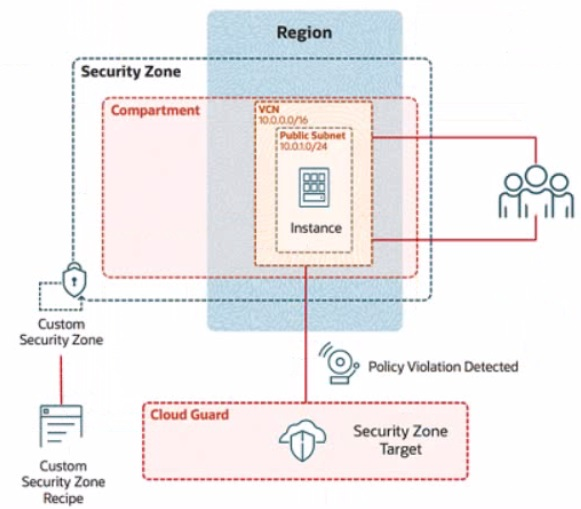
Preconfigured
To complete this requirement, you are provided with the following:
Access to an OCI tenancy, an assigned compartment, and OCI credentials
Required IAM policies
Task 1: Create a Custom Security Zone Recipe
Create a Custom Security Zone Recipe named IAD-SP-PBT-CSP-01 that allows the provisioning of compute instances in the public subnet.
Enter the OCID of the created custom security zone recipe in the text box below.
To create a Custom Security Zone Recipe named IAD-SP-PBT-CSP-01 that allows the provisioning of compute instances in a public subnet, we will follow the steps outlined in the Oracle Cloud Infrastructure (OCI) Security Zones documentation. These steps are based on verified procedures from the OCI Security Zone Guide and related resources.
Step-by-Step Solution for Task 1: Create a Custom Security Zone Recipe
Log in to the OCI Console:
Ensure you have access to the assigned compartment provided in the tenancy.
Navigate to Security Zones:
From the OCI Console, go to the navigation menu (hamburger icon) on the top left.
Under Governance and Administration, select Security Zones.
Create a New Security Zone Recipe:
In the Security Zones dashboard, click on the Recipes tab.
Click the Create Recipe button.
Configure the Recipe Details:
Name: Enter IAD-SP-PBT-CSP-01.
Description: (Optional) Add a description, e.g., 'Custom recipe to allow compute instances in public subnet.'
Leave the Compartment as the assigned compartment provided.
Define the Security Zone Policy:
In the policy editor, start with a base policy. Since the Maximum Security Zone recipe restricts public subnet usage, you need to customize it.
Add the following policy statement to allow compute instances in a public subnet:
Allow service compute to use virtual-network-family in compartment <compartment-name> where ALL {
target.resource.type = 'Instance',
target.vcn.cidr_block = '10.0.0.0/16',
target.subnet.cidr_block = '10.0.10.0/24'
}
Replace <compartment-name> with the name of your assigned compartment.
This policy allows the Compute service to provision instances in the public subnet (10.0.10.0/24) within the VCN (10.0.0.0/16).
Adjust Restrictions:
Ensure the recipe does not inherit the Maximum Security Zone recipe's default restrictions that block public subnet usage. Explicitly allow the public subnet by including the subnet CIDR block (10.0.10.0/24) in the policy.
Remove or modify any conflicting default rules that prohibit public subnet usage (e.g., rules blocking internet access or public IP assignment).
Save the Recipe:
Click Create to save the custom security zone recipe.
Once created, note the OCID of the recipe from the recipe details page. The OCID will be a unique identifier starting with ocid1.securityzonerecipe.
Verify the Recipe:
Go to the Recipes tab and locate IAD-SP-PBT-CSP-01.
Ensure the policy reflects the allowance for compute instances in the public subnet by reviewing the policy statement.
OCID of the Created Custom Security Zone Recipe
The exact OCID will be generated upon creation (e.g., ocid1.securityzonerecipe.oc1..unique_string). Please enter the OCID displayed in the OCI Console after completing Step 7.
Notes
Ensure IAM policies are correctly configured to grant you permissions to create and manage security zone recipes in the compartment.
The policy assumes the public subnet CIDR (10.0.10.0/24) matches the diagram. Adjust if the actual subnet CIDR differs.
Test the recipe by associating it with a security zone and attempting to launch a compute instance to confirm compliance.
During your investigation of a load balancer issue, you discovered that all back-end servers associated with one of the affected listeners were reported as unhealthy. However, when you checked the back-end servers, they seemed to be working just fine.
What might be causing this issue?
SIMULATION
Task 7: Verify the OCI Certificate with Load Balancer
Verify HTTPS connection to the load balancer by running the following command in Cloud Shell
curl -k https://
Enter the following URL in the web browser:
https://
If prompted with a certificate error, accept the risk and continue.
Verify web page content by ensuring the text, "You are visiting Web Server 1" from the index.html file is displayed in the browser
Task 7: Verify the OCI Certificate with Load Balancer
Step 1: Obtain the Public IP of the Load Balancer
Log in to the OCI Console.
Navigate to Networking > Load Balancers.
Click on PBT-CERT-LB-01.
Note the Public IP Address from the load balancer details page.
Step 2: Verify HTTPS Connection Using Cloud Shell
Open the OCI Cloud Shell from the top-right corner of the OCI Console.
Run the following command, replacing <Public IP of PBT-CERT-LB-01> with the public IP you noted:
curl -k https://<Public IP of PBT-CERT-LB-01>
Expected output: You should see the text 'You are visiting Web Server 1' if the connection is successful. The -k flag ignores certificate validation errors (common during initial testing with self-signed or newly issued certificates).
If you encounter an error, ensure the load balancer is active, the listener is configured correctly, and the backend server (PBT-CERT-VM-01) is reachable.
Step 3: Verify in a Web Browser
Open a web browser.
Enter the following URL, replacing <Public IP of PBT-CERT-LB-01> with the public IP you noted:
https://<Public IP of PBT-CERT-LB-01>
If prompted with a certificate warning (e.g., due to a self-signed certificate or untrusted CA), accept the risk and proceed (click 'Advanced' and 'Proceed' or similar, depending on your browser).
Verify that the web page displays the text 'You are visiting Web Server 1' from the index.html file created on PBT-CERT-VM-01.
Step 4: Troubleshoot (if needed)
If the text is not displayed:
Check the load balancer health status under Backend Sets > Health in the OCI Console.
Ensure the security list PBT-CERT-LB-SL-01 allows port 443 and the compute instance security list allows port 80.
Verify the Apache service is running on PBT-CERT-VM-01 by SSHing in and running sudo systemctl status httpd.
Topic 2, Misc. Questions
According to the Oracle Cloud Infrastructure (OCI) Shared Responsibility Model, which statement accurately reflects OCI's responsibility for security?
Your organization needs to implement strong password policies for users in OCI.
Which of the following statements is TRUE about password policies in OCI IAM?
36 questions covering all exam domains
Exam domains verified against: Official Oracle 1Z0-1104-25 exam guide, last checked September 2026.
Describe the OCI Shared Security Responsibility model to understand how security obligations are divided between Oracle and the customer. Learn core security design principles and how to apply them when deploying infrastructure and applications on OCI.
Create and manage IAM domains, users, groups, and compartments to organize your security structure. Implement IAM policies and configure Dynamic Groups, Network Sources, and Tag-based Access Control to enforce the principle of least privilege across your environment.
Implement Network Security Groups and Security Lists to control traffic flow within Virtual Cloud Networks. Deploy Network Firewalls and Web Application Firewalls to defend against unauthorized access and application-layer threats while maintaining high availability with Load Balancers.
Use OCI Bastion to provide time-limited, audited access to compute instances without exposing them directly to the internet. Run vulnerability scanning on hosts and container images, and leverage OS management tools to automate system updates and patch management at scale.
Sample question from this domain above: Q1
Secure data at rest and in transit using OCI Key Management Service to manage encryption keys according to your organization's policies. Configure and manage secrets in OCI Vault, and explore OCI Data Safe to discover, classify, and protect sensitive data.
Sample question from this domain above: Q5
Deploy Cloud Guard to continuously monitor your security posture and detect anomalies and compliance violations. Implement Security Zones to enforce consistent policies, use Security Advisor for remediation guidance, and set up OCI Logging and Events to maintain comprehensive audit trails and security alerts.
Sample question from this domain above: Q2
Common questions about the exam itself

