Key details for this exam, checked against the published exam outline
Each question shows the correct answer and an explanation of why it is right
Your consumption advice frequency is weekly and the billing cycle closing date is November 7, 2022. What happens when the Create Consumption Advice process is run on November 10, 2022?
SIMULATION
Back to Back fulfillment
Overview of Back-to-Back Fulfillment
The back-to-back fulfillment process is one in which specific sales order demand triggers supply creation, and a link is established between the sales order and the supply.
Note: Back-to-back flow is currently supported only for discrete manufacturing.
The following figure provides a high-level flow diagram showing the back-to-back supply creation and fulfillment process flow.
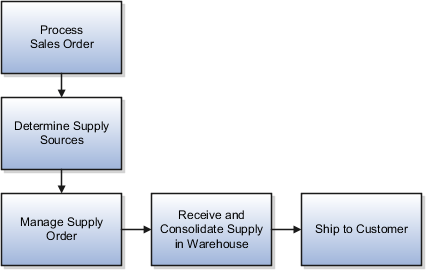
Back-to-back fulfillment is where supply is procured and then received at a warehouse only after an order is placed.
The supply is reserved against a sales order until shipping.
This process provides support to create and link supply after a sales order is entered and scheduled, allowing you to reduce your inventory while maintaining the ability to respond to customer demands.
You create supply for a back-to-back order using one or more of the following back-to-back flows:
* Buy: Procurement from an external supplier.
* Make: Production in an internal manufacturing facility (includes in-house manufacturing and contract manufacturing).
* Transfer: Transfer from another warehouse.
* On hand: Reservation of on-hand supply in the fulfillment organization.
Note: For information about back-to-back flows for contract manufacturing, see the Implementing Contract Manufacturing chapter in this guide.
After the supply is received into the fulfillment warehouse, the back-to-back order is ready for shipment to the customer.
Back-to-Back Fulfillment in Oracle Inventory Cloud
Back-to-back fulfillment in Oracle Inventory Cloud is a supply chain process where supply is created only after a sales order is placed. This process links the demand (customer sales order) directly to the supply (procurement, manufacturing, transfer, or existing stock), ensuring efficient inventory management while meeting customer demands. Below is a detailed step-by-step explanation of the back-to-back fulfillment process.
1. Overview of Back-to-Back Fulfillment Process
The back-to-back (B2B) fulfillment process ensures that supply is created only when a customer order is received.
Supply is specifically reserved for the sales order until shipping.
This process helps reduce excess inventory while maintaining responsiveness to customer needs.
It supports four fulfillment strategies: Buy, Make, Transfer, and On Hand Reservation.
Back-to-back fulfillment is mainly used in discrete manufacturing environments.
2. Step-by-Step Back-to-Back Fulfillment Process in Oracle Inventory Cloud
The back-to-back fulfillment process consists of the following key steps:
Step 1: Process Sales Order
The sales order is created in Oracle Order Management.
The order is validated for correctness (items, quantities, prices, etc.).
The order is scheduled, and the system checks if on-hand inventory is available.
If no inventory is available, Oracle Supply Chain Orchestration initiates a back-to-back fulfillment request.
Step 2: Determine Supply Sources
Oracle Supply Chain Orchestration (SCO) determines the best supply source based on predefined rules and sourcing strategies.
The system evaluates the following supply options:
Buy: Procurement from an external supplier.
Make: Internal manufacturing or contract manufacturing.
Transfer: Movement of inventory from another warehouse or distribution center.
On Hand: Direct reservation of existing inventory.
Step 3: Create and Manage the Supply Order
A supply order is generated in Oracle Supply Chain Orchestration.
The order is assigned to the appropriate fulfillment method:
Buy Order: A purchase requisition is created in Oracle Procurement Cloud, and the supplier provides the required goods.
Make Order: A work order is created in Oracle Manufacturing Cloud, and production begins.
Transfer Order: A transfer request is initiated in Oracle Inventory Management, moving stock from another warehouse.
On-Hand Reservation: If stock is available, it is reserved against the sales order.
Oracle monitors the progress of the supply order until completion.
Step 4: Receive and Consolidate Supply in Warehouse
Once supply is procured, manufactured, or transferred, it is received in the fulfillment warehouse.
If it is a purchased item, a receipt is created in Oracle Receiving.
If it is a manufactured item, the work order is completed, and inventory is updated.
The system ensures that the received inventory is linked to the original sales order.
Step 5: Ship to Customer
The sales order is released for fulfillment.
A Pick Release process is initiated in Oracle Inventory Cloud to allocate stock.
The order is picked, packed, and shipped using Oracle Shipping Execution.
A shipping confirmation is generated, and an invoice is created in Oracle Receivables.
The sales order is marked as complete, and the supply order is closed.
3. Detailed Explanation of Back-to-Back Fulfillment Flows
1. Buy Flow (Procurement)
If the supply is sourced externally, the system generates a purchase order in Oracle Procurement Cloud.
The supplier delivers the goods, which are received in Oracle Receiving.
The inventory is updated, and the order is prepared for shipment.
The sales order is fulfilled once the goods arrive.
2. Make Flow (Manufacturing)
If the item is manufactured internally, a work order is created in Oracle Manufacturing Cloud.
Production is executed, and the finished product is stored in inventory.
The system reserves the item against the sales order.
The order is fulfilled when the product is available.
3. Transfer Flow (Warehouse Transfer)
If the item is available in another warehouse, a transfer order is generated in Oracle Inventory Cloud.
The inventory is moved to the fulfillment warehouse.
Once received, the inventory is reserved and prepared for shipment.
The sales order is completed upon shipment.
4. On Hand Flow (Inventory Reservation)
If the item is available in stock, the system directly reserves it.
The order moves to the shipping phase without additional procurement or manufacturing steps.
The pick, pack, and ship process is executed, and the order is fulfilled.
4. Key Benefits of Back-to-Back Fulfillment in Oracle Inventory Cloud
Reduced Inventory Holding Costs -- Stock is only procured, manufactured, or transferred when needed.
Improved Order Fulfillment Efficiency -- Orders are linked directly to supply, reducing delays.
Better Customer Satisfaction -- Customers receive products faster with reduced stockouts.
Automated Supply Chain Coordination -- Oracle Cloud applications ensure seamless integration between order management, procurement, manufacturing, and inventory.
Flexibility in Sourcing -- Users can choose between procurement, manufacturing, transfer, or existing stock to fulfill demand efficiently.
5. Oracle Cloud Modules Involved in Back-to-Back Fulfillment
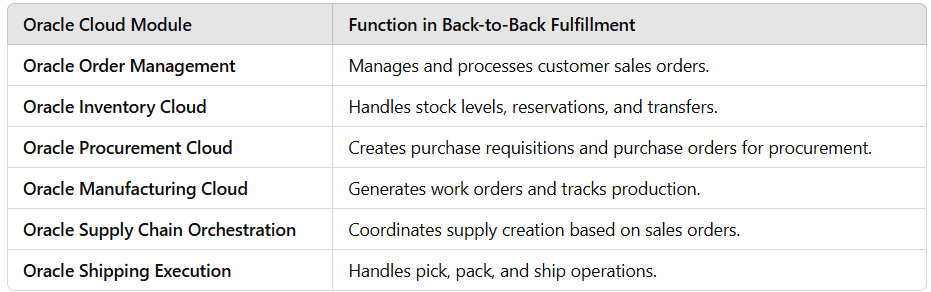
6. Example Use Case: Back-to-Back Fulfillment in Action
Scenario:
A customer places an order for 100 units of Item XYZ, but there is no stock available in the warehouse.
Solution:
The system checks stock availability and identifies that back-to-back fulfillment is required.
The sourcing rules determine that procurement from an external supplier is the best option.
A purchase requisition is created in Oracle Procurement Cloud.
The supplier delivers the items, and they are received into inventory.
The inventory is reserved against the sales order.
The shipping process is initiated, and the order is delivered to the customer.
The sales order and supply order are closed.
Your customer wants to implement locator control for a few subinventories in an inventory organization.Which configuration will help you achieve this?
Which two parameters affect the changes you can perform on an interorganization transfer order?
SIMULATION
How Back-to-Back Fulfillment Works
The back-to-back process flow is one in which specific sales order demand triggers supply creation and a link is established between the sales order and the supply.
An organization procures goods from an internal or external supplier or source to a specific warehouse from where you can combine those goods with others to create a single shipment to the customer.
Back-to-back supply processes are similar to regular supply processes that deliver supply to a warehouse except for one difference; the back-to-back supply is always reserved to an order management fulfillment line.
At a high level, you can think of back-to-back fulfillment as a three-step process:
1. Creation of a customer sales order (source of demand).
2. Creation and fulfillment of supply document (source of supply) to the fulfillment warehouse.
3. Shipment of sales order from the fulfillment warehouse to the customer.
However, the back-to-back flow is truly a highly integrated process flow involving several Oracle Fusion Cloud applications. The following figure shows the back-to-back process flow in detail. An explanation for each number follows the figure.
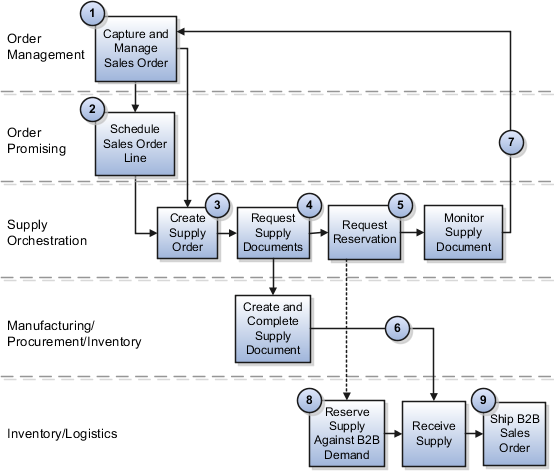
Back-to-Back Fulfillment: Detailed Simulation in Oracle Cloud
Introduction
Back-to-back (B2B) fulfillment is a process where supply is created only after a sales order is placed. The supply is specifically reserved for that order and remains linked until fulfillment is completed. Unlike regular inventory processes, back-to-back fulfillment ensures that supply is directly tied to a customer demand, optimizing inventory management while maintaining customer satisfaction.
Key Oracle Fusion Cloud Applications Involved
Back-to-back fulfillment integrates multiple Oracle Fusion Cloud applications, including:
Oracle Order Management (for sales order processing)
Oracle Procurement (for external supply sourcing)
Oracle Manufacturing (for in-house production)
Oracle Inventory Management (for warehouse operations and fulfillment)
Oracle Supply Chain Orchestration (for coordinating supply processes)
Oracle Shipping Execution (for shipping to customers)
Step-by-Step Back-to-Back Fulfillment Simulation
Step 1: Creation of a Customer Sales Order (Source of Demand)
A customer places an order for a product that is not available in stock.
The sales order is created in Oracle Order Management.
The system checks inventory availability in Oracle Inventory Cloud.
Since stock is unavailable, the Supply Chain Orchestration (SCO) module triggers a supply request.
The system determines the best supply source based on sourcing rules (Buy, Make, Transfer, or On-Hand Reservation).
The sales order line is marked for back-to-back fulfillment, and a supply order is generated.
System Action: The system reserves the sales order and waits for supply to be created.
Step 2: Creation and Fulfillment of Supply (Source of Supply to Warehouse)
Once the supply order is created, the system initiates one of the following supply methods:
Option 1: Buy (Procurement from Supplier)
The system generates a Purchase Requisition in Oracle Procurement Cloud.
The requisition is converted into a Purchase Order (PO) and sent to an external supplier.
The supplier fulfills the order and ships the goods to the fulfillment warehouse.
The warehouse receives the items using Oracle Receiving.
Option 2: Make (Manufacturing in-house or contract manufacturing)
The system generates a Work Order in Oracle Manufacturing Cloud.
The work order is scheduled, and production starts.
Once manufacturing is complete, the finished goods are moved to inventory.
Option 3: Transfer (Move from another warehouse or distribution center)
The system creates a Transfer Order in Oracle Inventory Cloud.
Stock is transferred from a different warehouse or location.
Once received, inventory is updated in the fulfillment warehouse.
Option 4: On-Hand (Reserve Existing Inventory)
If stock is available in the fulfillment warehouse, the system directly reserves the items.
No additional supply request is needed.
System Action: The system updates the sales order and marks it ready for fulfillment once supply is received.
Step 3: Shipment of Sales Order to the Customer
The order is released for picking in Oracle Inventory Cloud.
The picking process begins, and items are packed for shipping.
The shipping team processes the order using Oracle Shipping Execution.
A shipment confirmation is generated, and the order is shipped to the customer.
An invoice is created in Oracle Receivables.
The system marks the sales order as fulfilled and closed.
Final Action: The customer receives the order, and the back-to-back fulfillment process is completed.
Key Benefits of Back-to-Back Fulfillment in Oracle Cloud
Optimized Inventory Management -- Stock is acquired only when needed, reducing carrying costs.
Improved Order Fulfillment Efficiency -- Automated supply chain orchestration ensures smooth operations.
Enhanced Customer Satisfaction -- Orders are processed quickly, reducing delays and backorders.
Integrated Supply Chain Execution -- Oracle Fusion applications work together seamlessly.
Flexibility in Sourcing -- Businesses can choose procurement, manufacturing, transfers, or reservations based on demand.
Where do Oracle Supply Chain applications derive their legal entity information from?
Exam domains verified against: Official Oracle 1z0-1073-25 exam guide, last checked September 2026.
Learn the role of Item Organization, Cost Organization, and Inventory Organization in your Oracle Cloud setup. Enterprise Structure defines how your company is organized and how inventory is managed across different business units and accounting entities.
Understand Receipt Accounting, Cost Accounting, and Supply Chain Financial Orchestration. These features ensure that inventory costs are tracked accurately through every step of the supply chain.
Set up Subinventories, Locators, Units of Measure, Items, and Facilities Schedule. Configuration decisions here affect how inventory is stored physically and tracked in the system.
Work with Inventory Balances, Item Availability, and Inventory Reservations. You will create subinventory transfers, execute interorganization transfers, and manage receipts and picks using lot and serial controls.
Handle Consignment, Supply Chain Orchestration, and Project-specific Inventory Management. Learn Back-to-Back processes, item replacement, barcode scanning, and product recall execution.
Define PAR Locations and run Min-Max planning to keep inventory at optimal levels. Replenishment ensures stock is available when needed without overstocking.
Sample question from this domain above: Q3
Execute Cycle Counts and Physical Inventory using ABC analysis. Accurate inventory counts verify system records match physical stock and identify discrepancies early.
Understand how Inventory Cloud connects with Purchasing, Order Management, Manufacturing, and external systems. Integration points keep data consistent across your supply chain.
Identify business value from intelligent forecasting, mobile transaction capture, and automated workflows. These features improve operational efficiency in your inventory operations.
Enable Redwood user experience enhancements including responsive design and improved navigation. Redwood modernizes the interface while maintaining backward compatibility with existing configurations.
Common questions about the exam itself

