
Oracle 1Z0-1067-25 Practice Exam Questions & Answers
Oracle 1Z0-1067-25 Exam Details
Key details for this exam, checked against the published exam outline
- Exam Code
- 1Z0-1067-25
- Full Name
- Oracle Cloud Infrastructure 2025 Cloud Ops Professional
- Issuing Body
- Oracle
- Question Format (Our Bank)
- Multiple Choice
- Delivery
- Online proctored
- Full Question Set
- 93 questions Get All Questions
Free 1Z0-1067-25 Practice Questions
Each question shows the correct answer and an explanation of why it is right
Question 1 Domain 4 Implementing Reliability and Business Continuity
Which option is NOT a possible return value for an OCI health check?
Question 2 Domain 5 Managing Identity and Security
SIMULATION
Scenario: 1 (Create a reusable VCN Configuration with Terraform)
Scenario Description: (Hands-On Performance Exam Certification)
You'll launch and destroy a VCN and subnet by creating Terraform automation scripts and issuing commands in Code Editor. Next, you'll download those Terraform scripts and create a stack by uploading them into Oracle Cloud Infrastructure Resource Manager.
You'll then use that service to launch and destroy the same VCN and subnet.
In this scenario, you will:
a. Create a Terraform folder and file in Code Editor.
b. Create and destroy a VCN using Terraform.
c. Create and destroy a VCN using Resource Manager.
Create a Terraform Folder and File in Code Editor:
You'll create a folder and file to hold your Terraform scripts.
1. Log in to your tenancy in the Cloud Console and open the Code Editor, whose icon is at the top-right corner, to the right of the CLI Cloud Shell icon.
2. Expand the Explorer panel with the top icon on the left panel. It looks like two overlapping documents.
3. Expand the drop-down for your home directory if it isn't already expanded. It's okay if it is empty.
4. Create a new folder by clickingFile, thenNew Folder, and name it terraform-vcn.
5. Create a file in that folder by clickingFile, thenNew File, and name it vcn.tf.To make Code Editor, create the file in the correct folder, click the folder name in your home directory to highlight it.
6. First, you'll set up Terraform and the OCI Provider in this directory. Add these lines to the file:
terraform {required_providers {oci = {source = 'oracle/oci'version = '>=4.67.3'}}required_version = '>= 1.0.0'}
7. Save the changes by clickingFile, thenSave.
8. Now, run this code. Open a terminal panel in Cloud Editor by clickingTerminal, thenNew Terminal.
9. Use pwd to check that you are in your home directory.
10. Enter ls and you should see your terraform_vcn directory.
11. Enter cd terraform_vcn/ to change to that directory with.
12. Use terraform init to initialize this directory for Terraform.
13. Use ls -a and you should see that Terraform created a hidden directory and file.
Create and Destroy a VCN Using Terraform
You'll create a Terraform script that will launch a VCN and subnet.
You'll then alter your script and create two additional files that will apply a compartment OCID variable to your Terraform script.
Write the Terraform
1. Add the following code block to your Terraform script to declare a VCN, replacing<your_compartment_ocid>with the proper OCID. The onlystrictlyrequired parameter is the compartment OCID, but you'll add more later.
If you need to retrieve your compartment OCID, navigate toIdentity & Security, thenCompartments. Find your compartment, hover the cursor over the OCID, and clickCopy.
resource 'oci_core_vcn' 'example_vcn' {compartment_id = '<your_compartment_ocid>'}
This snippet declares aresource blockof typeoci_core_vcn. The label that Terraform will use for this resource isexample_vcn.
2. In the terminal, run terraform plan, and you should see that Terraform would create a VCN. Because most of the parameters were unspecified, terraform will list their values as ''(known after apply).'' You can ignore the ''-out option to save this plan'' warning.
Note that terraform plan parses your Terraform configuration and creates an execution plan for the associated stack, while terraform apply applies the execution plan to create (or modify) your resources.
3. Add a display name and CIDR block (the bolded portion) to the code. Note that we want to set thecidr_blocksparameter, rather thancidr_block(which is deprecated).
resource 'oci_core_vcn' 'example_vcn' {compartment_id = '<your_compartment_ocid>'display_name = 'VCN-01'cidr_blocks = ['10.0.0.0/16']}
4. Save the changes and run terraform plan again. You should see the display name and CIDR block reflected in Terraform's plan.
5. Now add a subnet to this VCN. At the bottom of the file, add the following block:
resource 'oci_core_subnet' 'example_subnet' {compartment_id = '<your_compartment_ocid>'display_name = 'SNT-01'vcn_id = oci_core_vcn.example_vcn.idcidr_block = '10.0.0.0/24'}
Note the line where we set the VCN ID. Here we reference the OCID of the previously declared VCN, using the name we gave it to Terraform: example_vcn. This dependency makes Terraform provision the VCN first, wait for OCI to return the OCID, then provision the subnet.
6. Run terraform plan to see that it will now create a VCN and subnet.
Add Variables
7. Before moving on there are a few ways to improve the existing code. Notice that the subnet and VCN both need the compartment OCID. We can factor this out into a variable. Create a file named variables.tf
8. In variables.tf, declare a variable named compartment_id:
variable 'compartment_id' {type = string}
9. In vcn.tf, replace all instances of the compartment OCID with var.compartment_id as follows:
terraform {required_providers {oci = {source = 'oracle/oci'version = '>=4.67.3'}}required_version = '>= 1.0.0'}resource 'oci_core_vcn' 'example_vcn' {compartment_id = var.compartment_iddisplay_name = 'VCN-01'cidr_blocks = ['10.0.0.0/16']}resource 'oci_core_subnet' 'example_subnet' {compartment_id = var.compartment_iddisplay_name = 'SNT-01'vcn_id = oci_core_vcn.example_vcn.idcidr_block = '10.0.0.0/24'}
Save your changes in both vcn.tf and variables.tf
10. If you were to run terraform plan or apply now, Terraform would see a variable and provide you a prompt to input the compartment OCID. Instead, you'll provide the variable value in a dedicated file. Create a file named exactly terraform.tfvars
11. Terraform will automatically load values provided in a file with this name. If you were to use a different name, you would have to provide the file name to the Terraform CLI. Add the value for the compartment ID in this file:
compartment_id = '<your_compartment_ocid>'
Be sure to save the file.
12. Run terraform plan and you should see the same output as before.
Provision the VCN
13. Run terraform apply and confirm that you want to make the changes by enteringyesat the prompt.
14. Navigate to VCNs in the console. Ensure that you have the right compartment selected. You should see your VCN. Click its name to see the details. You should see its subnet listed.
Terminate the VCN
15. Run terraform destroy. Enteryesto confirm. You should see the VCN terminate. Refresh your browser if needed.
Create and Destroy a VCN Using Resource Manager (You will most probably be tested on this in the actual certification)
We will reuse the Terraform code but replace the CLI with Resource Manager.
1. Create a folder named terraform_vcn on your host machine. Download the vcn.tf, terraform.tfvars, and variables.tf files from Code Editor and move them to the terraform_vcn folder to your local machine. To download from Code Editor, right-click the file name in the Explorer panel and selectDownload. You could download the whole folder at once, but then you would have to delete Terraform's hidden files.
Create a Stack
2. Navigate to Resource Manager in the Console's navigation menu underDeveloper Services. Go to theStackspage.
3. ClickCreate stack.
a. The first page of the form will be for stack information.
1) For the origin of the Terraform configuration, keepMy configurationselected.
2) UnderStack configuration, upload your terraform_vcn folder.
3) UnderCustom providers, keepUse custom Terraform providersdeselected.
4) Name the stack and give it a description.
5) Ensure that your compartment is selected.
6) ClickNext.
b. The second page will be for variables.
1) Because you uploaded a terraform.tfvars file, Resource Manager will auto-populate the variable for compartment OCID.
2) ClickNext.
c. The third page will be for review.
1) KeepRun applydeselected.
2) ClickCreate. This will take you to the stack's details page.
Run a Plan Job
4. The stack itself is only a bookkeeping resource---no infrastructure was provisioned yet. You should be on the stack's page. ClickPlan. A form will pop up.
a. Name the job RM-Plan-01.
b. ClickPlanagain at the bottom to submit a job for Resource Manager to run terraform plan. This will take you to the job's details page.
5. Wait for the job to complete, and then view the logs. They should match what you saw when you ran Terraform in Code Editor.
Run an Apply Job
6. Go back to the stack's details page (use the breadcrumbs). ClickApply. A form will pop up.
a. Name the job RM-Apply-01.
b. UnderApply job plan resolution, select the plan job we just ran (instead of ''Automatically approve''). This makes it execute based on the previous plan, instead of running a new one.
c. ClickApplyto submit a job for Resource Manager to run terraform apply. This will take you to the job's details page.
7. Wait for the job to finish. View the logs and confirm that it was successful.
View the VCN
8. Navigate to VCNs in the Console through the navigation menu underNetworkingandVirtual Cloud Networks.
9. You should see the VCN listed in the table. Click its name to go to itsDetailspage.
10. You should see the subnet listed.
Run a Destroy Job
11. Go back to the stack's details page inResource Manager.
12. ClickDestroy. ClickDestroyagain on the menu that pops up.
13. Wait for the job to finish. View the logs to see that it completed successfully.
14. Navigate back to VCNs in the Console. You should see that it has been terminated.
15. Go back to the stack in Resource Manager. Click the drop-down forMore actions. SelectDelete stack. Confirm by selectingDelete.
Question 3 Domain 2 Utilizing Configuration Management Tools
Recently, your e-commerce web application has been receiving significantly more traffic than usual. Users are reporting they often encounter a 503 Service Error when trying to access your site. Sometimes the site is very slow. You check your instance pool configuration to con-firm that the maximum number of instances is configured to allow 20 compute instances. Currently, 14 compute instances have been provisioned by the instance pool. You also confirm that current CPU utilization across all hosts exceeds the scale-out threshold you set in your auto-scaling policy. However, the instance pool is not provisioning any new instances. What can you check to determine why the application is NOT functioning properly? (Choose the best answer.)
Get the complete 1Z0-1067-25 question set
$20$40
Question 4 Domain 3 Optimizing Cost and Performance
You are an admin of an OCI tenancy. To save cost, you want to restrict the amount of OCPUs that can be provisioned in each compartment. Which will allow this?
Question 5 Domain 5 Managing Identity and Security
You have created a geolocation steering policy in the Oracle Cloud Infrastructure (OCI) Traffic Management service, with this configuration:
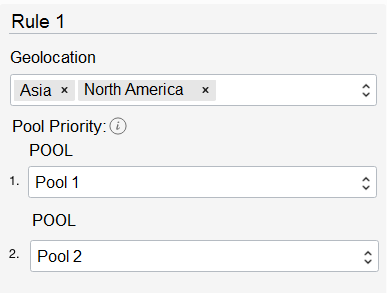
What happens to requests that originate in Africa? (Choose the best answer.)
Question 6 Domain 5 Managing Identity and Security
The general syntax for an IAM policy is: Allow
Question 7 Domain 1 Deploying and Managing Resources
One of your development teams has asked for your help to standardize the creation of several compute instances that must be provisioned each day of the week. You initially write several Command Line Interface (CLI) commands with all appropriate configuration parameters to achieve this task later determining this method lacks flexibility. Which command generates a JSON-based template that Oracle Cloud Infrastructure (OCI) CLI can use to provision these instances on a regular basis? (Choose the best answer.)
What the Oracle 1Z0-1067-25 Exam Covers
Exam domains verified against the Official Oracle 1Z0-1067-25 exam guide, last checked November 2026.
Domain 1 Deploying and Managing Resources
Deploy core OCI services manually through the console and use the OCI CLI to query, provision and destroy resources. Apply infrastructure as code tools to deploy replicable stacks and automate resource provisioning across environments.
Sample question from this domain above Q7
Domain 2 Utilizing Configuration Management Tools
Use configuration management tools to standardise resource setup and apply cloud-init to initialise compute instances with specific configurations. Automate the configuration and deployment of instances at scale to reduce manual effort.
Sample question from this domain above Q3
Domain 3 Optimizing Cost and Performance
Implement cost optimization strategies and apply performance tuning techniques to OCI resources. Use budgets and compartment quotas to monitor spending and prevent resource overages that drive costs.
Sample question from this domain above Q4
Domain 4 Implementing Reliability and Business Continuity
Implement scalability and elasticity to handle varying workloads and configure automated failover mechanisms for high availability. Design data retention strategies to meet compliance requirements and support disaster recovery plans.
Sample question from this domain above Q1
Domain 5 Managing Identity and Security
Implement tenancy security posture through network segmentation and security group configuration. Manage secrets and encryption keys and apply least-privilege access control policies to limit user and service permissions.
Domain 6 Implementing Observability
Implement Metric Query Language to create custom metrics and visualizations from OCI data. Configure alarms and notifications to alert teams to issues and set up health checks to monitor resource and application availability.
1Z0-1067-25 Exam FAQ
Common questions about the exam itself
Is the 1Z0-1067-25 exam a hands-on performance exam or just multiple choice questions?
What background do I need before taking 1Z0-1067-25?
How long should I spend preparing for the 1Z0-1067-25 exam?
What is the most challenging objective area for 1Z0-1067-25 candidates?
How is exam day structured for the 1Z0-1067-25 performance exam?
What happens if I fail the 1Z0-1067-25 exam? Can I retake it?
How long is the Cloud Ops Professional certification valid after I pass?
Does 1Z0-1067-25 count toward a larger Oracle Cloud certification track?
What cloud operations role does the 1Z0-1067-25 certification prepare me for?
Other Oracle Exams
Free practice questions for more Oracle certification exams