
Free Oracle 1Z0-1054-25 Exam Practice Questions & Explanations
Prepared & Reviewed by the ValidExamDumps Editorial Team
At ValidExamDumps, we consistently monitor updates to the Oracle 1Z0-1054-25 exam questions by Oracle. Whenever our team identifies changes in the exam questions, objectives, focus areas or requirements, We immediately update our exam questions for both PDF and online practice exams. This commitment ensures our customers always have access to the most current and accurate questions. By preparing with these up to date and 100% exam domain coverage questions, our customers can successfully pass the Oracle Fusion Cloud Financials: General Ledger 2025 Implementation Professional exam on their first attempt without needing additional materials or study guides.
Other certification materials providers often include outdated or removed questions by Oracle in their 1Z0-1054-25 exam. These outdated questions lead to customers failing their Oracle Fusion Cloud Financials: General Ledger 2025 Implementation Professional exam. In contrast, we ensure our questions bank includes only precise and up-to-date questions. Our main priority is your success in the Oracle 1Z0-1054-25 exam, not profiting from selling obsolete exam questions in PDF or Online Practice Test.
On a primary ledger in Use system options close section, the following field has been selected:
'Prevent General Ledger Period Close When Open Subledger Periods Exist'.
What three exceptions will prevent closing of the accounting period?
You have a requirement to override the Period End or Period Average rate that is used for translating several accounts at month end. How can you achieve this?
SIMULATION
Challenge 2
Manage Shorthand Aliases
Scenario
Your client intends to utilize the Shorthand Alias feature and would like to see how the aliases will appear when entering transactions.
Task 2
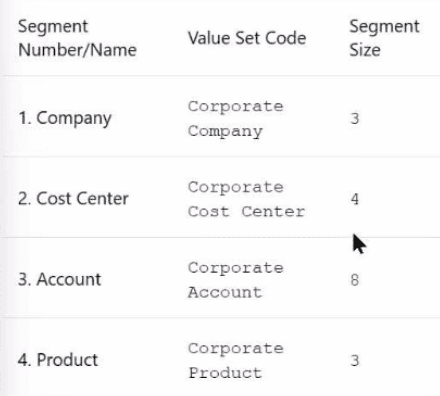
Create a shorthand alias for the US Chart of Accounts to record Revenue Domestic for Supremo Fitness, Line of Business 2, and US Operations Cost Center.
Note:
. Prefix your alias name with 07, where 07 is
your exam ID.
. There is no Product or Intercompany
impact.
Here are the steps you need to follow:
In the Setup and Maintenance work area, go to the following:
Offering: Financials
Functional Area: Financial Reporting Structures
Task: Manage Shorthand Aliases
Select the chart of accounts that you want to create the alias for. In this case, it is the Corporate chart of accounts.
Click on the Add Row icon to create a new alias. Enter the following information:
Alias Name: RevDom
Account Template: 101-2000-400000-000-000-000
Description: Revenue Domestic for Supremo Fitness, Line of Business 2, and US Operations Cost Center
Enabled: Yes
Start Date: Today's date
End Date: Blank
Click on the Save and Close button to save the alias.
You have successfully created a shorthand alias for the US Chart of Accounts. For more information, you can refer to the following resources:
Account Aliases
Enter a GL Account Alias
Short Hand Alias in Fusion Financials Key Flexfield
How to Enable Account Shorthand Aliases
Which two statements are true regarding the Translation process? (Choose two.)
According to Oracle documentation1, the following statements are true regarding the Translation process: Any resulting offset from the translation is entered in the Cumulative Translation Adjustment account, and if necessary, before submitting the Translation process, the Revaluation process should be completed. The Translation process enables you to translate balances from one currency to another for reporting purposes. The Translation process calculates any difference between the translated balance and the entered balance and posts it to the Cumulative Translation Adjustment account. The Revaluation process enables you to adjust balances denominated in foreign currencies to reflect current exchange rates. The Revaluation process should be completed before the Translation process to ensure that the balances are accurate. Therefore, options A and B are correct. Option C is incorrect because the Translation process should be run after posting Period Close adjustment entries. Option D is incorrect because the Translation process can be used for translating the balances of primary ledgers, secondary ledgers, and reporting currencies. Option E is incorrect because the Translation process can be used to translate both balance sheet accounts and income statement accounts.
You are trying to run a Financial Reporting Web Studio report from Financial Reporting Center. However, it is not appearing as a choice.
Which are two reasons for this? (Choose two.)
According to Oracle documentation, two reasons why a Financial Reporting Web Studio report may not appear as a choice in Financial Reporting Center are: You have not saved it in the Shared Folder/Custom/Financials directory, and you have not uploaded it to Financial Reporting Center. Financial Reporting Web Studio enables you to design and generate reports with grids, charts, images, and text boxes using data from various sources. Financial Reporting Center enables you to access and run all types of reports from a single user interface. To make a Financial Reporting Web Studio report available in Financial Reporting Center, you must save it in the Shared Folder/Custom/Financials directory and upload it to Financial Reporting Center using Workspace. Therefore, options A and C are correct. Option B is incorrect because saving it in the MyFolders directory does not make it available in Financial Reporting Center. Option D is incorrect because downloading it to your local drive does not make it available in Financial Reporting Center.