Key details for this exam, checked against the published exam outline
Each question shows the correct answer and an explanation of why it is right
Which three are prerequisites for using Data Guard Broker?
Data Guard Broker is a management tool that simplifies the configuration, management, and monitoring of Data Guard environments. The prerequisites for using Data Guard Broker include:
The primary and standby databases must run the same version of the Oracle Database server (A): This ensures compatibility between the primary and standby databases and enables seamless role transitions and data synchronization.
Network connectivity to the primary database instance must be defined on the servers hosting the standby database instances (B): Proper network connectivity is essential for communication between the primary and standby databases, allowing for the replication of data and the synchronization of changes.
If any database in the configuration is a RAC database, then the broker configuration files must reside in shared storage accessible by all database instances for all databases in the broker configuration (D): In Real Application Clusters (RAC) environments, shared storage ensures that all instances of the RAC database can access the broker configuration files, facilitating the management of the Data Guard environment across all instances. Reference:
Oracle Data Guard Broker documentation
Oracle Real Application Clusters Administration and Deployment Guide
A customer has these requirements for their proposed Data Guard implementation:
1. Zero data loss must still be guaranteed through the loss of any one configuration component.
2. The primary database must be protected against a regional disaster.
3. Performance overheads on the primary should be minimized as much as possible given these requirements.
4. Downtime on the primary database for any reason must be kept to a minimum.
Components referred to in the broker commands are:
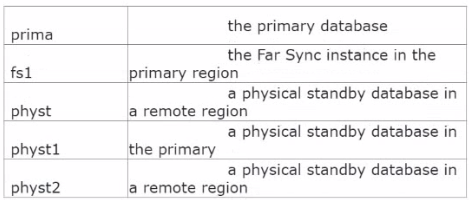
A)

B)

C)

D)

According to the requirements stated:
Zero data loss must be guaranteed despite the loss of any one component: This necessitates synchronous redo transport to at least one standby database (for no data loss).
The primary database must be protected against a regional disaster: This implies that there must be a standby database in a different region.
Performance overhead on the primary should be minimized: This suggests that asynchronous transport should be used where possible to reduce the performance impact on the primary.
Downtime on the primary for any reason must be kept to a minimum: This is indicative of a requirement for a fast failover mechanism, possibly with a fast-start failover (FSFO) and high availability.
Given these requirements, the appropriate option that fulfills all these is:
Option C, where 'prima' is the primary database, 'fs1' is the Far Sync instance in the primary region, and 'physt' and 'physt2' are physical standby databases in the primary and remote regions, respectively. In this configuration:
'prima' is set to send redo to 'fs1' using SYNC to guarantee zero data loss.
'fs1' is set to send redo to 'physt' (local standby) using FASTSYNC, which is a low-latency synchronous transport that is optimized for performance.
The Data Guard configuration's protection mode is set to MAXAVAILABILITY to provide the highest level of data protection that is possible without compromising the availability of the primary database.
This configuration ensures that there is zero data loss even if the primary region is completely lost, maintains performance by limiting the synchronous transport to the local region with a Far Sync instance, and has a remote standby database in a separate region for disaster recovery purposes.
Oracle Data Guard Concepts and Administration
Oracle Data Guard Broker documentation
Which four factors can influence the rate of SQL apply on a logical standby database?
The rate of SQL apply on a logical standby database can be influenced by:
A: The number of PREPARER processes (which seems to be a typographical error and should read as PREPARER or similar) which prepare the redo data for the applier processes.
B: The number of coordinator processes on the standby database instance which coordinate the SQL apply activities.
C: The number of full table scans performed by SQL apply since full table scans can be resource-intensive and slow down the apply rate.
E: The number of applier processes which apply the redo data to the logical standby database.
Option D is incorrect as the size of the undo tablespace on the logical standby database is more likely to affect the SQL apply lag rather than the rate of SQL apply.
Option F is incorrect because the size of the shared pool would typically not influence the rate of SQL apply. The shared pool is more related to the caching of shared SQL and PL/SQL code and control structures.
Which three statements are true....... With no Oracle Streams or Goldengate configured?
C . The LGWR (Log Writer) process is responsible for writing redo entries from the redo log buffer to the online redo log files on the primary database. This is a fundamental process in the Oracle Database architecture, ensuring that all changes made to the database are captured for purposes such as recovery, replication, and high availability.
D . Real-time apply on a logical standby database requires standby redo log files. The standby redo log files are used to store redo data received from the primary database before it is applied to the logical standby database. This enables the logical standby to apply changes as they are received, without waiting for the current redo log file to be archived.
E . Similarly, on a physical standby database, standby redo log files are used for real-time apply. They store redo data from the primary database, allowing the physical standby to apply redo data concurrently as it is received, rather than waiting for redo log files to be archived. This capability is crucial for maintaining a physical standby database that is closely synchronized with the primary database with minimal lag.
These functionalities are integral to Oracle Data Guard configurations and are not dependent on Oracle Streams or Oracle GoldenGate, which are separate technologies for data replication and integration.
You must configure on Oracle Data .......
1. A primary database
2. Three Physical Standby Databases
Examine these requirements:
A designated physical standby database should become the primary database automatically whenever the primary database fails.
2. The chosen protection mode should provide the highest level of protection possible without violating the other requirement.
Which redo transport mode and protection mode would you configure to meet these requirements?
To meet the requirements of automatic failover and the highest level of protection without data loss, the combination of FASTSYNC redo transport mode and Maximum Availability protection mode is appropriate. FASTSYNC ensures that the performance impact on the primary database is minimized while still providing synchronous transport. Maximum Availability protection mode offers the highest level of data protection without compromising the availability of the primary database. In case of a network failure or a standby failure, the primary will not halt, avoiding disruption to the primary database operations.
Reference Oracle Data Guard Concepts and Administration guide, which details the different protection modes and their respective levels of data protection and impact on database operations.
Which three are true regarding prerequisites for a logical standby database as a disaster recovery solution?
Exam domains verified against: Official Oracle 1Z0-076 exam guide, last checked October 2026.
Understand the architecture of Oracle Data Guard, including the role of primary and standby databases. Learn the differences between physical and logical standby databases and the benefits of implementing Data Guard for data protection and disaster recovery.
Master Oracle Net Services fundamentals and how to configure networking for Data Guard. Implement best-practice solutions to ensure reliable communication between primary and standby databases during role transitions and failovers.
Configure the primary database and Oracle Net Services for physical standby creation. Use RMAN commands including DUPLICATE TARGET DATABASE FOR STANDBY FROM ACTIVE DATABASE and explore DBCA as an alternative method.
Sample question from this domain above: Q1
Perform real-time queries on physical standby databases to access data. Understand which workloads are supported in Active Data Guard read-only instances and how to leverage them for reporting and analytics.
Sample question from this domain above: Q5
Create a snapshot standby database to provide a temporary, updatable copy of a physical standby. Learn how to convert the snapshot standby back to a physical standby when finished testing or evaluation.
Determine the appropriate scenarios for creating a logical standby database. Create the logical standby and manage SQL Apply filtering to control which changes are applied from the primary.
Understand the Data Guard broker architecture and its components. Learn the benefits of using the broker and the types of configurations it supports for managing Data Guard environments.
Create and manage Data Guard broker configurations using DGMGRL. Explore the new broker commands and how to establish centralized management of your Data Guard setup.
Use Enterprise Manager and DGMGRL to monitor your Data Guard configuration. Apply the new Data Guard Broker VALIDATE commands to check configuration health and identify potential issues.
Understand the three data protection modes available in Data Guard. Learn how to change the data protection mode to balance between data safety and performance requirements.
Sample question from this domain above: Q4
Master switchover and failover operations to transition the primary role between databases. Understand how to keep physical standby sessions active during role transitions and manage the database roles appropriately.
Configure Flashback Database to recover to a point in time. Learn the advantages of Flashback in Data Guard environments and how replicated restore points and automatic flashback functionality work.
Configure fast-start failover to automate the failover process when the primary becomes unavailable. Manage the observer, view configuration status, and manually reinstate the primary database when needed.
Use RMAN to perform backups on physical standby databases and offload backup operations from the primary. Enable block change tracking on standby databases and perform network-based recovery using synchronization commands.
Apply patches and upgrades to Data Guard environments using traditional methods. Perform rolling upgrades to minimize downtime by upgrading the standby first, then switching roles and upgrading the former primary.
Monitor configuration performance and optimize redo transport and SQL Apply operations. Use diagnostic tools available in Active Data Guard environments and understand tunable automatic outage resolution.
Identify which primary database structural changes require manual intervention at the physical standby. Manage tablespace additions, datafile changes and other schema modifications appropriately.
Sample question from this domain above: Q2
Use Far Sync instances to extend zero data loss protection across distant locations. Create Far Sync instances using RMAN and configure real-time cascading to replicate data through multiple standby databases.
Configure client connectivity options for Data Guard environments including automatic failover redirection. Implement Application Continuity to ensure that client sessions survive role transitions seamlessly.
Common questions about the exam itself

