At ValidExamDumps, we consistently monitor updates to the Oracle 1Z0-066 exam questions by Oracle. Whenever our team identifies changes in the exam questions,exam objectives, exam focus areas or in exam requirements, We immediately update our exam questions for both PDF and online practice exams. This commitment ensures our customers always have access to the most current and accurate questions. By preparing with these actual questions, our customers can successfully pass the Oracle Database 12c: Data Guard Administrator exam on their first attempt without needing additional materials or study guides.
Other certification materials providers often include outdated or removed questions by Oracle in their Oracle 1Z0-066 exam. These outdated questions lead to customers failing their Oracle Database 12c: Data Guard Administrator exam. In contrast, we ensure our questions bank includes only precise and up-to-date questions, guaranteeing their presence in your actual exam. Our main priority is your success in the Oracle 1Z0-066 exam, not profiting from selling obsolete exam questions in PDF or Online Practice Test.
Which three statements are true about Data Guard database modes and states? (Choose three.)
This is accomplished by shipping redo directly from the primary database log
References:
https://www.oracle.com/technetwork/database/features/availability/maa-wp-dr-dbm-130065.pdf
https://oracle-base.com/articles/11g/data-guard-setup-11gr2
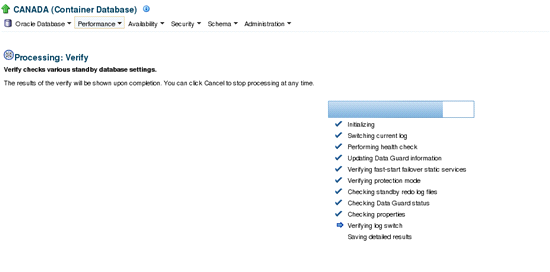
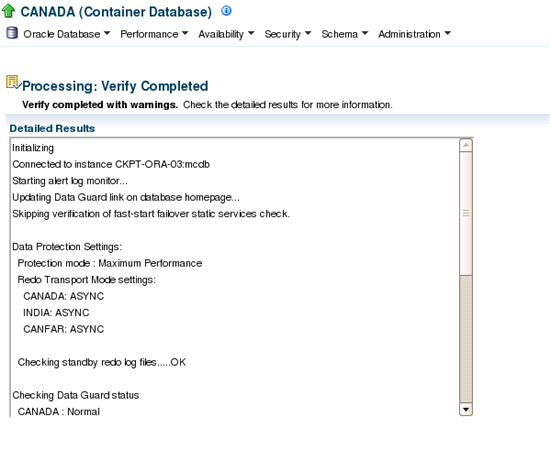
Which three are true regarding the Enterprise Manager Cloud Control Data Guard configuration verification wizard? (Choose three.)
Usually Data Guard configuration verification is kind of health check of Data Guard, it does many things like performing complete health check, verifying the FSFO status, determination of protection mode, availability of standby redo log files, Data Guard status whether valid or not, After the log switch whether the sequence is shipping to standby or not and Data Guard properties. To initiate Data Guard verification Navigation is 'Availability --> Verify Data Guard Configuration'.
References:
Which two are prerequisites for creating a standby database using Enterprise Manager cloud control? (Choose two.)
A: Before you create a standby database you must first ensure the primary database is properly configured.
Place the primary database in FORCE LOGGING mode.
B: If archiving is not enabled, issue the following SQL statements to put the primary database in ARCHIVELOG mode and enable automatic archiving:
SQL> SHUTDOWN IMMEDIATE;
SQL> STARTUP MOUNT;
SQL> ALTER DATABASE ARCHIVELOG;
SQL> ALTER DATABASE OPEN;
References:
https://docs.oracle.com/database/121/SBYDB/create_ps.htm#SBYDB4719
Examine the Data Guard configuration:
DGMGRL> show configuration;
Configuration -- Animals
Protection Mode: MaxPerformance
Databases:
dogs- Primary database
sheep- Physical standby database
cats- Snapshot standby database
Fast-Start Failover: DISABLED
Configuration Status:
SUCCESS
You receive an error while attempting to raise the protection mode to Maximum Protection:
DGMGRL> edit configuration set protection mode as maxprotection;
Error: ORA-16627: operation disallowed since no standby databases would remain to support protection mode
Failed.
What can you conclude based on this error?
Sheep is the Physical standby database.
Error cause: The broker rejects an attempt to change the configuration's overall protection mode since it could not find any online, enabled standby databases that support the proposed protection mode.
Action: If changing the overall protection mode, confirm that at least one standby database satisfies the new protection mode.
You are required to change the Data Guard Configuration protection mode from MAXPERFORMANCE to MAXAVAILABILITY using Enterprise Manager Cloud Control.
Which two are true about this change? (Choose two.)
Maximum Availability
This protection mode provides the highest level of data protection that is possible without compromising the availability of a primary database. Transactions do not commit until all redo data needed to recover those transactions has been written to the online redo log and to at least one synchronized standby database.
If the primary database cannot write its redo stream to at least one synchronized standby database, it operates as if it were in maximum performance mode to preserve primary database availability until it is again able to write its redo stream to a synchronized standby database.

