Key details for this exam, checked against the published exam outline
Each question shows the correct answer and an explanation of why it is right
A company needs to block access to their instance of Microsoft 365 from unmanaged devices. They have configured Reverse Proxy and have also created a policy that blocks login activity for the AD group "marketing-users" for the Reverse Proxy access method. During UAT testing, they notice that access from unmanaged devices to Microsoft 365 is not blocked for marketing users.
What is causing this issue?
The issue is likely caused by a missing group name in the SAML response (A). When access to Microsoft 365 from unmanaged devices is not blocked as expected, despite having a policy in place, it often indicates that the SAML assertion is not correctly identifying the user as a member of the restricted group. In this case, the ''marketing-users'' group name should be present in the SAML response to enforce the policy that blocks login activity for this group. If the group name is missing, the policy will not apply, and users will not be blocked as intended.
You are attempting to merge two Advanced Analytics reports with DLP incidents: Report A with 3000 rows and Report B with 6000 rows. Once merged, you notice that the merged report is missing a significant number of rows.
What is causing this behavior?
When merging two Advanced Analytics reports in Netskope, if the merged report is missing rows, it is likely due to viewing limits within the system. Netskope's Advanced Analytics platform has limitations on the number of rows that can be viewed at once, which can result in missing data when dealing with large reports. This viewing limit ensures performance and manageability of the data within the system.
Your company has a large number of medical forms that are allowed to exit the company when they are blank. If the forms contain sensitive data, the forms must not leave any company data centers, managed devices, or approved cloud environments. You want to create DLP rules for these forms.
Which first step should you take to protect these forms?
The first step to protect the medical forms containing sensitive data is to create fingerprints of all forms using Netskope Secure Forwarder. Fingerprints are unique identifiers that can be used to detect when a form contains sensitive data. By creating fingerprints, you can set up DLP (Data Loss Prevention) rules that will allow blank forms to exit the company but will prevent forms with sensitive data from leaving the protected environments. This method ensures that only forms without sensitive information are allowed to be shared externally.
You created a Real-time Protection policy that blocks all activities to non-corporate S3 buckets, but determine that the policy is too restrictive. Specifically, users are complaining that normal websites have stopped rendering properly.
How would you solve this problem?
Review the exhibit.
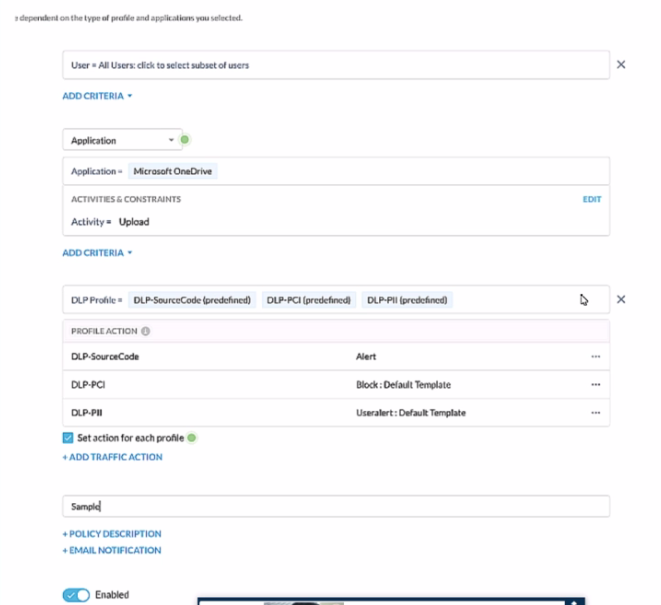
A user has attempted to upload a file to Microsoft OneDrive that contains source code with Pll and PCI data.
Referring to the exhibit, which statement Is correct?
In the given scenario, a user is attempting to upload a file containing sensitive PII and PCI data to Microsoft OneDrive. The Netskope Security Cloud provides real-time data and threat protection when accessing cloud services, websites, and private apps from anywhere, on any device. Based on the exhibit provided, different DLP (Data Loss Prevention) profiles are triggered - DLP-SourceCode, DLP-PCI, and DLP-PII. Each of these profiles has specific actions associated with them; for instance, an alert is generated for Source Code while blocking actions are initiated for PCI and PII data. Since multiple DLP profiles are triggered due to the sensitive nature of the content in the file being uploaded, separate incidents will be generated for each matching profile ensuring comprehensive security coverage and incident reporting.
Review the exhibit.
You work for a medical insurance provider. You have Netskope Next Gen Secure Web Gateway deployed to all managed user devices with limited block policies. Your manager asks that you begin blocking Cloud Storage applications that are not HIPAA compliant Prior to implementing this policy, you want to verity that no business or departmental applications would be blocked by this policy.
Referring to the exhibit, which query would you use in the Edit Widget window to narrow down the results?
Exam domains verified against: Official Netskope NSK300 exam guide, last checked September 2026.
Understand cloud security threats, risks, and best practices relevant to cloud environments. Learn about compliance requirements and the strategies to address potential cloud security challenges. Master the shared responsibility model and how cloud-native threats differ from traditional on-premises threats.
Build and configure Netskope to meet specific security requirements. Learn SaaS access control, data security, and how to extend protection to cloud workloads. Tailor Netskope's security measures to align with organizational needs and scenarios.
Detect and mitigate sophisticated threats using Netskope's advanced capabilities. Learn how the platform identifies malware infections and cloud data breaches. Understand threat detection methods, behavior analysis, and incident response approaches.
Create and manage granular security rules for cloud resources. Demonstrate proficiency in defining and enforcing policies that govern access to sensitive data and applications. Apply principles of least privilege and implement multi-layered security controls.
Conduct threat hunting and incident response within cloud environments. Use Netskope's advanced features for proactive threat hunting and thorough investigations. Orchestrate appropriate response strategies to minimize potential impact and disruption.
Monitor the Netskope platform's health and performance. Identify potential issues and resolve them successfully. Become familiar with diagnostic tools, log analysis, and best practices for troubleshooting common Netskope deployment issues.
Sample question from this domain above: Q1
Common questions about the exam itself

