At ValidExamDumps, we consistently monitor updates to the Microsoft PL-100 exam questions by Microsoft. Whenever our team identifies changes in the exam questions,exam objectives, exam focus areas or in exam requirements, We immediately update our exam questions for both PDF and online practice exams. This commitment ensures our customers always have access to the most current and accurate questions. By preparing with these actual questions, our customers can successfully pass the Microsoft Power Platform App Maker exam on their first attempt without needing additional materials or study guides.
Other certification materials providers often include outdated or removed questions by Microsoft in their Microsoft PL-100 exam. These outdated questions lead to customers failing their Microsoft Power Platform App Maker exam. In contrast, we ensure our questions bank includes only precise and up-to-date questions, guaranteeing their presence in your actual exam. Our main priority is your success in the Microsoft PL-100 exam, not profiting from selling obsolete exam questions in PDF or Online Practice Test.
You need to implement the change requested by the operations manager.
Which control should you use?
BF70D5D
Scenario: The operations manager asks that the time tracking app display the employee's photo once they have scanned their badge.
Image control in Power Apps is a control that shows an image from, for example, a local file or a data source.
https://docs.microsoft.com/en-us/powerapps/maker/canvas-apps/controls/control-image
You create a canvas app named Hardware Order that suggests computer hardware to customers.
A value must be entered for the EmployeeID field when creating a new order if the value in the OrderType field does not contain the prefix test.
You need to configure the business rule.
Which two actions should you perform? Each correct answer presents part of the complete solution.
NOTE: Each correct selection is worth one point.
Note: This question is part of a series of questions that present the same scenario. Each question in the series contains a unique solution that might meet the stated goals. Some question sets might have more than one correct solution, while others might not have a correct solution.
After you answer a question in this section, you will NOT be able to return to it. As a result, these questions will not appear in the review screen.
A company is deploying Microsoft Power Platform components to streamline a job candidate screening process.
The human resources (HR) representatives of the company plan to attend school career fairs. The HR representatives must qualify and enter potential job candidates into a Power Apps app. The HR representatives must enter the following information for each candidate:
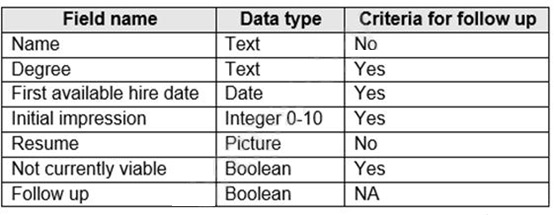
If a candidate is currently unqualified for a job position but would eventually qualify based on follow-up criteria, the follow-up checkbox must be selected or cleared in the system immediately.
The company plans to create a similar Power Apps app that will contain the same business use case, but for internal employees and promotions.
You need to create a Power Apps app solution to automatically mark the candidate for follow up.
Proposed solution: Use a Common Data Service workflow with a PowerQuery on the data entity.
Does the solution meet the goal?
Process (Workflow) table/entity reference is a set of logical rules that define the steps necessary to automate a specific business process, task, or set of actions to be performed.
Common Data Service workflow support: Filter triggers based on which attributes change - You can control which field changes trigger your automated flows. For example, trigger your flow only when the status field changes while ignoring all other fields that may change.
You are creating a canvas app for a company.
The app must access data from a private web service that is provided by the company.
You need to set up the connector.
Which connector type should you use?
A company uses Power Apps. You embed a canvas app in a model-driven app form. You need to bind the app to a form component. Which form component should you use?

