At ValidExamDumps, we consistently monitor updates to the Microsoft MS-740 exam questions by Microsoft. Whenever our team identifies changes in the exam questions,exam objectives, exam focus areas or in exam requirements, We immediately update our exam questions for both PDF and online practice exams. This commitment ensures our customers always have access to the most current and accurate questions. By preparing with these actual questions, our customers can successfully pass the Microsoft Troubleshooting Microsoft Teams exam on their first attempt without needing additional materials or study guides.
Other certification materials providers often include outdated or removed questions by Microsoft in their Microsoft MS-740 exam. These outdated questions lead to customers failing their Microsoft Troubleshooting Microsoft Teams exam. In contrast, we ensure our questions bank includes only precise and up-to-date questions, guaranteeing their presence in your actual exam. Our main priority is your success in the Microsoft MS-740 exam, not profiting from selling obsolete exam questions in PDF or Online Practice Test.
A company configures IP address 10.3.0.0 as the Location Information Service subnet.
The Microsoft Teams client does not display the emergency address for a user. You confirm that the user has a correctly assigned and validated E911 address that includes geo-coordinates.
You observe the following record in the Teams log:

You need to identify the root cause of the issue.
Which segment of the Teams log record identifies the cause of the issue?
Note: This question is part of a series of questions that present the same scenario. Each question in the series contains a unique solution that might meet the stated goals. Some question sets might have more than one correct solution, while others might not have a correct solution.
After you answer a question in this section, you will NOT be able to return to it. As a result, these questions will not appear in the review screen.
You support a Microsoft Teams environment for a company
Team owners report that the following error message displays when they try to add a guest to a team.
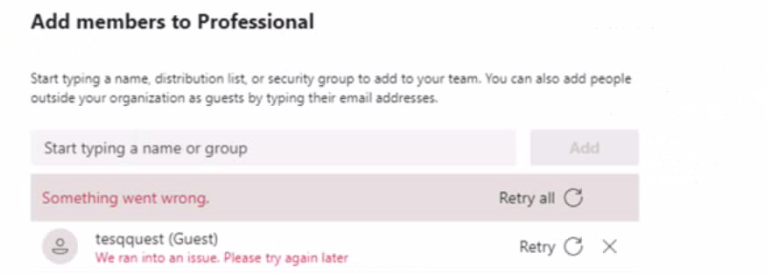
You need to recommend a solution to resolve the issue.
Solution: Disable and re-enable guest access from the Teams admin center.
Does the solution meet the goal?
The solution does not meet the goal. Disabling and re-enabling guest access from the Teams admin center will not resolve the error message that displays when they try to add a guest to a team. According to the [Troubleshoot Microsoft Teams - Training | Microsoft Learn] module, one of the possible causes of the error message is that the guest's domain is not in the allowed list of domains for the tenant. To resolve this issue, the Teams administrator can confirm whether the tenant domain is in the allowed list by following these steps:
In the Microsoft Teams admin center, go toOrg-wide settings>Guest access.
UnderDomain and email address settings, make sure thatAllow specific domainsis selected.
In theAllowed domainsbox, check if the guest's domain is listed. If not, add it and clickSave.
A company assigns Microsoft 365 E3 licenses to all users. The company configures a Conditional Access policy.
UserA initiates a one-to-one Microsoft Teams chat with UserB. UserA reports that they cannot share files with UserB. All other users within the company can share files in one-to-one chats.
You need to resolve the issue.
What should you do?
You need to resolve the issue reported by User4.
Which two actions should you recommend? Each correct answer presents part of the solution.
NOTE: Each correct selection is worth one point.
An organization has E5 licenses without audio conferencing.
When a user sends a chat message from the Microsoft Teams desktop app the messages are not delivered to recipients. When the user sends a chat message by using the Teams mobile app the messages are delivered.
You need to resolve the issue.
Which three actions should you perform? Each correct answer presents a complete solution.
NOTE: Each correct selection is worth one point.

