
Free Microsoft MS-220 Exam Practice Questions & Explanations
Prepared & Reviewed by the ValidExamDumps Editorial Team
At ValidExamDumps, we consistently monitor updates to the Microsoft MS-220 exam questions by Microsoft. Whenever our team identifies changes in the exam questions, objectives, focus areas or requirements, We immediately update our exam questions for both PDF and online practice exams. This commitment ensures our customers always have access to the most current and accurate questions. By preparing with these up to date and 100% exam domain coverage questions, our customers can successfully pass the Microsoft Troubleshooting Microsoft Exchange Online exam on their first attempt without needing additional materials or study guides.
Other certification materials providers often include outdated or removed questions by Microsoft in their MS-220 exam. These outdated questions lead to customers failing their Microsoft Troubleshooting Microsoft Exchange Online exam. In contrast, we ensure our questions bank includes only precise and up-to-date questions. Our main priority is your success in the Microsoft MS-220 exam, not profiting from selling obsolete exam questions in PDF or Online Practice Test.
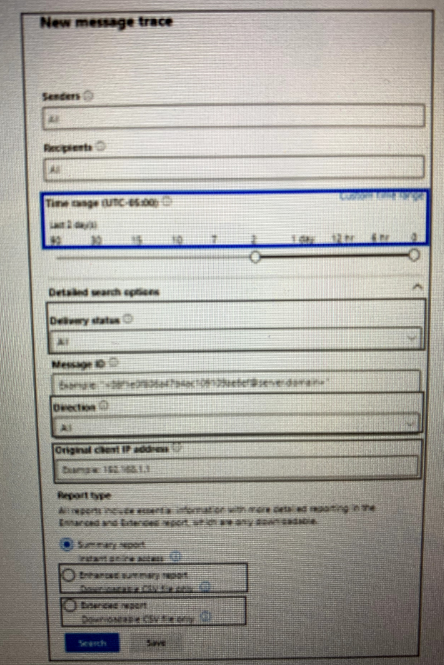
A company uses Exchange Online. Users report that emails sent to external recipients are not being received by the external recipients. The users do not receive nondelivery report (NDR) notifications.
You plan to perform a message trace. The trace report must meet the following requirements:
* Display only emails sent to the external recipients.
* Return email addresses for recipients. The recipients are unknown.
* Display up to 40,000 results.
* Identify emails up to 60 days.
You need to configure the trace definition. You select the sender.
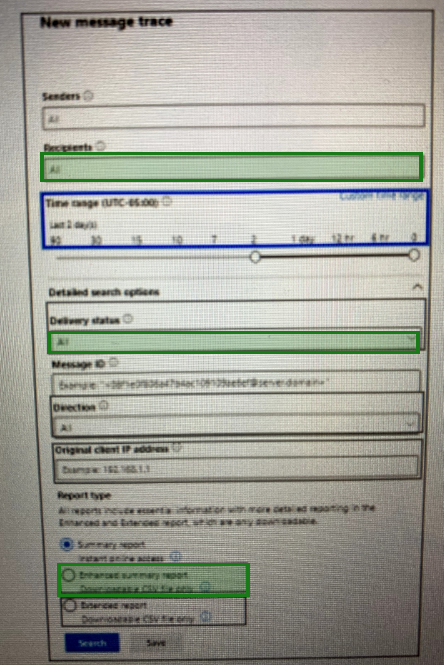
Which three parts of the trace definition must you configure? To answer, select the appropriate options in the dialog box in the answer area.
NOTE: Each correct selection is worth one point.
Correct answer area highlighted in green
A company uses Exchange Online. The company configures a transport rule that appends a disclaimer to emails from external senders.
Users report that they are unable to accept calendar invitations from external senders.
You need to ensure that users can accept calendar invitations.
What are two possible ways to achieve this goal? Each correct answer presents a complete solution.
NOTE: Each correct selection is worth one point.
A company uses Exchange Online. External sharing is disabled.
A user reports that they are unable to share their calendar with an external recipient.
You need to resolve the issue.
Solution: Instruct the user to add the external recipient as a delegate.
Does the solution meet the goal?
A company uses Exchange Online.
A user receives a non-delivery report when sending emails to external recipients. You perform a message trace and discover that emails are not being sent from the Exchange environment.
You need to identify the component that is causing the issue.
Which component is causing the issue?
A company uses Exchange Online.
A user reports that they did not receive an email from an external sender. You perform a message trace and observe the following in the message header SFV: BLK
You need to resolve the issue.
Solution: Remove the sender's email address from the recipient's block list.
Does the solution meet the goal?
A company uses Exchange Online.
A user named User1 schedules a meeting with a conference room mailbox named Conf1. Conf1 is already reserved for another meeting but does not automatically decline the conflicting meeting request.
You need to ensure that conflicting meeting requests sent to Conf1 are declined.
What should you do?
A company uses Exchange Online.
A user reports receiving the following non-delivery report (NDR) when sending an email:
5.2.2 Submission quota exceeded. The sender has exceeded the recipient rate limit.
What should you do?
A company uses Exchange Online.
A user reports that they did not receive an email from an external sender. You perform a message trace and observe the following in the message header
SFV: BLK
You need to resolve the issue.
Solution: Add the sender's email address to the recipient's allowed list
Does the solution meet the goal?