
Microsoft MS-102 Practice Exam Questions & Answers
Microsoft MS-102 Exam Details
Key details for this exam, checked against the published exam outline
- Exam Code
- MS-102
- Full Name
- Microsoft 365 Administrator
- Issuing Body
- Microsoft
- Question Format (Our Bank)
- Multiple Choice, Hotspot, Drag & Drop, Order List, Case Studies
- Delivery
- Pearson VUE or PSI at a testing center or online proctored
- Eligibility
- Functional experience with all Microsoft 365 workloads and Microsoft Entra ID. must have a qualifying Microsoft 365 Certified: Associate level certification such as Endpoint Administrator Associate, Messaging Administrator Associate, Teams Administrator A
- Validity
- Does not expire, but certification validity is 1 year from date earned
- Full Question Set
- 585 questions Get All Questions
Free MS-102 Practice Questions
Each question shows the correct answer and an explanation of why it is right
Question 1 Domain 3 Manage security and threats by using Microsoft Defender XDR
You have a Microsoft 365 subscription.
Your company has a customer ID associated to each customer. The customer IDs contain 10 numbers
followed by 10 characters. The following is a sample customer ID: 12-456-7890-abc-de-fghij.
You plan to create a data loss prevention (DLP) policy that will detect messages containing customer IDs.
D18912E1457D5D1DDCBD40AB3BF70D5D
What should you create to ensure that the DLP policy can detect the customer IDs?
https://docs.microsoft.com/en-us/microsoft-365/compliance/custom-sensitive-info-types?view=o365-worldwide
Question 2 Domain 1 Deploy and manage a Microsoft 365 tenant
You have a Microsoft 365 E5 subscription that contains the groups shown in the following exhibit.
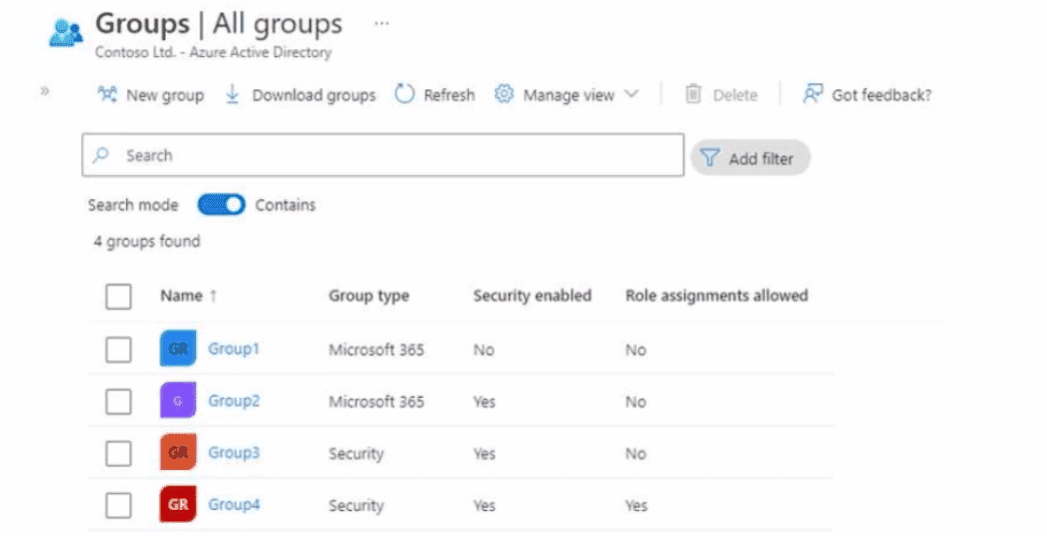
To which groups can you assign Microsoft 365 E5 licenses?
You can assign Microsoft 365 E5 licenses to Microsoft 365 groups and mail-enabled security groups.
Explanation:
- Microsoft 365 groups (formerly Office 365 groups) can be assigned licenses directly, and all members of the group automatically receive the license
- Mail-enabled security groups can also be assigned licenses for bulk licensing purposes
- Distribution lists (non-mail-enabled security groups) cannot be assigned licenses, as they are for email distribution only and do not support license assignments
- Regular security groups (on-premises) cannot be assigned cloud licenses directly
Using group-based licensing simplifies bulk license assignment and management, automatically assigning licenses to users when they join the group and removing licenses when they leave.
Question 3 Domain 4 Manage compliance by using Microsoft Purview
You have a Microsoft 365 E5 subscription that contains a Microsoft SharePoint site named site1. You need to ensure that site1 meets the following requirements:
* Retains all data for 10 years
* Prevents the sharing of data outside the organization
Which two items should you create and apply to site1? Each correct answer presents part of the solution. NOTE: Each correct selection is worth one point.
To meet both requirements, you need to create and apply two items:
- Retention Policy with 10-year retention: This policy will retain all data in site1 for 10 years, meeting the retention requirement. Create a retention policy with a 10-year retention period and apply it to the specific SharePoint site (site1).
- Sensitivity Label with external sharing restrictions: Apply a sensitivity label configured to prevent external sharing. This label should have settings that block users from sharing files with external users, meeting the data protection requirement.
Together, these two items ensure that site1 retains data for 10 years while preventing external data sharing. The retention policy handles the time-based requirement, while the sensitivity label enforces the organizational boundary for data sharing.
Get the complete MS-102 question set
$20$40
Question 4 Domain 2 Implement and manage Microsoft Entra identity and access
Note: This question is part of a series of questions that present the same scenario. Each question in the series contains a unique solution that might meet the stated goals. Some question sets might have more than one correct solution, while others might not have a correct solution.
After you answer a question in this section, you will NOT be able to return to it. As a result, these questions will not appear in the review screen.
You have a computer that runs Windows 10.
You need to verify which version of Windows 10 is installed.
Solution: From Device Manager, you view the computer properties.
Does this meet the goal?
https://support.microsoft.com/en-us/windows/which-version-of-windows-operating-system-am-i-running-628bec99-476a-2c13-5296-9dd081cdd808
Question 5 Domain 3 Manage security and threats by using Microsoft Defender XDR
You have a Microsoft 365 subscription.
All uses are assigned Microsoft 365 Apps for enterprise licenses.
You need to ensure that reports display the names of users that have activated Microsoft 365 apps and on how many devices. What should you modify in the Microsoft 365 admin center?
Question 6 Domain 4 Manage compliance by using Microsoft Purview
You have a Microsoft 365 E5 subscription.
You plan to create a data loss prevention (DLP) policy that will be applied to all available locations.
Which conditions can you use in the DLP rules of the policy?
Apply retention labels to content automatically if it matches specific conditions, that includes cloud attachments that are shared in email or Teams, or when the content contains:
Specific types of sensitive information.
Specific keywords that match a query you create.
Pattern matches for a trainable classifier.
Note: Retention policies can be applied to the following locations:
Exchange mailboxes
SharePoint classic and communication sites
OneDrive accounts
Microsoft 365 Group mailboxes & sites
Skype for Business
Exchange public folders
Teams channel messages (standard channels and shared channels)
Teams chats
Teams private channel messages
Yammer community messages
Yammer user messages
https://learn.microsoft.com/en-us/microsoft-365/compliance/retention
https://learn.microsoft.com/en-us/microsoft-365/compliance/dlp-exchange-conditions-and-actions
Question 7 Domain 1 Deploy and manage a Microsoft 365 tenant
You need to ensure that User1 can enroll the devices to meet the technical requirements. What should you do?
https://docs.microsoft.com/en-us/sccm/mdm/deploy-use/enroll-devices-with-device-enrollment-manager
What the Microsoft MS-102 Exam Covers
Exam domains verified against the Official Microsoft MS-102 exam guide, last checked October 2026.
Domain 1 Deploy and manage a Microsoft 365 tenant
25% - 30%Understand how to configure your Microsoft 365 tenant, including organizational profile, subscription options, and component services. Set up and manage user accounts, licenses, security groups, and administrative roles to establish foundational governance.
Domain 2 Implement and manage Microsoft Entra identity and access
25% - 30%Plan and execute identity synchronization using Azure Active Directory Connect and Connect Cloud Sync. Implement authentication mechanisms including multifactor authentication and self-service password reset, plus conditional access policies for secure access control.
Sample question from this domain above Q4
Domain 3 Manage security and threats by using Microsoft Defender XDR
30% - 35%Monitor and respond to security alerts and incidents within the Microsoft 365 Defender portal. Deploy and configure Microsoft Defender for Office 365 for email and collaboration protection, Microsoft Defender for Endpoint for device security, and Microsoft Defender for Cloud Apps for cloud application monitoring.
Domain 4 Manage compliance by using Microsoft Purview
10% - 15%Implement information protection through sensitivity labels and encryption. Configure data lifecycle management and retention policies. Deploy and manage data loss prevention (DLP) rules to identify and protect sensitive information across the organization.
MS-102 Exam FAQ
Common questions about the exam itself
What experience do I need before taking MS-102?
How does MS-102 relate to the Microsoft 365 Administrator Expert certification?
What makes MS-102 harder than other Microsoft 365 exams?
Is the Microsoft Entra identity domain the hardest part of MS-102?
How long should I prepare for MS-102?
How does the MS-102 exam day work?
Can I retake MS-102 if I fail?
How long does the MS-102 certification stay valid?
Which job roles does MS-102 prepare you for?
Is MS-102 being retired?
Other Microsoft Exams
Free practice questions for more Microsoft certification exams