Key details for this exam, checked against the published exam outline
Each question shows the correct answer and an explanation of why it is right
You have a Microsoft SQL Server 2025 database that contains a table named products. products contains two columns named description and embedding. embedding is generated from description.
You have an application named App1. App1 has a feature that uses the following query.
VECTOR_DISTANCE('cosine', @query_vector, embedding)
Users report that the feature is slow during peak usage times.
You discover that during peak usage times, the semantic search latency increases and CPU utilization spikes.
You need to reduce latency and CPU utilization related to the App1 feature.
What should you do?
The correct answer is C because the current query uses VECTOR_DISTANCE('cosine', @query_vector, embedding), which performs an exact vector distance calculation. Microsoft explicitly documents that VECTOR_DISTANCE does not use a vector index, even when one exists. Exact k-nearest-neighbor searches can require scanning large numbers of vectors and calculating distances row by row, which explains the observed CPU spikes and increased semantic-search latency during peak load.
A vector index on products.embedding is specifically designed to accelerate nearest-neighbor search, and VECTOR_SEARCH is the Transact-SQL function that can use that approximate nearest-neighbor index when the index metric matches the query metric. Using METRIC = 'cosine' preserves the same similarity metric currently used by App1 while reducing the amount of computation required.
The other choices are incorrect:
A normalizes vectors but does not replace the expensive exact search with indexed ANN retrieval.
B replaces semantic vector search with lexical full-text search and changes the feature's behavior.
D a standard nonclustered B-tree index cannot accelerate vector-distance operations.
E converting embeddings to VARBINARY(8000) removes native vector semantics and does not solve the performance problem.
Therefore, the exam-aligned solution is create a vector index and use VECTOR_SEARCH with cosine distance.
You have a SQL database in Microsoft Fabric that contains a table named dbo.Orders, dbo.Orders has a clustered index, contains three years of data, and is partitioned by a column named OrderDate by month.
You need to remove all the rows for the oldest month. The solution must minimize the impact on other queries that access the data in dbo.orders.
Solution; Identify the partition scheme (or the oldest month, and then run the following Transact-SQL statement.
ALTER TABLE dbo.Orders
DROP PARTITION SCHEME (partition_scheme_name);
Does this meet the goal?
This also does not meet the goal. DROP PARTITION SCHEME removes the partition scheme object from the database; it is not the command used to remove just the rows for the oldest month from a partitioned table. Microsoft's DROP PARTITION SCHEME documentation is explicit that the statement removes the partition scheme itself.
For removing only the oldest month's rows with minimal impact, Microsoft points to partition-level maintenance operations such as truncating a single partition on a partitioned table. That targets only the needed data subset and is more efficient for retention workloads.
You have a database that contains production data. The schema is stored in a Git repository as an SDK-style SQL database project and contains the following reference data.
Name
Data type
RefID
int, identity
Code
nvarchar(10)
CreatedDate
datetime2
Description
nvarchar(255)
A deployment pipeline can be rerun automatically when a transient failure occurs.
You need to deploy the reference data as part of the same CI/CD process. Rerunning the pipeline must produce the same outcome and must NOT create duplicate rows.
What should you do?
To ensure that rerunning the CI/CD pipeline produces the same outcome without creating duplicate rows, you should use the MERGE statement with a NOT MATCHED clause. The MERGE statement is idempotent—it can safely check if data already exists using the RefID as a primary key and only insert new rows or update existing ones if needed. This approach ensures that whether the pipeline runs once or multiple times, the reference data will be consistent without duplicates. You would structure it to match on RefID and either insert (if not matched) or update (if matched) the Code, CreatedDate, and Description columns based on your business logic.
You have an Azure SQL database that contains tables named dbo.ProduetDocs and dbo.ProductuocsEnbeddings. dbo.ProductOocs contains product documentation and the following columns:
* Docld (int)
* Title (nvdrchdr(200))
* Body (nvarthar(max))
* LastHodified (datetime2)
The documentation is edited throughout the day. dbo.ProductDocsEabeddings contains the following columns:
* Dotid (int)
* ChunkOrder (int)
* ChunkText (nvarchar(aax))
* Embedding (vector(1536))
The current embedding pipeline runs once per night
Vou need to ensure that embeddings are updated every time the underlying documentation content changes The solution must NOT 'equire a nightly batch process.
What should you include in the solution?
The requirement is to ensure embeddings are updated every time the underlying content changes without relying on a nightly batch job. The right design is to enable change tracking on the source table so an external process can identify which rows changed and regenerate embeddings only for those rows. Microsoft documents that change detection mechanisms are used to pick up new and updated rows incrementally, which is the right pattern when you need near-continuous refresh instead of full nightly rebuilds.
This is better than:
A . fixed-size chunking, which affects chunk strategy but not change detection.
B . a smaller embedding model, which affects model cost/latency but not update triggering.
C . table triggers, which would push embedding-maintenance logic directly into write operations and is generally not the best design for AI-processing pipelines. The question specifically asks for a solution that replaces the nightly batch requirement, not one that performs heavyweight work inline during every transaction.
You have an Azure SQL database.
You need to create a scalar user-defined function (UDF) that returns the number of whole years between an input parameter named 0orderDate and the current date/time as a single positive integer. The function must be created in Azure SQL Database. You write the following code.
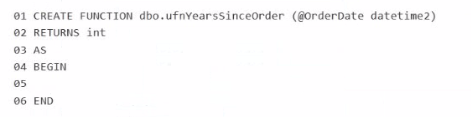
What should you insert at line 05?
The correct answer is D because the scalar UDF must return the number of whole years from the input @OrderDate to the current date/time as a single positive integer. The correct DATEDIFF order is:
DATEDIFF(year, @OrderDate, GETDATE())
Microsoft documents that DATEDIFF(datepart, startdate, enddate) returns the count of specified datepart boundaries crossed between the start and end values. Since @OrderDate is the earlier date and GETDATE() is the later date, this ordering returns a positive result for past order dates.
The other choices are incorrect:
A reverses the arguments and would return a negative value for a past order date.
B is missing RETURN, and converting month difference to years by dividing by 12 is not the direct whole-year expression the question asks for.
C subtracts year parts only, which can be off around anniversary boundaries because it ignores whether the full year has actually elapsed.
So the correct insertion at line 05 is:
RETURN DATEDIFF(year, @OrderDate, GETDATE());
You need to recommend a solution that will resolve the ingestion pipeline failure issues. Which two actions should you recommend? Each correct answer presents part of the solution. NOTE: Each correct selection is worth one point.
The two correct actions are D and E because the ingestion failures are caused by malformed JSON and duplicate payloads, and these two controls address those two problems directly. Microsoft's JSON documentation states that SQL Server and Azure SQL support validating JSON with ISJSON, and Microsoft specifically recommends using a CHECK constraint to ensure JSON text stored in a column is properly formatted.
For the duplicate-payload issue, creating a unique index on a hash of the payload is the appropriate design. Microsoft documents using hashing functions such as HASHBYTES to hash column values, and SQL Server allows a deterministic computed column to be used as a key column in a UNIQUE constraint or unique index. That makes a persisted hash-based computed column plus a unique index a practical and exam-consistent way to reject duplicate payloads efficiently.
The other options do not solve the stated root causes:
Snapshot isolation addresses concurrency behavior, not malformed JSON or duplicate payload detection.
A trigger to rewrite malformed JSON is not the right integrity control and is brittle.
Foreign key constraints enforce referential integrity, not JSON validity or duplicate-payload prevention
Exam domains verified against: Official Microsoft DP-800 exam guide, last checked September 2026.
Create tables with appropriate data types, indexes, and constraints. Build programmability objects including views, functions, stored procedures, and triggers. Write advanced T-SQL code featuring CTEs, window functions, JSON handling, regular expressions, graph queries, and correlated queries. Use AI-assisted tools like GitHub Copilot to write and optimize T-SQL code safely.
Sample question from this domain above: Q4
Implement encryption, Dynamic Data Masking, Row-Level Security, and object-level permissions. Evaluate query performance using execution plans and DMVs. Set up CI/CD pipelines with SQL Database Projects, manage version control and deployment approvals, and integrate SQL solutions with Azure services including Data API builder and change data capture methods.
Sample question from this domain above: Q3
Create and manage external AI models for embeddings. Design and implement vector search using native SQL types and indexes. Build retrieval-augmented generation workflows by converting structured data to JSON, invoking external REST endpoints, and extracting language model responses. Evaluate vector search performance and choose between full-text, semantic, and hybrid search approaches.
Common questions about the exam itself

