At ValidExamDumps, we consistently monitor updates to the Microsoft AZ-303 exam questions by Microsoft. Whenever our team identifies changes in the exam questions,exam objectives, exam focus areas or in exam requirements, We immediately update our exam questions for both PDF and online practice exams. This commitment ensures our customers always have access to the most current and accurate questions. By preparing with these actual questions, our customers can successfully pass the Microsoft Azure Architect Technologies Exam exam on their first attempt without needing additional materials or study guides.
Other certification materials providers often include outdated or removed questions by Microsoft in their Microsoft AZ-303 exam. These outdated questions lead to customers failing their Microsoft Azure Architect Technologies Exam exam. In contrast, we ensure our questions bank includes only precise and up-to-date questions, guaranteeing their presence in your actual exam. Our main priority is your success in the Microsoft AZ-303 exam, not profiting from selling obsolete exam questions in PDF or Online Practice Test.
Note: This question is part of a series of questions that present the same scenario. Each question in the series contains a unique solution that might meet the stated goals. Some question sets might have more than one correct solution, while others might not have a correct solution.
After you answer a question in this section, you will NOT be able to return to it. As a result, these questions will not appear in the review screen.
You manage an Active Directory domain named contoso.local.
You install Azure AD Connect and connect to an Azure Active Directory (Azure AD) tenant named contoso.com without syncing any accounts.
You need to ensure that only users who have a UPN suffix of contoso.com in the contoso.local domain sync to Azure AD.
Solution: You use the Synchronization Service Manager to modify the Active Directory Domain Services (AD DS) Connector.
Does this meet the goal?
Instead use Synchronization Rules Editor to create a synchronization rule.
Note: Filtering what objects are synced to Azure AD is a common request and there are many instances where filtering by OU just doesn't cut it. One option is to filter users by their UPN suffix so that only users with the public FQDN as their UPN suffix are synced to Azure AD (e.g., [email protected] would be synced while [email protected] would not).
Filtering can be configured using either the GUI (Synchronization Rules Editor) or PowerShell.
https://www.sidekicktech.com/blog/field-notes/2019/upn-suffix-filtering-ad-connect/
Note: This question is part of a series of questions that present the same scenario. Each question in the series contains a unique solution that might meet the stated goals. Some question sets might have more than one correct solution, while others might not have a correct solution.
After you answer a question in this section, you will NOT be able to return to it. As a result, these questions will not appear in the review screen.
You register App1 in Azure Active Directory (Azure AD) and publish App1 by using the Azure AD Application Proxy.
You need to ensure that App1 appears in the My Apps portal for all the users.
Solution: You modify User and Groups for App1.
Does this meet the goal?
Assigning users and groups to individual applications in Azure AD controls the visibility of the link.
If you want only a subset of your users to see the link in the Azure AD My Apps portal, configure user assignment as follows:
In the menu on the left, select Properties.
Set User assignment required to Yes.
Click Save.
In the menu on the left, click Manage > Users and groups.
Click Add user.
Select Users.
Select the users or groups that you want to provision. If you select a group, all members of the group are provisioned.
Click Select.
Click Assign.
It might take several minutes for a link to show up in the My Apps portal.
You have Azure virtual machines that have Update Management enabled. The virtual machines are configured as shown in the following table.
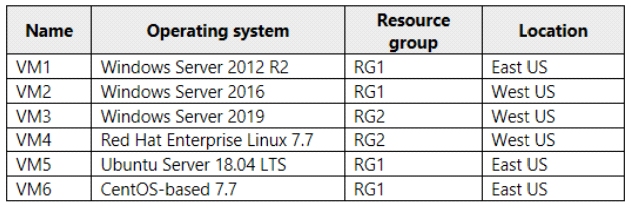
You need to ensure that all critical and security updates are applied to each virtual machine every month. What is the minimum number of update deployments you should create?
One for the Windows VMs, and for each type of Linux VM.
https://docs.microsoft.com/en-us/azure/automation/update-management/overview
You have an Azure data factory named ADF1.
A pipeline in ADF1 must authenticate to an Azure SQL database to perform scheduled data exports.
You need to recommend an authentication solution for the connection. The solution must minimize the risks associated with stored usernames and passwords.
Which type of authentication should you recommend?
Note: This question is part of a series of questions that present the same scenario. Each question in the series contains a unique solution that might meet the stated goals. Some question sets might have more than one correct solution, while others might not have a correct solution.
After you answer a question in this section, you will NOT be able to return to it. As a result, these questions will not appear in the review screen.
Solution: You configure the delegated permission for App1 in Azure AD.
Does this meet the goal?
Instead, you modify User and Groups for App1.

