Microsoft AZ-140 Practice Exam Questions & Answers
7 Free Questions
· Last reviewed: October 15, 2026
· Prepared & Reviewed by the ValidExamDumps Editorial Team
Exam Facts
Microsoft AZ-140 Exam Details
Key details for this exam, checked against the published exam outline
299
Practice Questions (Our Bank)
100 minutes
Exam Duration
700 out of 1000
Passing Score
USD 165
Official Exam Fee (United States)
- Exam Code
- AZ-140
- Full Name
- Configuring and Operating Microsoft Azure Virtual Desktop
- Issuing Body
- Microsoft
- Question Format (Our Bank)
- Multiple Choice, Hotspot, Drag & Drop, Order List, Case Studies
- Delivery
- Pearson VUE testing center or online proctored
- Validity
- 1 year
Practice Questions
Free AZ-140 Practice Questions
Each question shows the correct answer and an explanation of why it is right
VA
ValidExamDumps Editorial Team
Every question and its answer is checked by our AZ-140 exam
preparation team, who also write the explanation shown with each one.
How we research and review these pages
You have an Azure subscription that contains an Azure Virtual Desktop host pool. The host pool uses FSLogix profile containers.
You need to create a configuration file to prevent specific folders from syncing to the FSLogix profile containers when a user signs out.
How should you name the file?
Correct Answer:
A
Explanation
FSLogix profile containers use a redirections.xml file to exclude specific folders from syncing. This XML configuration file tells FSLogix which user profile paths should not be included in the container when the user signs out. The other options either don't exist or serve different purposes in FSLogix configuration. This file is essential for controlling what gets stored in the profile container.
You have an Azure Virtual Desktop personal host pool named Pool1 that contains 20 Azure AD-joined session hosts.
You need to ensure that only approved virtual machine extensions are installed on the Pool 1 session hosts. The solution must minimize administrative effort.
What should you use?
Correct Answer:
B
Explanation
Azure Policy allows you to enforce compliance requirements across your Azure environment without manual intervention on each host. You can create policies that restrict which virtual machine extensions can be deployed on the session hosts. This approach minimizes administrative effort compared to manually reviewing and approving extensions on each of the 20 hosts. Other solutions would require more hands-on management.
You have an Azure Virtual Desktop deployment and the users shown in the following table.
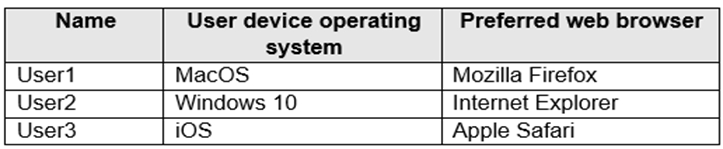
All the users plan to use a web browser to access Azure Virtual Desktop resources.
Which users can connect to Azure Virtual Desktop by using their preferred browser?
Correct Answer:
C
Explanation
https://learn.microsoft.com/en-us/azure/virtual-desktop/users/connect-web
You have a Azure Virtual Desktop deployment that contains multiple host pools.
You need to create a PowerShell script to sign users out of a specific session host before you perform a maintenance task.
Which PowerShell module should you load in the script?
Correct Answer:
D
You have an Azure Virtual Desktop deployment.
You use Hyper-V to create a virtual machine that runs Windows 11 and has the following configurations:
* Virtual machine generation: Generation 2
* Disk type: Dynamically expanding
* Disk format: VHDX
* Disk size: 2 TB
You need to prepare the virtual machine before uploading it to Azure.
Which two actions should you perform? Each correct answer presents part of the solution.
NOTE: Each correct selection is worth one point.
Correct Answer:
A, E
Explanation
Azure requires virtual machines to use fixed disk allocation and VHD format for uploading. Dynamically expanding disks can cause performance issues and aren't ideal for cloud deployments. VHD format is the standard for Azure, while VHDX is a Hyper-V specific format. Converting both the disk type to fixed and the format to VHD ensures the image meets Azure requirements and will perform optimally as a session host.
You network contains an on-premises Active Directory domain. The domain contains a universal security group named WVDusers.
You have a hybrid Azure Active Directory (Azure AD) tenant. WVDusers syncs to Azure AD.
You have a Windows Virtual Desktop host pool that contains four Windows 10 Enterprise multi-session hosts.
You need to ensure that only the members of WVDusers can establish Windows Virtual Desktop sessions to the host pool.
What should you do?
Correct Answer:
D
Explanation
https://docs.microsoft.com/en-us/azure/virtual-desktop/manage-app-groups
You have an Azure Virtual Desktop deployment that contains a session host named Host1.
You need to configure Windows Defender Firewall to allow inbound network traffic for RDP Shortpath on Host1.
Which program in the C:\Windows\System32 folder should you specify in the inbound firewall rule?
Correct Answer:
B
Full Access
Get the complete AZ-140 question set
- 299 questions covering all exam domains
- Correct answers with explanations, like the free questions above
- PDF and online practice test
- 90 days of free updates
Domain 1: Plan and implement an Azure Virtual Desktop infrastructure
40% - 45%
Set up networking, storage, and host pools for Azure Virtual Desktop deployments. Create and manage session host images to support your desktop and application delivery requirements.
Sample questions from this domain above:
Q3Q5
Domain 2: Plan and implement user environments and apps
20% - 25%
Configure FSLogix solutions for user profiles and implement client settings. Install and manage applications directly on session hosts to deliver the user experience your organization needs.
Sample questions from this domain above:
Q1Q6
Domain 3: Monitor and maintain an Azure Virtual Desktop infrastructure
10% - 15%
Track service health and performance metrics for your Azure Virtual Desktop deployment. Plan backup, disaster recovery, and update strategies to keep your infrastructure running reliably.
Sample questions from this domain above:
Q4Q7
Domain 4: Plan and implement identity and security
15% - 20%
Choose the right identity scenario for your environment using Active Directory or Microsoft Entra services. Implement role-based access control and conditional access policies to protect your Azure Virtual Desktop resources.
Sample question from this domain above:
Q2
FAQ
AZ-140 Exam FAQ
Common questions about the exam itself
What experience do I need before taking AZ-140?
You should have solid Azure administration skills and prior experience with virtualization, networking, identity, storage, backup and restore, and disaster recovery. You need knowledge of on-premises virtual desktop infrastructure technologies and should be familiar with Azure PowerShell and Cloud Shell.
What is the hardest objective area in AZ-140 and how should I prepare?
The Azure Virtual Desktop infrastructure planning and implementation domain carries the heaviest weighting at 40-45 percent, covering networking, storage, host pools, session host images, and automation. Focus your preparation on hands-on experience with these components and understand how they integrate with your broader Azure environment.
How long does it typically take to prepare for AZ-140?
Most candidates spend 4 to 8 weeks preparing, depending on their existing Azure and virtualization background. This includes studying the official Microsoft Learn resources, taking the training course AZ-140T00, completing hands-on labs in Azure, and practising with assessment tests.
What exactly happens on exam day for AZ-140?
You answer 40 multiple-choice and scenario-based questions in 100 minutes. You need a score of 700 out of 1000 to pass. The exam tests your ability to design, deploy, and manage Azure Virtual Desktop environments through realistic scenario questions, not just factual recall.
How long is the AZ-140 certification valid and what do I need to do to renew it?
Microsoft specialty certifications expire annually and you can renew by passing a free online assessment on Microsoft Learn. This renewal requirement keeps your credential current as Azure Virtual Desktop features and best practices evolve.
Can I retake AZ-140 if I do not pass?
Yes, you can retake the exam. There is typically a wait period before your first retake and a longer wait before a second consecutive retake, but Microsoft allows multiple attempts. Check the exam policies at your testing provider for specific retake windows and scheduling rules.
What job role does AZ-140 prepare me for?
The AZ-140 targets server or desktop administrators with subject matter expertise in designing, implementing, managing, and maintaining Microsoft Azure Virtual Desktop experiences and remote apps. This aligns with roles like Azure Virtual Desktop Administrator or Azure Desktop Infrastructure Specialist.
How does AZ-140 relate to other Microsoft Azure certifications?
AZ-140 is a specialty certification that builds on Azure fundamentals. Consider pairing it with AZ-104 (Azure Administrator) to deepen your infrastructure skills, or with AZ-305 (Azure Solutions Architect Expert) if you want to design enterprise Azure solutions beyond just desktop virtualization.
What is the difference between the planning and identity domains in AZ-140?
The planning domain focuses on the technical architecture and deployment mechanics of Azure Virtual Desktop - how to build it. The identity domain focuses on who accesses it and how to control that access - covering Active Directory, Microsoft Entra, role-based access control, and conditional access policies.

