Key details for this exam, checked against the published exam outline
Each question shows the correct answer and an explanation of why it is right
You have an Azure subscription that contains the virtual machines shown in the following table.
You deploy a load balancer that has the following configurations:
* Name: LB 1
* Type: Internal
* SKU: Standard
* Virtual network: VNET1
You need to ensure that you can add VM1 and VM2 to the backend pool of L81.
Solution: You create two Standard SKU public IP addresses and associate a Standard SKU public IP address to the network interface of each virtual machine.
Does this meet the goal?
In Azure, load balancer configurations must have consistent SKU compatibility between the load balancer and its associated backend pool members. The Standard SKU Load Balancer requires that all backend pool members --- such as virtual machines, network interfaces, or virtual machine scale sets --- use Standard SKU public IPs or Standard SKU configurations if external, and proper network interface associations if internal.
However, in this question:
LB1 is
an internal Standard SKU load balancer.
Internal load balancers do not require or support public IP addresses on the backend virtual machines.
Backend pool members of an internal load balancer are identified by private IP addresses from the virtual network, not public IPs.
According to Microsoft Azure Load Balancer documentation (Azure Administrator Guide, ''Configure Standard Load Balancer''),
''For a Standard internal load balancer, the backend pool can contain only virtual machines or NICs that are in the same virtual network as the load balancer. Public IP addresses are not required and not supported for backend members.''
To correctly meet the goal, the proper solution is to:
Ensure that VM1 and VM2 are deployed within the same virtual network (VNET1) and subnet as LB1.
Ensure that the NICs of both VMs are configured with Standard SKU (if public IPs are attached elsewhere) to match the load balancer SKU.
Add these NICs or virtual machines directly to the backend pool of LB1.
Creating and assigning Standard SKU public IP addresses to each VM is unnecessary and does not help connect them to the internal load balancer. In fact, it contradicts Azure's design for internal load balancers, which only route traffic using private addresses within the virtual network scope.
Therefore, the given solution does not meet the goal.
You plan to deploy three Azure virtual machines named VM1, VM2, and VM3. The virtual machines will host a web app named App1.
You need to ensure that at least two virtual machines are available if a single Azure datacenter becomes unavailable.
What should you deploy?
An Availability Zone in an Azure region is a combination of a fault domain and an update domain. For example, if you create three or more VMs across three zones in an Azure region, your VMs are effectively distributed across three fault domains and three update domains. The Azure platform recognizes this distribution across update domains to make sure that VMs in different zones are not updated at the same time.
Reference link
https://learn.microsoft.com/en-us/training/modules/configure-virtual-machine-availability/5-review-availability-zones
You have an Azure subscription that has a Recovery Services vault named Vault 1. The subscription contains the virtual machines shown in the following table.
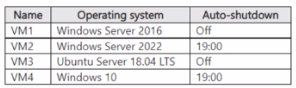
You plan to schedule backups to occur every night at 23:00.
Which virtual machines can you back up by using Azure Backup?
Note: This question is part of a series of questions that present the same scenario. Each question in the series contains a unique solution that might meet the stated goals. Some question sets might have more than one correct solution, while others might not have a correct solution.
After you answer a question in this section, you will NOT be able to return to it. As a result, these questions will not appear in the review screen.
You need to ensure that an Azure Active Directory (Azure AD) user named Admin1 is assigned the required role to enable Traffic Analytics for an Azure subscription.
Solution: You assign the Traffic Manager Contributor role at the subscription level to Admin1
The Traffic Manager Contributor role is not related to Traffic Analytics. Traffic Manager is a service that provides DNS-based load balancing and traffic routing across different regions and endpoints.Traffic Manager Contributor is a role that allows you to create and manage Traffic Manager profiles, endpoints, and geographies1.
Traffic Analytics is a service that provides visibility into user and application activity in your cloud networks. Traffic Analytics analyzes Azure Network Watcher network security group (NSG) flow logs to provide insights into traffic flow in your Azure cloud.With Traffic Analytics, you can visualize network activity, identify hot spots, secure your network, optimize your network deployment, and pinpoint network misconfigurations2.
To enable Traffic Analytics for an Azure subscription, you need to have a role that grants you the following permissions at the subscription level:
Microsoft.Network/applicationGateways/read
Microsoft.Network/connections/read
Microsoft.Network/loadBalancers/read
Microsoft.Network/localNetworkGateways/read
Microsoft.Network/networkInterfaces/read
Microsoft.Network/networkSecurityGroups/read
Microsoft.Network/publicIPAddresses/read
Microsoft.Network/routeTables/read
Microsoft.Network/virtualNetworkGateways/read
Microsoft.Network/virtualNetworks/read
Microsoft.OperationalInsights/workspaces/*
Some of the built-in roles that have these permissions are Owner, Contributor, or Network Contributor3. However, these roles also grant other permissions that may not be necessary or desirable for enabling Traffic Analytics.Therefore, the best practice is to use the principle of least privilege and create a custom role that only has the required permissions for enabling Traffic Analytics4.
Therefore, to meet the goal of ensuring that an Azure AD user named Admin1 is assigned the required role to enable Traffic Analytics for an Azure subscription, you should create a custom role with the required permissions and assign it to Admin1 at the subscription level.
You have an Anne container registry named Registry1 that contains an image named image1.
You receive an error message when you attempt to deploy a container instance by using image1.
You need to be able to deploy a container instance by using image1.
Solution: You assign the AcrPull role to ACR-Tasks-Network for Registry1.
Does this meet the goal?
Azure Container Registry (ACR) uses Azure roles-based access control (RBAC) to determine who can pull, push, or manage images. The AcrPull role allows identities to pull (read) container images from a registry but not to push (write) or deploy images.
In this scenario, the error occurs when trying to deploy an Azure Container Instance (ACI) using an image from Registry1. The deployment process requires that the Azure Container Instance resource provider (the identity performing the deployment) has access permissions to pull the image from ACR. However, simply assigning the AcrPull role to an internal system identity like ACR-Tasks-Network does not necessarily authorize the ACI to pull images unless that specific managed identity used by ACI has the role assignment.
According to the Microsoft Azure Administrator documentation, the correct method to allow a container instance to pull an image from an Azure Container Registry is:
Enable a managed identity (system-assigned or user-assigned) for the Azure Container Instance.
Assign that managed identity the AcrPull role on the container registry.
The ACR Tasks Network identity mentioned in the scenario is used internally by ACR for automated build tasks, not for deployment of container instances. Therefore, assigning the AcrPull role to ACR-Tasks-Network does not resolve the issue of ACI being unable to access the container image.
Hence, this solution does not meet the goal because the role was assigned to the wrong identity. The correct approach is to assign AcrPull to the Azure Container Instance's managed identity instead.
479 questions covering all exam domains, starting from $20
Exam domains verified against: Official Microsoft AZ-104 exam guide, last checked September 2026.
Configure and manage virtual networks in Azure. Configure secure access to virtual networks. Configure name resolution and load balancing.
Sample question from this domain above: Q5
Manage Microsoft Entra users and groups. Manage access to Azure resources. Manage Azure subscriptions and governance.
Sample question from this domain above: Q1
Configure access to storage. Configure and manage storage accounts. Configure Azure Files and Azure Blob Storage.
Sample question from this domain above: Q4
Automate deployment of resources by using Azure Resource Manager (ARM) templates or Bicep files. Create and configure virtual machines. Provision and manage containers in the Azure portal. Create and configure Azure App Service.
Monitor resources in Azure. Implement backup and recovery.
Common questions about the exam itself

