
Free Microsoft AI-900 Exam Practice Questions & Explanations
Prepared & Reviewed by the ValidExamDumps Editorial Team
At ValidExamDumps, we consistently monitor updates to the Microsoft AI-900 exam questions by Microsoft. Whenever our team identifies changes in the exam questions, objectives, focus areas or requirements, We immediately update our exam questions for both PDF and online practice exams. This commitment ensures our customers always have access to the most current and accurate questions. By preparing with these up to date and 100% exam domain coverage questions, our customers can successfully pass the Microsoft Azure AI Fundamentals exam on their first attempt without needing additional materials or study guides.
Other certification materials providers often include outdated or removed questions by Microsoft in their AI-900 exam. These outdated questions lead to customers failing their Microsoft Azure AI Fundamentals exam. In contrast, we ensure our questions bank includes only precise and up-to-date questions. Our main priority is your success in the Microsoft AI-900 exam, not profiting from selling obsolete exam questions in PDF or Online Practice Test.
What should you use to identify similar faces in a set of images?
The correct service to identify similar faces in a set of images is Azure AI Vision, which includes the Face API capability. According to the Microsoft Learn module ''Analyze images with Azure AI Vision'', this service provides prebuilt models for face detection, facial recognition, and similarity matching.
The Face API can detect individual faces in images and extract unique facial features to create a face embedding (a numerical representation of the face). It then compares these embeddings across multiple images to determine whether faces are similar or belong to the same person. This functionality is commonly used in identity verification, photo management systems, and security solutions.
The other options are incorrect:
B . Azure AI Custom Vision is used for custom image classification or object detection but does not provide face similarity or recognition features.
C . Azure AI Language processes text-based data (sentiment, entities, key phrases) --- not visual content.
D . Azure OpenAI Service focuses on text generation, summarization, and conversation, not facial analysis.
Therefore, the Microsoft-verified service for identifying similar faces across images is A. Azure AI Vision.
Which Azure Al Language feature can be used to retrieve data, such as dates and people's names, from social media posts?
The Azure AI Language service provides several NLP features, including language detection, key phrase extraction, sentiment analysis, and named entity recognition (NER).
When you need to extract specific data points such as dates, names, organizations, or locations from unstructured text (for example, social media posts), the correct feature is Entity Recognition.
Entity Recognition identifies and classifies information in text into predefined categories like:
Person names (e.g., ''John Smith'')
Organizations (e.g., ''Contoso Ltd.'')
Dates and times (e.g., ''October 22, 2025'')
Locations, events, and quantities
This capability helps transform unstructured textual data into structured data that can be analyzed or stored.
Option analysis:
A (Language detection): Determines the language of a text (e.g., English, French).
B (Speech recognition): Converts spoken audio to text; not applicable here.
C (Key phrase extraction): Identifies important phrases or topics but not specific entities like names or dates.
D (Entity recognition): Correctly extracts names, dates, and other specific data from text.
Hence, the accurate feature for this scenario is D. Entity Recognition.
You need to predict the income range of a given customer by using the following dataset.
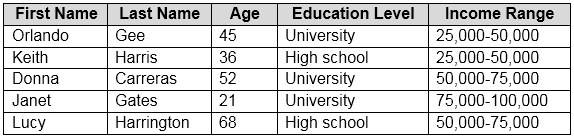
Which two fields should you use as features? Each correct answer presents a complete solution.
NOTE: Each correct selection is worth one point.
According to the Microsoft Azure AI Fundamentals (AI-900) official study guide and the Microsoft Learn module ''Describe core concepts of machine learning on Azure'', when building a predictive machine learning model, features are the input variables used by the algorithm to predict the target label. The target label is the output or value the model is trained to predict.
In this dataset, the target variable is clearly the Income Range, since the goal is to predict a customer's income bracket. Therefore, Income Range (D) is the label, not a feature. Features must be other attributes that help the model make this prediction.
The fields Education Level (A) and Age (C) are the most relevant features because both can logically and statistically influence income level.
Education Level is a categorical variable that often correlates strongly with income. Individuals with higher education levels tend to earn more on average, making this an important predictor.
Age is a numerical variable that typically affects income level due to factors such as experience and career progression.
By contrast:
First Name (E) and Last Name (B) are irrelevant as features because they are identifiers, not meaningful predictors of income. Including them could lead to bias or model overfitting without contributing to accurate predictions.
Hence, according to AI-900 principles, the features used to train a model predicting income range would be Education Level and Age.
What are three stages in a transformer model? Each correct answer presents a complete solution.
NOTE: Each correct answer is worth one point.
A transformer model is the foundational architecture behind many modern natural language processing systems such as GPT and BERT. It processes text data through multiple key stages. According to the Microsoft Azure AI Fundamentals (AI-900) curriculum and Microsoft Learn materials, the major stages of a transformer-based large language model are tokenization, embedding calculation, and next token prediction.
Tokenization (C) -- The first step converts raw text into smaller units called tokens (words, subwords, or characters). This process allows the model to handle text in a structured numerical form rather than as raw language.
Embedding Calculation (B) -- After tokenization, the tokens are mapped into high-dimensional numeric vectors, known as embeddings. These embeddings capture semantic relationships between words and phrases so that the model can understand context and meaning.
Next Token Prediction (D) -- This stage is the heart of transformer operation, where the model predicts the next likely token in a sequence based on prior tokens. Repeated next-token predictions enable text generation, summarization, or translation.
Options A (object detection) and E (anonymization) are incorrect because they relate to vision and privacy workflows, not language modeling.
In which two scenarios can you use speech recognition? Each correct answer presents a complete solution.
NOTE: Each correct selection is worth one point.
The correct answers are B and D.
Speech recognition, part of Azure's Speech service, converts spoken audio into written text. It is a core feature of Azure Cognitive Services for speech-to-text scenarios.
Providing closed captions for recorded or live videos (B) -- This is a typical application of speech recognition. The AI system listens to audio content from a video and generates real-time or post-event captions. Azure's Speech-to-Text API is frequently used in broadcasting and video platforms to improve accessibility and searchability.
Creating a transcript of a telephone call or meeting (D) -- Another common use case is automated transcription. The Speech service can process real-time audio streams (such as meetings or calls) and produce accurate text transcripts. This is widely used in customer service, call analytics, and meeting documentation.
The incorrect options are:
A . an in-car system that reads text messages aloud -- This uses Text-to-Speech, not speech recognition.
C . creating an automated public address system for a train station -- This also uses Text-to-Speech, since it generates spoken output from text.
Therefore, scenarios that convert spoken words into text correctly represent speech recognition, making B and D the right answers.