Key details for this exam, checked against the published exam outline
Each question shows the correct answer and an explanation of why it is right
Exhibit:
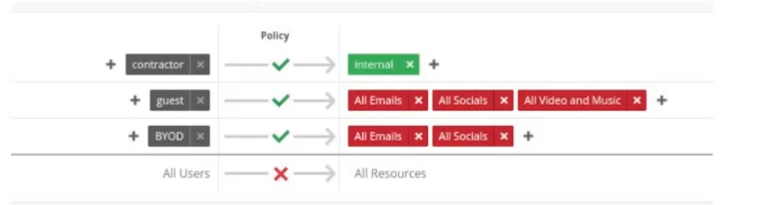
Your colleagues report that they are unable to browse tutorials needed for work located at youtube.com when using their BYOD devices. When using a guest device, they are able to access youtube.com.
In this scenario, how would you allow BYOD colleagues to access youtube.com using the WxLAN policies?
In Juniper Networks Mist AI Wireless, WxLAN policies are evaluated using a top-down, first-match logic. This means that when traffic matches a policy condition, that policy is applied immediately, and no further policies are evaluated. Understanding this evaluation order is critical when troubleshooting access discrepancies between user types such as BYOD and guest users.
From the scenario and the exhibit, guest devices are able to access youtube.com, while BYOD devices are blocked. This indicates that:
The guest WxLAN policy allows ''All Video and Music'' traffic (which includes YouTube).
The BYOD WxLAN policy blocks ''All Video and Music'' traffic.
The BYOD policy is evaluated before the guest policy.
Because BYOD users are matched to the BYOD label, their traffic hits the BYOD policy first and is denied before it can reach the more permissive guest policy. Simply modifying labels or deleting policies is unnecessary and could introduce unintended access control issues.
The correct and least disruptive solution is to move the BYOD WxLAN policy above the guest policy and then adjust the BYOD policy rules (for example, allowing YouTube or the ''All Video and Music'' category). By reordering the policies, you ensure that BYOD traffic is evaluated correctly and receives the intended permissions without impacting guest access.
The incorrect options are explained as follows:
Deleting policies (Options A and C) is not best practice and risks breaking segmentation and access control.
Option B is irrelevant, as the contractor policy does not affect BYOD or guest traffic in this scenario.
Therefore, the correct solution is to move the WxLAN policy for BYOD above the policy for guests, making Option D the correct answer.
You must define VLANs as untagged, tagged, or using VLAN pooling.
In this scenario, where would you accomplish this task in the Juniper Mist UI?
According to the VLANs (Static & Dynamic) - Mist document3, you can define VLANs as untagged, tagged, or using VLAN pooling in the WLAN settings in the Juniper Mist UI. A WLAN is a wireless network that defines parameters such as SSID, security type, and VLAN.
Which Wireless Assurance SLE has classifiers of Association, Authorization, DHCP, and Internet Services?
According to the Virtual Network Assistant | Juniper Networks US document2, Time to Connect is a Wireless Assurance SLE that has classifiers of Association, Authorization, DHCP, and Internet Services. This SLE measures how long it takes for a client device to connect to the network and access internet services.
What is the AP's role in the IEEE 802.1X authentication process?
In the IEEE 802.1X authentication process, the AP acts as an authenticator.
According to the Lecture 5 - Security - Part 1 document, the AP's role in the IEEE 802.1X authentication process is to act as an authenticator. This means that the AP acts as a gatekeeper between the client device (supplicant) and the RADIUS server (authentication server). The AP forwards authentication messages between the supplicant and the server and grants or denies network access based on the server's response.
Which two Mist Aps would be used for BLE location? (Choose two.)
According to the JNCIS-MistAI Certification page2, two Mist APs that would be used for BLE location are AP33 and AP43. These are the only two models that support vBLE array technology, which enables accurate location services without physical beacons.
Which Juniper AP is used to augment BLE coverage?
In the Juniper Mist AI product portfolio, the BT11 is a specialized, enterprise-grade access point designed exclusively for Bluetooth Low Energy (BLE).4 Unlike the other access points in the Juniper Mist family (such as the AP12, AP24, and AP34), the BT11 does not contain Wi-Fi radios.5 Its sole purpose is to provide high-accuracy, enterprise-grade location-based services (LBS) by leveraging Juniper's patented 16-element virtual BLE (vBLE) antenna array.6
The primary use case for the BT11 is to augment BLE coverage in environments where Wi-Fi connectivity is already established by other APs, but the density of those APs is insufficient for precise location services. For applications like turn-by-turn wayfinding or asset tracking, the RF requirements for BLE are often more stringent than those for Wi-Fi. A facility might have enough Wi-Fi APs to provide data coverage, but may have 'location holes' where the BLE signals are too sparse for 1--3 meter accuracy. By deploying BT11 units in these gaps, administrators can extend the reach of the location engine without the expense of adding full-featured Wi-Fi radios where additional capacity is not needed.7
The BT11 communicates directly with the Mist Cloud to manage virtual beacons, which eliminate the need for physical, battery-powered beacons and manual calibration.8 Because it runs on Power over Ethernet (PoE) and integrates seamlessly with the Mist AI engine, it provides a scalable and cost-effective way to ensure continuous, high-fidelity BLE coverage across a campus, hospital, or retail floor.
You are troubleshooting a client that has had intermittent connectivity problems. Using Marvis to troubleshoot, you see that AP uptime is negatively affecting the client. When inspecting Marvis' troubleshooting response, which category should you select to see when the AP went offline?
According to the Marvis - Mist document, Correlation is a category in Marvis' troubleshooting response that shows when the AP went offline. Correlation shows the correlation between events and SLEs for a given client or AP.
Exam domains verified against: Official Juniper JN0-452 exam guide, last checked October 2026.
Understand 802.11 PHY protocols, frequency bands, RF basics, modulation and coding schemes. Learn network arbitration, contention mechanisms, WLAN association and roaming processes, plus the full WLAN lifecycle from initialization through termination.
Sample question from this domain above: Q3
Identify general architecture concepts, account organization, subscriptions, and configuration objects. Apply RESTful API and Webhook concepts to manage organization and site objects. Deploy access points with proper PoE connectivity and configure Juniper Mist Edge systems.
Sample question from this domain above: Q7
Recognize WLAN security concepts and Juniper Mist WLAN implementations. Configure Multiple PSK and Policy (WxLAN) rules. Understand guest portals and wireless intrusion detection and prevention systems. Troubleshoot WLAN configurations and security policies in production environments.
Work with Service Level Expectations (SLEs) and Juniper Mist Wireless Assurance to monitor network quality. Manage events, insights, and alerts effectively. Configure and troubleshoot Radio Resource Management (RRM) and SLE-based monitoring systems.
Use Marvis for both reactive and proactive troubleshooting of network issues. Execute Marvis Actions and run Marvis Minis for targeted problem resolution. Work across multiple Marvis languages to interact with the AI assistant and interpret its findings.
Apply Wi-Fi and virtual Bluetooth Low Energy (vBLE) techniques for indoor location services. Implement user engagement strategies and asset visibility tracking. Deploy proximity tracing capabilities for analytics and security applications.
Common questions about the exam itself

