Key details for this exam, checked against the published exam outline
Each question shows the correct answer and an explanation of why it is right
You are configuring LDP in a service provider network. After enabling LDP on core interfaces, you notice that labels are being advertised for every loopback IPv4 address that is in your IGP. Which label distribution mode is being used in this scenario?
In the context of the Label Distribution Protocol (LDP), the method by which a router advertises labels to its neighbors is defined by its Label Advertisement Mode. According to Juniper Networks documentation and industry standards (RFC 5036), there are two primary modes: Downstream Unsolicited (DU) and Downstream on Demand (DoD).
In Downstream Unsolicited (DU) mode, which is the default behavior for Junos OS and most service provider implementations, an LSR (Label Switching Router) does not wait for a specific request from its neighbors. Instead, as soon as the LSR learns a prefix through its Interior Gateway Protocol (IGP) and establishes an LDP session, it automatically generates a label for that prefix and advertises it to all of its LDP peers. This explains the scenario where labels appear for every loopback address in the IGP as soon as LDP is enabled. DU mode is highly efficient for fast convergence because the labels are already present in the neighbors' databases before they are even needed for traffic forwarding.
By contrast, Downstream on Demand (DoD) requires a router to explicitly request a label for a specific prefix from its next-hop neighbor. Ordered Control (Option B) and Independent Control refer to the timing of label creation (whether a router waits for the next-hop to provide a label before creating its own), while Conservative Retention (Option A) refers to how a router stores labels it receives but doesn't currently use for forwarding. In the Junos default environment, LDP utilizes Downstream Unsolicited advertisement combined with Ordered Control and Liberal Retention to ensure a robust and rapidly converging MPLS control plane.
During OSPF neighbor establishment, which packet type is used to describe the contents of the link-state database?
In the OSPF (Open Shortest Path First) protocol, ensuring that all routers within an area have a synchronized Link-State Database (LSDB) is fundamental to building a consistent loop-free topology. During the adjacency formation process---specifically when transitioning from the ExStart state to the Exchange state---routers must determine what information they are missing from their neighbors without sending the entire database at once, which would be highly inefficient.
The Database Description (DBD) packet, also known as a DDP, is the mechanism used for this summary exchange. According to Juniper Networks technical documentation, the DBD packet does not contain full Link-State Advertisements (LSAs). Instead, it contains only the LSA headers, which include the LSA type, the ID of the advertising router, and the sequence number.
By exchanging these headers, a Juniper router can compare the neighbor's database summary against its own local LSDB. If the router identifies a header in the DBD packet that represents a newer or missing entry, it records that LSA in its 'Link-State Request List.' This collaborative 'handshake' ensures that only the necessary, updated information is requested in the subsequent Link-State Request (LSR) phase. It is important to distinguish this from the Link-State PDU (LSP) mentioned in Option D, which is actually the term used in the IS-IS protocol, not OSPF. In OSPF, the functional unit is the LSA, and the transport vehicle for the initial summary is the DBD packet. This methodical synchronization is what allows OSPF to scale effectively in large service provider environments.
Which OSPF packet type is used to initiate and maintain neighbor relationships?
The Hello packet is the most basic, yet most vital, component of the OSPF protocol. It serves as the primary mechanism for neighbor discovery, parameter negotiation, and 'keepalive' functionality. Per Juniper Networks' routing documentation, OSPF routers use the Hello protocol to dynamically discover other OSPF-enabled routers on their directly connected segments.
When OSPF is enabled on a Junos interface, the router begins multicasting Hello packets (typically to the 224.0.0.5 'All OSPF Routers' address). This initiates the neighbor relationship. For two routers to move beyond the Init state and become neighbors, they must agree on several critical parameters contained within the Hello packet:
Area ID: Routers must be in the same OSPF area.
Authentication: Passwords or keys must match.
Timers: The Hello and Dead intervals must be identical.
Options: Such as Stub area flags.
Beyond the initial 'initiation,' the Hello packet is used to maintain the relationship. By continuously sending these packets at a fixed interval (the Hello interval), a router signals to its peers that it is still functional. If a router stops receiving Hello packets from a neighbor for a duration exceeding the Dead Interval, it declares the neighbor 'down,' flushes the associated LSAs from the database, and triggers a new SPF calculation.
Furthermore, on multi-access networks like Ethernet, the Hello packet is the vehicle for the election of the Designated Router (DR) and Backup Designated Router (BDR). By exchanging priority values and Router IDs within the Hello packets, the segment can elect a central point of contact to minimize the number of adjacencies required on the wire.
What information is determined by using the AS path attribute included in the BGP update message? (Choose two.)
The AS_PATH attribute is a 'well-known mandatory' attribute in BGP, meaning it must be present in every BGP Update message exchanged between External BGP (eBGP) peers. It records the sequence of Autonomous System numbers that a route has traversed. Per Juniper Networks Service Provider documentation, this attribute serves two fundamental purposes:
1. Loop Prevention (Option B):
This is the most critical function of the AS_PATH. When a BGP router receives an update from an eBGP peer, it scans the AS_PATH attribute for its own AS number. If the router finds its local AS number already listed in the path, it concludes that the route has already passed through its network and has 'looped' back. To prevent an infinite routing loop, the router will immediately discard the update. This mechanism is the cornerstone of BGP's stability as a path-vector protocol.
2. Path Selection / Shortest Path Determination (Option C):
BGP uses a complex 'tie-breaking' algorithm to select the best path among multiple candidates. One of the highest-ranking criteria in this algorithm (after Weight, Local Preference, and AS_PATH length) is the length of the AS_PATH. A shorter AS_PATH (fewer AS numbers listed) is generally preferred over a longer one, as it typically represents a more direct path through the internet hierarchy.
Why other options are incorrect:
Option A: The 'origin' of a route (IGP, EGP, or Incomplete) is determined by the ORIGIN attribute, which is a separate well-known mandatory attribute.
Option D: BGP does not count individual 'next-hop devices' (which would be an IGP metric like hop count in RIP); it only tracks Autonomous Systems. A single AS in the path might contain hundreds of internal routers (next-hops), but BGP only sees it as one 'hop' in the AS_PATH.
You are troubleshooting a Level 1 IS-IS router that has an adjacency with a Level 1/2 router. Which two statements are correct in this scenario? (Choose two.)
In the context of Juniper Networks Junos OS and the IS-IS (Intermediate System to Intermediate System) protocol, understanding the hierarchical relationship between router levels is critical for effective troubleshooting and design. IS-IS uses a two-level hierarchy to manage scalability: Level 1 (L1), which represents intra-area routing, and Level 2 (L2), which represents inter-area backbone routing.
When a router is configured as a Level 1/2 (L1/L2) device, it acts as a bridge between the two levels. According to Juniper technical documentation, an L1/L2 router maintains two completely separate Link-State Databases (LSDB)---one for Level 1 and one for Level 2. It does not merge these into a single topology. This separation ensures that local area topology changes (L1) do not necessarily flood into the backbone (L2) unless specific redistribution is configured, and vice versa. Therefore, statement C is correct because the L1/L2 router maintains distinct SPF (Shortest Path First) computations for each level.
Regarding the visibility of the Level 1 router, IS-IS is designed to keep L1 areas 'stubby' by default. A Level 1 router only possesses the topology information for its own area (the Level 1 LSDB). It does not receive specific L2 routes or the L2 topology. Instead, the L1/L2 router sets the Attached (ATT) bit in its L1 Link-State PDUs (LSPs) to signal to L1-only routers that it has a connection to the backbone. The L1 router then generates a default route pointing to the L1/L2 router to reach inter-area destinations. This confirms that statement D is correct: the L1 router's knowledge is limited to its local L1 topology.
Conversely, statements A and B are incorrect because merging topologies would violate the hierarchical scaling principles of IS-IS, and L1 routers never learn the full L2 topology without explicit, non-standard route leaking.
You have configured an MPLS LSP that begins on R1 and terminates on R5 using the Junos default settings. Referring to the exhibit, which router will perform only label swap operations?
In an MPLS network, routers are categorized by their role along a Label Switched Path (LSP). In this scenario, the LSP originates on R1 (Ingress LER) and terminates on R5 (Egress LER). Between these two endpoints are the Provider (P) routers, also known as Transit Label Switching Routers (LSRs), which include R2, R3, and R4.
To identify which router performs only label swap operations, we must look at the standard Junos data plane behavior:
R1 (Ingress LER): Performs a Push operation. It receives native IP traffic from Networks 1 or 2, looks up the destination, and imposes (pushes) an MPLS label onto the packet before sending it to R2.
R2 and R3 (Transit LSRs): These routers perform a Swap operation. They receive a labeled packet, look up the incoming label in their Label Forwarding Information Base (LFIB), replace it with an outgoing label provided by the downstream neighbor, and forward it.
R4 (Penultimate Hop): By default, Junos uses Penultimate Hop Popping (PHP). Because R4 is the second-to-last router before the egress (R5), the egress router R5 advertises an 'implicit-null' label (Label 3) to R4. This instructs R4 to perform a Pop operation---removing the MPLS label entirely---and sending the native IP packet to R5.
R5 (Egress LER): Receives the packet (which is already unlabeled due to PHP) and performs a standard IP route lookup to reach the final destination in Network 3 or 4.
Among the options provided, R3 is the only router that is a transit LSR but not the penultimate hop. While R2 also performs a swap, it is not an option. R4 performs a Pop (due to PHP), R1 performs a Push, and R5 performs an IP lookup. Therefore, R3 is the correct answer as it solely performs the label swap operation.
Exhibit:
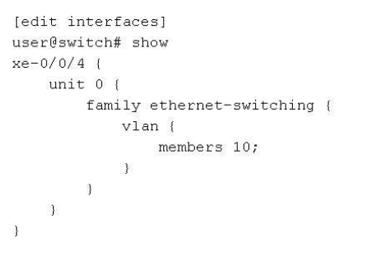
on a Juniper switch. It shows interfacexe-0/0/4withunit 0andfamily ethernet-switching. Under vlan, it lists members 10;`]
Referring to the exhibit, which two statements are true? (Choose two.)
In Junos OS for switching platforms, an interface is configured for Layer 2 bridging under the family ethernet-switching hierarchy. The way an interface handles VLAN traffic depends on its port mode: access or trunk.
According to Juniper Networks technical documentation, when an interface is configured simply with members <vlan-name/id>, it defaults to an access port. In an access port configuration:
The port is a member of only a single VLAN.
The port receives and sends untagged traffic (Option C). Any untagged frame arriving at this interface is implicitly associated with the configured VLAN member.
The interface does not expect or process 802.1Q tags in incoming frames.
In the exhibit, interface xe-0/0/4 has members 10;. In Junos, the members statement can reference either a VLAN name or a VLAN ID. However, when the configuration is shown as members 10; without further context of the specific ID mapping, the most precise interpretation of the CLI output provided is that the interface is a member of the VLAN named 10 (Option D). While '10' could be the numerical ID, Junos primarily maps members by their defined administrative name.
Why other options are incorrect:
Option A: Access ports do not receive tagged traffic; only trunk ports (which require the port-mode trunk and vlan members [ ... ] statements) are designed to process tagged frames.
Option B: While the VLAN named 10 likely has a VLAN ID of 10, the exhibit does not explicitly confirm the ID mapping. In Junos, a VLAN named '10' could technically have a different tag ID (e.g., VLAN 'Office' with ID 10). Option D is the more accurate direct reading of the displayed member configuration.
Exam domains verified against: Official Juniper JN0-364 exam guide, last checked October 2026.
Master static, aggregate, and generated routes along with load balancing and filter-based forwarding. Understand routing instances and the routing information base, plus how Junos OS evaluates and prioritizes routes from multiple sources.
Learn link-state database fundamentals, router ID selection, designated router election, and LSA packet types. Know how to configure interfaces, apply routing policies, and troubleshoot OSPF neighbour relationships in multi-area deployments.
Sample question from this domain above: Q5
Understand protocol data units, TLV encoding, and how IS-IS discovers and maintains neighbour relationships across levels. Configure and troubleshoot IS-IS in a service provider environment using Junos OS tools.
Grasp BGP message types, attribute handling, and path selection logic for both IBGP and EBGP. Apply routing policies to control route propagation and influence decision-making in large-scale service provider networks.
Sample question from this domain above: Q6
Know bridging elements, frame processing, and provider bridging including Q-in-Q tunneling. Configure VLANs with different port modes, handle tagging, and implement Integrated Routing and Bridging interfaces.
Sample question from this domain above: Q2
Understand STP, RSTP, MSTP, and VSTP concepts including port roles, states, and BPDU handling. Implement loop and root protection mechanisms and troubleshoot spanning-tree convergence issues.
Learn MPLS terminology, label operations, and end-to-end packet forwarding through the label information base. Configure and troubleshoot RSVP-signaled and LDP-signaled LSPs, plus segment routing with MPLS.
Sample question from this domain above: Q7
Configure static routes, dynamic routing protocols like OSPFv3 and IS-IS, and BGP in IPv6 environments. Set up IPv6 over IPv4 tunneling and troubleshoot IPv6 address and routing issues.
Sample question from this domain above: Q3
Understand IP tunneling applications and GRE tunnel requirements. Configure and troubleshoot GRE tunnels for encapsulation and connectivity across service provider networks.
Implement link aggregation groups, graceful restart, and nonstop services including NSR and NSB. Deploy BFD for rapid failure detection and VRRP for gateway redundancy in carrier environments.
Common questions about the exam itself

