Key details for this exam, checked against the published exam outline
Each question shows the correct answer and an explanation of why it is right
You are asked to create a real-time visualization dashboard which displays clients on a map.
Which two Juniper Mist functions would you use in this scenario? (Choose two.)
When developing a real-time visualization dashboard that displays client locations on a map, Juniper Mist offers specific APIs and data streaming methods to support dynamic updates.
According to the Juniper Mist Developer Documentation, the WebSocket interface enables continuous, real-time streaming of client location and telemetry data directly from the Mist Cloud. This mechanism is ideal for live dashboards, as it eliminates the need for repeated REST API polling. WebSocket connections provide instant updates whenever a device moves, connects, or disconnects, ensuring the displayed map remains accurate in real time.
The Live View feature complements this functionality within the Mist Cloud and third-party integrations. It allows administrators and developers to view live location movements of Wi-Fi clients, BLE beacons, and IoT devices within a site's floor plan. It uses telemetry directly from access points, offering second-by-second updates.
In contrast, RESTful APIs and Webhooks are designed for event-based automation and configuration management rather than live visualization. REST APIs are best for historical or static data retrieval, while Webhooks are used for triggering external actions based on events.
Therefore, the correct functions for real-time map visualization are:
WebSocket (C) --- for continuous live data streaming
Live View (D) --- for direct map-based visualization of client activity
-- Juniper Mist Developer API and WebSocket Guide
-- Juniper Mist Location Services and Live View Documentation
-- Juniper Mist Cloud Architecture Overview
You are asked to configure a site in Juniper Mist.
Which statement describes completing this step?
You must configure the site within your organization---this is the correct process according to Juniper Mist's official configuration guides. When setting up a deployment, first an organization is created in the Mist cloud. Within this organization, sites are added for each physical location. The Mist documentation says: 'You can create Sites in the Juniper Mist portal from the Organization > Site Configuration menu. Add or update sites as needed.' The configuration requires the site name, country, and location to be set at the site level---not the organization level. Claiming APs via QR codes and organization definition are separate steps in device onboarding and initial setup.
Juniper Mist Management Guide , Mist Edge Teleworker Solution User Guide , Juniper Mist Access Points
Which Juniper Mist feature provides visibility into BGP operations for MX Series routers?
The feature that provides deep visibility into BGP operations for MX Series routers is Routing Assurance. According to official Juniper documentation: 'Juniper Mist Routing Assurance provides insights about... routing, including routing events, routing protocol states, peer status analysis, routes, and more' for supported routers such as Juniper MX and ACX series. Routing Assurance extends Mist AI observability and analytics into the routing fabric, offering real-time visibility and telemetry for BGP peering session health, routing tables, events, path changes, and other core routing metrics. This empowers network operators with actionable insights and root cause analysis capabilities to maintain optimal WAN and core routing performance from the Mist cloud. Wired Assurance focuses on switch and port health and is not designed for routing protocol visibility.
Juniper Mist Routing Assurance Datasheet; Product Description
Which statement accurately describes the capabilities of the Juniper Mist AI platform?
The Juniper Mist AI platform is a cloud-native, AI-driven network management solution that leverages machine learning and data science to provide predictive insights, proactive troubleshooting, and automated optimization across wireless, wired, and WAN environments.
At the core of this intelligence is the Predictive Analytics and Correlation Engine (PACE), which powers Mist AI's ability to process and analyze massive volumes of telemetry data in near real time.
According to the Juniper Mist AI Cloud Architecture Guide,
''The Predictive Analytics and Correlation Engine (PACE) collects, correlates, and analyzes pre-connection and post-connection user experience data, enabling real-time visibility and proactive detection of network anomalies.''
This allows Mist AI to perform the following:
Understand client onboarding and connectivity performance through SLE (Service Level Expectation) metrics.
Detect anomalies automatically and identify root causes with Marvis.
Continuously learn and improve via the Mist AI efficacy loop.
Options A, C, and D are incorrect because:
Mist AI is fully automated and does not rely on manual data collection.
The Mist Cloud is the central data aggregation and analysis engine.
Marvis is proactive and autonomous, not dependent on user-driven troubleshooting.
Therefore, the correct answer is B. Juniper Mist AI uses Predictive Analytics and Correlation Engine (PACE) to collect and analyze pre-connection and post-connection user and location states in near real-time.
-- Juniper Mist AI Cloud Architecture and Operations Guide
-- Juniper Mist Predictive Analytics and Correlation Engine (PACE) Documentation
-- Juniper Mist AI Platform Overview and Study Guide
Which two statements describe port profiles? (Choose two.)
Port profiles in Juniper Mist Wired Assurance are reusable configuration templates that define how switch ports behave. They streamline switch provisioning and ensure consistent configurations across multiple ports and devices within a site or organization.
According to the Juniper Mist Wired Assurance Configuration Guide, port profiles are defined as:
''A collection of interface-level settings that can be applied to one or more switch ports to simplify configuration and ensure uniform policy enforcement.''
Key characteristics include:
Reusable templates: Port profiles can be assigned to multiple ports on one or more switches, allowing rapid deployment and consistent port behavior (e.g., access, trunk, voice VLAN).
Interface-level parameters: They include settings such as VLAN assignments, PoE configuration, speed, duplex, and LLDP options.
Port profiles do not include routing configurations (those are defined at the Layer 3 interface or VLAN interface level) and are not limited to a single port.
Therefore, the correct answers are:
A . They can be assigned to multiple ports.
B . They include a set of interface configurations.
-- Juniper Mist Wired Assurance Configuration and Templates Guide
-- Juniper Mist Cloud Switch Management Documentation
-- Juniper EX Series Switch Wired Assurance Overview
What are two guest portal authentication options in the UI? (Choose two.)
In Juniper Mist Cloud, guest access is managed through the Guest Portal feature, which allows administrators to configure secure and flexible authentication methods for temporary or visitor access. These options are designed to provide a balance between user convenience and network security.
According to the Juniper Mist Guest Access and Captive Portal Configuration Guide, the supported authentication options include:
''Authentication Code (Self-registration) and Sponsored Guest workflows, among others, which provide different levels of administrative control and ease of use.''
Authentication Code (A):
Visitors receive a temporary authentication code (PIN) via email or SMS that they use to log in. This method is ideal for self-service access while maintaining accountability.
Sponsored Guest (C):
In this mode, guests must be approved by a designated employee or sponsor before gaining access. This adds an extra layer of security by involving internal personnel validation.
MAC Authentication (B) and SAML (D) are not used for guest portals; they are designed for device-based authentication and enterprise-level identity federation, respectively.
-- Juniper Mist Guest Access and Captive Portal Configuration Guide
-- Juniper Mist Cloud Administration and Access Management Documentation
-- Juniper Mist Wireless Assurance Guest Network Overview
Exhibit:
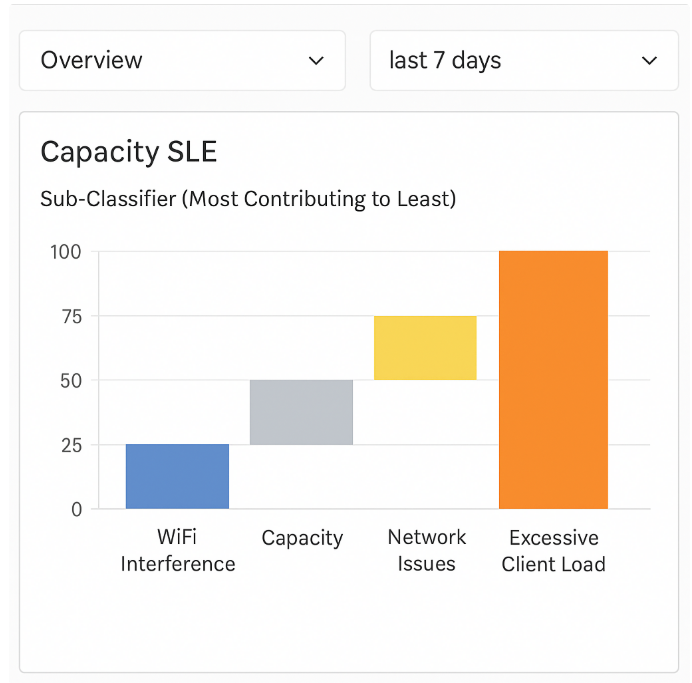
Referring to the exhibit, which sub-classifier contributed the most to capacity issues?
In the Juniper Mist Wireless Assurance dashboard, each Service Level Expectation (SLE) is broken down into sub-classifiers to identify the specific causes of degraded user experience. For the Capacity SLE, Mist AI analyzes performance indicators related to access point utilization, airtime availability, client density, and radio congestion.
According to the Juniper Mist Wireless Assurance Analytics Guide, sub-classifiers within the Capacity SLE may include:
WiFi Interference -- measures co-channel and adjacent-channel interference.
Capacity -- monitors total bandwidth and airtime utilization.
Network Issues -- highlights backend transport or switching congestion.
Excessive Client Load -- indicates when too many clients are associated with a single access point or radio, leading to reduced throughput and contention.
In the exhibit, the Excessive Client Load bar clearly shows the highest contribution to the Capacity SLE degradation. This means that the majority of capacity issues were caused by an overloaded access point or radio channel handling more clients than optimal.
Therefore, the correct answer is D. Excessive Client Load.
-- Juniper Mist Wireless Assurance SLE and Classifier Documentation
-- Juniper Mist AI Operations and Analytics Guide
-- Juniper Mist Cloud Dashboard Metrics Overview
Exam domains verified against: Official Juniper JN0-253 exam guide, last checked October 2026.
Learn the core architecture and concepts behind the Juniper Mist cloud-native platform. This foundation covers AI and machine learning principles as well as the advantages of cloud-based management over traditional approaches. You will understand the key capabilities of the Mist cloud and how different use cases benefit from its design.
Master the practical tasks of setting up and managing Juniper Mist environments. You will work with user accounts and roles, device claiming and onboarding, organization and site creation, templates, labels and policies. Advanced topics include licensing subscriptions, certificate management including RadSec and Mist certificates, and auto provisioning features.
Discover how Juniper Mist provides visibility and assurance across wireless, wired and WAN networks. Wi-Fi Assurance offers insights into wireless performance while Wired Assurance covers switching and connectivity. You will also explore WAN Assurance for wide-area network optimization, Routing Assurance for path intelligence and Access Assurance for network authentication and policy enforcement.
Understand how Juniper Mist delivers AI-driven insights and monitoring capabilities. You will work with service-level expectations, capture and analyse network packets, review the dashboard insights that guide troubleshooting, set up alerts for critical conditions and audit logs for compliance tracking. These tools help identify and resolve issues quickly.
Get familiar with Juniper's AI assistant for network operations. Marvis provides automated actions at both organization and site levels to streamline tasks. You will learn how to query Marvis for insights and make use of Marvis Minis, the quick-action features that automate routine troubleshooting and optimization work.
Explore how Juniper Mist uses location intelligence for network and business operations. The virtual BLE (vBLE) technology enables asset visibility across your venue and engagement features that support context-aware networking policies. These services are essential for retail, healthcare and enterprise campus deployments.
Learn the technical and operational aspects of managing Juniper Mist. This includes RESTful APIs and WebSocket connections for automation and integration as well as webhook capabilities for event-driven workflows. You will also understand the support options available including ticket submission, update management and access to documentation.
Sample question from this domain above: Q5
Common questions about the exam itself

