
Free Juniper JN0-105 Exam Practice Questions & Explanations
Prepared & Reviewed by the ValidExamDumps Editorial Team
At ValidExamDumps, we consistently monitor updates to the Juniper JN0-105 exam questions by Juniper. Whenever our team identifies changes in the exam questions, objectives, focus areas or requirements, We immediately update our exam questions for both PDF and online practice exams. This commitment ensures our customers always have access to the most current and accurate questions. By preparing with these up to date and 100% exam domain coverage questions, our customers can successfully pass the Juniper Junos, Associate Exam (old) exam on their first attempt without needing additional materials or study guides.
Other certification materials providers often include outdated or removed questions by Juniper in their JN0-105 exam. These outdated questions lead to customers failing their Juniper Junos, Associate Exam (old) exam. In contrast, we ensure our questions bank includes only precise and up-to-date questions. Our main priority is your success in the Juniper JN0-105 exam, not profiting from selling obsolete exam questions in PDF or Online Practice Test.
Which two statements describe the result when you enter? at the command-line prompt? (Choose two.)
When you enter ? at the command-line prompt in Junos OS, the system provides assistance in two significant ways. Firstly, it lists the available commands and options that can be used at the current point in the command hierarchy, aiding users in understanding what commands they can execute next. Secondly, it displays summary information about those commands and options, providing brief descriptions or additional context that can help users understand the function of each command or option. This feature is particularly useful for learning the command structure or for quick reference when specific command syntax is forgotten.
Click the Exhibit button.
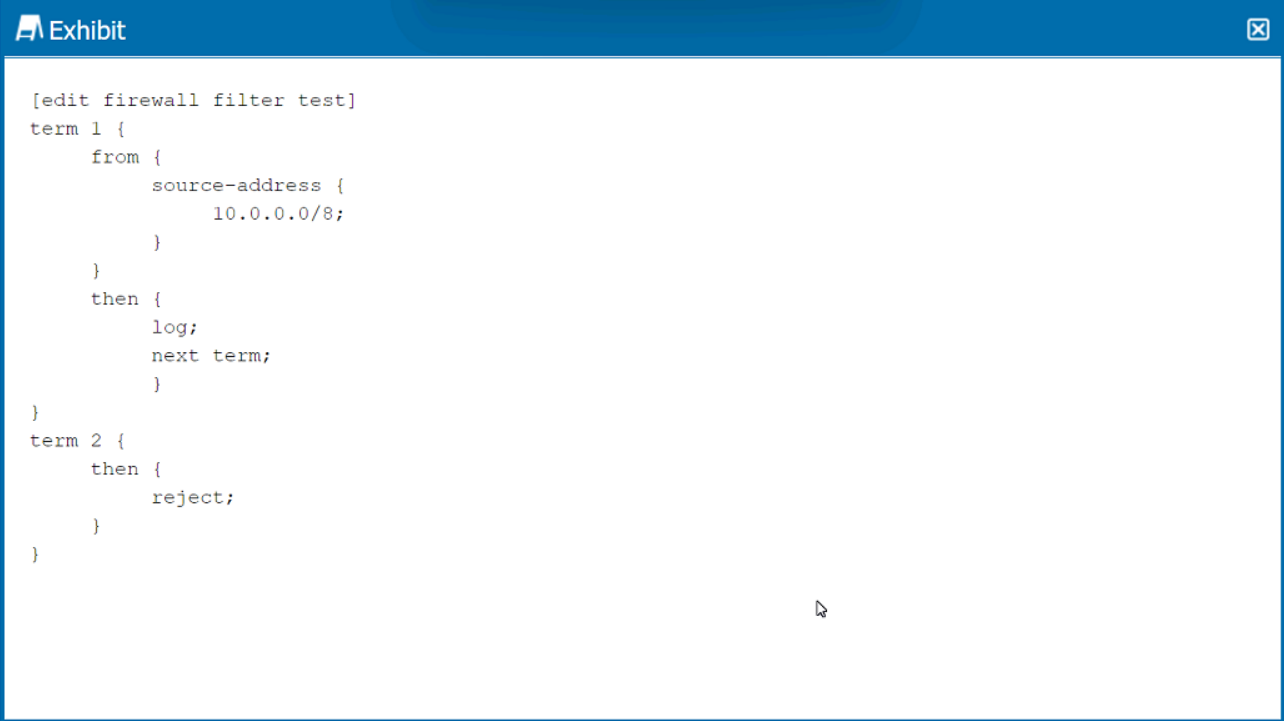
How is traffic, sourced from 10.0.0.0/8, treated by the firewall filter shown in the exhibit?
The firewall filter configuration in the exhibit specifies a filter with two terms. Term 1 matches traffic from the source address 10.0.0.0/8 and has two actions: 'log' and 'next term'. The 'log' action will record the match to a log file, and 'next term' indicates that the firewall should evaluate the next term after logging. There is no explicit action such as 'accept' or 'reject' in term 1, so by default, the traffic will be accepted unless subsequently rejected by another term.
Term 2 has the action 'reject', which discards packets that reach this term. Since there is no 'from' condition in term 2, it acts as a default rule for all traffic not matched by term 1.
Because the traffic sourced from 10.0.0.0/8 matches term 1 and there is no reject action in that term, it will be logged and then accepted by the firewall filter. There is no subsequent term that rejects this specific traffic, so the action from term 2 does not apply to it.
Which three benefits occur when operating an interior gateway protocol (IGP) in an autonomous system (AS)? (Choose three.)
Operating an Interior Gateway Protocol (IGP) within an Autonomous System (AS) provides several benefits, including determining the optimal paths for data transmission (B), reacting quickly to network changes (D), and learning all about the subnets and best paths within the network (E). IGPs are designed to manage routing within a single AS efficiently, adapting to changes and ensuring data is routed through the best available paths.
Which prompt indicates that you are using configuration mode?
In Junos OS, the # prompt indicates that you are in configuration mode. This mode is used for making changes to the configuration of the device.
'The # prompt indicates that you are in configuration mode.'
What are two attributes of the UDP protocol? (Choose two.)
UDP (User Datagram Protocol) is known for being connectionless (D) and providing best-effort delivery without the reliability mechanisms present in TCP (C). This means that UDP does not establish a connection before sending data and does not guarantee delivery, order, or error checking, making it faster but less reliable than TCP.
Which two statements are correct about Junos traceoptions? (Choose two.)
Traceoptions in Junos OS are used for detailed debugging and troubleshooting of protocols and processes within the system. They are not enabled by default due to the potential performance impact and volume of data generated. Instead, traceoptions are enabled through specific configuration settings under the relevant protocol or process hierarchy. This allows administrators to target their troubleshooting efforts and control the scope of logging. By default, the output generated by traceoptions is stored in files located in the /var/log directory, with the file name typically specified in the traceoptions configuration. This structured approach to logging and debugging helps in diagnosing complex issues without overwhelming the system or the administrator with irrelevant data.
You want to find out the chassis serial number of a Junos device.
Which command would display this information?
The show chassis hardware command in Junos OS displays detailed information about the hardware installed in the device, including the chassis itself. This command provides a list of all hardware components, their serial numbers, part numbers, and version information. When looking for the chassis serial number specifically, this command is the most direct and comprehensive way to retrieve that information, as it includes the serial number of the chassis among the details provided.
What are two methods for navigating to configuration mode from an operational mode prompt? (Choose two.)
In Junos OS, to navigate from operational mode to configuration mode, you can use either the edit or configure command. Both commands move the CLI from operational mode, where you can view the state of the device, to configuration mode, where you can make changes to the device's configuration.