Key details for this exam, checked against the published exam outline
Each question shows the correct answer and an explanation of why it is right
On the IS-IS IPv6 network shown in the figure, multi-topology is enabled on all routers.
The ipv6 default-route-advertise always level-1 command is configured in the IS-IS process of R4.
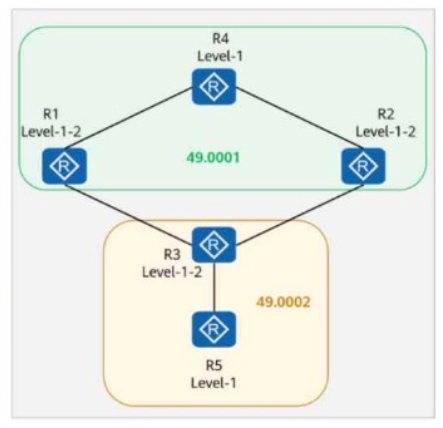
Which of the following routers does not have the default route in its routing table?
Comprehensive and Detailed In-Depth
Understanding the IS-IS Network Structure in the Questio n :
IS-IS Area IDs and Router Roles
Area 49.0001 (Level-1-2): Contains R1, R2, R4 (all Level-1-2 routers).
Area 49.0002 (Level-1-2 & Level-1): Contains R3 (Level-1-2) and R5 (Level-1 only).
Key Command Used: ipv6 default-route-advertise always level-1
This command forces R4 to advertise a default route (::/0) to all Level-1 routers within its area.
Only Level-1 routers in the same area as R4 will receive the default route.
Level-2 routers do not receive or propagate this default route unless additional configuration is done.
Route Distribution Analysis:
R4 (Level-1-2) is configured to advertise a default route to Level-1 routers.
R1 and R2 (both Level-1-2) are in the same area (49.0001) as R4, so they receive the default route.
R3 (Level-1-2) is in area 49.0002 but connects to R4 (49.0001), meaning it can receive the default route through its Level-1 connection.
R5 (Level-1 only) is in area 49.0002, but R4 does not propagate the default route to another Level-1 area (49.0002).
Since R5 is a Level-1 router and does not have a Level-2 connection, it cannot receive the default route from R4.
Final Conclusion:
R1 receives the default route.
R2 receives the default route.
R3 receives the default route.
R5 does NOT receive the default route.
Thus, the correct answer is: C. R5.
HCIP-Datacom-Advanced Routing & Switching Technology V1.0 -- IS-IS Multi-Topology and IPv6 Routing
Huawei Official HCIP-Datacom Study Guide -- IS-IS Default Route Advertisement for Level-1 and Level-2 Areas
Huawei Documentation on ipv6 default-route-advertise always level-1 Command Behavior
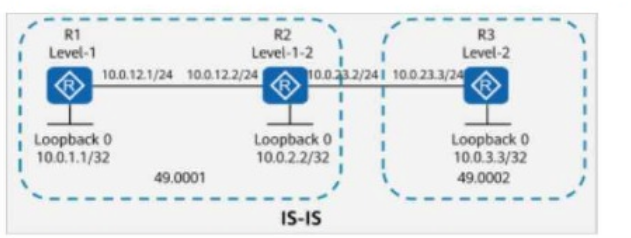
On the IS-IS network shown in the figure, R1 imports a default route using the default-route-advertise always level-1 command. Which of the following statements is false?
Comprehensive and Detailed In-Depth
Understanding the IS-IS Topology in the Questio n:
R1 (Level-1 Router) is connected to R2 (Level-1-2 Router).
R2 connects Level-1 and Level-2 areas, making it an inter-area router.
R3 (Level-2 Router) connects to R2.
The loopback addresses are:
R1: 10.0.1.1/32
R2: 10.0.2.2/32
R3: 10.0.3.3/32
Key Command Used: default-route-advertise always level-1
This command forces R1 to advertise a default route (0.0.0.0/0) to Level-1 routers.
Level-1 routers (like R1) do not have visibility into Level-2 routes unless a default route is provided by an L1-L2 router (R2 in this case).
Analyzing Each Option:
Option A (TRUE):
If R1 pings an unknown address like 10.0.4.4, it will use the default route if available. However, if no such route exists, it will not send any packets.
This behavior is expected, so this statement is true.
Option B (TRUE):
10.0.2.2 (R2) is a Level-1-2 router, and it can communicate with 10.0.3.3 (R3), which is a Level-2 router.
Since R2 and R3 are both in Level-2, they can exchange routes.
So, 10.0.2.2 can ping 10.0.3.3. This statement is true.
Option C (TRUE):
10.0.1.1 (R1) is a Level-1 router, and 10.0.2.2 (R2) is a Level-1-2 router.
Since R2 is Level-1-2, it shares Level-1 routes with R1, allowing communication between R1 (10.0.1.1) and R2 (10.0.2.2).
Therefore, this statement is true.
Option D (FALSE - Correct Answer):
10.0.1.1 (R1) is a Level-1 router, which means it only knows about Level-1 routes.
10.0.3.3 (R3) is a Level-2 router, and its route is only known by Level-2 routers (R2 & R3).
Since Level-1 routers do not learn Level-2 routes directly (unless specific redistribution is done), R1 does not have a route to 10.0.3.3.
Therefore, R1 (10.0.1.1) cannot ping R3 (10.0.3.3), making this statement false.
Conclusion:
The false statement is Option D (10.0.1.1 can ping 10.0.3.3).
HCIP-Datacom-Advanced Routing & Switching Technology V1.0 -- IS-IS Route Types and Forwarding Principles
Huawei Official HCIP-Datacom Study Guide -- IS-IS Level-1 and Level-2 Routing Concepts
Huawei Documentation on default-route-advertise always level-1 Command
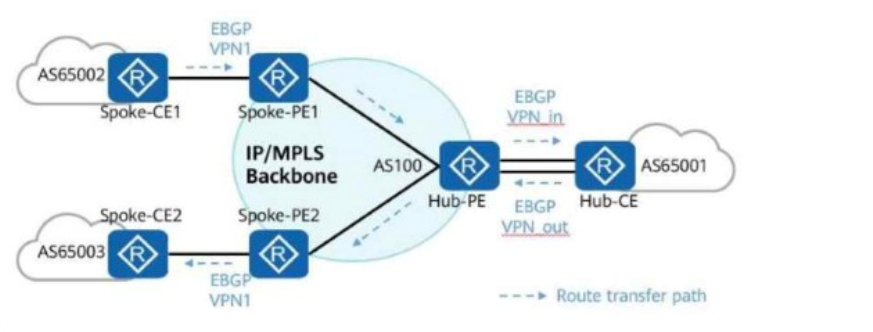
In the hub-spoke networking shown in the figure, which of the following commands must be configured on the Hub-PE to ensure correct route transmission?
Comprehensive and Detailed In-Depth
1. Understanding the Hub-Spoke Network Model in MPLS VPN
Hub-Spoke (or Route Reflector) topology is used in MPLS Layer 3 VPNs where multiple spoke sites communicate through a central hub.
The Hub-PE acts as an intermediate BGP speaker and redistributes routes between spokes.
The challenge is preventing routing loops when exchanging routes between spokes.
2. Understanding the Role of Site of Origin (SoO) in BGP/MPLS VPNs
BGP Site of Origin (SoO) is a route attribute used to prevent routing loops in scenarios where a hub redistributes routes between spokes.
If a route originating from a spoke is advertised back to the same site, SoO prevents it from being re-learned.
The SoO value (e.g., 200:1) ensures that a site does not accept its own previously advertised prefixes.
3. Analyzing the Answer Choices
A. [Hub-PE-bgp-VPN_out] peer x.x.x.x allow-as-loop (Incorrect)
The allow-as-loop command allows BGP to accept routes with its own AS number in the AS path.
This is NOT needed in a Hub-Spoke VPN because BGP routes are not being looped through the same AS.
This is unnecessary for preventing loops in a Hub-Spoke VPN.
B. [Hub-PE-bgp-VPN_in] peer x.x.x.x allow-as-loop (Incorrect)
Again, allow-as-loop is used when a router needs to accept its own AS number in the BGP AS path.
This is NOT the mechanism used for preventing loops in Hub-Spoke VPNs; SoO is used instead.
This is not required in this scenario.
C. [Hub-PE-bgp-VPN_in] peer x.x.x.x soo 200:1 (Correct Answer)
The correct way to prevent spoke routes from looping through the hub is to apply the Site of Origin (SoO) attribute.
This command ensures that if a route with SoO 200:1 is received, it is not advertised back to the same spoke.
This is the correct answer.
D. [Hub-PE-bgp-VPN_out] peer x.x.x.x soo 200:1 (Incorrect)
Applying SoO on outgoing routes is NOT effective because the hub should mark received routes and prevent loops when re-advertising them.
SoO should be applied on the inbound (received) routes at the Hub-PE, not outbound.
This is not the correct implementation of SoO.
Final Conclusion:
Correct Answe r : C. [Hub-PE-bgp-VPN_in] peer x.x.x.x soo 200:1
A. allow-as-loop is unnecessary in a Hub-Spoke MPLS VPN.
B. allow-as-loop is not relevant here.
D. SoO should be applied inbound, not outbound.
Thus, the correct answer is: C. [Hub-PE-bgp-VPN_in] peer x.x.x.x soo 200:1.
HCIP-Datacom-Advanced Routing & Switching Technology V1.0 -- MPLS VPN Hub-Spoke Design and SoO Configuration
Huawei Official HCIP-Datacom Study Guide -- Route Loop Prevention in Hub-Spoke VPNs
Huawei Documentation on Site of Origin (SoO) in MPLS VPN
The device operating environment is crucial for stable device operating, including the equipment room, power supply, and heat dissipation. Maintenance personnel must be on site to maintain the device operating environment.
On the network shown in the figure, the DHCP server function is enabled on GE0/0/0 of R2, and the address pool is an interface address pool.
When GE0/0/0 and GE0/0/1 of R1 function as DHCP clients, only one interface can obtain an IP address by default.

Options:
Comprehensive and Detailed In-Depth
Understanding the DHCP Process in This Scenario:
DHCP Server on R2:
The DHCP server is configured on interface GE0/0/0 of R2.
The address pool is an interface address pool, meaning that IP addresses are allocated from the subnet of GE0/0/0 (i.e., 10.0.12.0/24).
DHCP Clients on R1:
Both interfaces (GE0/0/0 and GE0/0/1) on R1 are set as DHCP clients, meaning they will send DHCP DISCOVER messages to obtain an IP address dynamically.
Why Only One Interface Gets an IP Address?
Interface address pools in Huawei devices assign only one IP address per MAC address (which is typically the router's MAC).
Since both interfaces belong to R1, they share the same MAC address when making a DHCP request.
As a result, the DHCP server on R2 only assigns one IP address to the first requesting interface.
The second request is ignored or denied by the DHCP server due to the duplicate MAC address issue.
Key Takeaways:
Huawei routers using an interface-based DHCP address pool assign only one IP per MAC address.
Since both interfaces on R1 have the same MAC, only one gets an IP.
This behavior is expected in Huawei's HCIP-Datacom-certified DHCP configurations.
HCIP-Datacom-Advanced Routing & Switching Technology Reference:
Huawei HCIP-Datacom Official Certification Guide, Chapter on DHCP Server and Client Configurations.
Huawei Datacom Configuration Guide, Section on Interface Address Pools and Address Assignment Limitations.
Huawei Enterprise Networking Training Materials, DHCP Relay and DHCP Server Behavior.
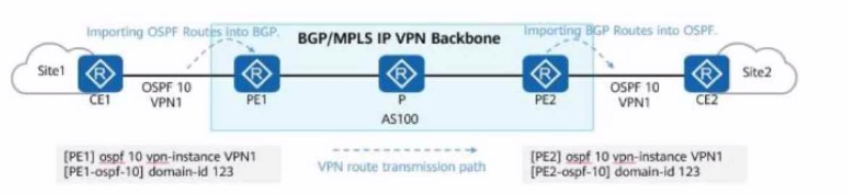
Service routes of an enterprise are transmitted on the network. Some configurations of PE1 and PE2 are shown in the figure. Which of the following LSAs may CE2 receive?
8 domains from the Huawei H12-831_V1.0 exam outline, with approximate weightings. Every sample question above is tagged with the domain it comes from
Master advanced interior gateway protocols including OSPF and IS-IS to achieve fast convergence and effective route control. Learn how to optimize routing behavior through protocol-specific features that improve network stability and performance.
Sample question from this domain above: Q1
Understand route control mechanisms and route reflector deployment for inter-domain routing. Study advanced BGP capabilities that enable efficient scaling and policy implementation across enterprise networks.
Configure static routes, OSPFv3, IS-IS for IPv6, and BGP4+ to support IPv6-enabled networks. Gain hands-on skills for network migration from IPv4 to IPv6 in production environments.
Design secure and efficient Ethernet networks using VLAN configurations and security mechanisms. Apply best practices for managing large-scale Ethernet deployments typical of modern data centers.
Sample question from this domain above: Q4
Apply MPLS principles, label distribution, and static LSP configuration to enable efficient data forwarding. Deploy MPLS-based VPN solutions for secure inter-site connectivity and network scalability.
Sample question from this domain above: Q5
Perform routine network maintenance and execute systematic data collection for network monitoring. Establish operational procedures that maintain network reliability and performance over time.
Apply structured troubleshooting processes to diagnose and resolve common network issues systematically. Use methodical approaches to isolate root causes and implement effective solutions.
Sample question from this domain above: Q3
Understand basic cutover concepts and execute controlled migration processes for network changes. Plan and implement network transitions that minimize downtime and service disruption.
Common questions about the exam itself

