- Home
- HP
- HPE2-T37 Exam Questions
HP HPE2-T37 Practice Exam Questions & Answers
7 Free Questions
· Last reviewed: October 16, 2026
· Prepared & Reviewed by the ValidExamDumps Editorial Team
Exam Facts
HP HPE2-T37 Exam Details
Key details for this exam, checked against the published exam outline
115
Practice Questions (Our Bank)
60 minutes
Exam Duration
70%
Passing Score
- Exam Code
- HPE2-T37
- Full Name
- Using HPE OneView
- Issuing Body
- Hewlett Packard Enterprise
- Question Format (Our Bank)
- Multiple Choice, Hotspot, Drag & Drop
- Delivery
- Web-based
Practice Questions
Free HPE2-T37 Practice Questions
Each question shows the correct answer and an explanation of why it is right
VA
ValidExamDumps Editorial Team
Every question and its answer is checked by our HPE2-T37 exam
preparation team, who also write the explanation shown with each one.
How we research and review these pages
Which statement about server hardware types is true?
Correct Answer:
A
Explanation
Server hardware types define the physical characteristics and capabilities of a server. Once you select a hardware type when creating a server profile, that choice is locked in. You cannot change it later because the profile is bound to that specific hardware configuration. A server profile can only move between servers of the same hardware type, not different ones. This ensures consistency and prevents incompatible assignments.
Which operation can be performed using HPE OneView for VMware vCenter Server?
Correct Answer:
A
Explanation
HPE OneView integrates with VMware vCenter Server to manage cluster operations. One key capability is the ability to remove nodes from existing clusters. This operation helps with cluster maintenance and scaling. The other options either don't represent actual OneView functionality with vCenter or describe operations that cannot be performed through OneView's integration.
Which types of support dump can be created using HPE OneView? (Select two.)
Correct Answer:
B, D
Explanation
Support dumps in HPE OneView come in different types depending on what you need to troubleshoot. Appliance support dumps capture data about the OneView appliance itself, including logs and configuration details. Logical enclosure support dumps contain information specific to a logical enclosure, which is useful for diagnosing enclosure-level issues. Other dump types may exist but these two are the primary ones available for support and diagnostics.
Correct Answer:
C
Explanation
A network set is an organizational construct within OneView that groups multiple tagged Ethernet networks together under a single name. This makes it much easier and faster to create server profiles because you can reference the entire network set instead of selecting each individual network. It's essentially a template that simplifies the provisioning process and ensures consistency across profiles.
Which statement about HPE OneView Global Dashboard is true?
Correct Answer:
C
Explanation
The HPE OneView Global Dashboard is a virtual appliance that sits above individual OneView instances or Composers. Its job is to pull health and inventory data from multiple HPE OneView appliances or Composers and present a unified view. This is useful for organizations managing multiple OneView deployments across different locations. It provides centralized monitoring and reporting capabilities.
Your customer would like to use the second mezzanine slot in an HPE Synergy 480 Genii compute node for dedicated FC connectivity. What is required to use the second mezzanine slot For the compute node?
Correct Answer:
D
Explanation
To use the second mezzanine slot in an HPE Synergy 480 Gen10 compute node for dedicated FC connectivity, a second processor must be installed. The second mezzanine slot is electrically connected to the second processor's PCIe lanes. Without the second CPU, the slot is inactive and cannot be used, regardless of any configuration in HPE OneView.
Option A: While server profiles are necessary, they do not enable hardware components.
Option B: Memory size does not affect mezzanine slot availability.
Option C: Licensing does not enable hardware slots; it allows for management features.
HPE Synergy Compute Module QuickSpecs: Indicates the dependency of mezzanine slots on the presence of CPUs.
HPE OneView and Synergy Configuration Guide: Provides information on hardware requirements for full functionality.
Refer to the exhibit.
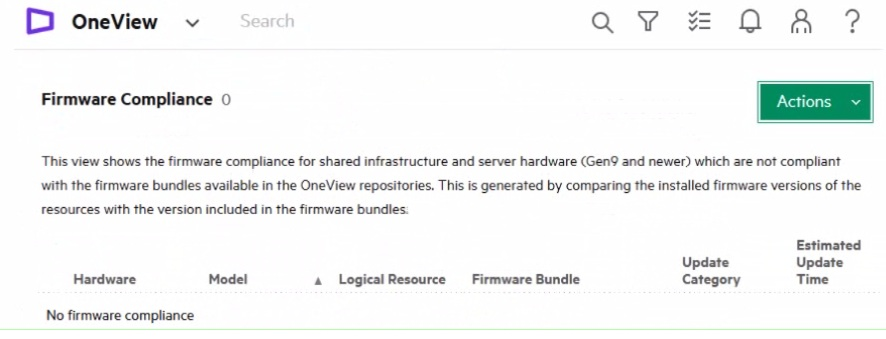
A customer complains that firmware compliance is empty. The customer confirmed that Synergy Service Pack is uploaded to the HPE OneView repository. How should you respond?
Correct Answer:
A
Full Access
Get the complete HPE2-T37 question set
- 115 questions covering all exam domains
- Correct answers with explanations, like the free questions above
- PDF and online practice test
- 90 days of free updates
Domain 1: Describe industry standard data center infrastructure management technologies
2%
Understand foundational concepts of DCIM tools and how they standardize infrastructure oversight across enterprise environments. This provides context for where HPE OneView fits within the broader industry landscape.
Domain 2: Describe HPE OneView and its elements and positioning for customer business outcomes
13%
Learn the architecture of HPE OneView, its core modules, and how it delivers measurable business benefits such as reduced operational costs and faster deployment cycles. Know how OneView integrates servers, storage, and networking into a single control plane.
Sample question from this domain above:
Q5
Domain 3: Architect and design a data center management solution using the HPE OneView
15%
Design scalable infrastructure solutions that leverage OneView capabilities for hybrid IT environments. Address design considerations such as scalability, redundancy, and multi-site management using OneView as the orchestration platform.
Domain 4: Install and configure HPE OneView and related elements
27%
Deploy HPE OneView appliances, integrate with management frameworks and discovery tools, and perform initial configuration. Handle networking setup, user permissions, and connection to physical infrastructure components including servers and storage arrays.
Sample question from this domain above:
Q6
Domain 5: Provision Hybrid IT infrastructure using HPE OneView
24%
Create and manage profiles for servers, storage, and networking to provision resources consistently and at scale. Use OneView to automate provisioning workflows that span on-premises and cloud infrastructure while enforcing compliance and governance policies.
Sample questions from this domain above:
Q1Q2Q4
Domain 6: Manage and report on Hybrid IT infrastructure using HPE OneView
11%
Generate operational reports, track resource usage, and maintain audit trails of changes across hybrid environments. Use OneView dashboards and alerting to stay informed about infrastructure state and performance metrics.
Sample questions from this domain above:
Q3Q7
Domain 7: Monitor and troubleshoot common Hybrid IT infrastructure issues using HPE OneView
8%
Identify and resolve infrastructure faults using OneView monitoring, logs, and diagnostic tools. Diagnose issues in servers, storage connectivity, network configuration, and OneView operations itself using available visibility and telemetry.
FAQ
HPE2-T37 Exam FAQ
Common questions about the exam itself
Who is HPE2-T37 designed for, and what background do I need?
HPE2-T37 targets HPE customers, partners, and employees who configure, implement, support, and use OneView to manage hybrid IT solutions. You should have basic infrastructure knowledge covering storage, servers, and networking, but no formal prerequisites are required.
How hard is HPE2-T37 compared to other HPE certifications?
HPE2-T37 tests both conceptual understanding and practical application of OneView across provisioning, monitoring, and troubleshooting real infrastructure. The exam uses mixed question types including multiple choice, drag-and-drop, and point-and-click exercises, which mirrors real operational tasks.
Which objective area is hardest and why?
Objective 4, 'Install and configure HPE OneView and related elements', carries the highest weight at 27 percent. This is because it covers hands-on deployment, networking setup, and integration with existing infrastructure, all of which require practical experience beyond theoretical knowledge.
How long should I spend preparing for HPE2-T37?
Preparation time depends on your current OneView experience. With structured study and practice tests, allow 20 to 30 hours for someone new to OneView, or less if you already work with it daily. Running full timed practice sessions helps you learn pace management for the 60-minute exam window.
What happens on exam day for HPE2-T37?
You will take a web-based exam with 40 questions in 60 minutes. No reference material is allowed at the testing site. You need 70 percent to pass. You must have an HPE Learner ID and Pearson VUE login to register and sit the exam.
What are the retake and rescheduling rules?
Check the official HPE certification page for current retake and rescheduling policies, as these rules can change. Generally each exam attempt carries the full registration fee.
How long is the HPE Product Certified - OneView certification valid?
Visit the official HPE certification page to confirm the validity period and any renewal requirements, as these are not published in the publicly available datasheet.
What job role does HPE2-T37 map to?
HPE2-T37 is suited for infrastructure managers, system administrators, and technical leads who oversee HPE data center environments. The credential demonstrates the ability to design and operate unified management solutions for hybrid IT infrastructure.
How does HPE2-T37 relate to other HPE certifications in the same track?
HPE2-T37 earns the HPE Product Certified - OneView credential and contributes to HPE ASE certifications in compute and infrastructure solutions. It is part of the HPE Product Certified tier and aligns with broader HPE ASE credentials focused on solution architecture and infrastructure management.
Can I take HPE2-T37 if I have never used OneView before?
Yes, the exam has no formal prerequisites. However, you will find it very difficult without some hands-on experience or detailed study of OneView architecture, provisioning, and troubleshooting. Consider requesting an HPE trial environment or working through documented lab scenarios before exam day.

