Key details for this exam, checked against the published exam outline
Each question shows the correct answer and an explanation of why it is right
Which of these ate secure options for storing secrets for connecting to a Terraform remote backend? Choose two correct answers.
Environment variables and connection configurations outside of Terraform are secure options for storing secrets for connecting to a Terraform remote backend. Environment variables can be used to set values for input variables that contain secrets, such as backend access keys or tokens. Terraform will read environment variables that start with TF_VAR_ and match the name of an input variable.For example, if you have an input variable called backend_token, you can set its value with the environment variable TF_VAR_backend_token1. Connection configurations outside of Terraform are files or scripts that provide credentials or other information for Terraform to connect to a remote backend.For example, you can use a credentials file for the S3 backend2, or a shell script for the HTTP backend3. These files or scripts are not part of the Terraform configuration and can be stored securely in a separate location. The other options are not secure for storing secrets. A variable file is a file that contains values for input variables. Variable files are usually stored in the same directory as the Terraform configuration or in a version control system. This exposes the secrets to anyone who can access the files or the repository.You should not store secrets in variable files1. Inside the backend block within the Terraform configuration is where you specify the type and settings of the remote backend. The backend block is part of the Terraform configuration and is usually stored in a version control system. This exposes the secrets to anyone who can access the configuration or the repository.You should not store secrets in the backend block4.Reference= [Terraform Input Variables]1, [Backend Type: s3]2, [Backend Type: http]3, [Backend Configuration]4
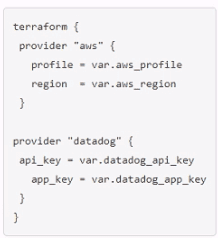
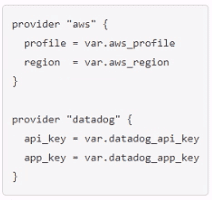
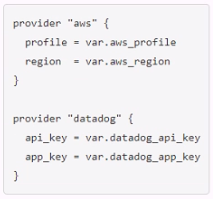
You ate creating a Terraform configuration which needs to make use of multiple providers, one for AWS and one for Datadog. Which of the following provider blocks would allow you to do this?
A)
B)
C)
D)
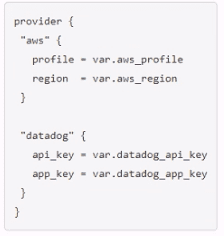
Option C is the correct way to configure multiple providers in a Terraform configuration.Each provider block must have a name attribute that specifies which provider it configures2. The other options are either missing the name attribute or using an invalid syntax.
Which of the following should you add in the required_providers block to define a provider version constraint?
Rationale for Correct Answer (B):
Provider version constraints in Terraform are specified using the version argument in the required_providers block, e.g.:
terraform {
required_providers {
aws = {
source = 'hashicorp/aws'
}
}
}
This ensures Terraform always uses a specific provider version (or constraint expression).
Analysis of Incorrect Options:
A . version: Incomplete, no value specified.
C . version: 3.1: Incorrect syntax, Terraform uses = not :.
D . version - 3.1: Incorrect syntax, - is invalid here.
Key Concept:
Defining provider version constraints ensures consistent provider behavior across environments and avoids breaking changes.
Terraform Exam Objective -- Manage Terraform Resources and Providers.
Exhibit:
data "vsphere_datacenter" "dc" {}
resource "vsphere_folder" "parent" {
path = "Production"
type = "vm"
datacenter_id = _________
}
You want to pass the id of the vsphere_datacenter data source to the datacenter_id argument of the vsphere_folder resource. Which reference would you use?
Rationale for Correct Answer: Data sources are referenced with: data.<TYPE>.<NAME>.<ATTRIBUTE>.For a vSphere datacenter data source, the correct reference to its id is:data.vsphere_datacenter.<name>.id. Given the options, only A follows the correct data-source addressing pattern and includes the .id attribute.
Analysis of Incorrect Options (Distractors):
B: Incorrect---missing the data. prefix, so it looks like a managed resource reference.
C: Incorrect---missing the attribute (.id).
D: Incorrect---missing the data source type and name.
Key Concept: Correct HCL reference syntax for data sources.
What is the provider for the resource shown in the Exhibit?
resource "aws_vpc" "main" {
name = "test"
}
The provider for theaws_vpcresource isaws, as the resource type begins withaws_, which denotes that it is managed by the AWS provider.
Terraform Providers
You are creating a reusable Terraform configuration and want to include an optional billing_dept tag so your Finance team can track team-specific spending on resources. Which of the following billing_dept variable declarations will achieve this?
Rationale for Correct Answer: To make a variable optional, you define a type that allows omission. Using optional(string) indicates the input may be unset (commonly used when the variable is part of an object type, or when you want to explicitly model optionality). This supports reusable configs where the tag is included only when provided.
Analysis of Incorrect Options (Distractors):
A: Invalid syntax---type = default is not a valid type declaration.
B: Invalid syntax---default must have a value.
D: Invalid---there is no optional = true argument for variable blocks.
Key Concept: Input variable type constraints and optional inputs.
Terraform variables and outputs that set the description argument will store that description in the state file.
The description argument for Terraform variables and outputs is purely for documentation purposes and isnotstored in the Terraform state file.
Terraform variables and outputs can have descriptions for readability and clarity in .tf files.
However, these descriptions are not retained in the Terraform state file.
The state file only stores actual values and references needed for resource management, not metadata such as descriptions.
Official Terraform Documentation Reference:
Terraform Variables - HashiCorp Documentation
Terraform Outputs - HashiCorp Documentation
Exam domains verified against: Official HashiCorp Terraform-Associate-004 exam guide, last checked October 2026.
Understand what IaC is and the advantages of infrastructure-as-code patterns. Learn how Terraform manages multi-cloud, hybrid cloud, and service-agnostic workflows to enable consistent infrastructure provisioning across different platforms.
Install and version Terraform providers and understand how Terraform uses them to interact with infrastructure platforms. Write configurations using multiple providers and learn how Terraform manages state to track infrastructure changes.
Sample question from this domain above: Q4
Master the core workflow of init, plan, apply, and destroy operations. Initialize working directories, validate configurations, review execution plans, apply changes, and clean up infrastructure while applying consistent formatting and style.
Use resource and data blocks effectively and refer to attributes to create cross-resource references. Define variables, outputs, and complex types. Write dynamic configurations using expressions and functions, manage dependencies, validate with custom conditions, and handle sensitive data securely including integration with Vault.
Sample question from this domain above: Q3
Understand how Terraform sources and organizes modules for code reuse. Learn about variable scope within modules, how to use modules in configurations, and strategies for managing module versions across your infrastructure codebase.
Sample question from this domain above: Q7
Understand local and remote backends for state storage. Learn about state locking mechanisms to prevent concurrent modifications and configure remote state using the backend block. Detect and manage resource drift to keep infrastructure synchronized with Terraform state.
Import existing infrastructure into your Terraform workspace and use the CLI to inspect and understand state. Learn when and how to use verbose logging for troubleshooting and debugging Terraform operations.
Use HCP Terraform to create and manage infrastructure with cloud-based state management. Understand collaboration and governance features including policy enforcement. Learn how to organize work using workspaces and projects and integrate HCP Terraform with your development workflow.
Common questions about the exam itself

