Key details for this exam, checked against the published exam outline
Each question shows the correct answer and an explanation of why it is right
An insurer wants to add a new typecode for an alternate address to a base
typelist EmployeeAddress that has not been extended.
In the Guidewire InsuranceSuite framework, maintaining the integrity of the base configuration is paramount for ensuring a smooth upgrade path. This is achieved through a strict "extension-only" philosophy for out-of-the-box (OOTB) components. When a developer needs to modify a base typelist---like EmployeeAddress---they must understand the distinction between .tti (Typelist Interface) files and .ttx (Typelist Extension) files.
A .tti file defines the original structure and initial typecodes of a typelist. These files are considered "base" and should never be edited directly (making Option C incorrect). If a developer were to modify the base .tti, those changes would be overwritten during the next platform update. To safely add a new typecode to an existing base typelist, Guidewire requires the creation of a .ttx file with the exact same name as the base typelist (e.g., EmployeeAddress.ttx). This extension file tells the Guidewire metadata engine to merge the new entries with the existing ones at runtime.
Furthermore, Guidewire best practices for metadata extensions require specific naming conventions to prevent future "namespace collisions." While the .ttx file itself adopts the base name, the new typecode added within that file should be suffixed with _Ext (e.g., alternate_Ext). This ensures that if Guidewire later releases a product update that adds an "alternate" code to the base EmployeeAddress typelist, the customer's custom code remains unique and does not conflict with the new base code.
Option B is incorrect because you do not create a new .tti with an _Ext suffix for an existing list. Option E is incorrect because .tix is not a valid Guidewire metadata file extension; the correct extension is .ttx. Therefore, Option D is the only choice that follows the correct file creation and naming convention protocols required by the Guidewire development lifecycle.
Given the image:
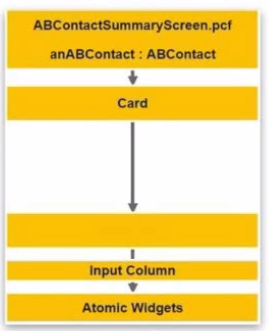
Which container type must be added between Card and Input Column?
The Guidewire Page Configuration Framework (PCF) follows a strict nesting hierarchy to ensure that the layout engine can correctly render widgets on the screen. According to the InsuranceSuite Developer Fundamentals curriculum, specifically the lesson on "Container Widget Usage," developers must understand the parent-child relationships required for different layout styles.
A Card widget is a component of a CardViewPanel, used to create tabbed interfaces within a page. However, a Card itself cannot directly host an Input Column. Instead, a Card serves as a container for other panels. To display data fields in the standard column-based layout favored by InsuranceSuite, a DetailViewPanel (commonly referred to simply as a Detail View in the Studio palette) must be placed inside the Card.
The Detail View acts as the intermediate container that establishes the data context (the row or entity being edited) and provides the grid system necessary for the Input Column. The Input Column, in turn, allows developers to align fields vertically. Without the Detail View container, the PCF would be syntactically invalid because the layout engine requires the Detail View to manage the labels and input alignment for any child columns.
Option A is incorrect because a "PCF File" is the entire document, not a widget added to a tree. Option C (List View) is used for tabular data, not column-based input layouts. Option D (Input Set) is a grouping mechanism that sits inside or alongside an Input Column but cannot serve as the parent to one. Therefore, adding a Detail View (B) is the correct and necessary step to bridge the hierarchy between the Card and its Input Columns.
Succeed Insurance is developing multiple policy lines of business (LOB). The LOBs they are implementing are Homeowners (HO), Commercial Auto (CA), and Personal Auto (PA). They want to show key data elements of these LOBs on the exposure screen in ClaimCenter. To support this, you will need to modify the ExposureDetailDV container to support the different LOBs. Following best practices, which of the following implementations should be used?
In Guidewire InsuranceSuite, when a single location must display significantly different content based on a specific property---such as a Line of Business (LOB)---the recommended architectural pattern is to use PCF Modes. While visibility logic (Option A or B) can technically hide or show elements, it leads to "bloated" PCF files that are difficult to maintain and performance-heavy, as the system must evaluate complex Boolean expressions for every element in the container.
Using Modes allows a developer to create multiple versions of an InputSet (or other containers) that share the same name but have different "Mode" identities (e.g., HO, CA, PA). In the parent configuration file (ExposureDetailDV), the developer adds a single InputSetRef. Instead of pointing to a static file, the def attribute points to the shared name of the InputSet, and the mode attribute is set to a dynamic expression, such as Exposure.Claim.LOBCode. At runtime, Guidewire's UI engine evaluates this expression and "swaps in" the specific PCF that matches the mode. If no specific mode matches, the system gracefully falls back to the Default mode. This approach promotes modularity, encapsulates LOB-specific logic within separate files, and ensures that the main ExposureDetailDV remains clean and readable. This is a core tenet of PCF Architecture and Dynamic UI management within the InsuranceSuite Developer curriculum.
Succeed Insurance needs to modify an existing PolicyCenter typelist called PreferredContactMethod with the following options: Social Media, Work Phone, and Work Email. Following best practices, which of the following options would a developer use to implement these requirements?
When extending a Base Application Typelist---a typelist provided out-of-the-box by Guidewire---developers must adhere to specific formatting and naming standards to ensure the application remains upgrade-safe and consistent.
The first rule involves Casing. Typecodes in Guidewire should follow lower_snake_case. This means all letters are lowercase, and words are separated by underscores. Using PascalCase (as seen in Options A and D) is a violation of the standard naming conventions used across the InsuranceSuite metadata.
The second rule involves Namespace Protection. When a customer adds a new code to a typelist that Guidewire owns, they must add the _Ext suffix to the code (e.g., social_media_Ext). This is a defensive practice. If Guidewire later decides to add a "Social Media" option to the base PreferredContactMethod typelist in a future release, their code would likely be social_media. If the customer has used the exact same code without a suffix (Option B), a naming collision would occur during the upgrade process. This collision can break the database schema, cause data migration failures, or create logical errors in Gosu rules.
By choosing Option C, the developer follows both the casing standard and the suffix requirement. This ensures that the custom options are easily identifiable as customer-created and that the application is fully compliant with the Guidewire SurePath methodology for both on-premise and cloud implementations.
An insurer wants to add a new typecode for an alternate address to a base typelist EmployeeAddress that has not been extended. Following best practices, which step must a developer take to perform this task?
Adding custom codes to an out-of-the-box typelist is a fundamental task in Data Model Configuration. To ensure that the configuration is upgrade-safe and follows Guidewire's architectural standards, developers must use the Typelist Extension mechanism.
The first rule is that base .tti (Typelist Internal) files must never be edited (ruling out Option D). Modifications to these files will be lost during a platform upgrade. Instead, developers must use a .ttx (Typelist Extension) file. The filename must match the base typelist exactly (e.g., EmployeeAddress.ttx). Adding _Ext to the filename itself (Option A) is incorrect and will prevent the application from merging the metadata correctly.
The second rule concerns the naming of the new typecode. According to the InsuranceSuite Developer standards, any code added by a customer to a Guidewire-owned typelist should include the _Ext suffix (e.g., alternate_Ext). This "namespacing" protects the customer from future collisions. If a future release of PolicyCenter or ClaimCenter includes a base alternate code in the EmployeeAddress typelist, the customer's version will remain distinct, preventing database errors or logic failures during the upgrade process.
By creating the .ttx file and using the _Ext suffix on the typecode (Option C), the developer adheres to the Open Type System principles. This ensures the custom data is properly recognized by the UI and Gosu rules while remaining perfectly aligned with the Guidewire Cloud Delivery Standards.
Guidewire Home provides self-service capabilities for managing storage access permissions for InsuranceSuite. According to the training, which app in Guidewire Home is used for this purpose?
In the Guidewire Cloud Platform (GWCP), managing security and access to infrastructure components is a critical part of the developer and system administrator workflow. Guidewire Home serves as the central orchestration portal, providing various self-service applications to handle these tasks without requiring manual support tickets for routine operations.
The Storage Access app is specifically designed to manage credentials and permissions for the cloud storage services utilized by InsuranceSuite. In a cloud environment, integrations often rely on external storage (such as Amazon S3 buckets) to exchange files, store digital assets, or handle large-scale data imports and exports. The Storage Access app allows authorized users to define access policies, manage service accounts, and rotate security keys for these storage buckets. This ensures that only authorized processes and users can read or write sensitive insurance data, maintaining the system's security posture.
Other apps in Guidewire Home serve distinct purposes: the Planets app provides a dashboard for environment health; the Build Promotion app manages the movement of Docker images between star systems; and Lifecycle Manager (LCM) is used for managing configuration variables and secrets. The Quality Gates app is used to monitor compliance with coding and performance standards. Therefore, for the specific requirement of managing storage permissions, the Storage Access app is the verified tool within the GWCP astronomy metaphor.
Exam domains verified against: Official Guidewire InsuranceSuite-Developer exam guide, last checked October 2026.
Page Configuration Format file design and structure for building user interface elements. Mastering PCF concepts is essential for creating and modifying screens in Guidewire InsuranceSuite applications.
Gosu language concepts, rule implementation, debugging, and logging practices for business logic. Understanding Gosu allows developers to write custom validation and automation rules within the platform.
Entity design, typelists, and data structure principles for extending InsuranceSuite. Proper data model design ensures consistency and supports scalability across configuration implementations.
Using profiler tools, database health checks, code inspections, and performance best practices. Monitoring system health prevents production issues and ensures optimal application performance.
Guidewire Cloud architecture, source control practices, archiving, and deployment lifecycle. Cloud development skills are mandatory for developers working on Guidewire Cloud implementations.
Sample question from this domain above: Q6
Common questions about the exam itself

