
Free Fortinet NSE7_ZTA-7.2 Exam Practice Questions & Explanations
Prepared & Reviewed by the ValidExamDumps Editorial Team
At ValidExamDumps, we consistently monitor updates to the Fortinet NSE7_ZTA-7.2 exam questions by Fortinet. Whenever our team identifies changes in the exam questions, objectives, focus areas or requirements, We immediately update our exam questions for both PDF and online practice exams. This commitment ensures our customers always have access to the most current and accurate questions. By preparing with these up to date and 100% exam domain coverage questions, our customers can successfully pass the Fortinet NSE 7 - Zero Trust Access 7.2 exam on their first attempt without needing additional materials or study guides.
Other certification materials providers often include outdated or removed questions by Fortinet in their NSE7_ZTA-7.2 exam. These outdated questions lead to customers failing their Fortinet NSE 7 - Zero Trust Access 7.2 exam. In contrast, we ensure our questions bank includes only precise and up-to-date questions. Our main priority is your success in the Fortinet NSE7_ZTA-7.2 exam, not profiting from selling obsolete exam questions in PDF or Online Practice Test.
Exhibit.
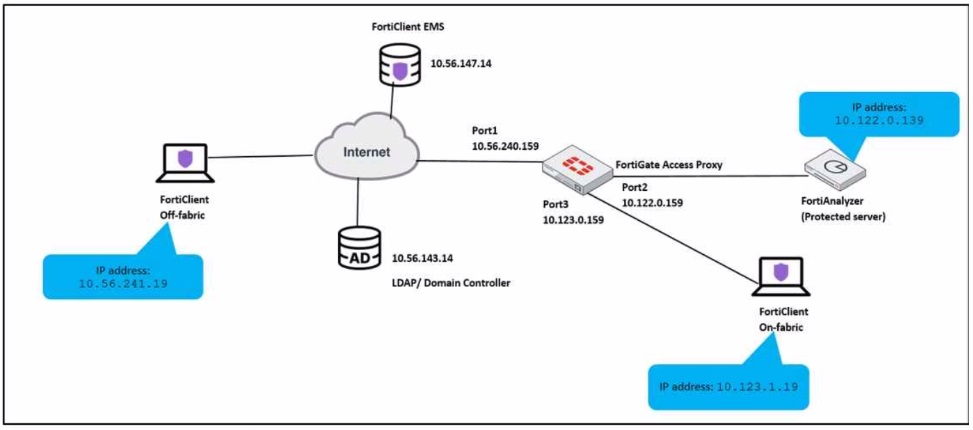
An administrator has to provide on-fabric clients with access to FortiAnalyzer using ZTNA tags
Which two conditions must be met to achieve this task? (Choose two.)
For on-fabric clients to access FortiAnalyzer using ZTNA tags, the following conditions must be met:
A) The on-fabric client should have FortiGate as its default gateway: This is essential to ensure that all client traffic is routed through FortiGate, where ZTNA policies can be enforced.
B) The ZTNA server must be configured on FortiGate: For ZTNA tags to be effectively used, the ZTNA server, which processes and enforces these tags, must be configured on the FortiGate appliance.
Configuring ZTNA tags and tagging rules
Synchronizing FortiClient ZTNA tags
Technical Tip: ZTNA Tags fail to synchronize between FortiClient and FortiGate
Which one of the supported communication methods does FortiNAC use for initial device identification during discovery?
Which two statements are true regarding certificate-based authentication for ZTNA deployment? (Choose two.)
Certificate-based authentication is a method of verifying the identity of a device or user by using a digital certificate issued by a trusted authority. For ZTNA deployment, certificate-based authentication is used to ensure that only authorized devices and users can access the protected applications or resources.
B) The default action for empty certificates is block. This is true because ZTNA requires both device and user verification before granting access. If a device does not have a valid certificate issued by the ZTNA CA, it will be blocked by the ZTNA gateway. This prevents unauthorized or compromised devices from accessing the network.
D) Client certificate configuration is a mandatory component for ZTNA. This is true because ZTNA relies on client certificates to identify and authenticate devices. Client certificates are generated by the ZTNA CA and contain the device ID, ZTNA tags, and other information. Client certificates are distributed to devices by the ZTNA management server (such as EMS) and are used to establish a secure connection with the ZTNA gateway.
A) FortiGate signs the client certificate submitted by FortiClient. This is false because FortiGate does not sign the client certificates. The client certificates are signed by the ZTNA CA, which is a separate entity from FortiGate. FortiGate only verifies the client certificates and performs certificate actions based on the ZTNA tags.
C) Certificate actions can be configured only on the FortiGate CLI. This is false because certificate actions can be configured on both the FortiGate GUI and CLI. Certificate actions are the actions that FortiGate takes based on the ZTNA tags in the client certificates. For example, FortiGate can allow, block, or redirect traffic based on the ZTNA tags.
1: Technical Tip: ZTNA for Corporate hosts with SAML authentication and FortiAuthenticator as IDP
Which method is used to install passive agent on an endpoint?
The method used to install a passive agent on an endpoint is:
D) Installed by user or deployment tools: Passive agents are typically installed on endpoints either manually by users or automatically through deployment tools used by the organization.
The other options do not accurately describe the installation of passive agents:
A) Deployed by using a login/logout script: This is not the standard method for deploying passive agents.
B) Agent is downloaded from Playstore: This is more relevant for mobile devices and does not represent the general method for passive agent installation.
C) Agent is downloaded and run from captive portal: This method is not typically used for installing passive agents.
FortiNAC Agent Deployment Guide.
Installation Methods for Passive Agents in FortiNAC.
Exhibit.
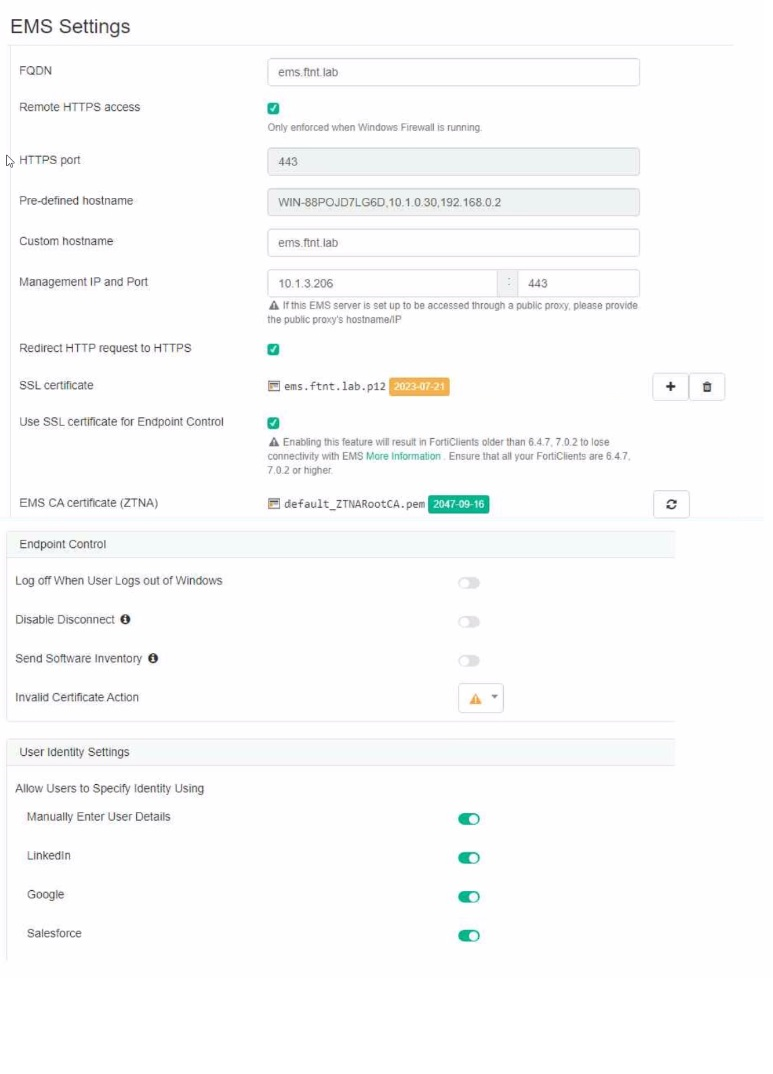
Which statement is true about the configuration shown in the exhibit?
The exhibit shows the EMS Settings where various configurations related to network security are displayed. Option C is correct because, in the settings, it is indicated that HTTPS port is used (which operates over TCP) and SSL certificates are involved in securing the connection, implying the use of TLS for encryption and secure communication between FortiClient and FortiClient EMS.
Option A is incorrect because the domain that FortiClient is connecting to does not have to match the domain to which the certificate is issued. The certificate is issued by the ZTNA CA, which is a separate entity from the domain. The certificate only contains the device ID, ZTNA tags, and other information that are used to identify and authenticate the device.
Option B is incorrect because if the FortiClient EMS server certificate is invalid, FortiClient does not connect silently. Instead, it performs the Invalid Certificate Action that is configured in the settings. The Invalid Certificate Action can be set to block, warn, or allow the connection.
Option D is incorrect because default_ZTNARoot CA does not sign the FortiClient certificate for the SSL connectivity to FortiClient EMS. The FortiClient certificate is signed by the ZTNA CA, which is a different certificate authority from default_ZTNARoot CA. default_ZTNARoot CA is the EMS CA Certificate that is used to verify the identity of the EMS server.
[1]: Technical Tip: ZTNA for Corporate hosts with SAML authentication and FortiAuthenticator as IDP
[2]: Zero Trust Network Access - Fortinet