At ValidExamDumps, we consistently monitor updates to the Fortinet NSE7_SSE_AD-25 exam questions by Fortinet. Whenever our team identifies changes in the exam questions, objectives, focus areas or requirements, We immediately update our exam questions for both PDF and online practice exams. This commitment ensures our customers always have access to the most current and accurate questions. By preparing with these up to date and 100% exam domain coverage questions, our customers can successfully pass the Fortinet NSE 7 - FortiSASE 25 Enterprise Administrator exam on their first attempt without needing additional materials or study guides.
Other certification materials providers often include outdated or removed questions by Fortinet in their NSE7_SSE_AD-25 exam. These outdated questions lead to customers failing their Fortinet NSE 7 - FortiSASE 25 Enterprise Administrator exam. In contrast, we ensure our questions bank includes only precise and up-to-date questions. Our main priority is your success in the Fortinet NSE7_SSE_AD-25 exam, not profiting from selling obsolete exam questions in PDF or Online Practice Test.
You are configuring FortiSASE SSL deep inspection. What is required for FortiSASE to inspect encrypted traffic? (Choose one answer)
SSL deep inspection (DPI) is a critical security function that allows FortiSASE to decrypt and inspect the actual payload of encrypted traffic (such as HTTPS, SMTPS, and FTPS) to identify and block hidden threats.
The Role of the CA: For this process to occur, FortiSASE must act as a 'man-in-the-middle' by intercepting the SSL session, decrypting it for inspection, and then re-encrypting it before sending it to the endpoint.2 To re-encrypt the traffic, FortiSASE acts as a Certificate Authority (CA) and signs a new certificate for the destination website on the fly.
Certificate Types: This CA role can be fulfilled using the default self-signed certificate provided by Fortinet (typically Fortinet_CA_SSL) or a certificate issued by an organization's internal/private CA. Publicly trusted third-party CAs (like DigiCert or Let's Encrypt) do not sell CA-capable certificates that can be used for this type of inspection.
Client Machine Requirement: Because the endpoint's browser or operating system will not natively trust a certificate signed by a private or self-signed CA, the root CA certificate must be imported into the Trusted Root Certification Authorities store on all managed client machines. Failure to do so results in persistent certificate warnings or blocked connections for the end user.
Supported Features: Once enabled, SSL deep inspection provides the necessary visibility for high-level security features to function, including Antivirus, Web Filtering, Data Loss Prevention (DLP), File Filter, and Application Control.
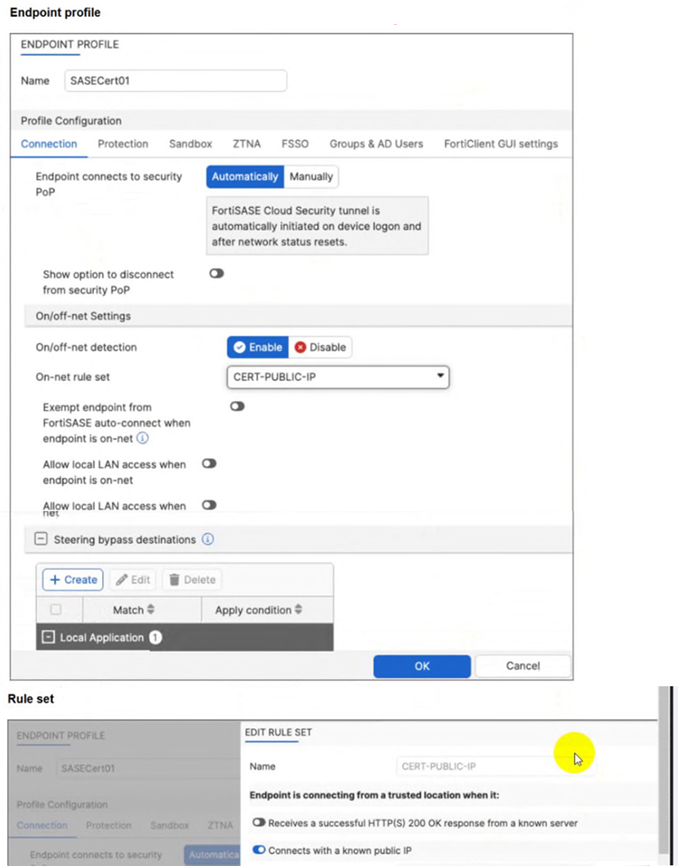
A customer configured the On/off-net detection rule to disable FortiSASE VPN auto-connect when users are inside the corporate network. The rule is set to Connects with a known public IP using the company's public IP address. However, when the users are on the corporate network, the FortiSASE VPN still auto-connects. The customer has confirmed that traffic is going to the internet with the correct IP address.
Which configuration is causing the issue? (Choose one answer)
The FortiSASE On/off-net detection feature is a two-part configuration designed to optimize bandwidth and user experience by determining when a device is in a trusted environment.
Rule Set Definition: The first part involves defining what constitutes an 'on-net' or 'on-fabric' status. In this scenario, the customer successfully configured a rule set named CERT-PUBLIC-IP using the Connects with a known public IP detection type. This tells FortiSASE that if the endpoint's public WAN IP matches the corporate gateway, it is considered to be on the corporate network.
Profile Exemption Logic: Defining the rule set is not enough to stop the VPN connection. Within the Endpoint Profile (under the Connection tab > On/off-net Settings), there is a specific toggle labeled Exempt endpoint from FortiSASE auto-connect when endpoint is on-net (or in some versions, Bypass FortiSASE when endpoint is on-net).
Exhibit Analysis: Looking at the provided exhibit (image_57097d.jpg), the 'Exempt endpoint from FortiSASE auto-connect...' toggle is clearly disabled (switched to the left).
Root Cause: Because this toggle is disabled, FortiClient identifies that it is 'on-net' based on the IP rule, but it has no instruction to skip the VPN connection. Consequently, the 'Automatically' initiate tunnel setting remains the dominant instruction, causing the VPN to connect regardless of the network location.
To resolve the issue, the administrator must enable the Exempt endpoint from FortiSASE auto-connect when endpoint is on-net option in the SASECert01 profile.
Refer to the exhibits.
How will the application vulnerabilities be patched, based on the exhibits provided? (Choose one answer)
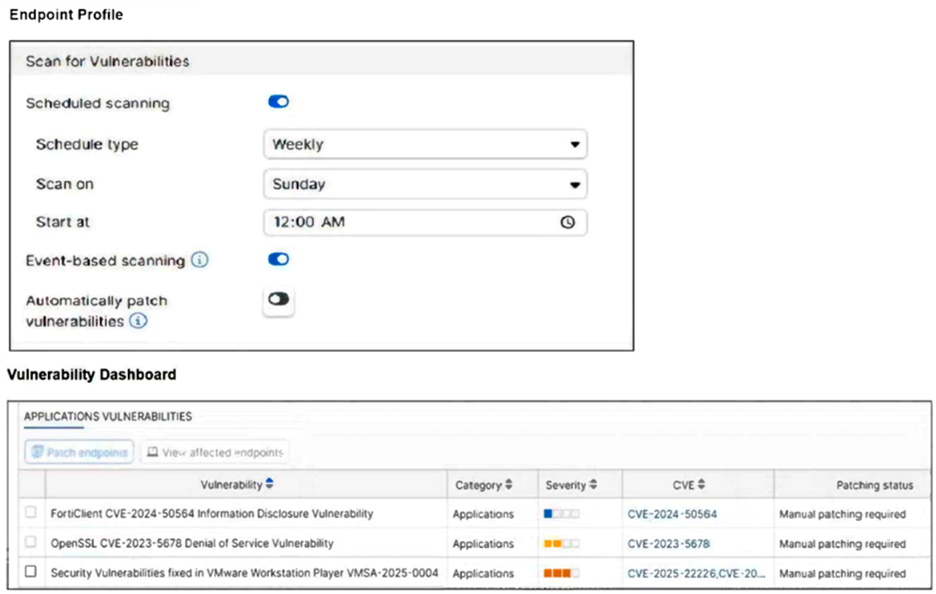
Based on the settings shown in the provided exhibits, the vulnerability remediation workflow is determined by the Endpoint Profile and the Vulnerability Dashboard.
Endpoint Profile Evaluation: The top exhibit displays the Scan for Vulnerabilities settings. The toggle for Automatically patch vulnerabilities is explicitly set to Disabled. Consequently, the system will not perform automated remediation when a scan completes.
Manual Patching Requirement: The Vulnerability Dashboard (bottom exhibit) lists several application vulnerabilities with a Patching status of Manual patching required. In a FortiSASE environment, 'Manual' indicates that the vulnerability cannot be handled by the client's autonomous update process and requires a direct instruction from the management plane.
Administrative Intervention: The dashboard includes a Patch endpoints action button. Since auto-patching is disabled in the profile, an administrator must manually select the vulnerabilities and click the 'Patch endpoints' button to remotely trigger the patching sequence on the managed endpoints via the FortiSASE cloud service.
Workflow Logic: While FortiClient acts as the 'conductor' on the local machine to facilitate the download and installation, the trigger for this specific scenario is the administrator's remote action within the portal. This differentiates it from Option D (which is disabled) and Option C (which would involve a user manually browsing a website outside the managed SASE workflow).
One user has reported connectivity issues; no other users have reported problems. Which tool can the administrator use to identify the problem? (Choose one answer)
In a FortiSASE deployment, Digital Experience Monitoring (DEM) is the primary diagnostic tool used to troubleshoot connectivity and performance issues specifically for a single user or endpoint.
End-to-End Visibility: DEM provides real-time, end-to-end visibility into the network path between the end-user's device and the application they are trying to reach. This is critical when only one user reports an issue, as it allows administrators to pinpoint whether the problem resides on the local device, the local ISP, the SASE backbone, or the destination application.
Performance Metrics: The DEM agent (often integrated with the FortiMonitor agent on the endpoint) collects granular performance metrics such as latency, jitter, packet loss, and RTT (Round Trip Time). It also provides device-specific health data, including CPU and memory usage, to determine if the connectivity issue is actually caused by the remote computer's performance.
Hop-by-Hop Analysis: Unlike standard monitoring, DEM offers End-to-End Continuous Hop Analytics. This path monitoring visualizes every 'hop' in the traffic route and highlights exactly where degraded service is occurring. For a single user experiencing issues while everyone else is fine, this tool immediately triangulates if a specific 'problem hop' in their unique connection path is the cause.
Operational Comparison: * MDM (A) is used for managing device configurations and software distribution, not for real-time network performance troubleshooting.
Forensics (C) is a security-focused service used for investigating malware incidents or data breaches, not for measuring network latency.
SOCaaS (D) is a managed security service for threat monitoring and event triage; while it handles 'security' connectivity issues (like a blocked IP), it is not a tool for performance metric evaluation.
What is the purpose of security posture tagging in ZTNA? (Choose one answer)
In the context of Zero Trust Network Access (ZTNA), security posture tagging is the fundamental mechanism used to enforce compliance and security standards before granting access to protected resources.
Granular Access Control: The primary purpose of tagging is to provide granular access control.3 Instead of relying solely on static credentials, ZTNA uses these dynamic tags to determine if a device or user meets specific security requirements at the moment of the connection request.
Compliance-Based Enforcement: Tags are assigned based on the compliance status of the endpoint. For example, the FortiSASE Endpoint Management Service (EMS) can verify if a device has an active antivirus, is running a specific OS version, or is joined to the corporate domain.5 If the device fails any of these checks, the 'Compliant' tag is removed, and access is automatically revoked.
Dynamic and Continuous Assessment: Unlike traditional VPNs that check posture only at login, ZTNA posture tagging allows for continuous assessment. If a device's security posture changes---for instance, if the user disables their firewall---the tag is updated in real-time across the Security Fabric, and the ZTNA policy will immediately deny further access.8
Integration with Policies: On the FortiGate (acting as a ZTNA proxy) or within FortiSASE, these tags are used as source criteria in ZTNA policies.9 Only traffic originating from endpoints with the required tags (e.g., 'EMS-Tag: Corporate-Managed') is permitted to reach the protected application.

