
Fortinet NSE7_SOC_AR-7.6 Practice Exam Questions & Answers
Fortinet NSE7_SOC_AR-7.6 Exam Details
Key details for this exam, checked against the published exam outline
- Exam Code
- NSE7_SOC_AR-7.6
- Full Name
- Fortinet NSE 7 - Security Operations 7.6 Architect
- Issuing Body
- Fortinet
- Question Format (Our Bank)
- Multiple Choice, Drag & Drop
- Official Exam Fee
- USD 200 (current price through November 1, 2026). USD 400 (from November 2, 2026 onwards)
- Delivery
- Pearson VUE test center or OnVUE online proctoring
- Full Question Set
- 118 questions Get All Questions
Free NSE7_SOC_AR-7.6 Practice Questions
Each question shows the correct answer and an explanation of why it is right
Question 1 Domain 4 SOAR Playbook Development
Refer to the exhibits.
The DOS attack playbook is configured to create an incident when an event handler generates a denial-of-ser/ice (DoS) attack event.
Why did the DOS attack playbook fail to execute?
Understanding the Playbook and its Components:
The exhibit shows the status of a playbook named 'DOS attack' and its associated tasks.
The playbook is designed to execute a series of tasks upon detecting a DoS attack event.
Analysis of Playbook Tasks:
Attach_Data_To_Incident: Task ID placeholder_8fab0102, status is 'upstream_failed,' meaning it did not execute properly due to a previous task's failure.
Get Events: Task ID placeholder_fa2a573c, status is 'success.'
Create SMTP Enumeration incident: Task ID placeholder_3db75c0a, status is 'failed.'
Reviewing Raw Logs:
The error log shows a ValueError: invalid literal for int() with base 10: '10.200.200.100'.
This error indicates that the task attempted to convert a string (the IP address '10.200.200.100') to an integer, which is not possible.
Identifying the Source of the Error:
The error occurs in the file 'incident_operator.py,' specifically in the execute method.
This suggests that the task 'Create SMTP Enumeration incident' is the one causing the issue because it failed to process the data type correctly.
Conclusion:
The failure of the playbook is due to the 'Create SMTP Enumeration incident' task receiving a string value (an IP address) when it expects an integer value. This mismatch in data types leads to the error.
Fortinet Documentation on Playbook and Task Configuration.
Python error handling documentation for understanding ValueError.
Question 2 Domain 4 SOAR Playbook Development
A customer wants FortiAnalyzer to run an automation stitch that executes a CLI command on FortiGate to block a predefined list of URLs, if a botnet command-and-control (C&C) server IP is detected.
Which FortiAnalyzer feature must you use to start this automation process?
Understanding Automation Processes in FortiAnalyzer:
FortiAnalyzer can automate responses to detected security events, such as running commands on FortiGate devices.
Analyzing the Customer Requirement:
The customer wants to run a CLI command on FortiGate to block predefined URLs when a botnet C&C server IP is detected.
This requires an automated response triggered by a specific event.
Evaluating the Options:
Option A: Playbooks orchestrate complex workflows but are not typically used for direct event-triggered automation processes.
Option B: Data selectors filter logs based on criteria but do not initiate automation processes.
Option C: Event handlers can be configured to detect specific events (such as detecting a botnet C&C server IP) and trigger automation stitches to execute predefined actions.
Option D: Connectors facilitate communication between FortiAnalyzer and other systems but are not the primary mechanism for initiating automation based on log events.
Conclusion:
To start the automation process when a botnet C&C server IP is detected, you must use an Event handler in FortiAnalyzer.
Fortinet Documentation on Event Handlers and Automation Stitches in FortiAnalyzer.
Best Practices for Configuring Automated Responses in FortiAnalyzer.
Question 3 Domain 2 Detection Capabilities
Review the incident report:
An attacker identified employee names, roles, and email patterns from public press releases, which were then used to craft tailored emails.
The emails were directed to recipients to review an attached agenda using a link hosted off the corporate domain.
Which two MITRE ATT&CK tactics best fit this report? (Choose two answers)
From FortiSOAR 7.6., FortiSIEM 7.3 Exact Extract study guide:
Based on the official documentation for FortiSIEM 7.3 (which utilizes the MITRE ATT&CK mapping for incident correlation) and FortiSOAR 7.6 (which uses these tactics for incident classification and playbook triggering):
Reconnaissance (Tactic TA0043): This tactic consists of techniques that involve adversaries actively or passively gathering information that can be used to support targeting. In this scenario, the attacker identifies 'employee names, roles, and email patterns from public press releases.' This is categorized under Gather Victim Org Information (T1591) and Search Open Technical Databases (T1596). Since this activity happens prior to the compromise and involves gathering intelligence, it is strictly Reconnaissance.
Initial Access (Tactic TA0001): This tactic covers techniques that use various entry vectors to gain an initial foothold within a network. The act of sending 'tailored emails... to recipients to review an attached agenda using a link' is the definition of Phishing: Spearphishing Link (T1566.002). This is the specific delivery mechanism used to gain the initial entry.
Why other options are incorrect:
Discovery (B): This tactic involves techniques an adversary uses to gain knowledge about the internal network after they have already gained access. Since the attacker is looking at public press releases, they are operating outside the perimeter.
Defense Evasion (D): This tactic consists of techniques that adversaries use to avoid detection throughout their compromise. While using an external link might bypass some basic reputation filters, the primary goal described in the report is the act of establishing contact and access, which is the core of the Initial Access tactic.
Get the complete NSE7_SOC_AR-7.6 question set
$20$40
Question 4 Domain 1 SOC Concepts and Frameworks
Refer to the exhibits.
What can you conclude from analyzing the data using the threat hunting module?
Understanding the Threat Hunting Data:
The Threat Hunting Monitor in the provided exhibits shows various application services, their usage counts, and data metrics such as sent bytes, average sent bytes, and maximum sent bytes.
The second part of the exhibit lists connection attempts from a specific source IP (10.0.1.10) to a destination IP (8.8.8.8), with repeated 'Connection Failed' messages.
Analyzing the Application Services:
DNS is the top application service with a significantly high count (251,400) and notable sent bytes (9.1 MB).
This large volume of DNS traffic is unusual for regular DNS queries and can indicate the presence of DNS tunneling.
DNS Tunneling:
DNS tunneling is a technique used by attackers to bypass security controls by encoding data within DNS queries and responses. This allows them to extract data from the local network without detection.
The high volume of DNS traffic, combined with the detailed metrics, suggests that DNS tunneling might be in use.
Connection Failures to 8.8.8.8:
The repeated connection attempts from the source IP (10.0.1.10) to the destination IP (8.8.8.8) with connection failures can indicate an attempt to communicate with an external server.
Google DNS (8.8.8.8) is often used for DNS tunneling due to its reliability and global reach.
Conclusion:
Given the significant DNS traffic and the nature of the connection attempts, it is reasonable to conclude that DNS tunneling is being used to extract confidential data from the local network.
Why Other Options are Less Likely:
Spearphishing (A): There is no evidence from the provided data that points to spearphishing attempts, such as email logs or phishing indicators.
Reconnaissance (C): The data does not indicate typical reconnaissance activities, such as scanning or probing mail servers.
FTP C&C (D): There is no evidence of FTP traffic or command-and-control communications using FTP in the provided data.
SANS Institute: 'DNS Tunneling: How to Detect Data Exfiltration and Tunneling Through DNS Queries' SANS DNS Tunneling
OWASP: 'DNS Tunneling' OWASP DNS Tunneling
By analyzing the provided threat hunting data, it is evident that DNS tunneling is being used to exfiltrate data, indicating a sophisticated method of extracting confidential information from the network.
Question 5 Domain 1 SOC Concepts and Frameworks
Refer to the exhibit.
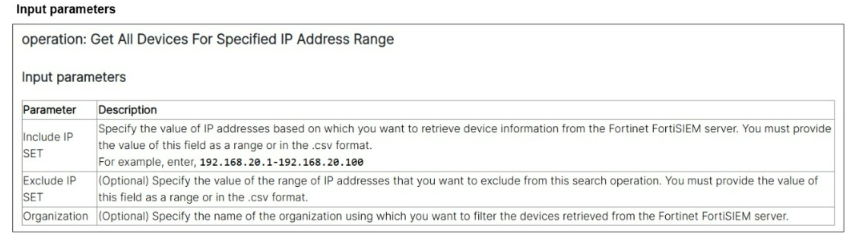
A list of FortiSIEM connector actions is shown. You want to create a playbook on FortiSOAR that allows you to accomplish the following:
Manually input a range of IP addresses.
Use the connector action in the exhibit to retrieve a list of devices from the FortiSIEM configuration management database (CMDB) within that IP address range.
For each returned result, create an asset record based on the IP address of the device.
Which combination and order of step operations fulfills the requirements with the fewest required playbook steps?
Exact Extract: ''The playbook uses a manual trigger, where you can define three mandatory fields: starting destination IP address, ending destination IP address, and user.''
Exact Extract: ''This slide shows an example of the Get All Devices For Specified IP Address Range action. This action requires an IP address range as input, with optional parameters to exclude certain IP address ranges and specify a FortiSIEM organization scope.''
Exact Extract: ''Record: A record is an entry within any FortiSOAR module. Module: A module is a structured component in the FortiSOAR database. It defines the data structure and behavior for a specific type of record, such as alerts, incidents, or tasks.''
The correct answer is C. The playbook must start with a Manual trigger because the analyst must manually input the IP address range. The next step is the FortiSIEM connector action shown in the exhibit, specifically Get All Devices For Specified IP Address Range, using the manually supplied range as the input parameter. The final step is Create record, targeting the Assets module and mapping each returned device IP address to the asset record fields. This satisfies all requirements with the fewest steps.
Option A is wrong because it has no manual trigger, so there is no proper operator input point for the IP range. Option B is wrong because an On create trigger is event-driven, not manually initiated, and a code snippet is unnecessary for the minimal workflow. Option D works conceptually but is bloated: a Set Variable and Update Record are not required when the connector input and create-record mapping can reference prior step outputs directly.
Question 6 Domain 2 Detection Capabilities
Which FortiAnalyzer connector can you use to run automation stitches9
Overview of Automation Stitches:
Automation stitches in FortiAnalyzer are predefined sets of automated actions triggered by specific events. These actions help in automating responses to security incidents, improving efficiency, and reducing the response time.
FortiAnalyzer Connectors:
FortiAnalyzer integrates with various Fortinet products and other third-party solutions through connectors. These connectors facilitate communication and data exchange, enabling centralized management and automation.
Available Connectors for Automation Stitches:
FortiCASB:
FortiCASB is a Cloud Access Security Broker that helps secure SaaS applications. However, it is not typically used for running automation stitches within FortiAnalyzer.
FortiMail:
FortiMail is an email security solution. While it can send logs and events to FortiAnalyzer, it is not primarily used for running automation stitches.
Local:
The local connector refers to FortiAnalyzer's ability to handle logs and events generated by itself. This is useful for internal processes but not specifically for integrating with other Fortinet devices for automation stitches.
FortiOS:
FortiOS is the operating system that runs on FortiGate firewalls. FortiAnalyzer can use the FortiOS connector to communicate with FortiGate devices and run automation stitches. This allows FortiAnalyzer to send commands to FortiGate, triggering predefined actions in response to specific events.
Detailed Process:
Step 1: Configure the FortiOS connector in FortiAnalyzer to establish communication with FortiGate devices.
Step 2: Define automation stitches within FortiAnalyzer that specify the actions to be taken when certain events occur.
Step 3: When a triggering event is detected, FortiAnalyzer uses the FortiOS connector to send the necessary commands to the FortiGate device.
Step 4: FortiGate executes the commands, performing the predefined actions such as blocking an IP address, updating firewall rules, or sending alerts.
Conclusion:
The FortiOS connector is specifically designed for integration with FortiGate devices, enabling FortiAnalyzer to execute automation stitches effectively.
Fortinet FortiOS Administration Guide: Details on configuring and using automation stitches.
Fortinet FortiAnalyzer Administration Guide: Information on connectors and integration options.
By utilizing the FortiOS connector, FortiAnalyzer can run automation stitches to enhance the security posture and response capabilities within a network.
Question 7 Domain 3 SOAR Incident Handling and Threat Hunting
When you use a manual trigger to save user input as a variable, what is the correct Jinja expression to reference the variable? (Choose one answer)
From FortiSOAR 7.6., FortiSIEM 7.3 Exact Extract study guide:
In FortiSOAR 7.6, the playbook engine utilizes Jinja2 expressions to handle dynamic data. When a playbook is configured with a Manual Trigger, the administrator can define input fields (such as text, picklists, or checkboxes) that an analyst must fill out when executing the playbook from a record.
Input Parameter Mapping: Any data entered by the user during this manual trigger phase is automatically mapped to the input.params dictionary within the vars object. Therefore, the syntax to retrieve a specific input value is {{ vars.input.params.variable_name }}.
Scope of Variables: This specific path ensures that the variable is pulled from the initial user input rather than from the output of a subsequent step (vars.steps) or a globally defined variable (globalVars).
What the Fortinet NSE7_SOC_AR-7.6 Exam Covers
Exam domains verified against the Official Fortinet NSE7_SOC_AR-7.6 exam guide, last checked October 2026.
Domain 1 SOC Concepts and Frameworks
Analyze security incidents and identify adversary behaviors. Understand Fortinet SOC enterprise architecture and recognize attack vectors in the context of modern threat landscapes.
Domain 2 Detection Capabilities
Configure incident detection rules within FortiSIEM and build queries to search event logs. Learn to analyze FortiSIEM incidents to understand detection strategies and alert tuning.
Domain 3 SOAR Incident Handling and Threat Hunting
Manage incidents in FortiSOAR and create queues and shifts for team workload distribution. Use war rooms for collaborative incident handling and analyze threat hunting data sources.
Sample question from this domain above Q7
NSE7_SOC_AR-7.6 Exam FAQ
Common questions about the exam itself
What is the difference between NSE 7 Security Operations Architect and the NSE 6 level exams?
Do I need prior Fortinet certifications before taking NSE 7 Security Operations Architect?
How long does the NSE 7 Security Operations Architect certification stay valid?
What is the current exam fee for NSE7_SOC_AR-7.6?
Can I take NSE 7 Security Operations Architect at a test centre or must it be online?
Which exam domain is typically hardest for NSE7_SOC_AR-7.6 candidates?
How long should I prepare for the NSE 7 Security Operations Architect exam?
What happens if I fail the NSE7_SOC_AR-7.6 exam? Can I retake it immediately?
Does passing NSE 7 Security Operations Architect automatically recertify me for lower Fortinet certifications?
What job roles is NSE 7 Security Operations Architect designed for?
Other Fortinet Exams
Free practice questions for more Fortinet certification exams