
Fortinet NSE7_FSN_AR-7.6 Practice Exam Questions & Answers
Fortinet NSE7_FSN_AR-7.6 Exam Details
Key details for this exam, checked against the published exam outline
- Exam Code
- NSE7_FSN_AR-7.6
- Full Name
- Fortinet NSE 7 - Secure Networking 7.6 Architect
- Issuing Body
- Fortinet
- Question Format (Our Bank)
- Multiple Choice
- Delivery
- Pearson VUE (online proctored or at test center)
- Eligibility
- Hold NSE 4 FortiOS certification and either NSE 5 Secure Networking or NSE 6 Secure Networking certification. Must pass within 2 years of the last prerequisite exam.
- Validity
- 2 years from the date of exam completion
- Full Question Set
- 164 questions Get All Questions
Free NSE7_FSN_AR-7.6 Practice Questions
Each question shows the correct answer and an explanation of why it is right
Question 1 Domain 5 Advanced IPsec
Refer to the exhibit, which contains the output of diagnose vpn tunnel list.
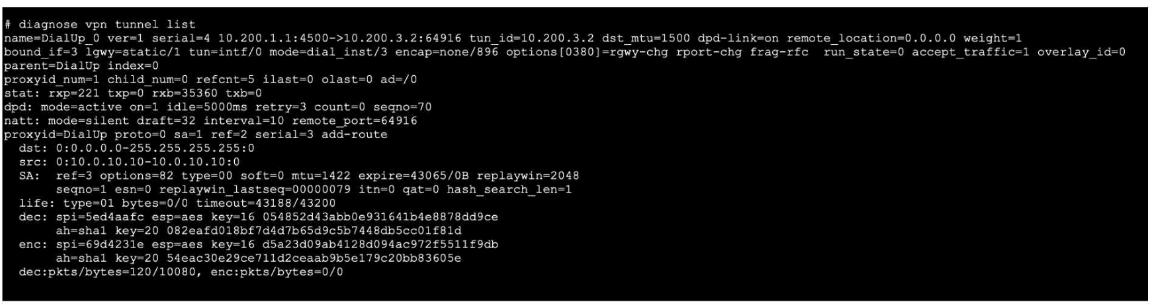
Which command will capture ESP traffic for the VPN named DialUp_0?
The exhibit with the diagnose vpn tunnel list output is not visible. The correct command to capture ESP (Encapsulating Security Payload) traffic for a specific VPN tunnel typically involves using a packet capture or debug command that targets the tunnel interface. For a VPN named DialUp_0, this would likely be a tcpdump or diagnose sniffer command specifying the tunnel name or interface.
Question 2 Domain 5 Advanced IPsec
What are two reasons that an OSPF router does not have any type 5 tank-state advertisements (LSAs) In its link-stale database (LSD6)? (Choose two.)
To understand why Type 5 LSAs (AS External LSAs) are missing from the Link-State Database (LSDB), we must look at how OSPF generates and propagates them:
A . There is no autonomous system border router (ASBR) in the network:
Reason: Type 5 LSAs are exclusively generated by an ASBR to advertise routes redistributed from other protocols (like Static, BGP, or RIP) into the OSPF domain. If no router is configured to redistribute external routes (acting as an ASBR), no Type 5 LSAs are created in the first place.
C . The local router is located in a stub area:
Reason: By definition, a Stub Area (and a Totally Stubby Area) prevents Type 5 LSAs from entering. The Area Border Router (ABR) connecting the stub area to the backbone filters out all Type 5 LSAs to reduce the size of the LSDB and routing table for routers inside that area. Instead, a default route is usually injected.
Why other options are incorrect:
B: While database filtering exists, standard prefix-list filtering typically affects the routing table (RIB) generation, not the underlying LSDB propagation of Type 5 LSAs, or it is less common than the architectural reasons (Stub/No ASBR).
D: IP Protocol 89 is the transport for OSPF itself. If this were blocked, the OSPF adjacency would not form at all, meaning the router would receive no LSAs (Type 1, 2, etc.), not specifically just Type 5.
FortiGate Security 7.6 Study Guide (OSPF): 'Type 5 LSAs are generated by ASBRs... Stub areas do not allow Type 5 LSAs; they are replaced by a default route.'
Question 3 Domain 1 System configuration and SD-WAN setup
What are two functions of automation stitches? (Choose two.)
The correct answers are A and D.
The Network Security Support Engineer 7.6 Study Guide explains that automation stitches consist of a trigger and one or more actions, and that they can detect events such as high CPU and conserve mode across the Security Fabric
The FortiOS administration guide then gives the exact practical example for A:
''Automation stitches can be created to run a CLI script and send an email message when memory or CPU usage exceeds specified thresholds.''
It also shows examples where the email body contains the script output using:
%%results%%
That directly confirms A.
For D, the FortiOS administration guide states:
''The URI and HTTP body can use parameters from logs or previous action results.''
It also explains the execution model:
''The stitch Action execution can be set to either Sequential or Parallel. In sequential execution actions will execute one after another with a delay (if specified). ... In parallel execution all actions will execute immediately when the stitch is triggered.''
A concrete example shows a second action using the output of the first action:
''This string for the body text includes the results from the preceding CLI script action.'' with
Body=%%results%%...
That confirms D.
Why the other options are wrong:
B is wrong because automation stitches can be triggered by IPS events, but the documentation does not describe them as modifying packet headers or payloads. Instead, they perform actions such as email, CLI script, webhook, quarantine, and similar automated responses
C is wrong because delay is associated with sequential execution, not parallel execution. The guide explicitly says: ''A delay can be added before an action if Sequential action execution is used.''
So the verified answers are: A, D.
Get the complete NSE7_FSN_AR-7.6 question set
$20$40
Question 4 Domain 1 System configuration and SD-WAN setup
Refer to the exhibit.
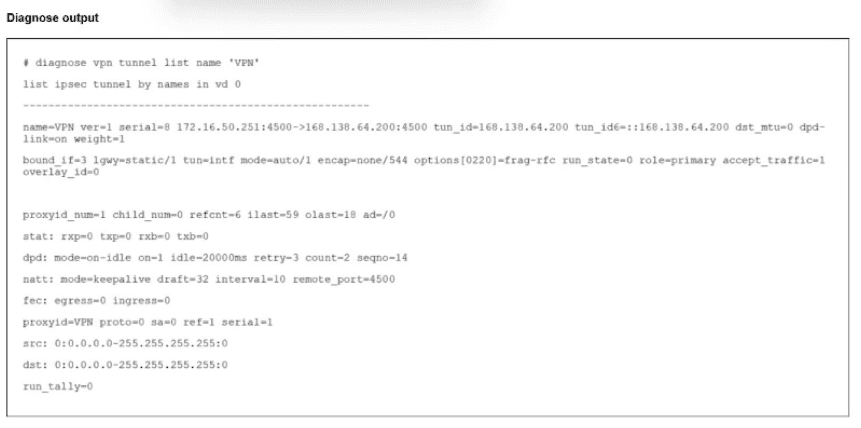
The output of the command diagnose vpn tunnels liar is shown.
Which two statements accurately describe the status of the tunnel? (Choose two.)
Based on the Fortinet FCSS - Network Security 7.6 documents and the analysis of the VPN tunnel exhibit, here is the verified answer.
Questions no: 91
Verified Answer: A, C
Comprehensive and Detailed Explanation with all FCSS - Network Security 7.6 documents:
To determine the status of the VPN tunnel, we must examine the specific counters and fields in the diagnose vpn tunnel list output provided in the exhibit.
Analyze Phase 2 Status (Option A):
The output displays child_num=0.
In IKEv2 (and IKEv1 implementations in FortiOS), 'Child SAs' refer to the Phase 2 (IPsec) Security Associations that carry the actual data traffic.
A value of 0 indicates that no Phase 2 tunnels are established. If Phase 2 were up, child_num would be at least 1.
Additionally, under the proxyid section, the field sa=0 confirms there is no active Security Association for that traffic selector.
Analyze Traffic Status (Option C):
The stat line shows: rxp=0 txp=0 rxb=0 txb=0.
rxp (Received Packets) and txp (Transmitted Packets) are both zero. This definitively confirms that no traffic is traversing the tunnel currently. This is expected since Phase 2 is down.
Analyze Phase 1 Status (Why B is incorrect):
The tunnel entry exists in the list with a valid tun_id, and NAT-Traversal is active (natt: mode=keepalive).
The presence of the tunnel in this command output, along with active Keepalive mechanisms, typically indicates that Phase 1 (IKE SA) is established and the peers are communicating on port 4500 (NAT-T), even though the data tunnels (Phase 2) failed to negotiate. If Phase 1 were down, the tunnel would often not appear in this 'list' view or would show different status flags indicating a complete connection failure.
Conclusion: The exhibit shows a scenario where the Phase 1 control channel is likely up (evidenced by the entry existence and NATT keepalives), but the Phase 2 data channel is down (child_num=0), resulting in zero traffic flow (rxp=0/txp=0).
Question 5 Domain 2 Central management
Refer to the exhibit showing a debug output.

An administrator deployed FSSO in DC Agent Mode but FSSO is failing on FortiGate. Pinging FortiGate from where the collector agent is deployed is successful.
The administrator then produces the debug output shown in the exhibit.
What could be causing this error message?
The debug output showing the FSSO failure is not provided. In DC Agent Mode, the collector agent authenticates users and the FortiGate queries the collector agent. If ping is successful but FSSO fails, the issue typically involves: incorrect collector agent port configuration, authentication failures (certificate or credentials), wrong IP address configured on FortiGate, firewall policy blocking the required port, or FSSO service not running on the collector agent.
Question 6 Domain 3 Security profiles
Refer to the exhibits, which contain the partial configurations of two VPNs on FortiGate.
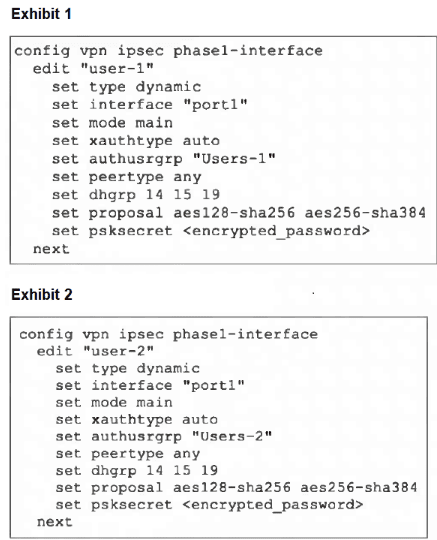
An administrator has configured two VPNs for two different user groups. Users who are in the Users-2 group are not able to connect to the VPN. After running a diagnostics command, the administrator discovers that FortiGate is not matching the user-2 VPN for members of the Users-2 group.
Which two changes must the administrator make to fix the issue? (Choose two.)
The key point is that the two VPNs are dynamic dialup IPsec tunnels on the same interface and both are using IKEv1 main mode. In this design, FortiGate cannot reliably distinguish which dialup phase1 to match before phase 1 completes.
The uploaded Network Security Support Engineer 7.6 Study Guide shows that XAuth happens only after phase 1 is already established:
''The IKE real-time debug shows, after phase 1, the exchange of extended authentication (XAuth) packets... You can also see the CFG_REPLY, showing the XAuth user and group name.''
That means the user group is learned too late to be used for selecting the correct phase1 definition. So the fix must be applied to the phase1 matching method itself, not to XAuth.
The FortiOS administration guide gives the exact rule for this scenario:
''When the remote VPN peer has a dynamic IP address and is authenticated by a pre-shared key you must select Aggressive mode if there is more than one dialup phase 1 configuration for the interface IP address.''
Question 7 Domain 4 Rules and routing
Refer to the exhibit.
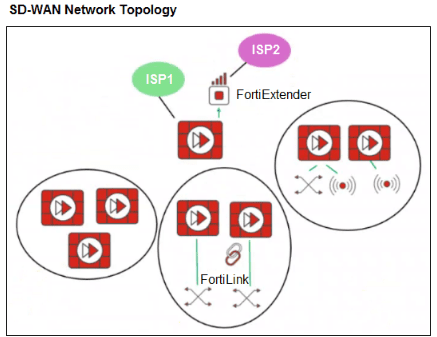
You want to configure SD-WAN on a network, as shown in the exhibit. The network contains many FortiGate devices. Some are used as next-generation firewalls (NGFWs), and some are deployed with extensions such as FortiSwitch, FortiAP, or FortiExtender.
Which factor should you consider when planning the deployment? (Choose one answer.)
The SD-WAN 7.6 Enterprise Administrator Study Guide states: ''An SD-branch is a site with an SD-WAN spoke FortiGate device and one or multiple extensions.'' It explains that FortiSwitch and FortiAP provide wired and wireless LAN connectivity through FortiLink, while FortiExtender supplements WAN connectivity by providing 4G/5G transport.
The guide further explains that the management plane sees extension-device ports as logical interfaces belonging to the controlling FortiGate. Therefore, FortiSwitch, FortiAP, and FortiExtender do not become independent SD-WAN topology nodes and do not require separate topologies. FortiGate devices with FortiLink connections also do not need to be excluded.
FortiExtender is specifically designed as a natural SD-WAN extension that introduces cellular connectivity as another WAN transport. Consequently, a FortiGate using FortiExtender can function as a hub, provided it satisfies the required capacity, routing, and IPsec design requirements. There is no rule requiring hubs to be extension-free. Therefore, option D correctly describes the unified topology shown in the exhibit.
What the Fortinet NSE7_FSN_AR-7.6 Exam Covers
Exam domains verified against the Official Fortinet NSE7_FSN_AR-7.6 exam guide, last checked October 2026.
Domain 1 System configuration and SD-WAN setup
20% - 30%Design and implement enterprise SD-WAN deployments using FortiGate devices, including Security Fabric integration, HA clustering modes, VLAN and VDOM segmentation. Understand FGCP and FGSP synchronization strategies for session preservation across distributed sites.
Domain 2 Central management
15% - 25%Deploy SD-WAN branches using zero-touch provisioning with device blueprints and CSV imports. Configure FortiManager for SD-WAN oversight including metadata variables, overlay templates, and IPsec template-based hub-and-spoke topologies.
Sample question from this domain above Q5
Domain 3 Security profiles
5% - 15%Implement SSL/SSH inspection with certificate validation and SNI checks. Apply web filtering, application control, IPS and ISDB together to protect network endpoints while tuning firewall performance and managing false positives.
Sample question from this domain above Q6
Domain 4 Rules and routing
25% - 35%Configure OSPF and BGP for enterprise routing, including ECMP, route reflectors, and graceful restart. Design SD-WAN rules with traffic matching, application steering and member priority election. Implement policy routes, static routes and member probe routes in SD-WAN topology.
Sample question from this domain above Q7
Domain 5 Advanced IPsec
25% - 35%Design and deploy IPsec VPN topologies with IKE v2, DPD modes and hardware offload. Implement ADVPN for on-demand shortcut tunnels between branch sites. Configure dual-hub and multiregion deployments with VRF-aware overlays for large enterprise and MSSP scenarios.
NSE7_FSN_AR-7.6 Exam FAQ
Common questions about the exam itself
What background and experience does NSE7_FSN_AR-7.6 require?
How long does NSE7_FSN_AR-7.6 certification stay valid?
What is the current exam fee for NSE7_FSN_AR-7.6?
What exam format and question types does NSE7_FSN_AR-7.6 use?
Which objective area in NSE7_FSN_AR-7.6 is most challenging for candidates?
How can I prepare for the practical requirements of NSE7_FSN_AR-7.6?
Where and how is the NSE7_FSN_AR-7.6 exam delivered?
Does passing NSE7_FSN_AR-7.6 automatically renew lower-level certifications?
What role and career path does NSE7_FSN_AR-7.6 lead to?
How is NSE7_FSN_AR-7.6 scored and what happens if I fail?
Other Fortinet Exams
Free practice questions for more Fortinet certification exams