Key details for this exam, checked against the published exam outline
Each question shows the correct answer and an explanation of why it is right
Refer to the exhibit.
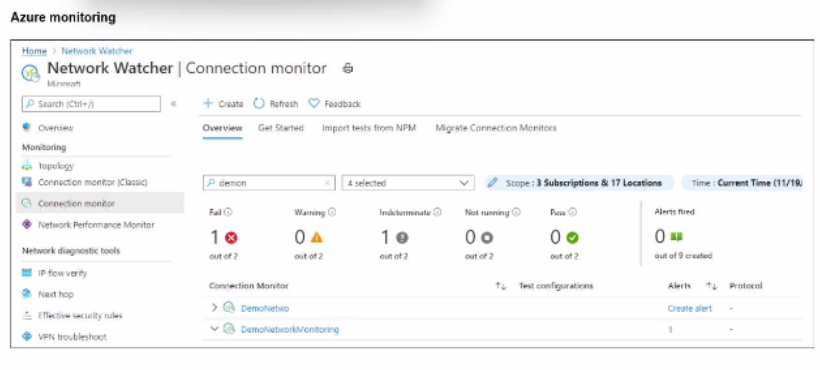
After analyzing the native monitoring tools available in Azure, an administrator decides to use the tool displayed in the exhibit.
Why would an administrator choose this tool?
Refer to the exhibit.
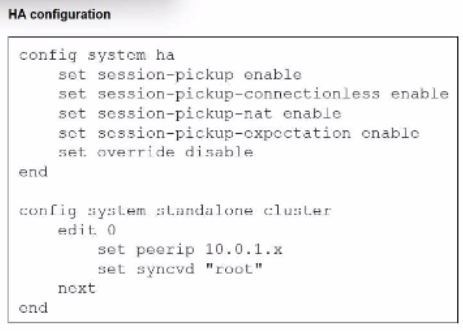
You deployed an HA active-active load balance sandwich with two FortiGate VMs in Microsoft Azure.
After the deployment, you prefer to use FGSP to synchronize sessions, and allow asymmetric return traffic. In the environment, FortiGate port 1 and port 2 are facing external and internal load balancers respectively.
What IP address must you use in the peerip configuration?
Refer to the exhibit.
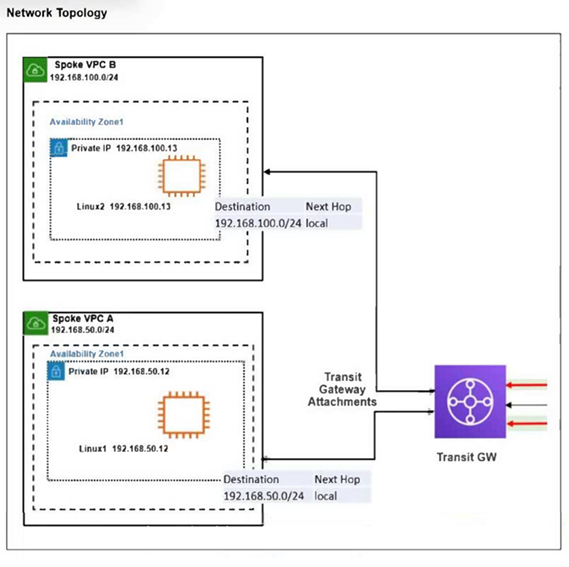
The exhibit shows a customer deployment of two Linux instances and their main routing table in Amazon Web Services (AWS). The customer also created a Transit Gateway (TGW) and two attachments. Which two steps are required to route traffic from Linux instances to the TGW? (Choose two answers)
Comprehensive and Detailed Explanation From FortiOS 7.6, FortiWeb 7.4 Exact Extract study guide:
Based on the FortiOS 7.6 Cloud Security Study Guide regarding AWS Transit Gateway (TGW) integration and VPC routing, the following steps are mandatory to establish connectivity between Spoke VPCs via a TGW:
VPC Route Table Configuration (Option A): For traffic to leave a VPC and reach the Transit Gateway, the VPC's subnet route table must have a specific entry. While the exhibit shows local routes for internal VPC traffic (192.168.50.0/24 and 192.168.100.0/24), any traffic destined for 'outside' the local VPC (such as the other Spoke VPC) must be directed to the TGW. Adding a default route (0.0.0.0/0) with the TGW ID as the next hop ensures that all non-local traffic is forwarded to the Transit Gateway for processing.
TGW Association (Option B): Within the Transit Gateway itself, connectivity is managed through Associations and Propagations. An 'Association' links a specific VPC attachment to a TGW route table. Without associating the two attachments (for Spoke VPC A and Spoke VPC B) to a TGW route table, the TGW will not know which route table to use to make forwarding decisions for packets arriving from those VPCs.
Why Option C is incorrect: Route propagation is used to automatically populate the TGW route table with the CIDR blocks of the attached VPCs. While propagation is a valid step for dynamic routing, Option C specifically mentions propagating a static summary range (192.168.0.0/16) which is not the standard automated mechanism; usually, you propagate the specific VPC CIDRs. Furthermore, without the Association (Option B), propagation alone does not allow the TGW to process incoming traffic from the attachment.
Why Option D is incorrect: Directing traffic to an Internet Gateway (IGW) would send the traffic to the public internet. This would not facilitate internal routing between the two Spoke VPCs via the Transit Gateway.
Refer to the exhibit.
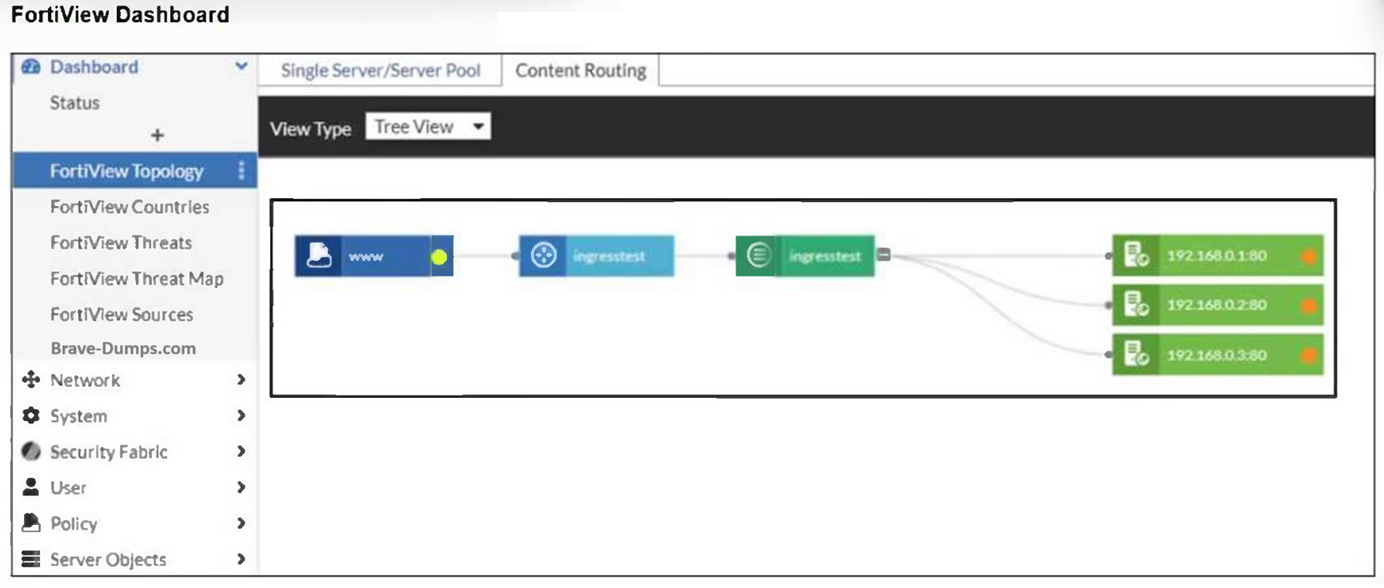
An administrator installed a FortiWeb ingress controller to protect a containerized web application. What is the reason for the status shown in FortiView? (Choose one answer)
Comprehensive and Detailed Explanation From FortiOS 7.6, FortiWeb 7.4 Exact Extract study guide:
According to the FortiWeb 7.4 Administration Guide and the FortiWeb Ingress Controller Installation Guide, the status of backend servers in the FortiView Topology dashboard is a direct reflection of the health check results.
Interpreting the Status Icon (Orange): In the FortiView Topology view, a green circle indicates that the server is up and responding to health checks, while an orange circle indicates that the server is not running or is unreachable.
Connectivity and Routing (Option B): For the FortiWeb ingress controller to accurately monitor and protect a containerized application, it must have a valid network path to the Kubernetes (K8s) worker nodes. If the FortiWeb VM is missing a route to the specific subnet where the K8s nodes reside, the health check packets will fail to reach their destination. As a result, FortiWeb identifies the backend servers (192.168.0.1, 192.168.0.2, and 192.168.0.3) as 'Down,' leading to the orange status shown in the exhibit.
Health Check Failures: When the status is orange, it implies that the Server Health Check (configured in the server pool) is detecting that the web servers are not responsive to connections. While this could be caused by an application-level failure, in a fresh cloud deployment of an ingress controller, the most common underlying cause is a network routing misconfiguration preventing the FortiWeb appliance from reaching the node IPs.12
Why other options are incorrect:34
Option A: If the SDN connector were not authenticated correctly, FortiWeb would likely fail to discover the containerized resources entirely, rather than discovering them and repor5ting them as 'Down'.6
Option C: While wron7g IP addresses would cause a failure, the Ingress Controller's job is to dynamically sync these addresses from the K8s API; a manual configuration error in a manifest file regarding IP addresses is less likely in an automated ingress environment.
Option D: The load balancing algorithm (Round Robin, Least Connections, etc.) affects how traffic is distributed, but it does not influence the up/down health status of the individual backend servers.
Your monitoring team reports performance issues with a web application hosted in Azure. You suspect that the bottleneck might be due to unexpected inbound traffic spikes.
Which method should you use to identify and analyze the traffic pattern?
According to the FortiOS 7.6 Azure Administration Guide and the Fortinet 7.4 Public Cloud Security documentation regarding monitoring and troubleshooting in Microsoft Azure, administrators must utilize native diagnostic tools to gain visibility into network traffic patterns:
NSG Flow Logs (Option D): Network Security Group (NSG) flow logs are a feature of Azure Network Watcher that allows you to record information about IP traffic flowing through an NSG. These logs capture critical 5-tuple information (source/destination IP, port, and protocol) and whether the traffic was allowed or denied by specific security rules.
Traffic Pattern Analysis with Azure Monitor: To effectively analyze the 'pattern' of a traffic spike, these logs are typically sent to a Log Analytics workspace within Azure Monitor. By using Traffic Analytics, the raw flow data is processed into rich visualizations and searchable datasets. This allows administrators to run Kusto Query Language (KQL) queries to identify 'top talkers,' visualize traffic spikes over time, and correlate the timing of these spikes with application performance degradation.
Identifying Bottlenecks: This method is preferred for identifying bottlenecks because it provides a granular view of every packet entering or leaving the subnets where the FortiGate-VM or application servers are hosted, revealing the exact nature of the inbound volume.
Why other options are incorrect:
Option A: While Azure Firewall provides logging, it is an additional security layer that may not be deployed in all environments. NSG Flow Logs are the primary and more ubiquitous method for monitoring all subnet-level traffic regardless of firewall placement.
Option B: DDoS Protection is a preventative measure; it does not provide the historical 'identification and analysis' of traffic patterns required to diagnose a past performance bottleneck.
Option C: Azure Traffic Manager is a DNS-based load balancer. While it provides high-level metrics, it does not have visibility into the actual flow-level traffic data needed for a detailed pattern analysis of application bottlenecks.
In an SD-WAN TGW Connect topology, which three initial steps are mandatory when routing traffic from a spoke VPC to a security VPC through a Transit Gateway? (Choose three.)
Comprehensive and Detailed Explanation From FortiOS 7.6, FortiWeb 7.4 Exact Extract study guide:
In an AWS SD-WAN Transit Gateway (TGW) Connect topology, traffic flow must be meticulously orchestrated through VPC route tables to ensure that the FortiGate-VM (Security VPC) can inspect traffic transitioning between spokes.
Spoke to TGW Redirection (Option E): For traffic to leave a Spoke VPC and reach the inspection hub, the Spoke VPC internal routing table must be configured to send all non-local traffic (0.0.0.0/0) to the Transit Gateway (TGW). This is the first step in the traffic chain.
TGW to FortiGate Redirection (Option A): Once the traffic arrives at the TGW and is forwarded to the Security VPC via a TGW attachment, it lands in the TGW subnet (or attachment subnet). To ensure this traffic is inspected, the Security VPC TGW subnet routing table must point the default route (0.0.0.0/0) to the FortiGate's internal network interface (ENI).
FortiGate Return/Egress Path (Option D): After the FortiGate processes the packet, it must be sent back to the TGW to reach its final destination in a different spoke or to exit via a different gateway. Therefore, the Security VPC FortiGate internal subnet routing table (the subnet where the FortiGate's internal leg resides) must have a default route (0.0.0.0/0) pointing back to the TGW.
Why other options are incorrect:
Option B: If the Security VPC TGW subnet routing table points to the TGW as the next hop, it creates a routing loop where traffic arrives from the TGW and is immediately sent back without being inspected by the FortiGate.
Option C: Pointing all traffic to an Internet Gateway (IGW) would bypass the Transit Gateway entirely and send traffic to the public internet rather than through the internal security fabric.
Refer to the exhibit.
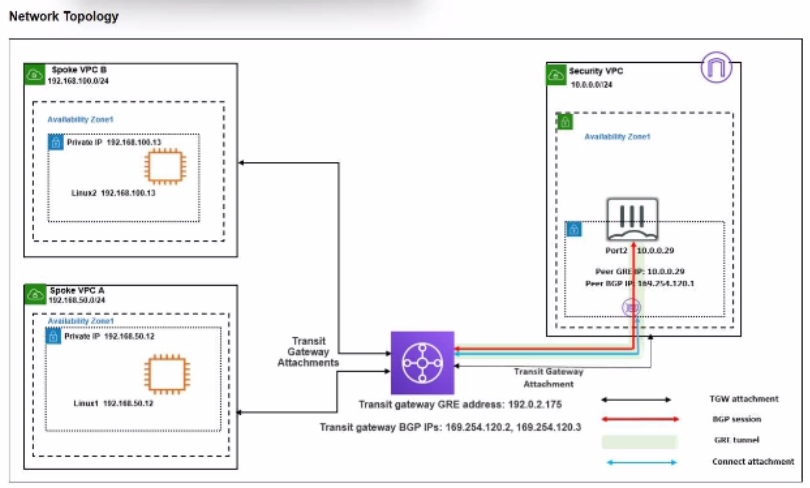
You attempted to access the Linux1 EC2 instance directly from the internet using its public IP address in AWS. However, your connection is not successful.
Given the network topology, what can be the issue?
The Fortinet documentation states: 'An IGW in AWS is a VPC component that allows communication between instances in your VPC and the internet... AWS users with less experience may face connectivity issues if they create a new VPC, add EC2 instances to it, but forget that they need an IGW for internet connectivity.'
Exam domains verified against: Official Fortinet NSE7_CDS_AR-7.6 exam guide, last checked October 2026.
Deploy Fortinet solutions to protect IaaS and CaaS environments. Integrate Fortinet solutions with cloud native tools to create layered security across containerized workloads.
Deploy cloud infrastructure using Terraform and Ansible for consistent, repeatable deployments. Use Azure Bicep and AWS CloudFormation to deploy Fortinet solutions as infrastructure-as-code.
Monitor AWS and Azure networks for security events and performance metrics. Use Fortinet monitoring tools to track cloud workload health and threat activity.
Troubleshoot AWS and Azure connectivity issues at the network level. Diagnose and resolve problems with AWS and Azure SDN connectors to restore cloud connectivity.
Common questions about the exam itself

