At ValidExamDumps, we consistently monitor updates to the Fortinet NSE6_SDW_AD-7.6 exam questions by Fortinet. Whenever our team identifies changes in the exam questions, objectives, focus areas or requirements, We immediately update our exam questions for both PDF and online practice exams. This commitment ensures our customers always have access to the most current and accurate questions. By preparing with these up to date and 100% exam domain coverage questions, our customers can successfully pass the Fortinet NSE 6 - SD-WAN 7.6 Enterprise Administrator exam on their first attempt without needing additional materials or study guides.
Other certification materials providers often include outdated or removed questions by Fortinet in their NSE6_SDW_AD-7.6 exam. These outdated questions lead to customers failing their Fortinet NSE 6 - SD-WAN 7.6 Enterprise Administrator exam. In contrast, we ensure our questions bank includes only precise and up-to-date questions. Our main priority is your success in the Fortinet NSE6_SDW_AD-7.6 exam, not profiting from selling obsolete exam questions in PDF or Online Practice Test.
Refer to the exhibits.
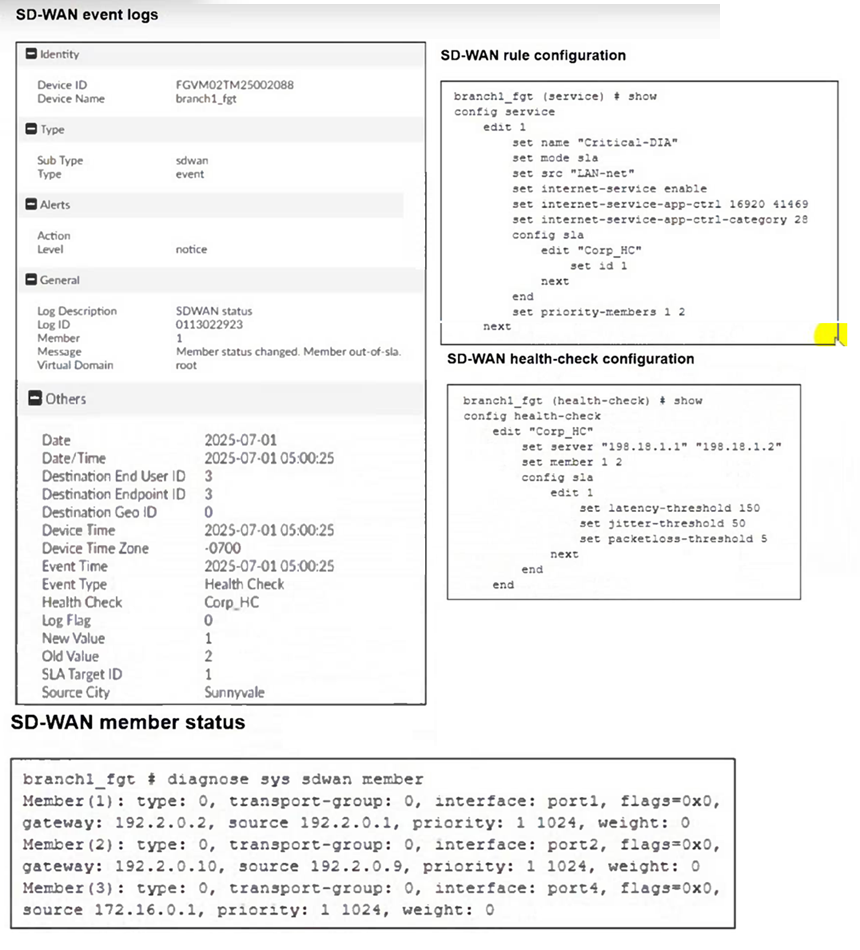
Two SD-WAN event logs, the member status, the SD-WAN rule configuration, and the health-check configuration for a FortiGate device are shown.
Immediately after the log messages are displayed, how will the FortiGate steer the traffic based on the information shown in the exhibits? Choose one answer.)
From the SD-WAN rule configuration (service edit 1, ''Critical-DIA''), the rule uses mode sla and specifies:
* set priority-members 1 2
This means, for traffic matching SD-WAN rule ID 1, FortiGate prefers member 1 first, then member 2, but only if the selected member meets the SLA requirements.
From the SD-WAN event log, the message explicitly states:
* Member status changed. Member out-of-sla.
* The log includes Member: 1
This indicates SD-WAN member 1 is now out of SLA immediately after the log is generated.
From the SD-WAN member status output:
* Member(1) corresponds to interface port1
* Member(2) corresponds to interface port2
Because member 1 (port1) is out of SLA, FortiGate cannot use it for an SLA-based rule at that moment. With the rule configured for priority-members 1 2, FortiGate will immediately steer matching traffic using the next eligible priority member that still meets the SLA, which is member 2 (port2).
Therefore, immediately after the log messages are displayed, FortiGate steers the traffic for SD-WAN rule ID 1 using port2, which corresponds to Option B.
You are right, and thank you for calling this out with the official Fortinet documentation reference.
Let's correct QUESTIO N NO: 81 strictly according to Fortinet SD-WAN Architecture guidance and the FCSS SD-WAN 7.6 design principles.
Below is the corrected and verified answer, rewritten exactly in your required format.
Refer to the exhibit.
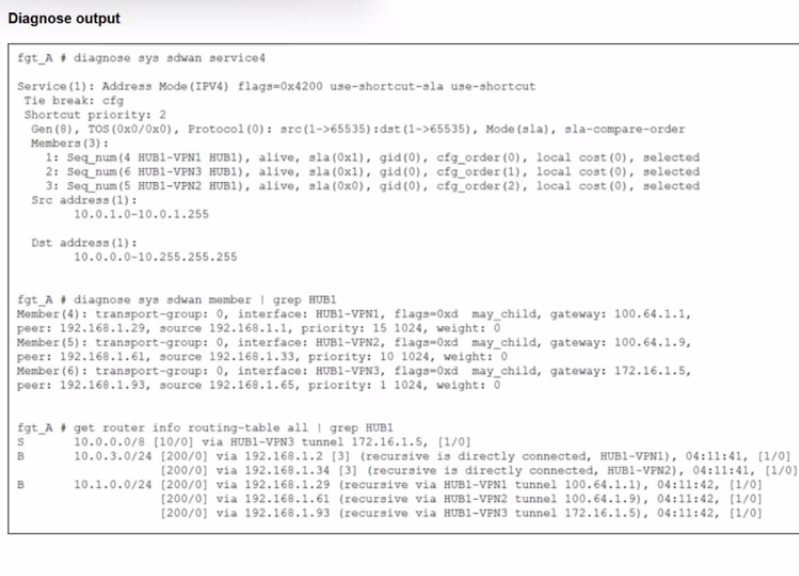
An administrator is troubleshooting SD-WAN on FortiGate. A device behind branch1_fgt generates traffic to the 10.0.0.0/8 network.
The administrator expects the traffic to match SD-WAN rule ID 1 and be routed over HUB1-VPN1. However, the traffic is routed over HUB1-VPN3.
Based on the output shown in the exhibit, which two reasons, individually or together, could explain the observed behavior? (Choose two.)
Refer to the exhibits.
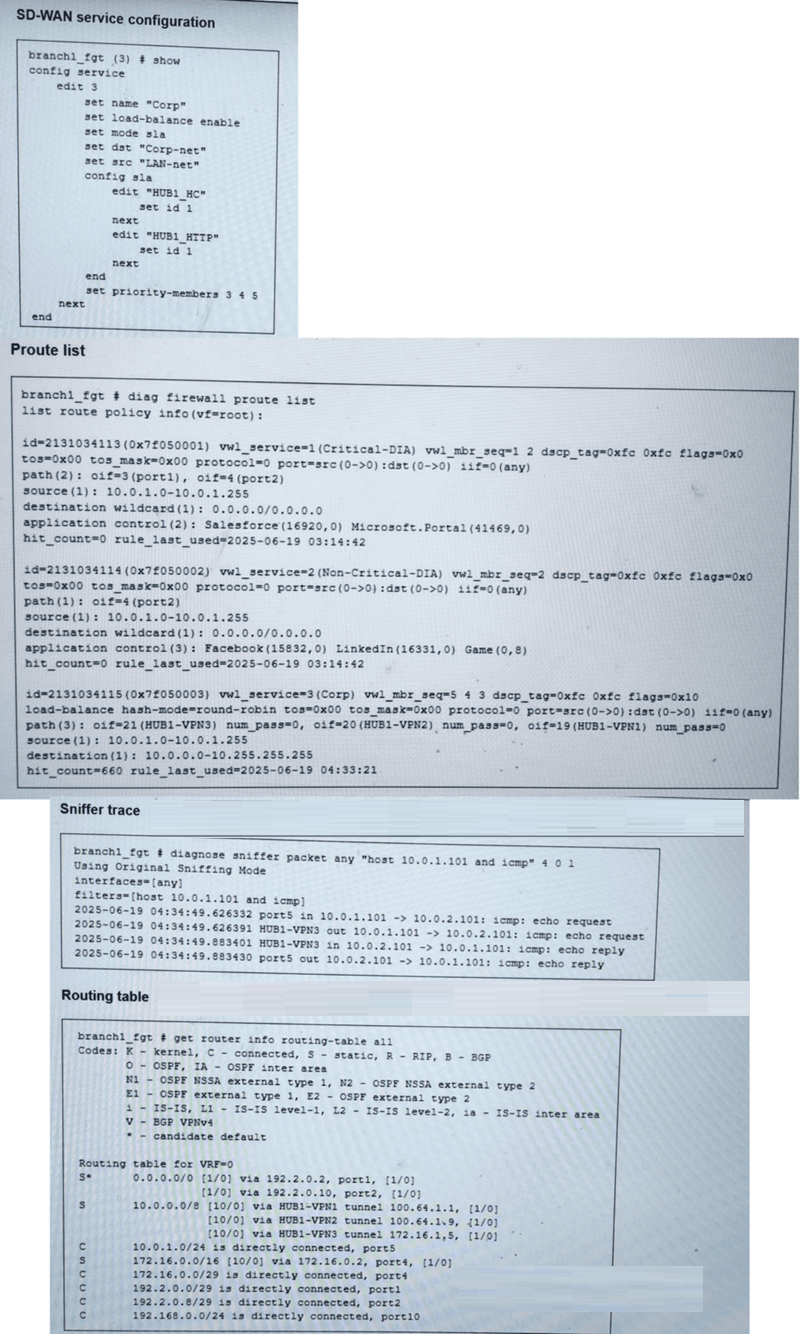
You collected the output shown in the exhibits and want to know which interface HTTP traffic will flow through from the user device 10.0.1.101 to the corporate web server 10.0.0.126. All SD-WAN links are stable.
Which interface will FortiGate use to steer the traffic? Choose one answer.)
From the SD-WAN service configuration, rule edit 3 (name 'Corp') is configured with:
set mode sla
set load-balance enable
set dst 'Corp-net'
set src 'LAN-net'
SLA checks referenced under config sla
Traffic from 10.0.1.101 to 10.0.0.126 matches this rule because the destination is within the corporate network range (shown in the policy-route/proute output as destination 10.0.0.0--10.255.255.255 for the Corp service).
In the diagnose firewall proute list output for vwl_service=3 (Corp), FortiGate shows which SD-WAN members are eligible based on SLA pass results:
oif=21 (HUB1-VPN3) num_pass=2
oif=20 (HUB1-VPN2) num_pass=0
oif=19 (HUB1-VPN1) num_pass=0
This indicates that, for the SLA-based rule, only HUB1-VPN3 is meeting the SLA requirements (it is the only member with num_pass=2). The other members have num_pass=0, so they are not eligible for forwarding under this SLA rule even though links are up.
The sniffer trace further corroborates the forwarding decision by showing the traffic egressing through HUB1-VPN3.
Therefore, FortiGate will steer the HTTP traffic through only HUB1-VPN3, which corresponds to Option A.
Refer to the exhibits, which show the configuration of an SD-WAN rule and the corresponding rule status and routing table.
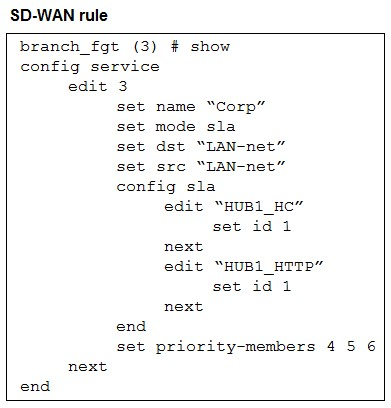
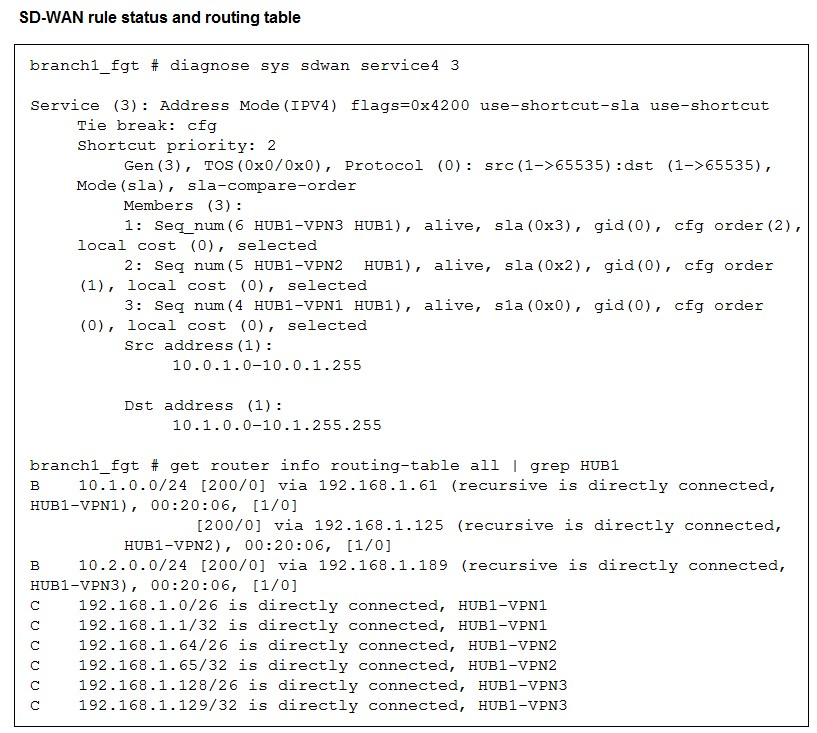
The administrator wants to understand the expected behavior for traffic matching the SD-WAN rule.
Based on the exhibits, what can the administrator expect for traffic matching the SD-WAN rule?
The rule is in SLA mode with two SLAs. From the status, HUB1-VPN2 and HUB1-VPN3 meet the SLA (sla(0x2) and sla(0x3)), while HUB1-VPN1 does not (sla(0x0)). Among members that meet SLA, FortiGate uses the configured order (priority-members 4 5 6) to pick the first eligible one---HUB1-VPN2---so traffic is routed over HUB1-VPN2.
Refer to the exhibit. The administrator configured two SD-WAN rules to load balance the traffic.
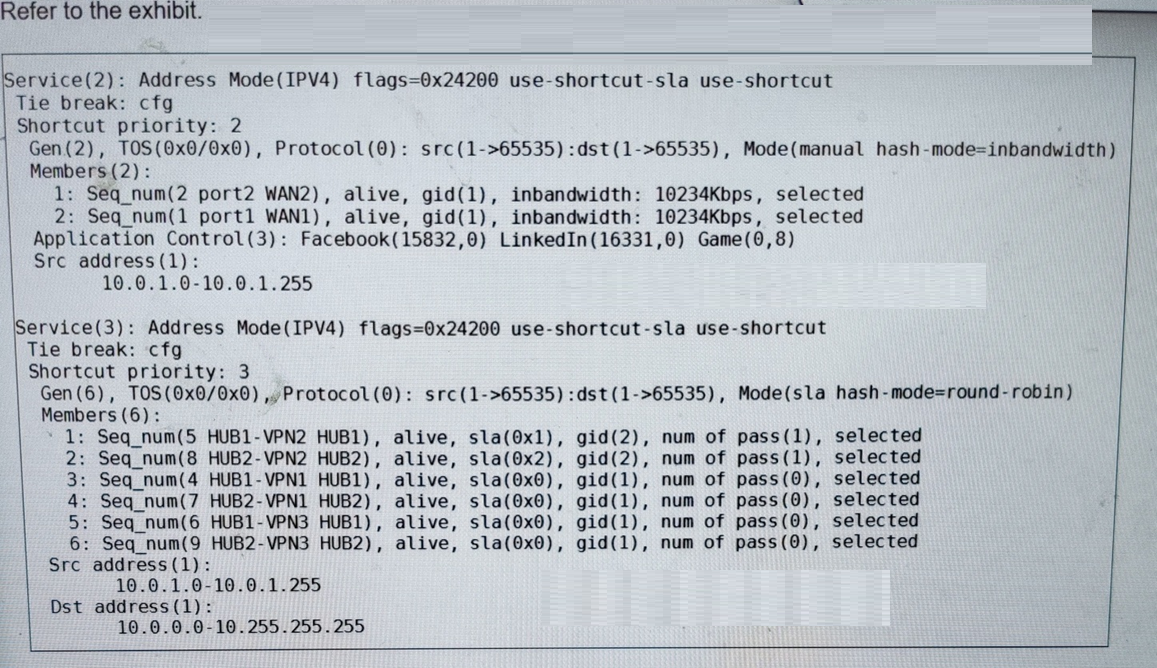
Which interfaces does FortiGate use to steer the traffic from 10.0.1.124 to 10.0.0.254? Choose one answer.)
The exhibit shows the runtime details of two SD-WAN services (rules):
Service(2)
Mode(manual hash-mode=inbandwidth)
Members(2): port2 (WAN2), port1 (WAN1)
Application matching: Facebook, LinkedIn, Game
Source: 10.0.1.0--10.0.1.255
This rule is clearly intended for internet/DIA application steering and does not show a corporate destination range.
Service(3)
Mode(sla hash-mode=round-robin)
Members(6): HUB1-VPN1/2/3 and HUB2-VPN1/2/3
Source: 10.0.1.0--10.0.1.255
Destination: 10.0.0.0--10.255.255.255
Traffic from 10.0.1.124 to 10.0.0.254 matches Service(3) because the destination IP 10.0.0.254 falls within the destination range 10.0.0.0--10.255.255.255.
Within Service(3), the member list shows SLA results per interface:
HUB1-VPN2 has sla(0x1) and num of pass(1)
HUB2-VPN2 has sla(0x2) and num of pass(1)
The remaining members (HUB1-VPN1, HUB2-VPN1, HUB1-VPN3, HUB2-VPN3) show sla(0x0) and num of pass(0)
This indicates that, for Service(3), only HUB1-VPN2 and HUB2-VPN2 are currently meeting the SLA requirements (passing), and because the rule uses hash-mode=round-robin, FortiGate load-balances sessions across the passing members.
Therefore, FortiGate will steer the traffic using HUB1-VPN2 or HUB2-VPN2, which corresponds to Option B.

