At ValidExamDumps, we consistently monitor updates to the Fortinet NSE6_OTS_AR-7.6 exam questions by Fortinet. Whenever our team identifies changes in the exam questions, objectives, focus areas or requirements, We immediately update our exam questions for both PDF and online practice exams. This commitment ensures our customers always have access to the most current and accurate questions. By preparing with these up to date and 100% exam domain coverage questions, our customers can successfully pass the Fortinet NSE 6 - OT Security 7.6 Architect exam on their first attempt without needing additional materials or study guides.
Other certification materials providers often include outdated or removed questions by Fortinet in their NSE6_OTS_AR-7.6 exam. These outdated questions lead to customers failing their Fortinet NSE 6 - OT Security 7.6 Architect exam. In contrast, we ensure our questions bank includes only precise and up-to-date questions. Our main priority is your success in the Fortinet NSE6_OTS_AR-7.6 exam, not profiting from selling obsolete exam questions in PDF or Online Practice Test.
Refer to the exhibit.
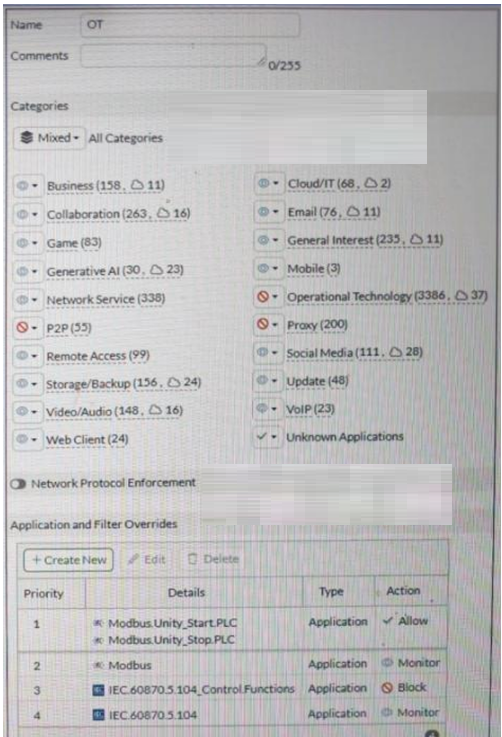
A partial Application Sensor profile is shown. When you apply this profile in a firewall policy, which two statements are correct? (Choose two answers)
The correct answers are A and C.
Option C is correct because the profile clearly contains the Operational Technology category and specific OT application signatures such as Modbus and IEC.60870.5.104. The study guide says ''You can use application control signatures to detect OT protocols'' and ''You can filter to a specific OT protocol.'' That means OT application signatures are active in this sensor profile.
Option A is correct because the guide explains that application control works at different levels: ''Detection of protocol (one detection per session)'' and ''Message level (one detection per protocol message).'' It also says you can use application signatures for ''granular message type identification.'' In the exhibit, IEC.60870.5.104.Control.Functions is explicitly configured, which is a granular IEC message/control-level signature rather than only a protocol-level match. That means logging and control can occur at the IEC command level.
Option B is not correct because the profile shows Modbus configured at the parent protocol level as Monitor, while the guide states that the ''parent signature takes precedence over the child signature.'' Since protocol-level detection is one detection per session, that does not mean FortiGate will necessarily log each Modbus command individually.
Option D is incorrect because even though the broader Operational Technology category is set to block, the profile includes specific application and filter overrides for Modbus and IEC 104 behavior. So the resulting effect is not simply that all OT protocols are blocked.
Refer to the exhibits.
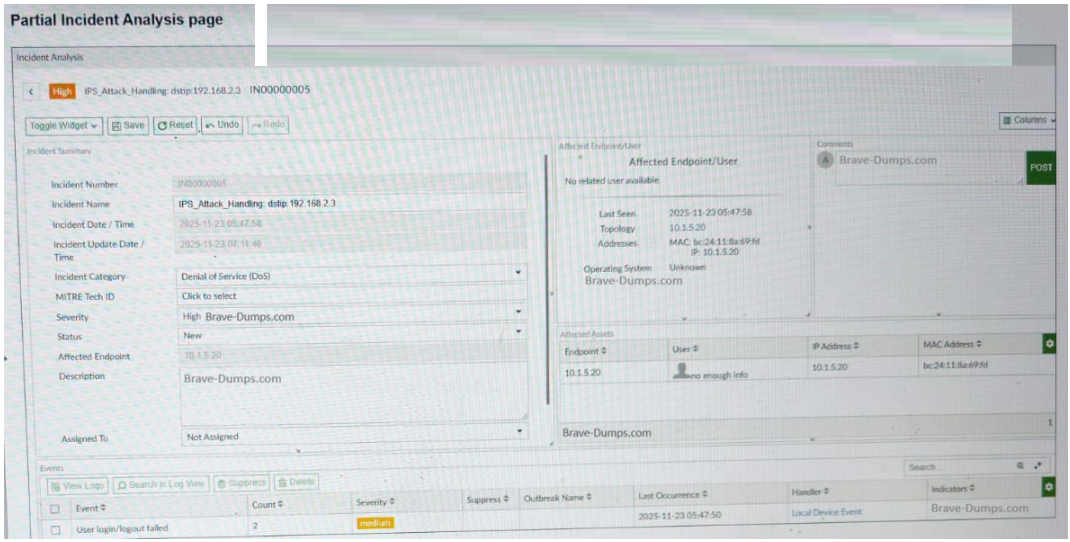
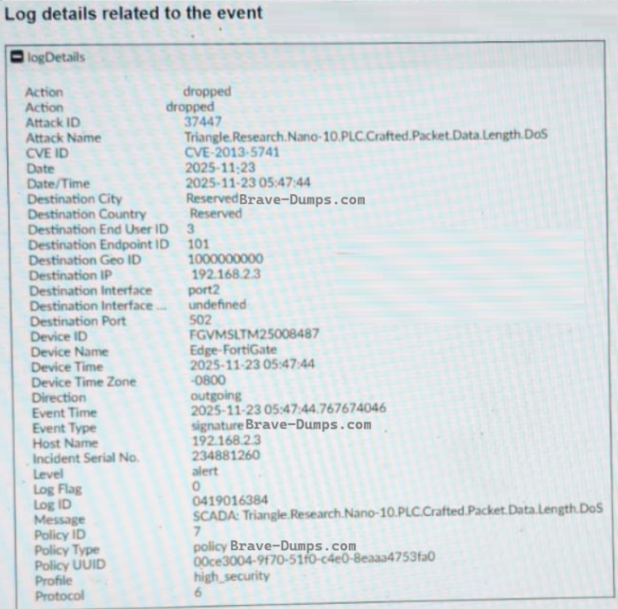
A partial Incident Analysis page and the log details related to the event are shown. An attack is reported on your OT network. You analyze the corresponding incident. Based on the information provided on the Incident Analysis page and the log details, which two statements are correct? (Choose two answers)
Based on the technical data provided in the exhibits and the OT Security 7.6 Architect curriculum:
Industrial Protocol Identification (Statement A): The log details exhibit clearly shows that the Destination Port used in the attack is 502. According to the study guide's section on Industrial Protocol Protection, the standard port used by the Modbus TCP protocol is 502. Furthermore, the attack name identifies a 'Triangle.Research.Nano-10.PLC,' which are industrial controllers commonly utilizing Modbus for communications.
Attack Mitigation (Statement B): The log details specify that the Action taken by the FortiGate (Edge-FortiGate) was dropped. In cybersecurity and Fortinet fabric operations, dropping a packet associated with an IPS signature means the traffic was blocked from reaching its target, thereby mitigating the attack.
Target IP Address (Statement E): The log detail explicitly lists the Destination IP as 192.168.2.3. The Incident Analysis page also titles the incident with dstip:192.168.2.3. While the 'Affected Endpoint' is shown as 10.1.5.20, in an 'outgoing' attack direction (as shown in the log), this likely refers to the internal source/attacker IP, whereas the target is the destination IP (192.168.2.3). Thus, Statement E is incorrect.
Protocol Conflict (Statement C): The IEC 104 protocol typically utilizes port 2404. Since the log specifies port 502, Statement C is incorrect.
Severity Distinction (Statement D): While the Incident severity is marked as High, the question specifically asks about event severity. The 'Events' table at the bottom of the Incident Analysis page shows a 'User login/logout failed' event with a medium severity. Because there is a distinction in the management console between the severity of individual events and the aggregated incident, and Statement A and B are technically definitive based on port and action, A and B are the correct architectural choices.
What is the main OT component for monitoring and controlling industrial processes? (Choose one answer)
The correct answer is C. Industrial Control System (ICS). The study guide states that ''ICS is a main component of OT'' and ''consists of systems used for monitoring and controlling industrial processes.'' It also explains that ICS includes various devices, systems, controls, and networks that manage industrial processes, and that the most common types are SCADA and distributed control systems (DCS). This makes ICS the primary OT component for monitoring and controlling industrial processes.
The other options are related OT components, but they are not the best answer to this wording. SCADA collects real-time data and helps visualize and control the OT environment, but it is described as a system within the broader ICS structure. PLC devices collect and transmit real-time data and connect sensors and RTUs to SCADA, while IIoT refers to sensors, actuators, and other connected field devices. Therefore, the overarching main OT component for monitoring and controlling industrial processes is ICS.
Refer to the exhibit.
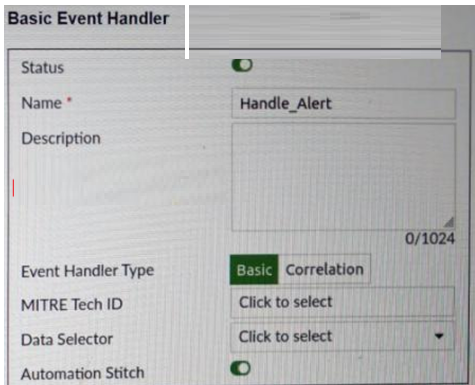
A basic event handler is shown. You have enabled Automation Stitch to automate the handling of an alert. Which two steps must you take to use this automation stitch? (Choose two answers)
The correct answers are C and D.
Option D is correct because the study guide states that the configuration of an event handler can include ''Rules'' and explains that ''Rules are granular conditions'' and ''Event handlers can have one or more rules.'' It further states that ''FortiAnalyzer uses event handlers to filter all incoming logs'' and ''If logs match the conditions configured in an event handler, FortiAnalyzer generates an event.'' Therefore, to use the automation stitch, you must define the rules on FortiAnalyzer so the event handler can actually generate the event that starts the automation flow.
Option C is also correct. The study guide explains that ''When a handler generates an event with the automation stitch option enabled, FortiAnalyzer sends a notification'' to the FortiGate side, and in the attack-detection example it says ''FortiAnalyzer parses the logs and notifies the root FortiGate'' and then ''The root FortiGate triggers the action.'' It also explicitly shows ''Stitches configured on root FortiGate.'' This means the FortiGate must have the corresponding automation trigger configured for the FortiAnalyzer event handler notification.
Option A is incorrect because the study guide does not describe configuring an Action on FortiAnalyzer as the required step for this FortiAnalyzer-to-FortiGate automation-stitch flow. Option B is also incorrect because playbooks are a different FortiAnalyzer automation mechanism; the question specifically refers to using the Automation Stitch option in the event handler.
Refer to the exhibits.
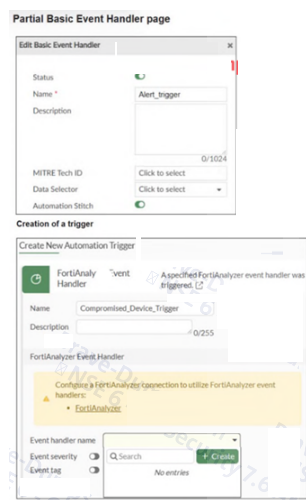
A partial Basic Event Handler page on FortiAnalyzer and the creation of a trigger in a FortiGate device are shown. To improve the protection of your OT network, you want to automate the handling of compromised devices notified through FortiAnalyzer. You have configured an event handler named Alert_trigger as shown in the exhibit. When you create the trigger on the FortiGate device, the Event handler name field does not provide the Alert_trigger option. What two actions must you perform to make the Alert_trigger option available? (Choose two answers)
The correct answers are C and D.
Option C is correct because the study guide explains that when ''a handler generates an event with the automation stitch option enabled, FortiAnalyzer sends a notification'' and, in the Security Fabric workflow, ''FortiAnalyzer parses the logs and notifies the root FortiGate.'' This means FortiGate must first have the FortiAnalyzer connection configured so it can consume FortiAnalyzer event handlers and use them in automation. The wizard message in the exhibit also points to this requirement by indicating that a FortiAnalyzer connection must be configured.
Option D is also correct because the study guide explicitly says that in this automation flow ''the root FortiGate triggers the action'' and shows ''Stitches configured on root FortiGate.'' Therefore, if you want the FortiAnalyzer event handler to appear and be usable for automation, the trigger must be configured on the root FortiGate, not on an arbitrary downstream FortiGate.
Option A is incorrect because + Create is only a GUI control and does not solve the missing-event-handler visibility problem. Option B is not identified in the study guide as the requirement for making a FortiAnalyzer event handler available in the FortiGate automation trigger list.

